
Endpoints | RS Pathfinder
What are endpoints?
In Vault, endpoints refer to the systems that are discovered and associated with shared Vault accounts. These systems include information such as the name, hostname, operating system, domain, distinguished name, and the accounts linked to them.
How are endpoints useful to my organization?
Endpoints allow Vault administrators to view and manage systems associated with shared Vault accounts. By displaying detailed information about each endpoint, administrators can more easily organize and secure accounts, ensuring proper access and credential management across the Vault environment.
How do I access the Endpoints page?
- Sign into app.beyondtrust.io.
The BeyondTrust Home page displays. - From the left menu, click Remote Support > Vault.
The Vault page opens and the Accounts tab displays by default. - At the top of the page, click Endpoints.
The Endpoints page displays.
The Endpoints page
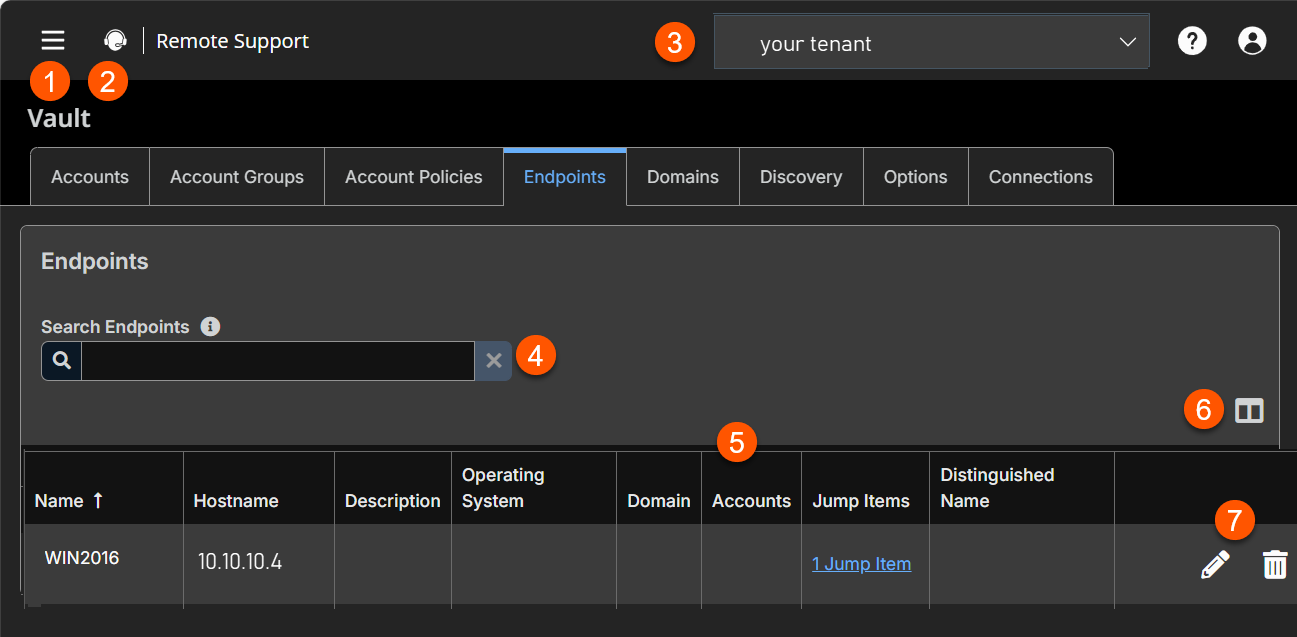
- Left menu: Easy access to all pages in Remote Support, including Status, Consoles & Downloads, My Account, Configuration, Asset Management, Vault, Console Settings, Users & Security, Reports, Public Portals, Dashboards, Management, and Appliance pages.
- Status: Opens the Status page.
- Header: Change your tenant site, manage your profile, and access documentation.
- Filter:- Search on a Name, Hostname, Description, or Domain.
- Endpoints columns: The list of columns varies on what you choose to display. Not all columns are displaying.
Endpoints columns
- Name: Unique name of the account.
- Host Name: Fully Qualified Domain Name .
- Description: A brief description of the Account Group.
- Operating System: Name of the Operating System. For example, Windows Server 2016.
- Domain: The name of the domain.
- Accounts: The accounts that are associated with the endpoint.
- Assets: The name of the Asset that is associated with the endpoint.
- Services: A list of services that are associated with the endpoint.
- Distinguished Name: A unique identifier in Active Directory for an object within the directory.
- List options: Column toggle to select which columns display in the table.
- Endpoint options: Lets you edit an endpoint or delete an endpoint.
Search endpoints
Search for a specific endpoint or a group of endpoints based on Name, Hostname, Description, or Domain Name.
Select visible columns
Click the Select Visible Columns button (columns icon) above the Endpoints grid and select the columns to display in the grid.
Accounts
View the number of accounts associated with each endpoint. Click the Accounts link to view the accounts associated with the system.
Assets
View the number of Assets associated with each endpoint. Click the Assets link to view the Assets associated with the system.
Services
View the number of Windows services associated with each endpoint. Click the Services link to view the services associated with the system.
Edit
Modify the endpoint's information, specifically Name, Description, and Hostname.
If Windows services were discovered and imported into the Vault, any service used by the endpoint is listed and the user account that runs the service is indicated.
Delete
Delete the endpoint from the Endpoints list.
Services
View the list of services found during discovery along with their associated endpoints and accounts, as well as the last status for each service. You also have the option to restart the service upon rotation of the service account.
Search account groups
Search for specific services or a group of services based on Short Name, Description, Endpoint (Hostname) or Username.
Restart
Check the Restart box for the service to have the service restarted when the account running the service is rotated.
Delete
Delete the service from the Services list.
Updated 24 days ago
