
Assets | RS On-prem
Formerly known as Jump Items
What are Assets?
Assets are individual systems or devices that are made available for remote access within an Asset Group, enabling administrators to organize and control access to remote systems in a secure manner.
How are Assets useful to my organization?
Assets allow support representatives to securely access and troubleshoot remote systems, ensuring efficient issue resolution while maintaining control over which systems can be accessed and when. Create Assets to start VNC sessions, Remote Desktop Protocol sessions, Shell Sessions, and Intel vPro.
You can add and manage Assets from both the Assets page in /login and the Representative Console.
How do I access the Assets page?
- Use a Chromium-based browser to sign in to your Remote Support URL.
This URL is provided in the BeyondTrust welcome email and includes your site URL followed by /login. - From the left menu, click Asset Management.
The Assets page opens and displays by default.
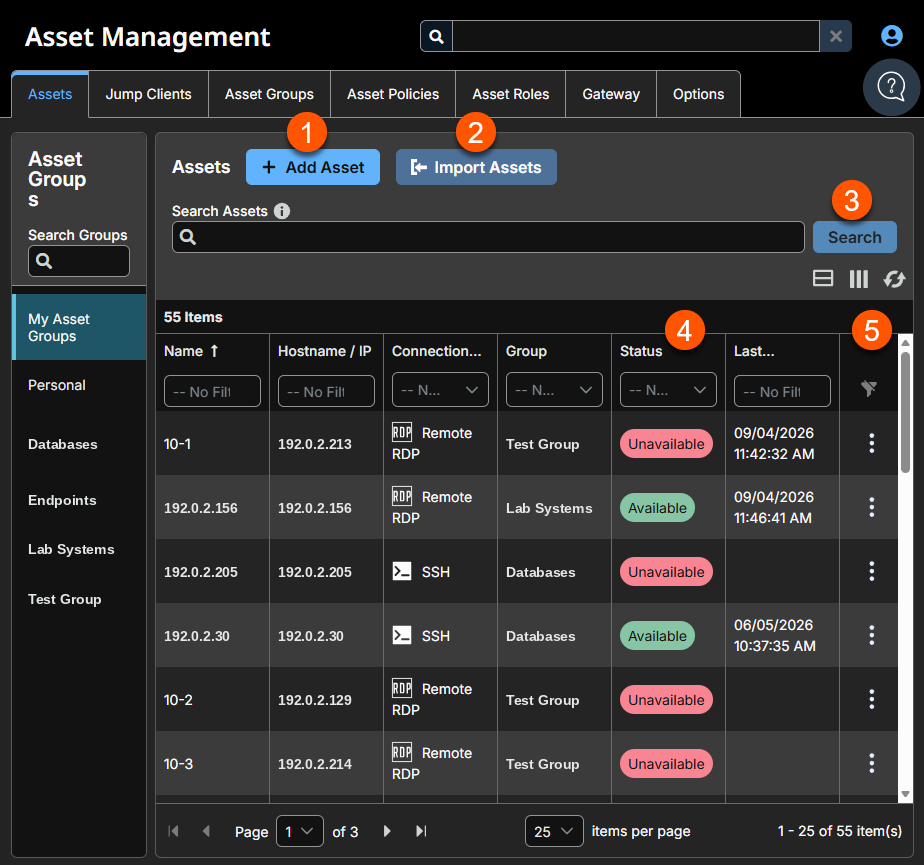
- Add Asset: Manually add a new Asset.
- Import Assets: Downloads a template for specified Assets.
- Search: Enter an Asset in the Search field to retrieve it.
- Grid display preferences: Set display preferences on the Asset grid.
- Assets grid: scroll through Assets, or click on an Asset to view its details.
Import Assets
You can use the Assets Mass Import Wizard to create Assets for anyone of the following sessions:
- Local VNC
- Remote VNC
- Remote RDP
- Local RDP
- SSH
- Intel vPro
Important infoLinux Gateways can only be used for RDP, SSH/Telnet, and VNC sessions. Linux Gateways do allow for credential injection from user or Vault, as well as RemoteApp functionality and connection filtering. Clustered Gateways can only add new nodes of the same operating system.
You cannot mix Windows and Linux nodes.
When you create a large number of Assets, it may be easier to import them via a spreadsheet than to add them one by one in the representative console.
Download a template suitable for importing Assets
To do this, use the templates via the Assets Mass Import Wizard and follow these steps:
- On the Assets page, click Import Assets.
- From the Download Template section, click the Asset Type dropdown and select the type of Asset you wish to add.
- Click Download Template.
A comma-separated file (*.csv) is downloaded. - Use the text in the CSV template as column headers and add the information for each Asset you wish to import. Optional fields can be filled in or left blank.
Import Assets
Once you have completed filling out the template, click Import Assets to upload the CSV file containing the Asset information. The CSV file should use the format described in the tables below.
The maximum file sized allowed to be uploaded at one time is 5 megabytes (MB). Only one type of Asset can be included in each CSV file.
Asset Help
Local VNC Asset help
| Parameter | API Value | Required | Default Value | Description |
|---|---|---|---|---|
| Hostname | local_vnc_hostname | Yes | The hostname of the endpoint to be accessed by this Asset. This string has a maximum of 128 characters. | |
| Port | port | No | 5900 | A valid port number from 100 to 65535. |
| Name | name | Yes | The name of the endpoint to be accessed by this Asset. This string has a maximum of 128 characters. | |
| Asset Group | group | Yes | The code name of the Asset Group with which this Asset should be associated. | |
| Tag | tag | No | You can organize your Assets into categories by adding a tag. This string has a maximum of 64 characters. | |
| Comments | comments | No | You can add comments to your Assets. This string has a maximum of 1024 characters. | |
| Asset Policy | jump_policy | No | The code name of a Asset Policy. You can specify a Asset Policy to manage access to this Asset. | |
| Public Portal | public_portal | No | A Public Portal site address that the shortcut should use for any session started from that shortcut. If a value is not provided then the default public site will be used. | |
| Session Policy | session_policy | No | The code name of a Session Policy. You can specify a Session Policy to manage the permissions available on this Asset. |
Remote VNC Asset help
| Parameter | API Value | Required | Default Value | Description |
|---|---|---|---|---|
| Hostname | remote_vnc_hostname | Yes | The hostname of the endpoint to be accessed by this Asset. This string has a maximum of 128 characters. | |
| Gateway | Gateway | Yes | The code name of the Gateway through which the endpoint is accessed. | |
| Port | port | No | 5900 | A valid port number from 100 to 65535. |
| Name | name | Yes | The name of the endpoint to be accessed by this Asset. This string has a maximum of 128 characters. | |
| Asset Group | group | Yes | The code name of the Asset Group with which this Asset should be associated. | |
| Tag | tag | No | You can organize your Assets into categories by adding a tag. This string has a maximum of 64 characters. | |
| Comments | comments | No | You can add comments to your Assets. This string has a maximum of 1024 characters. | |
| Asset Policy | jump_policy | No | The code name of a Asset Policy. You can specify a Asset Policy to manage access to this Asset. | |
| Public Portal | public_portal | No | A Public Portal site address that the shortcut should use for any session started from that shortcut. If a value is not provided then the default public site will be used. | |
| Session Policy | session_policy | No | The code name of a Session Policy. You can specify a Session Policy to manage the permissions available on this Asset. |
Remote RDP Asset help
| Parameter | API Value | Required | Default Value | Description |
|---|---|---|---|---|
| Hostname | remote_rdp_hostname | Yes | The hostname of the endpoint to be accessed by this Asset. This string has a maximum of 128 characters. | |
| Gateway | Gateway | Yes | The code name of the Gateway through which the endpoint is accessed. | |
| Username | rdp_username | No | The username to sign in as. | |
| Domain | domain | No | The domain the endpoint is on. | |
| Quality | quality | No | best_performance | The quality at which to view the remote system. Can be black_white (Black & White for lowest bandwidth consumption), few_colors (8-bit color quality), more_colors (16-bit color for medium color quality performance), full_colors (32-bit for true color reproduction), best_performance (VP9 codec for more fluid video), or lossless (high definition for exact reproduction). This cannot be changed during the Remote Desktop Protocol (RDP) Session. |
| Console Session | console | No | 0 | 1: Starts a console session. 0: Starts a new session. |
| Ignore Untrusted Certificate | ignore_untrusted | No | 0 | 1: Ignores certificate warnings. 0: Shows a warning if the server's certificate cannot be verified. |
| Name | name | Yes | The name of the endpoint to be accessed by this Asset. This string has a maximum of 128 characters. | |
| Asset Group | group | Yes | The code name of the Asset Group with which this Asset should be associated. | |
| Tag | tag | No | You can organize your Assets into categories by adding a tag. This string has a maximum of 64 characters. | |
| Comments | comments | No | You can add comments to your Assets. This string has a maximum of 1024 characters. | |
| Asset Policy | jump_policy | No | The code name of a Asset Policy. You can specify a Asset Policy to manage access to this Asset. | |
| Public Portal | public_portal | No | A Public Portal site address that the shortcut should use for any session started from that shortcut. If a value is not provided then the default public site will be used. | |
| Session Policy | session_policy | No | The code name of a Session Policy. You can specify a Session Policy to manage the permissions available on this Asset. |
Local RDP Asset help
| Parameter | API Value | Required | Default Value | Description |
|---|---|---|---|---|
| Hostname | local_rdp_hostname | Yes | The hostname of the endpoint to be accessed by this Asset. This string has a maximum of 128 characters. | |
| Username | rdp_username | No | The username to sign in as. | |
| Domain | domain | No | The domain the endpoint is on. | |
| Quality | quality | No | best_performance | The quality at which to view the remote system. Can be black_white (Black & White for lowest bandwidth consumption), few_colors (8-bit color quality), more_colors (16-bit color for medium color quality performance), full_colors (32-bit for true color reproduction), best_performance (VP9 codec for more fluid video), or lossless (high definition for exact reproduction). This cannot be changed during the Remote Desktop Protocol (RDP) Session. |
| Console Session | console | No | 0 | 1: Starts a console session. 0: Starts a new session. |
| Ignore Untrusted Certificate | ignore_untrusted | No | 0 | 1: Ignores certificate warnings. 0: Shows a warning if the server's certificate cannot be verified. |
| Name | name | Yes | The name of the endpoint to be accessed by this Asset. This string has a maximum of 128 characters. | |
| Asset Group | group | Yes | The code name of the Asset Group with which this Asset should be associated. | |
| Tag | tag | No | You can organize your Assets into categories by adding a tag. This string has a maximum of 64 characters. | |
| Comments | comments | No | You can add comments to your Assets. This string has a maximum of 1024 characters. | |
| Asset Policy | jump_policy | No | The code name of a Asset Policy. You can specify a Asset Policy to manage access to this Asset. | |
| Public Portal | public_portal | No | A Public Portal site address that the shortcut should use for any session started from that shortcut. If a value is not provided then the default public site will be used. | |
| Session Policy | session_policy | No | The code name of a Session Policy. You can specify a Session Policy to manage the permissions available on this Asset. |
Shell Asset help
| Parameter | API Value | Required | Default Value | Description |
|---|---|---|---|---|
| Hostname | shelljump_hostname | Yes | The hostname of the endpoint to be accessed by this Asset. This string has a maximum of 128 characters. | |
| Gateway | Gateway | Yes | The code name of the Gateway through which the endpoint is accessed. | |
| Username | shelljump_username | No | The username to sign in as. | |
| Protocol | protocol | Yes | Can either be "ssh" or "telnet". | |
| Port | port | No | SSH: 22, Telnet: 23 | A valid port number from 1 to 65535. Defaults to 22 if the protocol is SSH or 23 if the protocol is Telnet. |
| Terminal Type | terminal | No | xterm | Can be either xterm or vt100. |
| Keep-Alive | keep_alive | No | The number of seconds between each packet sent to keep an idle session from ending. Can be any number from 5 to 300 or blank to disable the feature. | |
| Name | name | Yes | The name of the endpoint to be accessed by this Asset. This string has a maximum of 128 characters. | |
| Asset Group | group | Yes | The code name of the Asset Group with which this Asset should be associated. | |
| Tag | tag | No | You can organize your Assets into categories by adding a tag. This string has a maximum of 64 characters. | |
| Comments | comments | No | You can add comments to your Assets. This string has a maximum of 1024 characters. | |
| Asset Policy | jump_policy | No | The code name of a Asset Policy. You can specify a Asset Policy to manage access to this Asset. | |
| Session Policy | session_policy | No | The code name of a Session Policy. You can specify a Session Policy to manage the permissions available on this Asset. | |
| Public Portal | public_portal | No | A Public Portal site address that the shortcut should use for any session started from that shortcut. If a value is not provided then the default public site will be used. |
Intel vPro Asset help
| Parameter | API Value | Required | Default Value | Description |
|---|---|---|---|---|
| Hostname | vpro_hostname | Yes | The hostname of the endpoint to be accessed by this Asset. This string has a maximum of 128 characters. | |
| Gateway | Gateway | Yes | The code name of the Gateway through which the endpoint is accessed. | |
| Name | name | Yes | The name of the endpoint to be accessed by this Asset. This string has a maximum of 128 characters. | |
| Asset Group | group | Yes | The code name of the Asset Group with which this Asset should be associated. | |
| Tag | tag | No | Organize Assets into categories by adding a tag. This string has a maximum of 64 characters. | |
| Comments | comments | No | Add comments to Assets. This string has a maximum of 1024 characters. | |
| Asset Policy | jump_policy | No | The code name of a Asset Policy. Specify a Asset Policy to manage access to this Asset. | |
| Public Portal | public_portal | No | A Public Portal site address that the shortcut should use for any session started from that shortcut. If no value is provided, the default public site is used. | |
| Session Policy | session_policy | No | The code name of a Session Policy. Specify a Session Policy to manage the permissions available on this Asset. |
Updated 4 months ago
