
Domains | RS Pathfinder
What are domains in Vault?
In Vault, domains represent the logical grouping of systems based on common attributes, such as network or organizational structure. Domains help organize and manage the access to accounts and resources within Vault.
How are domains useful in Vault?
Domains enable Vault administrators to organize endpoints and accounts more efficiently, making it easier to manage access and apply policies. By grouping systems into domains, administrators can streamline access controls and ensure that appropriate policies are enforced across related systems and accounts.
How do I access the Domains page?
- Sign into app.beyondtrust.io.
The BeyondTrust Home page displays. - From the left menu, click Remote Support > Vault.
The Vault page opens and the Accounts tab displays by default. - At the top of the page, click Domains.
The Domains page displays.
The Domains page
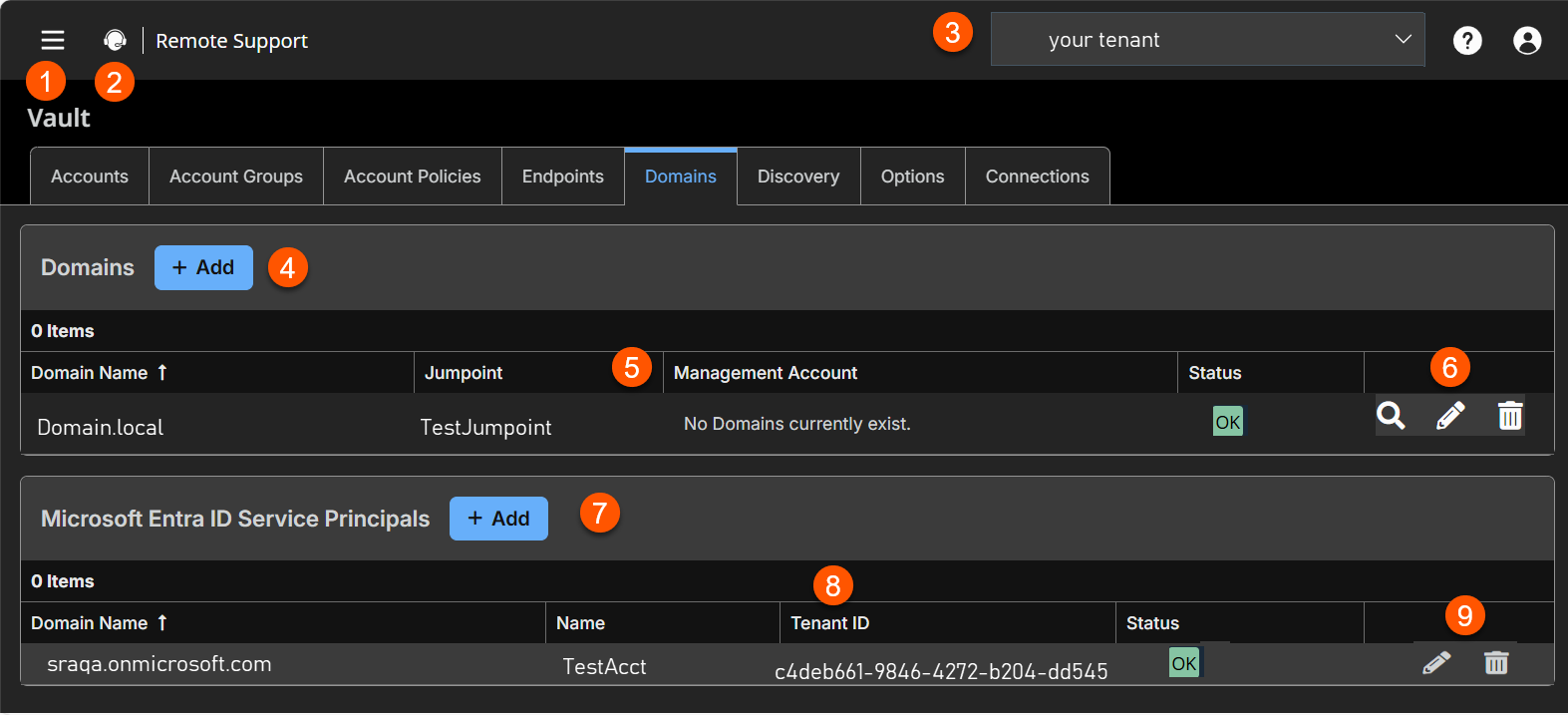
- Left menu: Easy access to all pages in Remote Support, including Status, Consoles & Downloads, My Account, Configuration, Asset Management, Vault, Console Settings, Users & Security, Reports, Public Portals, Dashboards, Management, and Appliance pages.
- Status: Opens the Status page.
- Header: Change your tenant site, manage your profile, and access documentation.
-
Add:- Adds a new domain.
-
Domain columns: The list of Domains columns.
Domains columns
- Domain Name: Fully qualified DNS name.
- Gateway: The name of the Gateway. Only support Windows Gateways.
- Management Account: This account is used to connect and perform the discovery of accounts and endpoints of the specified domain.
- Status: Displays any issue with the domain.
-
List options- You can discovery a domain, edit a domain, or delete a domain.
-
Microsoft Entra ID Service Principals columns The list of Microsoft Entra ID Service Principals columns.
Microsoft Entra ID Service Principals columns
- Domain Name: The Domain name of the account.
- Name: Internal descriptive name to easily identify the Service Principal.
- Tenant ID: The ID of the tenant.
- Status: The status of the principal account. If the attributes were incorrectly added and saved, the status shows as disabled or failed.
-
Entra ID list options: Edit or delete a Entra ID Service principal.
Add a domain
- At the top of the page, click the Add button.
The Add Domain page displays. - In the DNS Name of the Domain field, enter a valid fully qualified DNS name for the domain you are performing the discovery action on.
- In the Gateway field, view the Gateway used to discover accounts and endpoints on the domain.
- For Management Account, this account is used to connect and perform the discovery of accounts and endpoints of the specified domain. You can choose to use a new account, which requires a Username, Password, and Password Confirmation or choose to use an existing account discovered from a previous job or added manually in the Accounts section where is the name of your domain you want to discover.
This account should be a functional account and only requires password change and reset permissions.
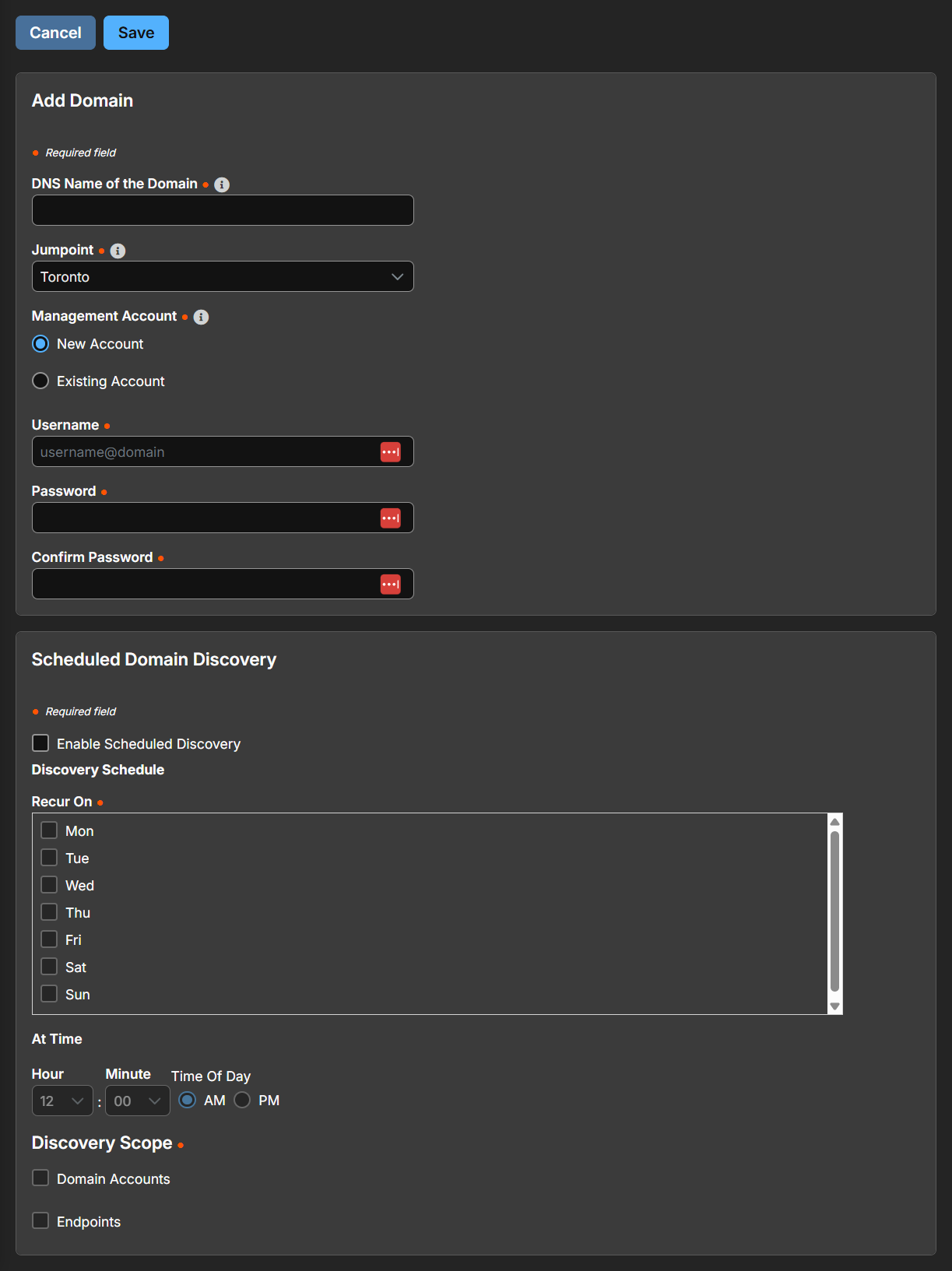
Schedule domain discovery
To enable scheduled discovery, click the Enable Scheduled Discovery checkbox.
- Select the day of the week and time you want the discovery job to run.
- Select the objects you want Vault to discover:
- Domain Accounts
- Endpoints
- Local Accounts
- Services
Important infoIn order to discover Services, you must also discover domain accounts, endpoints, and local accounts. Only Windows accounts are discovered.
You can enter a Search Path, or leave it blank to search all OUs and containers. You can also use an LDAP Query to narrow the scope of user accounts and endpoints searched.
Edit a domain
From a domain list, select the appropriate domain and then click the pencil to edit. Make your changes, and then click Save.
Delete a domain
To delete a domain from the Domains list, click the trash can.
Add a Microsoft Entra ID Service Principal
To create an Entra ID Service Principal, see Register a Microsoft Entra app and create a service principal.
Updated 13 days ago
