
Account Groups | RS Pathfinder
What are account groups?
Vault account groups are collections of user accounts within the Vault system, organized based on access permissions or roles. These groups are used to streamline the management of shared Vault accounts, enabling Vault administrators to efficiently grant users access to multiple shared accounts. Account groups can also associate a group of shared Vault accounts with a specific group policy. Note that shared Vault accounts can only belong to one group at a time, and personal Vault accounts cannot be added to an account group.
How are account groups useful to my organization?
Account groups help simplify credential management by allowing administrators to assign access to multiple shared Vault accounts at once, ensuring efficient and controlled access for users. These groups also provide an effective way to apply policies to a collection of shared accounts, enhancing security and compliance while reducing administrative overhead.
A shared Vault account can belong to only one group at a time and personal Vault accounts cannot be added to an account group.
How do I access the Account Groups page?
- Sign into app.beyondtrust.io.
The BeyondTrust Home page displays. - From the left menu, click Remote Support > Vault.
The Vault page opens and the Accounts tab displays by default. - At the top of the page, click Account Groups.
The Account Groups page displays.
The Account Groups page
Vault admins can use account groups to logically group credentials together, granting users access to multiple shared Vault accounts at one time. Account groups can also be associated to a group policy, allowing policy members to access that group of shared Vault accounts.
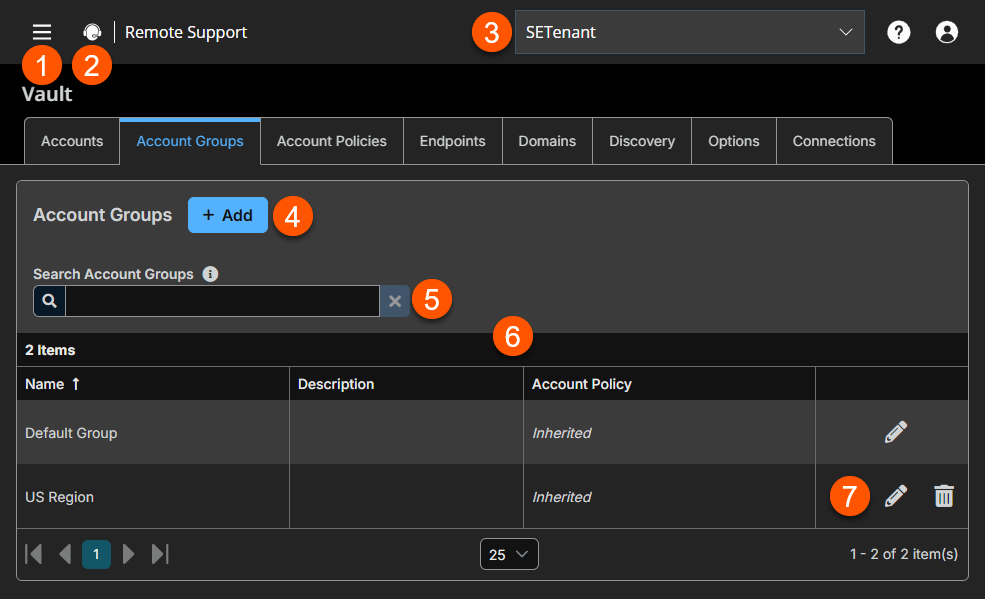
- Left menu: Easy access to all pages in Remote Support, including Status, Consoles & Downloads, My Account, Configuration, Asset Management, Vault, Console Settings, Users & Security, Reports, Public Portals, Dashboards, Management, and Appliance pages.
- Status: Opens the Status page.
- Header: Change your tenant site, manage your profile, and access documentation.
-
Add: Add a new Account Group.
-
Filter: Search on a Name or Description.
-
Account Groups columns: The list of columns varies on what columns you choose to display.
Account Groups columns
- Name: Unique name of the account.
- Description: A brief description of the Account Group.
- Account Policy: Select an existing policy or specify a custom policy.
-
Account Groups options: Edit an Account Group or delete an Account Group.
Add an Account Group
-
At the top of the page, click Add.
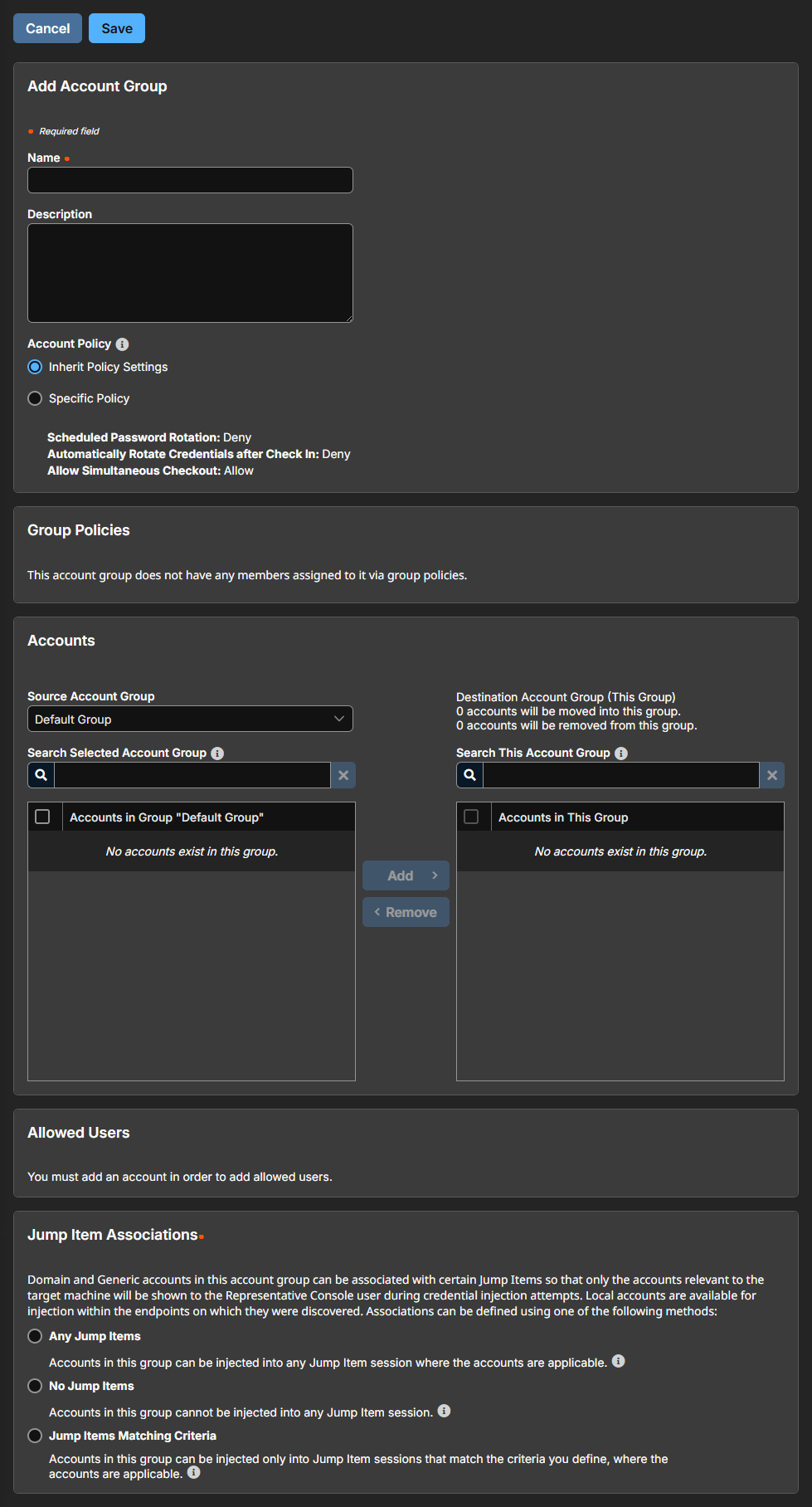
The Add Account Group page displays. -
In the Name field, enter a name for the account.
-
In the Description field, enter a useful description for the account.
-
Select a specific policy for the account group or leave Account Policy set to the default value of Inherit Policy Settings. If Inherit Policy Settings is selected, the accounts in this account group inherit the policy settings set for the global default account policy on the Vault > Options page.
-
Group policies shows any links between this account group and a group policy.
-
Under Accounts, select the group from the Source Account Group list, and then select the accounts to add to this group.
The Default Group is a system generated group that contains all user accounts that do not belong to an account group. The Default Group is selected by default.
You can filter the list of available accounts to add to the group by selecting a group from the Source Account Group list or by using the Search Selected Account Group box to search by Name, Endpoint, and Description.
-
Click Add to move the accounts over to the Accounts in This Group list.
-
In the Allowed Users section, add a user and select their Vault role from the New Member Role dropdown, and then click Add. Users can be assigned one of two member roles:
- Inject: Users with this role can use this account in Secure Remote Access sessions (default value).
- Inject and Checkout: Users with this role can use this account in Secure Remote Access sessions and can check out the account on Support for Admins. The Checkout permission has no effect on generic SSH accounts.
-
Select the type of Asset Associations for the account. The Asset Associations setting determines which Assets the account is associated with, so the account is available only for relevant target computers in the console during credential injection attempts.
Select one of the following types:
Asset Association Type Description Inherited from the Account Group Associations for this account are determined by the associations defined in this account's Account Group. Any Assets This account can be injected within any session started from an Asset in which the account is applicable. The applicable accounts are the following: - Local Accounts- discovered on a Vault Endpoint are available for injection on Assets targeting the Endpoint.
- Domain Accounts- are available for injection on Assets targeting Vault Endpoints on the Domain.
- All Domain Accounts- are available for injection on Assets targeting remote systems that do not match a Vault Endpoint.
- Shared Generic Username & Password Accounts- are available for injection into all Assets.
- Shared Generic SSH Accounts- are available for injection into all SSH Assets.
- Shared Generic Token Accounts- are available for injection into all Kubernetes Cluster Tunnel Assets.
ℹ️ Personal Assets are not supported.
No Assets This account cannot be injected into any session started from an Asset. Assets Matching Criteria This account can be injected only within sessions started from Assets that match the criteria you define, in which the account is applicable. The applicable accounts are the following: - Local Accounts- discovered on a Vault Endpoint are available for injection on Assets targeting the Endpoint.
- Domain Accounts- are available for injection on Assets targeting Vault Endpoints on the Domain.
- All Domain Accounts- are available for injection on Assets targeting remote systems that do not match a Vault Endpoint.
- Shared Generic Username & Password Accounts- are available for injection into all Assets.
- Shared Generic SSH Accounts- are available for injection into all SSH Assets.
- Shared Generic Token Accounts- are available for injection into all Kubernetes Cluster Tunnel Assets.
ℹ️ Personal Assets are not supported.
If the Asset Attributes section is configured, this list combines with any Assets that match the criteria.
The following connection methods are supported:- Jump Client
- Remote RDP
- Remote Jump
- SSH
- Database Connection
- Website
Injection is not supported for the following items:- Personal Assets
- TCP Tunnel Database Connections
- IP Tunnel Database Connections
You can define a direct association between Vault accounts and specific Assets by selecting the Assets from the list and then click Add Asset.
If configured, the account is available for injection for any Assets that match the specified attribute criteria in addition to any specific Assets you added as matching criteria.
Local accounts are available for injection within the endpoints on which they were discovered.
You can further define the association between Vault accounts and Assets by specifying matching criteria. Each of the following values have a maximum length of 64 characters and can contain a maximum of 32 values.
The different Asset attributes are the following:
-
Name: This filter is matched against the value that appears in the Name column of the Asset in the console.
-
Hostname / IP: This filter is matched against the value that appears in the Hostname / IP column of the Asset in the console.
-
Tag: This filter is matched against the value that appears in the Tag column of the Asset in the console.
-
Comments: This filter is matched against the value that appears in the Comments column of the Asset in the console.
For example, a list of filter criteria is:
| Criteria | Result |
|---|---|
| value | matches the field exactly. |
| value* | matches the field as a prefix. |
| *value | matches the field as a suffix. |
| **value** | matches if the field contains the value |
- Click Save at the top of the page.
Search Account Groups
You can filter the list of available account groups by using the Search Account Groups box. Based on the account type, you can use Name or Description as the criteria to search.
Edit an Account Group
-
From the list of account groups, find the group you want to edit.
-
Click Edit
 to make changes to a group.
 -
Make the necessary changes, and then click Save.
Delete an Account Group
-
From the list of account groups, find the group you want to delete.
-
Click Delete
 to delete a group.
 -
When prompted to confirm, click Yes.
Add an existing account to an account group
- Switch to the Vault > Accounts page.
- From an existing shared account, click the ellipsis button, and then select Edit.
- Select the desired account group from the Account Group list, and then click Save.
Import a discovered account
-
Switch to the Vault > Discovery page.
-
From the Discovery Jobs section, select a discovery job.
-
Click View Results for the job.
-
Select the Local Accounts or Domain Accounts tab as applicable.
-
From the list of accounts, select the account you wish to import.
-
Click Import Selected.
-
Select the group from the Account Group list.
-
Click Start Import.
Add an account group to a group policy
-
Switch to the Users & Security > Group Policies page.
The User page opens and displays by default. -
From the list of existing group policies, click the pencil
to edit a policy. -
Scroll down to the Memberships section.
-
Check the Add Vault Account Group Memberships checkbox.
-
Select the Account Group from the list.
-
Select the Vault Account Role from the list.
Users can be assigned one of two member roles:- Inject: Users with this role can use this account in Secure Remote Access sessions (default value).
- Inject and Checkout: Users with this role can use this account in Secure Remote Access sessions and can check out the account on Support for Admins. The Checkout permission has no effect on generic SSH accounts.
-
Click Add.
-
Click Save at the top of the page.
-
The group policy and its Vault account role are now displayed under the Group Policies section for the account group that was added to the policy.
-
The members of the group policy are now added under Allowed Users for the account group.
If a user was granted access individually from the account group edit page and also through a group policy, the group policy access is overridden by the explicitly granted individual access for this user.
Updated 20 days ago
