
Localization | RS Pathfinder
What is localization?
Localization is the process of adapting the Real‑Time Chat experience to support different languages by using a translation service to translate chat messages in real time.
How is localization useful?
Localization removes language barriers, improves real‑time communication, and allows a single product or support team to serve users globally in a way that feels natural and accessible.
How do I access the Localization page?
- Sign into app.beyondtrust.io.
The BeyondTrust Home page displays. - From the left menu, click Remote Support > Localization.
The Localization page displays.
The Localization page
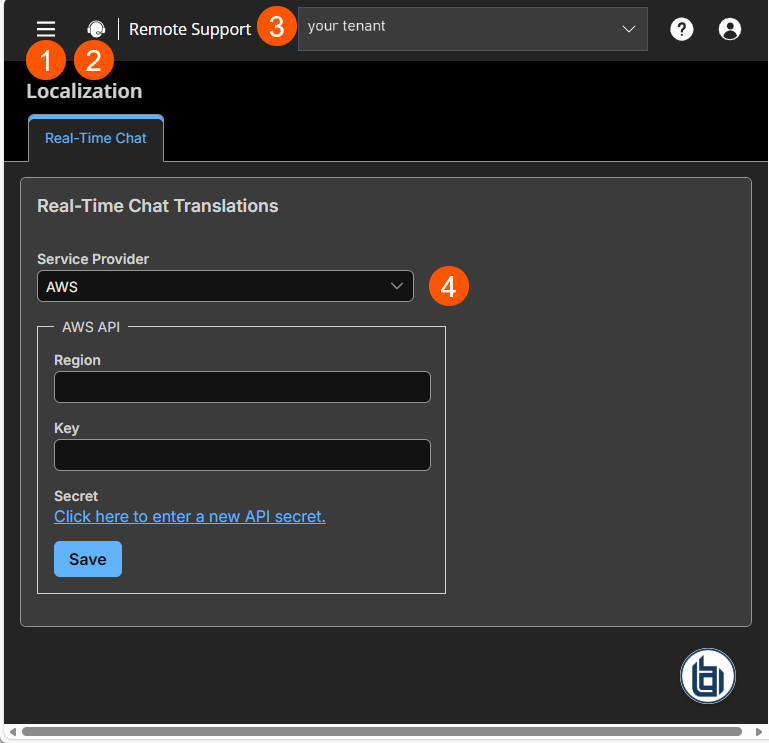
- Left menu: Easy access to all pages in Remote Support, including Status, Consoles & Downloads, My Account, Configuration, Asset Management, Vault, Console Settings, Users & Security, Reports, Public Portals, Dashboards, Management, and Appliance pages.
- Status: Opens the Status page.
- Header: Change your tenant site, manage your profile, and access documentation.
- Service Provider: Select the service provider to provide the chat translation.
Updated 3 months ago
