
Users | PRA Pathfinder
Who are users?
Privileged Remote Access users are people in your organization, such as IT representatives or Help Desk representatives, who use Privileged Remote Access to actively aid other people and troubleshoot issues within your organization via access sessions.
A user consumes one Privileged Remote Access license.
What are "extended availability" users?
If extended availability mode is enabled in your Privileged Remote Access instance, your users can enable it on their accounts so they can share sessions even when they are not using the Desktop user Console.
Enabling extended availability mode consumes an additional license.
What is the Users tab?
The Users tab provides a snapshot of, and communication with, all signed-in users within Privileged Remote Access.
How is it useful to my organization?
You can view who is in an access session, a user's license type and license pool, send your users a message, and terminate a user's access to the Privileged Remote Access console.
How do I access the Users tab?
- Sign into app.beyondtrust.io.
The BeyondTrust Home page displays. - Click the Privileged Remote Access tile, or, from the main menu, click Privileged Remote Access > Status.
Privileged Remote Access opens, and the Status page displays with the Information tab open by default. - Click Users.
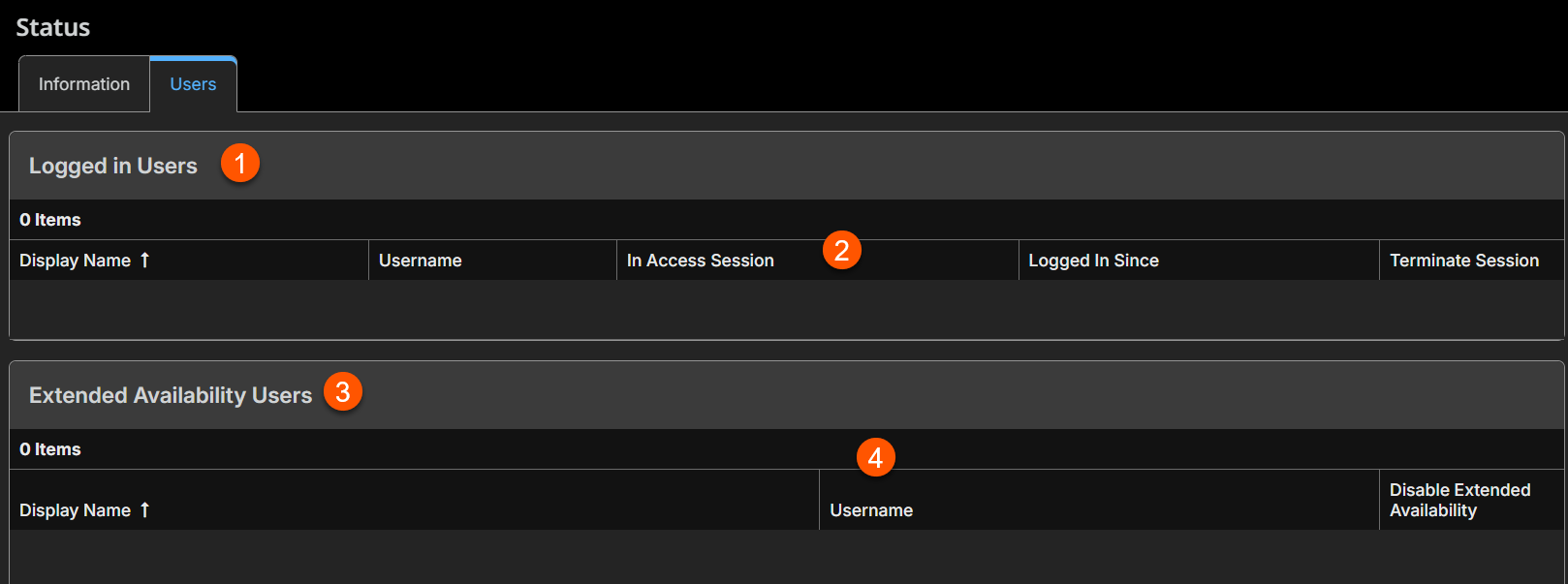
The Users tab displays.
fdgfgsf
gjhgj
View your logged-in users
- From the Users tab, in the Logged in users section, review your users and their details:
- Display Name: The name shown to the person receiving help in an access session.
- Username: The user's name they use to sign in to Privileged Remote Access.
- In Support Session: Yes if the user is currently in an active Privileged Remote Access session; No if the user is not in an active Privileged Remote Access session.
- License type: The license assigned to the user.
- Logged in since: The date and time stamp of the user's latest log in.
View your extended availability users
If you enable extended availability in Privileged Remote Access, users can opt to enable extended availability mode. Those who do can share sessions when they are not using the Desktop Access Console.
- From the Users tab, in the Extended Availability users section, review the list of users who have enabled their extended availability mode:
- Display Name: The name shown to the person receiving help in an access session.
- Username: The user's name they use to sign in to Privileged Remote Access.
- License type: The license assigned to the user.
- License pool: The license pool from which the extended availability license is pulling.
Disable a user's extended availability
Disabling an extended availability mode from a user means they can no longer share sessions. Their extended availability license is released back into the license pool, and can be consumed by a different user.
- From the Users tab, in the Extended Availability users section, locate the user you want to disable from extended availability.
- Click Disable.
A confirmation message displays. - Click Yes.
The user's extended availability is disabled immediately and the license is released back into the license pool.
Terminate a user's connection to the Desktop Access Console
Terminating a user's connection signs them out of the Desktop Access Console and ends any active sessions. This does not delete a user or block access from Privileged Remote Access, but the user must sign in again.
-
From the Users tab, in the Logged in users section, locate the user name of the user whose Desktop Access Console connection you wish to terminate.
-
Click Terminate.
A confirmation message displays.
-
Click Yes.
The user is immediately signed out from the Privileged Remote Access console. If they were in a session, the session terminates immediately.
Send a message to logged-in users
Messages are only visible to your Privileged Remote Access users, and not to those they may be assisting at the time of the message.
- From the Users tab, in the Send Message to users section, enter up to 256 characters.
- Click Send.
The message sends immediately, and users in the Desktop Access Console receive it as a pop-up message.
Updated 2 months ago
