
Services | PRA On-prem
What are services in Vault?
Services are features that facilitate the secure and automated management of accounts and credentials, including account discovery, password rotation, and secure storage for use during remote sessions.
How are services useful to my organization?
Services enhance security and operational efficiency by automating the discovery of accounts, managing password updates to comply with security policies, and securely providing credentials during support sessions. This ensures sensitive information remains protected while minimizing manual processes.
How do I access the Services page?
- Use a Chromium-based browser to sign in to your Privileged Remote Access URL.
This URL is provided in the BeyondTrust welcome email and includes your site URL followed by /login. - From the left menu, click Vault.
The Accounts page opens and displays by default. - At the top of the page, click Services.
The Services page displays.
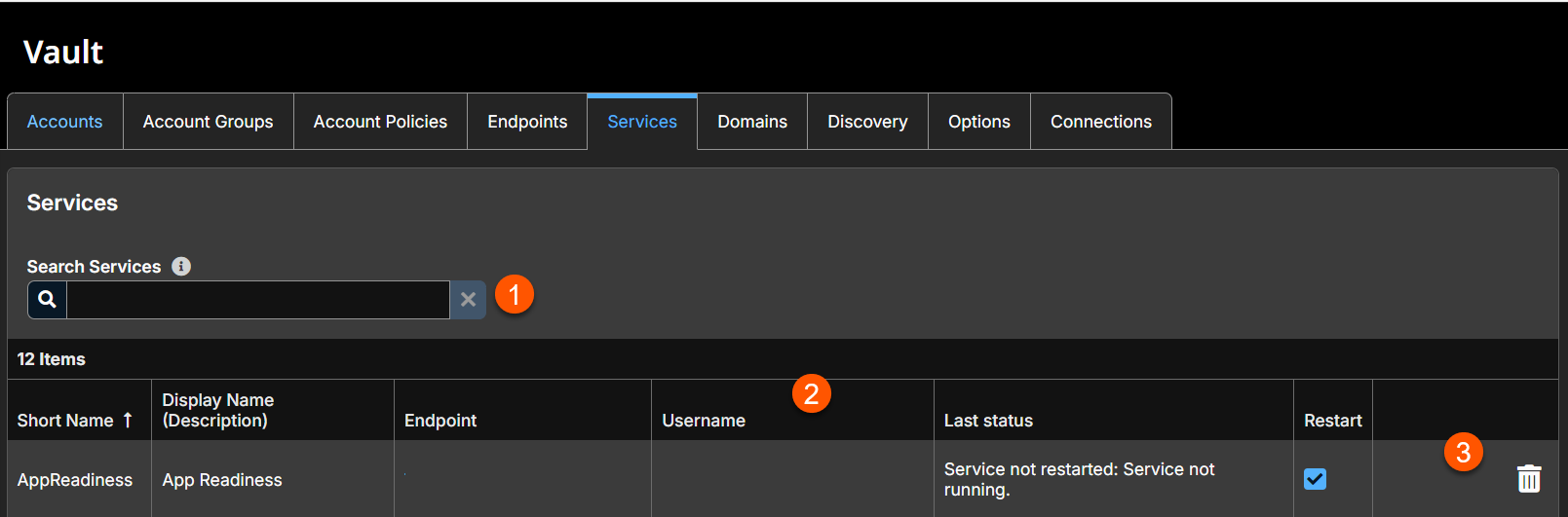
- Filter: Search on a Short Name, Display Name (Description), Endpoint (Hostname) and Username.
- Services columns: The list of columns varies on what you choose to display.
Services columns
- Short Name: Unique name of the service.
- Display Name: Full name of the service .
- Endpoint: The name of the endpoint.
- Username: The username assocated with the service.
- Last status: The status of the service. For example, Service started, Service not started.
- Restart: Enables the service to restart.
- Services options: Lets you delete a service.
Search account groups
Search for specific services or a group of services based on Short Name, Description, Endpoint (Hostname) or Username.
Restart
Check the Restart box for the service to have the service restarted when the account running the service is rotated.

Delete
- From the left menu, click Vault > Services.
- Locate the service you want to delete from the list.
- Click the trash icon.
A confirmation message displays. - Click Yes.
The service deletes immediately.
Updated 3 months ago
