
Ticket systems | PS Cloud
Password Safe can be configured to allow references to ticketing systems in the password release requests. This provides a method to include information that can be cross-referenced to an existing ticket or change control system for auditing purposes, or to be used in the approval process.
To create a list of ticket system labels to populate the Ticket System list on a request, do the following steps:
-
Use a browser to sign in to your BeyondInsight/Password Safe URL.
This URL is provided in the BeyondTrust welcome email and includes your site URL followed by /login. -
From the left menu, click
 .
.
The Configuration page displays. -
Under Privileged Access Management, select Ticket Systems.
The Ticket Systems page displays.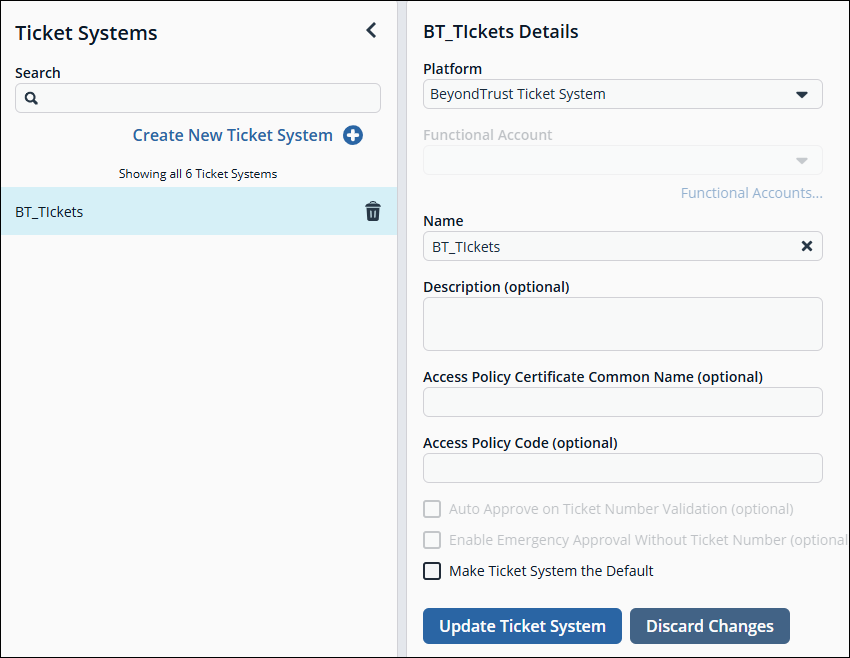
-
Click Create New Ticket System +.
The New Ticket System Details pane displays. -
Select BeyondTrust Ticket System from the Platform dropdown.
-
Enter a name and description.
-
Click Create Ticket System.
Updated 2 months ago
