
GitHub Custom Action | PS
The Secrets Safe custom action is a GitHub integration for Secrets Safe, which enables using Secrets Safe secrets management capabilities with GitHub workflows.
Prerequisites
- The Secrets Safe action supports retrieval of secrets from BeyondInsight and Password Safe versions 23.1 and later releases.
- For this extension to retrieve a secret, the Secrets Safe instance must be preconfigured with the secret in question and authorized to read it.
- Runners must use a Linux operating system. Additionally, self-hosted runners must install Docker.
New changes for 2.0.0
Important informationBreaking changes:
Instead of a single unified operation for handling secrets, this release splits functionality into two distinct operations:
- get secret – For retrieving a secret from Secrets Safe (BeyondTrust/secrets-safe-action/get_secret)
- create secret – For creating a secret in Secrets Safe (BeyondTrust/secrets-safe-action/create_secret)
If you are upgrading from version 1.x, you need to update your GitHub Actions workflows to use these new operation names. Workflows that previously relied on the older combined behavior will no longer work without switching to the appropriate get_secret or create_secret operation.
Overview
The Secrets Safe custom action retrieves ASCII secrets from BeyondTrust Secrets Safe and makes them available in the GitHub action workflow. Secrets are requested using either a Secrets Safe path or a path to a managed account which is composed of a managed system and account. The action output returns the secrets with an output_id specified in the action request. This allows immediate retrieval and usage of secrets from your BeyondTrust Secrets Safe instance. Retrieved secrets are masked on the GitHub runner used to retrieve the secret. This helps reduce the chance that secrets are printed or logged in error.
Important informationSecurity-minded engineers must review workflow composition before changes are run with access to secrets.
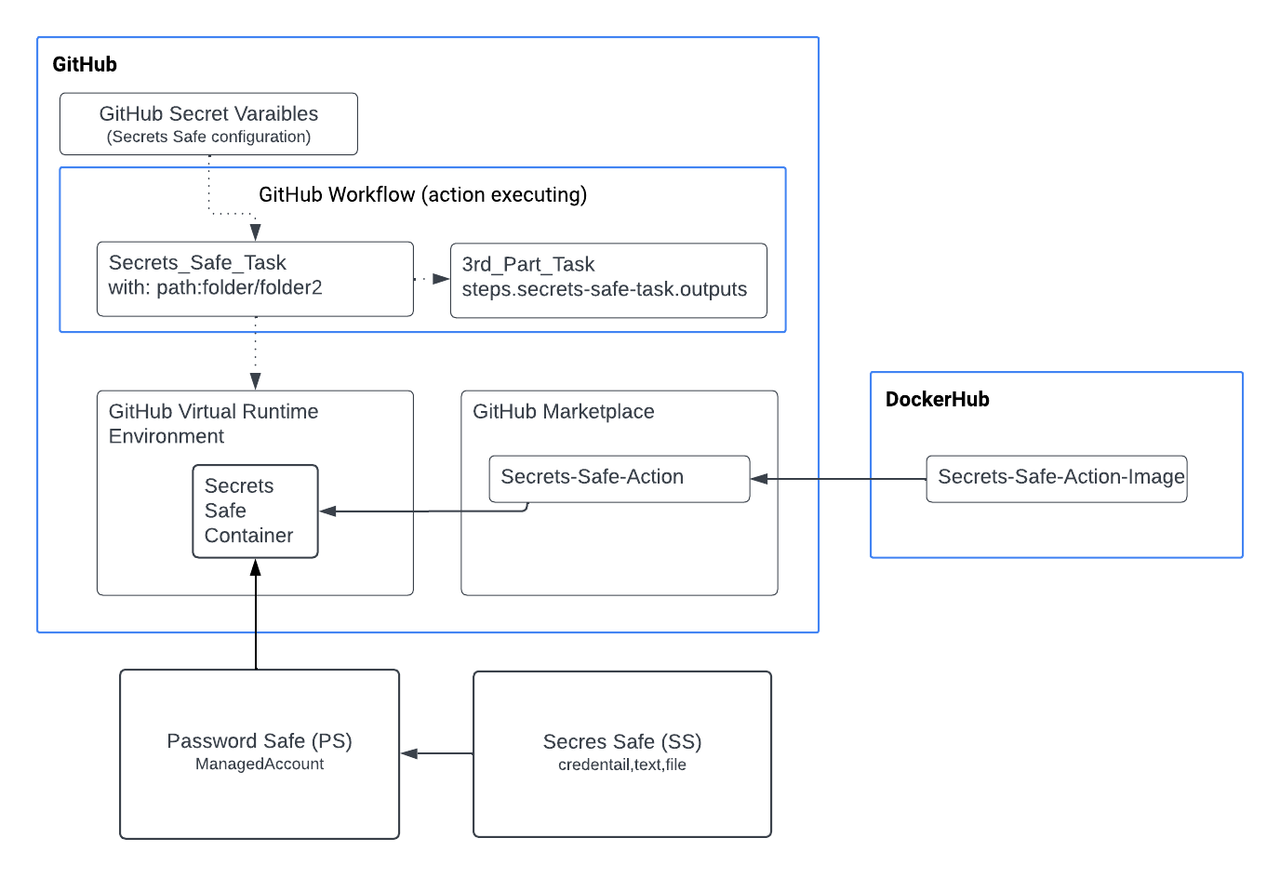
Configure Password Safe
The following instructions are meant to be a quick start guide to help with Password Safe setup.
Set up OAuth application user
- Create an API access registration in BeyondInsight. Reduce your Access Token Duration to one that makes sense.
- Create or use an existing Secrets Safe group.
- Create or use an existing application user.
- Add the API registration to the application user.
- Add the user to the group.
- Add the Secrets Safe feature to the group.
Set up managed accounts
- Create or use an existing access policy that has the View Password Auto Approve option set.
- Add the All Managed Accounts Smart Group to the BeyondInsight group.
- Add the access policy to the Password Safe role for the All Managed Accounts Smart Group, and ensure that both Requestor and Approver are checked in the role.
- Create or use an existing managed system.
- Create or use an existing managed account associated with the managed system.
- Configure the managed account with the API Enabled and Max Concurrent Requests Unlimited options selected.
Setup for GitHub get secret action
Inputs
| Input value | Description |
|---|---|
| api_key (optional) | The API key for making requests to the Password Safe instance. For use when authenticating to Password Safe. |
| client_id (required) | API OAuth Client ID. |
| client_secret (required) | API OAuth Client Secret. |
| api_url (required) | BeyondTrust Password Safe API URL. https://example.com:443/beyondtrust/api/public/V3 |
| api_version (optional) | The recommended version is 3.1. If no version is specified, the default API version 3.0 is used. |
| verify_ca (optional) | Indicates whether to verify the certificate authority on the Secrets Safe instance. Defaults to True if not specified.- False means insecure and instructs the Secrets Safe custom action not to verify the certificate authority. |
| certificate (optional) | Content of the certificate (cert.pem) for use when authenticating with an OAuth Client ID using a Client Certificate |
| certificate_key (optional) | Certificate private key (key.pem). For use when authenticating with an OAuth Client ID. |
| secret_path (required) | Path of the secret to retrieve. Special characters must be escaped. |
| managed_account_path (required) | Path of the Managed account to retrieve. |
| log_level (optional) | Level of logging verbosity. The levels are the following:
|
| decrypt (optional) | When set to true, the decrypted password field is returned. When set to false, the password field is omitted. This option applies only to secret retrieval type. Default value is True. |
Authentication: Use api_key or client_id/client_secret, when api_key is empty so client_id and client_secret are used to authenticate using API OAuth method.
Example
[
   {
      "path": "folder1/folder2/title",
      "output_id": "title"
   },
   {
       "path": "folder1/folder2/title2",
       "output_id": "title2"
   }
[
Example
[
   {
      "path": "system/account",
      "output_id": "account"
   },
   {
       "path": "system/account2",
       "output_id": "account2"
   }
[
Outputs
output_id: The action stores the retrieved secrets in output variables defined by the end user. The output_id must be a unique identifier within the outputs object. The output_id must start with a letter or an underscore ( _ ), and contain only alphanumeric characters, hyphens ( - ), or underscores. See secret_path and managed_account_path.
Example
uses: BeyondTrust/secrets-safe-action/get_secret@26b034aa43d67f95661ebabe84299c9416a65852
env:
  API_URL: ${{vars.API_URL}}
  VERIFY_CA: ${{vars.VERIFY_CA}}
  CLIENT_ID: ${{secrets.CLIENT_ID}}
  CLIENT_SECRET: ${{secrets.CLIENT_SECRET}}
  CERTIFICATE: ${{secrets.CERTIFICATE}}
  CERTIFICATE_KEY: ${{secrets.CERTIFICATE_KEY}}
  API_VERSION: ${{vars.API_VERSION}}
with:
  SECRET_PATH: '{"path": "folder1/folder2/title", "output_id": "title"}'
  MANAGED_ACCOUNT_PATH: '{"path": "system/account", "output_id": "account"}'
  DECRYPT: true
Setup for GitHub create secret action
This action creates new secrets in BeyondTrust Secrets Safe. The action supports creating different types of secrets including credentials (username/password), text secrets, and file-based secrets. Created secrets are stored in specified folders within your Secrets Safe instance.
Authentication
The action supports two authentication methods:
- API Key Authentication: Using an API key with optional client certificates
- OAuth Client Credentials: Using client ID and client secret
Prerequisites
- Appropriate permissions to create secrets in the target folder
- Target parent folder must exist in Secrets Safe
- Runners must use a Linux operating system with Docker installed
Create Secret Inputs
Authentication Inputs
| Input value | Description |
|---|---|
| api_key (optional) | The API Key configured in BeyondInsight for your application. If not set, then client credentials must be provided. |
| client_id (optional) | The API OAuth Client ID configured in BeyondInsight for your application. |
| client_secret (optional) | The API OAuth Client Secret configured in BeyondInsight for your application. |
| api_url (required) | The API URL for the Secrets Safe instance. https://example.com:443/BeyondTrust/api/public/v3 |
| api_version (optional) | The recommended version is 3.1. If no version is specified, the default API version 3.0 is used. |
| verify_ca (optional) | Indicates whether to verify the certificate authority on the Secrets Safe instance. Default value is True. |
| certificate (optional) | Content of the certificate (cert.pem) for use when authenticating with an API key using a Client Certificate. |
| certificate_key (optional) | Certificate private key (key.pem) for use when authenticating with an API key using a Client Certificate. |
Secret Configuration Inputs
| Input value | Description |
|---|---|
| secret_title (required) | Title of the secret to be created. Must be unique within the parent folder. |
| parent_folder_name (required) | Name of the parent folder where the secret will be created. The folder must exist in Secrets Safe. |
| secret_description (optional) | Description of the secret for documentation purposes.. |
Secret Content Inputs
| Input value-Credential Secrets | Description |
|---|---|
| username (optional) | Username for credential type secrets. |
| password (optional) | Password for credential type secrets. |
| Input value-Text Secrets | Description |
|---|---|
| text (optional) | Text content for text type secrets. |
| Input value-File Secrets | Description |
|---|---|
| file_content (optional) | File content for file type secrets (base64 encoded or plain text). |
| file_name (optional) | File name for file type secrets. |
Advanced Configuration Inputs
| Input value | Description |
|---|---|
| owner_id (optional) | ID of the owner for the secret. |
| owner_type (optional) | Type of the owner (User or Group). |
| owners (optional) | List of owners for the secret in JSON format. |
| password_rule_id (optional) | Password rule ID for credential secrets to enforce password policies. |
| notes (optional) | Additional notes for the secret. |
| urls (optional) | URLs associated with the secret in JSON format. For example, [{"url": "https://example.com"}] |
| log_level (optional) | Level of logging verbosity. The levels are the following:
|
Create Secret Examples
Create Credential Secret
- name: Create credential secret
  id: credential_secret
  uses: BeyondTrust/secrets-safe-action/create_secret@bd174328f6b88a6cd795049a9dbe2a81c8669342
  env:
    API_URL: ${{vars.API_URL}}
    CLIENT_ID: ${{secrets.CLIENT_ID}}
    CLIENT_SECRET: ${{secrets.CLIENT_SECRET}}
    VERIFY_CA: ${{vars.VERIFY_CA}}
    LOG_LEVEL: ${{vars.LOG_LEVEL}}
    API_VERSION: "3.1"
  with:
    SECRET_TITLE: "Secret Title"
    PARENT_FOLDER_NAME: "Parent folder name"
    SECRET_DESCRIPTION: ""
    USERNAME: "username"
    PASSWORD: "p4ssw0rd!#"
    TEXT: ""
    FILE_NAME: ""
    FILE_CONTENT: ""
    OWNER_ID: "1"
    OWNER_TYPE: "User"
    NOTES: ""
    OWNERS: '[{"owner_id": 1}]'
Example 2: Create Text Secret


- name: Create Text secret
  id: text_secret
  uses: BeyondTrust/secrets-safe-action/create_secret@bd174328f6b88a6cd795049a9dbe2a81c8669342
  env:
    API_URL: ${{vars.API_URL}}
    CLIENT_ID: ${{secrets.CLIENT_ID}}
    CLIENT_SECRET: ${{secrets.CLIENT_SECRET}}
    VERIFY_CA: ${{vars.VERIFY_CA}}
    LOG_LEVEL: ${{vars.LOG_LEVEL}}
    API_VERSION: "3.1"
  with:
    SECRET_TITLE: "Secret Title"
    PARENT_FOLDER_NAME: "Parent folder name"
    SECRET_DESCRIPTION: ""
    USERNAME: ""
    PASSWORD: ""
    TEXT: "Doc_S3guro!21"
    FILE_NAME: ""
    FILE_CONTENT: ""
    OWNER_ID: "1"
    OWNER_TYPE: "User"
    NOTES: ""
    OWNERS: '[{"owner_id": 1}]'
Create Text Secret
- name: Create Text secret
  id: text_secret
  uses: BeyondTrust/secrets-safe-action/create_secret@bd174328f6b88a6cd795049a9dbe2a81c8669342
  env:
    API_URL: ${{vars.API_URL}}
    CLIENT_ID: ${{secrets.CLIENT_ID}}
    CLIENT_SECRET: ${{secrets.CLIENT_SECRET}}
    VERIFY_CA: ${{vars.VERIFY_CA}}
    LOG_LEVEL: ${{vars.LOG_LEVEL}}
    API_VERSION: "3.1"
  with:
    SECRET_TITLE: "Secret Title"
    PARENT_FOLDER_NAME: "Parent folder name"
    SECRET_DESCRIPTION: ""
    USERNAME: ""
    PASSWORD: ""
    TEXT: "Doc_S3guro!21"
    FILE_NAME: ""
    FILE_CONTENT: ""
    OWNER_ID: "1"
    OWNER_TYPE: "User"
    NOTES: ""
    OWNERS: '[{"owner_id": 1}]'
Create File Secret
- name: Create File secret
  id: file_secret
  uses: BeyondTrust/secrets-safe-action/create_secret@bd174328f6b88a6cd795049a9dbe2a81c8669342
  env:
    API_URL: ${{vars.API_URL}}
    CLIENT_ID: ${{secrets.CLIENT_ID}}
    CLIENT_SECRET: ${{secrets.CLIENT_SECRET}}
    VERIFY_CA: ${{vars.VERIFY_CA}}
    LOG_LEVEL: ${{vars.LOG_LEVEL}}
    API_VERSION: "3.1"
  with:
    SECRET_TITLE: "Secret Title"
    PARENT_FOLDER_NAME: "Parent folder name"
    SECRET_DESCRIPTION: ""
    USERNAME: ""
    PASSWORD: ""
    TEXT: ""
    FILE_NAME: "secret.txt"
    FILE_CONTENT: "Doc4!Pass789"
    OWNER_ID: "1"
    OWNER_TYPE: "User"
    NOTES: ""
    OWNERS: '[{"owner_id": 1}]'
Extracting Client Secret
Download the pfx certificate from Secrets Safe and extract the certificate and the key to be pasted into a GitHub secret:
openssl pkcs12 -in client_certificate.pfx -nocerts -out ps_key.pem -nodes
openssl pkcs12 -in client_certificate.pfx -clcerts -nokeys -out ps_cert.pem
Copy the text from the ps_key.pem to a secret:
-----BEGIN PRIVATE KEY-----

...

-----END PRIVATE KEY-----
Copy the text from the ps_cert.pem to a secret:
-----BEGIN CERTIFICATE-----

...

-----END CERTIFICATE-----
Updated 3 months ago
