
Azure DevOps with Secrets Safe | PS
Azure DevOps is a comprehensive set of development tools and services provided by Microsoft that supports collaboration and streamlines the software development lifecycle. It offers a range of features and capabilities to facilitate communication, planning, coding, testing, and deployment of software projects.
The Azure DevOps extension allows for the retrieval of ASCII secrets from an instance of Secrets Safe.
Manage Secrets with Secrets Safe
This extension allows for both the retrieval and creation of secrets in BeyondTrust Secrets Safe, enabling secure secret management throughout your Azure DevOps pipelines.
Breaking changes in version 3.0.2
ImportantStarting with extension version 3.0.2, all tasks are published under a new major version,
@3, which adds Node.js 24 support.The previous
@2line remains available for backward compatibility, but it is frozen at its last release and does not include Node.js 24 support, pipelines that stay on@2keep failing once their agent's Node.js 16 runner reaches end-of-life.For more information, see Prerequisites.
If your pipeline YAML references any of these tasks with @2, update it to @3:
- SecretsSafeGetSecret@2 → SecretsSafeGetSecret@3
- PasswordSafeGetManagedAccount@2 → PasswordSafeGetManagedAccount@3
- SecretsSafePostFolder@2 → SecretsSafePostFolder@3
- SecretsSafePostCredentialSecret@2 → SecretsSafePostCredentialSecret@3
- SecretsSafePostTextSecret@2 → SecretsSafePostTextSecret@3
- SecretsSafePostFileSecret@2 → SecretsSafePostFileSecret@3
Breaking changes in version 2.0.0
ImportantVersion 2.0.0 introduced breaking changes. The
SecretsSafeSecrettask has been removed and replaced with two separate tasks:
- SecretsSafeGetSecret@2 - For retrieving secrets from Secrets Safe
- PasswordSafeGetManagedAccount@2 - For retrieving managed account credentials from Password Safe
If you are upgrading from version 1.x, you will need to update your pipeline YAML files to use the new task names.
Prerequisites
The Secrets Safe Azure DevOps extension supports retrieval of secrets from BeyondInsight/Password Safe versions 23.1 or greater.
For this extension to retrieve a secret for use in each Azure DevOps pipeline, the Secrets Safe instance must be preconfigured with the secret in question and an account must be authorized to read it.
These tasks require an Azure Pipelines agent with Node.js 24 support. Microsoft-hosted agents are updated automatically. If you use a self-hosted agent, it must be updated to a version from January 2026 or later — older self-hosted agents will fail to run these tasks. See Node.js runners in Azure Pipelines Agent for details.
General Setup
- Create an
API registrationin BeyondInsight (does not require a user password). - Create or use an existing Secrets Safe group.
- Create or use an existing BeyondInsight user.
- Add API registration to the group.
- Add the user to the group.
- Add the
Secrets Safefeature to the group.
Managed Accounts Setup
- Create or use an existing access policy that has
view passwordandauto approveset. - Add the
All Managed AccountsSmart Group to the BeyondInsight group. - Add the access policy to the
All Managed AccountsSmart Group role, and ensure that bothrequestorandapproverare set. - Create or use an existing managed system.
- Create or use an existing managed account associated with the managed system.
- Configure the managed account with
API EnabledandMax Concurrent Requests Unlimited.
Secrets Safe service connection configuration
It's possible to configure either a Basic or using OAuth Authentication.
Configure a service connection using Basic Authentication for the Secrets Safe pipeline task.
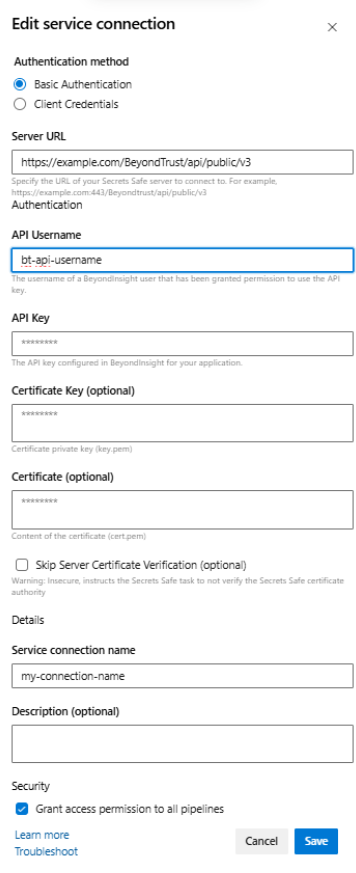
Basic authentication service connection fields
- Server URL - The URL for the Secrets Safe instance from which to request a secret.
- API username - The username of a BeyondInsight user that has been granted permission to use the API key for the API request to the Secrets Safe instance.
- API Key - The API key configured in BeyondInsight for your application. For use when authenticating to Secrets Safe.
- Certificate Key – (optional) Certificate private key (key.pem). For use when authenticating with an API key using a Client Certificate. See “Extracting Client Secret” section.
- Certificate – (optional) Content of the certificate (cert.pem) for use when authenticating with an API key using a Client Certificate.
- Skip Server Certificate Verification – (optional) Indicates whether to verify the certificate authority on the Secrets Safe instance. For use when authenticating to Secrets Safe.
Configure a service connection using OAuth for the Secrets Safe pipeline task.
OAuth Service Connection Fields
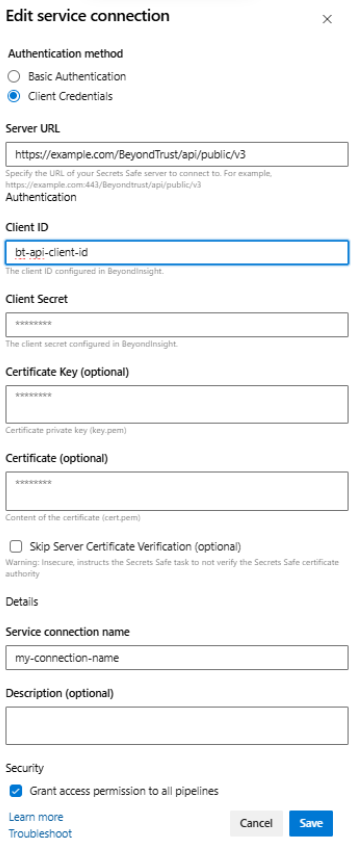
- Server URL - The URL for the Secrets Safe instance from which to request a secret.
- Client ID - The Client ID configured in BeyondInsight.
- Client Secret - The Client Secret configured in BeyondInsight.
- Certificate Key – (optional) Certificate private key (key.pem). For use when authenticating with an API key using a Client Certificate. See “Extracting Client Secret” section.
- Certificate – (optional) Content of the certificate (cert.pem) for use when authenticating with an API key using a Client Certificate.
- Skip Server Certificate Verification – (optional) Indicates whether to verify the certificate authority on the Secrets Safe instance. For use when authenticating to Secrets Safe.
Extracting Client Secret
Download the pfx certificate from Secrets Safe and extract the certificate and the key to be pasted into the service connection.
openssl pkcs12 -in client_certificate.pfx -nocerts -out ps_key.pem -nodes

openssl pkcs12 -in client_certificate.pfx -clcerts -nokeys -out ps_cert.pem
Copy all of the text from the ps_key.pem to the service connection "Certificate key" field. Copy all of the text from the ps_cert.pem to the service connection "Certificate" field.
Create Folder task configuration
A task for creating folders in BeyondTrust Secrets Safe.
This task creates a new folder in Secrets Safe and optionally stores the folder ID in a pipeline variable for use in subsequent tasks (such as creating secrets in that folder).
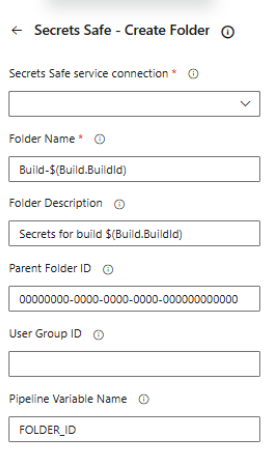
Task fields
- Secrets Safe service connection - Select the Secrets Safe service connection to use.
- Folder Name - Name of the folder to create.
- Folder Description - (optional) Description for the folder.
- Parent Folder ID - (optional) UUID of the parent folder. Leave empty to create in root folder.
- User Group ID - (optional) User group ID. Default is 0.
- Pipeline Variable Name - (optional) Name of the pipeline variable to store the created folder ID for use in subsequent tasks.
Example
- task: SecretsSafePostFolder@3
  displayName: 'Create Build Secrets Folder'
  inputs:
    connectedServiceName: 'MySecretsSafeConnection'
    folderName: 'Build-$(Build.BuildId)'
    folderDescription: 'Secrets for build $(Build.BuildId)'
    parentFolderId: '00000000-0000-0000-0000-000000000000'
    pipelineVariableName: 'FOLDER_ID'
Create Credential Secret task configuration
A task for creating credential secrets (username/password) in BeyondTrust Secrets Safe.
This task creates a credential secret in a specified folder. The secret can have owners, notes, and associated URLs.
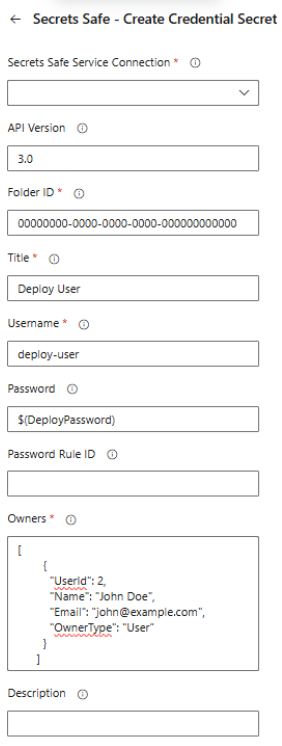
Task fields
- Secrets Safe service connection - Select the Secrets Safe service connection to use.
- API Version - API version to use: 3.0, 3.1, or 3.2. Default is 3.0. Note: v3.0 uses different owner format.
- Folder ID - UUID of the target folder where the secret will be created.
- Title - Title of the credential secret (1-256 characters).
- Username - Username for the credential.
- Password - Password for the credential (can be a pipeline variable).
- Owners - JSON array of owners. Format depends on API version:
- v3.0:
[{"UserId": 2, "Name": "John Doe", "Email": "[email protected]", "OwnerType": "User"}] - v3.1+:
[{"UserId": 2, "Name": "John Doe", "Email": "[email protected]"}]or[{"GroupId": 1, "Name": "Admins"}]
- v3.0:
- Description - (optional) Additional information about the secret (max 256 characters).
- Notes - (optional) Notes about the secret (max 4000 characters).
- URLs - (optional) JSON array of URLs. Example:
[{"Url": "https://example.com"}] - Pipeline Variable Name - (optional) Variable name to store the created secret ID.
Example
- task: SecretsSafePostCredentialSecret@3
  displayName: 'Store Deploy Credentials'
  inputs:
    connectedServiceName: 'MySecretsSafeConnection'
    apiVersion: '3.0'
    folderId: '$(FOLDER_ID)'
    title: 'Deploy User'
    username: 'deploy-user'
    password: '$(DeployPassword)'
    owners: |
      [
        {
          "UserId": 2,
          "Name": "John Doe",
          "Email": "[email protected]",
          "OwnerType": "User"
        }
      ]
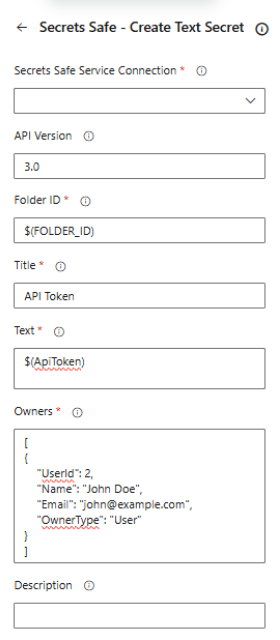
Create Text Secret task configuration
A task for creating text secrets in BeyondTrust Secrets Safe.
This task creates a text secret (such as API tokens, configuration values) in a specified folder.
Task fields
- Secrets Safe service connection - Select the Secrets Safe service connection to use.
- API Version - API version to use: 3.0, 3.1, or 3.2. Default is 3.0.
- Folder ID - UUID of the target folder where the secret will be created.
- Title - Title of the text secret (1-256 characters).
- Text - The text content to store as a secret.
- Owners - JSON array of owners. Format depends on API version (see Credential Secret format).
- Description - (optional) Additional information about the secret (max 256 characters).
- Notes - (optional) Notes about the secret (max 4000 characters).
- URLs - (optional) JSON array of URLs associated with this secret.
- Pipeline Variable Name - (optional) Variable name to store the created secret ID.
Example
- task: SecretsSafePostTextSecret@3
  displayName: 'Store API Token'
  inputs:
    connectedServiceName: 'MySecretsSafeConnection'
    apiVersion: '3.0'
    folderId: '$(FOLDER_ID)'
    title: 'API Token'
    text: '$(ApiToken)'
    owners: |
      [
        {
          "UserId": 2,
          "Name": "John Doe",
          "Email": "[email protected]",
          "OwnerType": "User"
        }
      ]
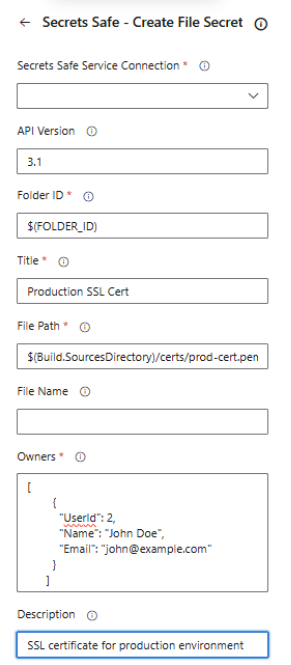
Create File Secret task configuration
A task for creating file secrets in BeyondTrust Secrets Safe.
This task uploads a file from your build agent and stores it as a secret in Secrets Safe.
Task fields
- Secrets Safe service connection - Select the Secrets Safe service connection to use.
- API Version - API version to use: 3.0, 3.1, or 3.2. Default is 3.0.
- Folder ID - UUID of the target folder where the secret will be created.
- Title - Title of the file secret (1-256 characters).
- File Path - Path to the file on the build agent to upload as a secret.
- Owners - JSON array of owners. Format depends on API version (see Credential Secret format).
- Description - (optional) Additional information about the secret (max 256 characters).
- Notes - (optional) Notes about the secret (max 4000 characters).
- Pipeline Variable Name - (optional) Variable name to store the created secret ID.
Example
- task: SecretsSafePostFileSecret@3
  displayName: 'Store SSL Certificate'
  inputs:
    connectedServiceName: 'MySecretsSafeConnection'
    apiVersion: '3.1'
    folderId: '$(FOLDER_ID)'
    title: 'Production SSL Cert'
    filePath: '$(Build.SourcesDirectory)/certs/prod-cert.pem'
    owners: |
      [
        {
          "UserId": 2,
          "Name": "John Doe",
          "Email": "[email protected]"
        }
      ]
    description: 'SSL certificate for production environment'
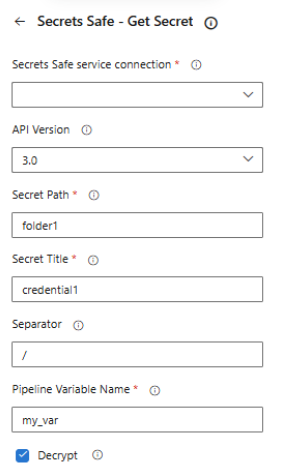
Retrieve Secret task configuration
A task for retrieving secrets from BeyondTrust Secrets Safe.
Pick the service connection, and enter the path and title of the requested secret. Specify the name of the pipeline variable to populate. The pipeline variable is created and set at runtime by the task, it contains your retrieved Secrets Safe secret base64 encoded. Reuse of the variable name in multiple tasks overwrites the existing secret.
Secrets Safe secrets are base64 encoded and saved to the pipeline variable. When using the variable in the pipeline the variable must be decoded.
Example
$(variableFromPipeLine) | base64 –-decode
WarningWe support encoding of text data only.
Take precautions to not accidentally log the secret in the pipeline log after you base64 decode the secret. It is important that security-minded engineers review pipeline composition before changes are run with access to secrets.
Task fields
- Secrets Safe service connection - Select the Secrets Safe service connection to use.
- API Version - API version to use: 3.0 or 3.1. Default is 3.0.
- Secret Path - Path to the Secrets Safe secret. For example folder1/folder2.
- Secret Title - Title of the Secrets Safe secret found at the path specified above.
- Separator - Path separator character. Default is '/'.
- Decrypt - Whether to decrypt the secret. Default is true.
- Pipeline Variable Name - A pipeline variable created and set at runtime that will contain your retrieved secret. Reuse of the variable name in multiple tasks overwrites the existing secret.
Example
- task: SecretsSafeGetSecret@3
  displayName: 'Get Database Password'
  inputs:
    connectedServiceName: 'MySecretsSafeConnection'
    apiVersion: '3.0'
    secretPath: '/Production/Databases'
    secretTitle: 'PostgreSQL Admin'
    separator: '/'
    decrypt: true
    pipelineVariableName: 'DB_PASSWORD'
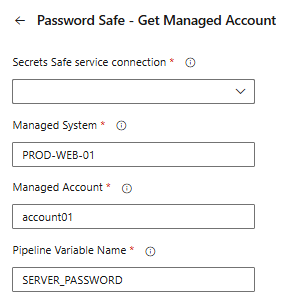
Retrieve Managed account task configuration
A task for retrieving managed account credentials from BeyondTrust Password Safe.
Pick the service connection, enter the managed system, and account for the requested secret. Specify the name of the pipeline variable to populate. The pipeline variable is created and set at runtime by the task, it contains your retrieved secret. Reuse of the variable name in multiple tasks overwrites the existing secret.
Task fields
- Secrets Safe service connection - Select the Secrets Safe service connection to use.
- Managed System - System managed by Password Safe.
- Managed Account - Account associated with the managed system.
- Pipeline Variable Name - A pipeline variable created and set at runtime that will contain the managed account credential. Reuse of the variable name in multiple tasks overwrites the existing secret.
Example
- task: PasswordSafeGetManagedAccount@3
  displayName: 'Get Server Admin Password'
  inputs:
    connectedServiceName: 'MySecretsSafeConnection'
    managedSystem: 'PROD-WEB-01'
    managedAccount: 'root'
    pipelineVariableName: 'SERVER_PASSWORD'
Complete pipeline example
trigger:
  - main

pool:
  vmImage: 'ubuntu-latest'

steps:
  # Step 1: Create a folder for build secrets
  - task: SecretsSafePostFolder@3
    displayName: 'Create Build Secrets Folder'
    inputs:
      connectedServiceName: 'MySecretsSafeConnection'
      folderName: 'Build-$(Build.BuildId)'
      folderDescription: 'Secrets for build $(Build.BuildId)'
      parentFolderId: '00000000-0000-0000-0000-000000000000'
      pipelineVariableName: 'FOLDER_ID'

  # Step 2: Store deployment credentials
  - task: SecretsSafePostCredentialSecret@3
    displayName: 'Store Deploy Credentials'
    inputs:
      connectedServiceName: 'MySecretsSafeConnection'
      apiVersion: '3.0'
      folderId: '$(FOLDER_ID)'
      title: 'Deploy User'
      username: 'deploy-user'
      password: '$(DeployPassword)'
      owners: |
        [
          {
            "UserId": 2,
            "Name": "John Doe",
            "Email": "[email protected]",
            "OwnerType": "User"
          }
        ]

  # Step 3: Store API token
  - task: SecretsSafePostTextSecret@3
    displayName: 'Store API Token'
    inputs:
      connectedServiceName: 'MySecretsSafeConnection'
      apiVersion: '3.0'
      folderId: '$(FOLDER_ID)'
      title: 'API Token'
      text: '$(ApiToken)'
      owners: |
        [
          {
            "UserId": 2,
            "Name": "John Doe",
            "Email": "[email protected]",
            "OwnerType": "User"
          }
        ]

  # Step 4: Retrieve a managed account
  - task: PasswordSafeGetManagedAccount@3
    displayName: 'Get Server Admin Password'
    inputs:
      connectedServiceName: 'MySecretsSafeConnection'
      managedSystem: 'PROD-WEB-01'
      managedAccount: 'root'
      pipelineVariableName: 'SERVER_PASSWORD'

  # Step 5: Retrieve an existing secret
  - task: SecretsSafeGetSecret@3
    displayName: 'Get Database Password'
    inputs:
      connectedServiceName: 'MySecretsSafeConnection'
      apiVersion: '3.0'
      secretPath: '/Production/Databases'
      secretTitle: 'MainDB Admin'
      pipelineVariableName: 'DB_PASSWORD'
      decrypt: true

  # Use the retrieved secrets in deployment
  - script: |
      echo "Deploying application with retrieved secrets..."
      # Secrets are available as $(SERVER_PASSWORD), $(DB_PASSWORD), etc.
    displayName: 'Deploy Application'
Updated 2 months ago
