
Password Safe | BI On-prem
What is Password Safe?
Password Safe includes a web-based interface for executing password and remote session requests and approvals. You can launch the Password Safe web portal by selecting Password Safe from the left navigation menu in the BeyondInsight management console. The web portal is configured by your Password Safe administrator.
Password Safe's random password generator algorithm does not use any common phrases or dictionary words as inputs or in its generation. It selects each password character randomly from the list of allowable characters, numerals, and symbols to build the password.
A Password Safe user is authorized to log in to the Password Safe portal and perform specific tasks, as determined by the privileges assigned to that user.
How is it useful?
Password Safe enables you to have complete visibility and control of privileged credentials and secrets used by human and non-human users, in a single solution. With Password Safe, you can:
- Secure privileged accounts, applications, SSH keys, cloud admin accounts, DevOps secrets, service accounts and more, with a searchable audit trail for compliance and forensics.
- Scan, identify, and profile all assets for automated onboarding, ensuring no credentials are left unmanaged.
- Monitor and record live sessions in real time and pause or terminate suspicious sessions.
- Use Secrets Safe to empower your teams with the confidence to securely develop and deploy cloud solutions.
- Leverage Workforce Passwords to bring enterprise-level visibility, security, audit support, and ease of use to business application password management.
How do I access Password Safe?
Your Password Safe administrator configures login credentials for the web portal. Contact your administrator if you are unsure which credentials to use. Potential authentication methods include:
- Password Safe:
- Open a browser and enter the URL for your Password Safe instance: https://<hostname>/WebConsole/index.html.
- Enter your username and password.
- Active Directory: Enter your Active Directory credentials, select a domain from the list, and then click Login.
- LDAP: Enter your LDAP credentials, select an LDAP server from the list, and then click Login.
- RADIUS: Enter your Password Safe credentials and then click Login. Enter RADIUS code and then click Submit.
- Smart Card: Select a certificate and then enter the smart card PIN.
- SAML: Follow the procedure for your third-party authentication type.
Once logged in:
- From the left menu, click
 .
.
The Password Safe home page displays.
When opened, the Password Safe page displays the Accounts tab.
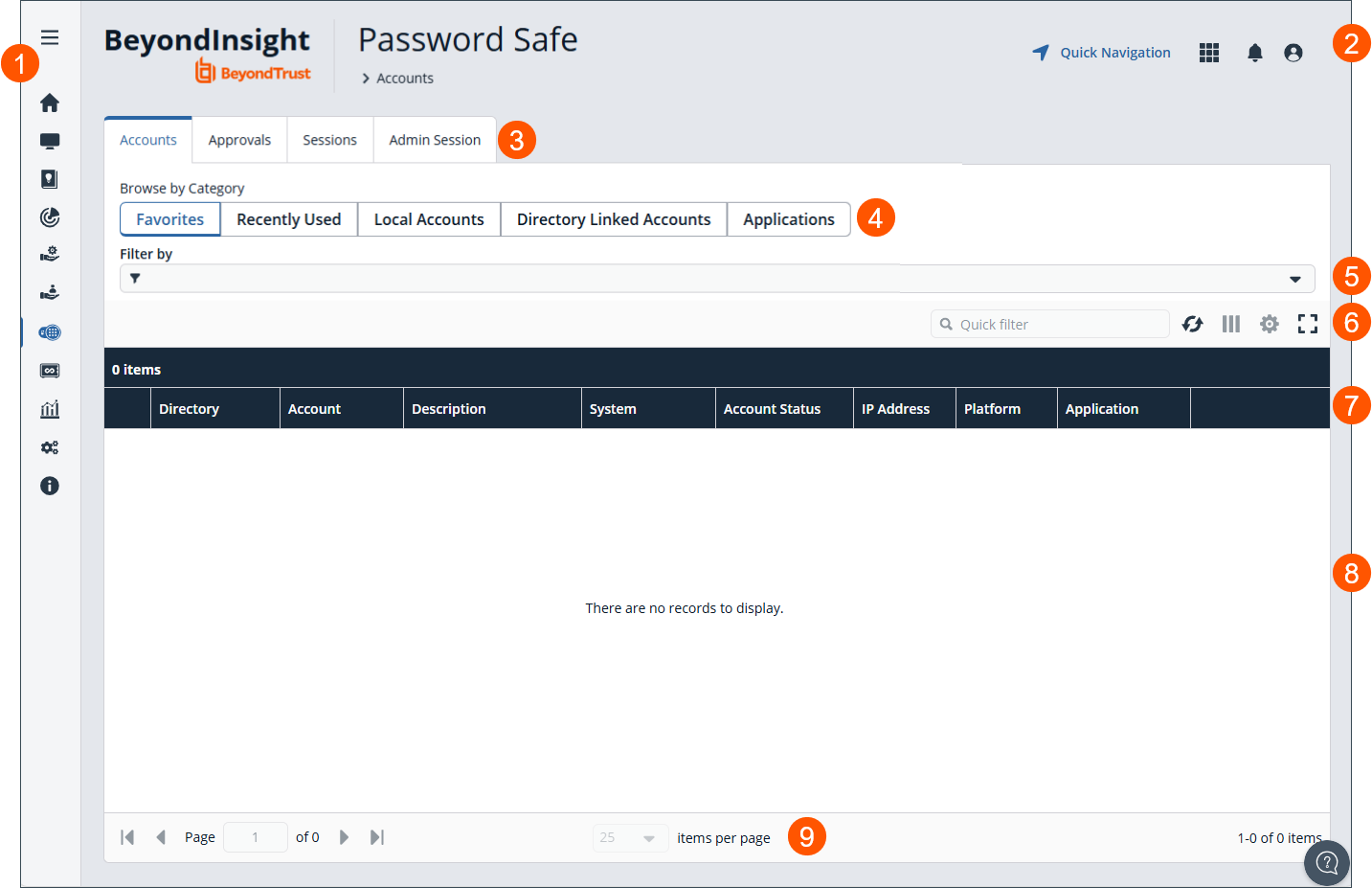
- Left Menu: Easy access to all pages in BeyondInsight, including Home, Assets, Smart Rules, Discovery Scanner, Endpoint Privilege Management Events, Managed Systems, Managed Accounts, Password Safe, Secrets Safe, Analytics and Reporting, Configuration, and About.
- Header: Navigate to your favorite pages, view your notifications, access your connected apps, and set your account preferences.
- Tabs: Depending upon the permissions assigned to your user account, the Password Safe portal displays the following tabs:
- Category: Displays in the Accounts tab. Browse by favorites, recently used, local accounts, directory linked accounts, and applications.
- Filters by: Select a filter to refine your results.
- Grid display preferences: Set display preferences on the Password Safe grid using the following options represented by icons above the grid:
- Click
 to refresh the list,
  to select which columns to display on the page,
  to configure your page display, and
 to expand the grid.
- Click
- Password Safe list columns: Displays columns selected with the column chooser.
- Password Safe grid: Displays information based on tab, filters, and additional selections.
- List navigation options: Navigate in the Managed Systems list.
For more information, see Password Safe User Guide.
Updated 3 months ago
