
Welcome to BeyondInsight (BI) | BI Cloud
What is BeyondInsight (BI)?
BeyondInsight is a central management, policy, reporting, and analytics console for many products within the BeyondInsight portfolio.

How is it useful?
BeyondInsight enables IT and security professionals to collaboratively reduce user-based risks, mitigate threats to information assets, address security exposures across large, diverse IT environments, and comply with internal, industry, and government mandates.
When working in BeyondInsight, times and time zones match the web browser on the local computer unless stated otherwise.
How do I access BeyondInsight?
After accepting the email invite and activating your access to BeyondInsight, you can sign in using your credentials. The admin credentials used to log in for the first time are configured during the installation process and depend on the type of authentication configured in BeyondInsight.
Sign in with a username and password
- Use a browser to sign in to your BeyondInsight/Password Safe URL.
This URL is provided in the BeyondTrust welcome email and includes your site URL followed by /login. - Select Username and password from the Authentication Type drop-down list.
- Enter your credentials.
The default username is Administrator and the password is the one you set from the initialization email. - If applicable, select a domain or LDAP Server from the Log in to list.
The Log in to list displays on the Login page when there are either AD or LDAP user groups created in BeyondInsight. Administrators can enable or disable the display of this list to their users.
You are automatically signed in, and the BeyondInsight Home page displays.
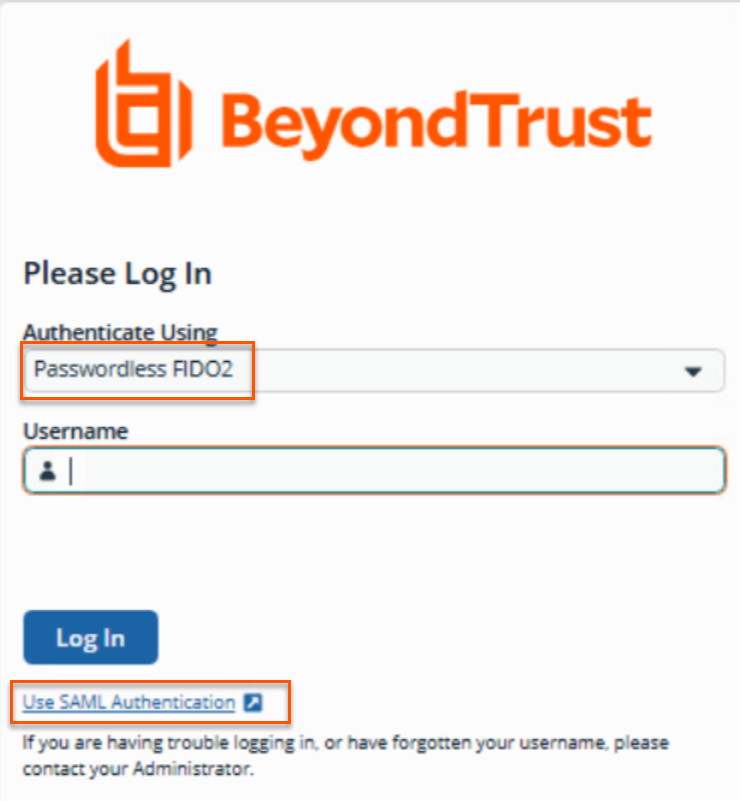
Sign in with passwordless FIDO2
- Use a browser to sign in to your BeyondInsight/Password Safe URL.
This URL is provided in the BeyondTrust welcome email and includes your site URL followed by /login. - Select Username and password from the Authentication Type drop-down list.
- Enter your username.
The default username is Administrator. - Click Log in.
- Follow the on-screen prompts.
Sign in using SAML authentication
- Use a browser to sign in to your BeyondInsight/Password Safe URL.
This URL is provided in the BeyondTrust welcome email and includes your site URL followed by /login. - Below the Log In button, click Use SAML Authentication link.
The single sign-on access site for the default SAML identity provider configured by your administrator displays.
If your initial SAML login attempt fails, and two-factor authentication (2FA) is enabled, you are redirected to the 2FA page for security reasons.
SAML login supported regardless of selected method
The sign in experience now provides consistent access to SAML-based authentication. This update ensures that users who rely on SAML can always reach the correct authentication workflow, even when another login method is selected.
SAML Login Option
When SAML is configured for the environment, the Use SAML Authentication link now appears on the login page at all times. This includes scenarios where FIDO2 authentication is selected as the active authentication method.
Displaying the link consistently helps users:
- Access SAML authentication without changing their login method first.
- Avoid confusion when switching between different authentication workflows.
- Authenticate reliably in environments that support multiple sign‑in options.
Updated 3 months ago
