
Available languages
Language selection in BeyondInsight
When you run BeyondInsight in Pathfinder, BeyondInsight displays in the language you select in the Pathfinder menu. You do not configure a separate language setting in BeyondInsight.
This behavior applies only to BeyondInsight running in Pathfinder.
On-premises and cloud installs keep their own language selection on the login page and in the BeyondInsight header.
Select a language
The language picker lives in the menu, the shared Pathfinder header that appears above every Pathfinder application.
-
In the Pathfinder, open the profile menu.
-
Select a language.
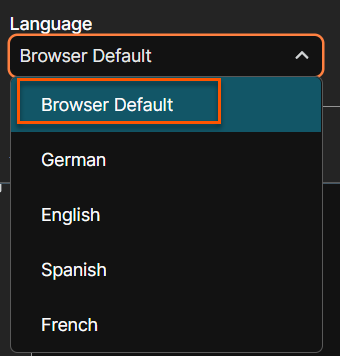
BeyondInsight refreshes in the language you select.
If you select Browser Default, BeyondInsight uses your browser's current language setting. If you change your browser language, BeyondInsight automatically updates to match only if the browser language matches one of the languages that BeyondInsight supports. Otherwise, selecting Browser Default results in BeyondInsight displaying in English (United States).
Supported languages
BeyondInsight ships the following languages:
- English
- German
- Spanish
- French
- Portuguese
- Japanese
- Korean
Updated about 22 hours ago
