
Managed accounts: Overview | PS Pathfinder
What are managed accounts?
Managed accounts are user accounts which are local or Active Directory accounts on the managed system.
How are managed accounts useful?
Managed accounts provide centralized control, security, and automation for user accounts on managed systems.
How do I access managed accounts?
- Sign into app.beyondtrust.io with your credentials.
The BeyondTrust Pathfinder Home displays. - At the top right of the page, select your site from the drop-down.
- Select the Password Safe tile from your list of available applications.
The Password Safe Home page displays. - At the top left of the page, click
 > Password Safe > Managed Accounts.
The Managed Accounts page displays. You can also select the Managed Accountscontainer card on the Password Safe Home page.
The Managed Accounts page
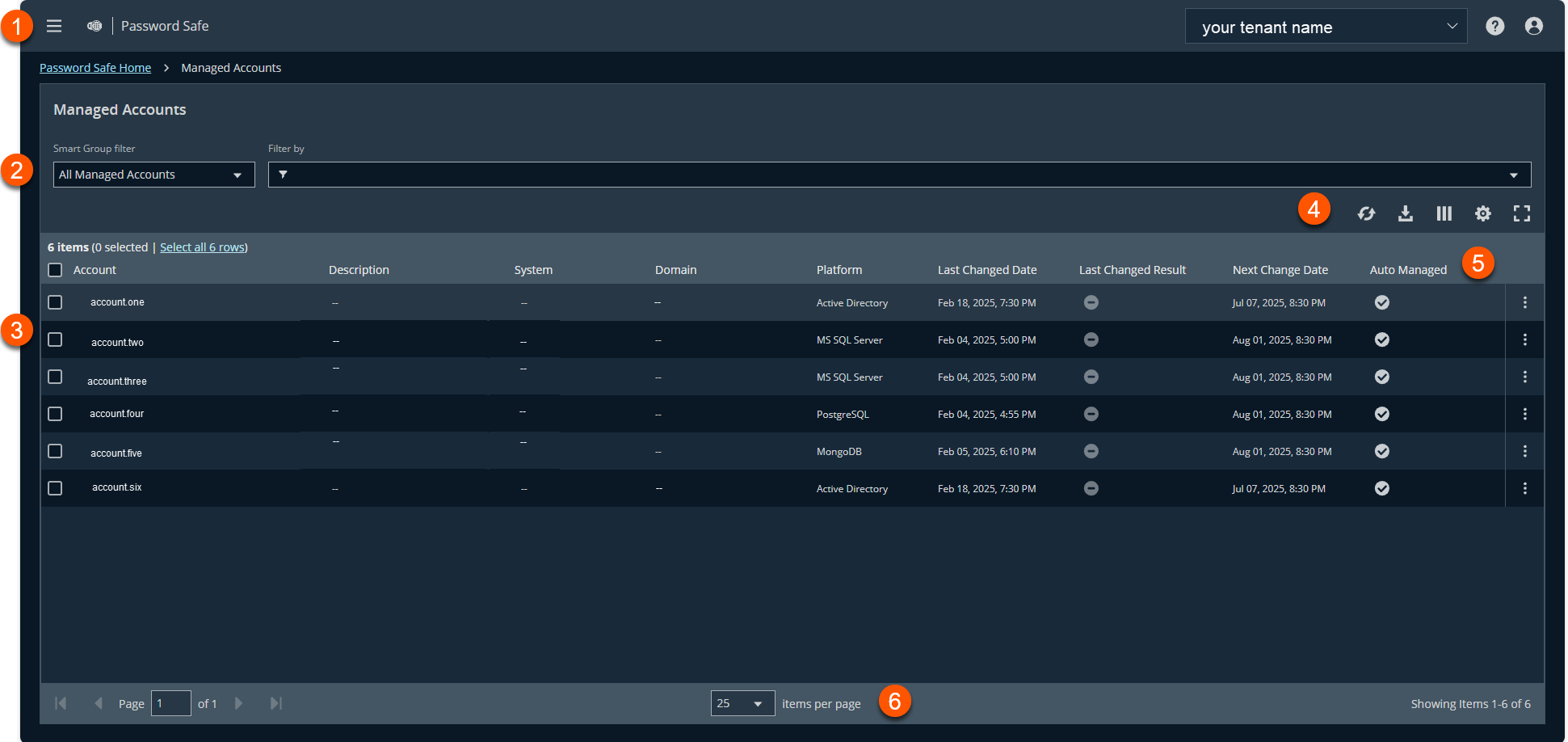
- Administration menu: Access Pathfinder administration pages if you are assigned as an administrator. You can also access all permissioned areas within Password Safe from the menu.
- Filters: Select a filter to refine your results.
Filter types- Smart Group filter: Filter by Managed Accounts or Platforms.
- Filter by:
- Account
- Description
- System
- Domain
- Platform
- Last Changed Date
- Last Changed Result
- Next Change Date
- Auto Managed
- Disabled At Rest
- API Enabled
- Mapped To User
- Change Agent
- Change Password After Release
- Check Password
- Instance Name
- Release Notification Email
- Reset Password On Mismatch
- Use Self
- Use For Scanning
- Workgroup
- AD/LDAP Queries
- Managed Accounts grid: Displays information based on filter selections.
- Grid display preferences: Set display preferences on the Managed Accounts grid using the following options represented by icons above the grid:
- Click
 to refresh the list,
  to download the list to a .csv file,
  to select which columns to display on the page,
  to configure your page display, and
  to expand the grid.
- Click
- Managed Accounts list columns: Not all columns display in the image above.
Column Names
- Account
-
Description
-
System
-
Domain
-
Platform
-
Last Changed Date
-
Last Changed Result
-
Next Change Date
-
Auto Managed
-
Disabled At Rest
-
API Enabled
-
Mapped To User
-
Change Agent
-
Change Password After Release
-
Check Password
-
Instance Name
-
Release Notification Email
-
Reset Password On Mismatch
-
Use Self
-
Use For Scanning
-
Workgroup
-
AD/LDAP Queries
-
- List navigation options: Navigate in the Managed Accounts list.
For configuration of Managed Accounts, see Managed Accounts: Configure.
Updated 6 months ago
