
Just-in-time (JIT) settings | EPM-WM Pathfinder
Activate JIT settings for application access and admin access.
To manage JIT access requests, you need one of the following:
- Administrator or Request Manager role
- Manage Application Access Requests permission (application requests)
- Manage Admin Access Requests permission (admin requests)
For more information, see User management.
Application access provides access to specific applications as defined in policy.
You must activate the Just-in-Time (JIT) feature to use the EPM-WM JIT access management system.
To use JIT application access, you require an API account with access
to the JIT API. See
To activate JIT application access:
Sign into app.beyondtrust.io.
The BeyondTrust Home page displays.From the top left of the page, click

Endpoint Privilege Management for Windows and Mac Configuration.
The Configuration page displays.
Select Just-in-time (JIT) Access Settings.
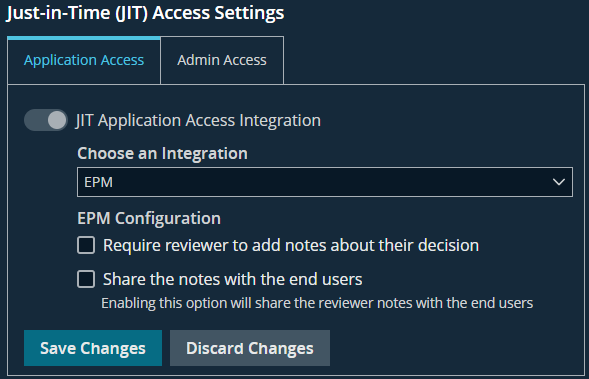
Select Application Access.
Select the toggle,
JIT Application Access Integration.From the list, select the integration type,
EPM or ServiceNow.For EPM:
Check the box to require notes to support the user's approval
or denial decision.Check the box to share the notes with the end users.
Select Save Changes.
Updated 3 months ago
