
Just-in-time (JIT) Access auditing | EPM-WM Cloud
The Just-in-time (JIT) Access Management features (application access requests and admin access requests) are audited for troubleshooting and logging purposes.
- From the left menu, click
 .
.
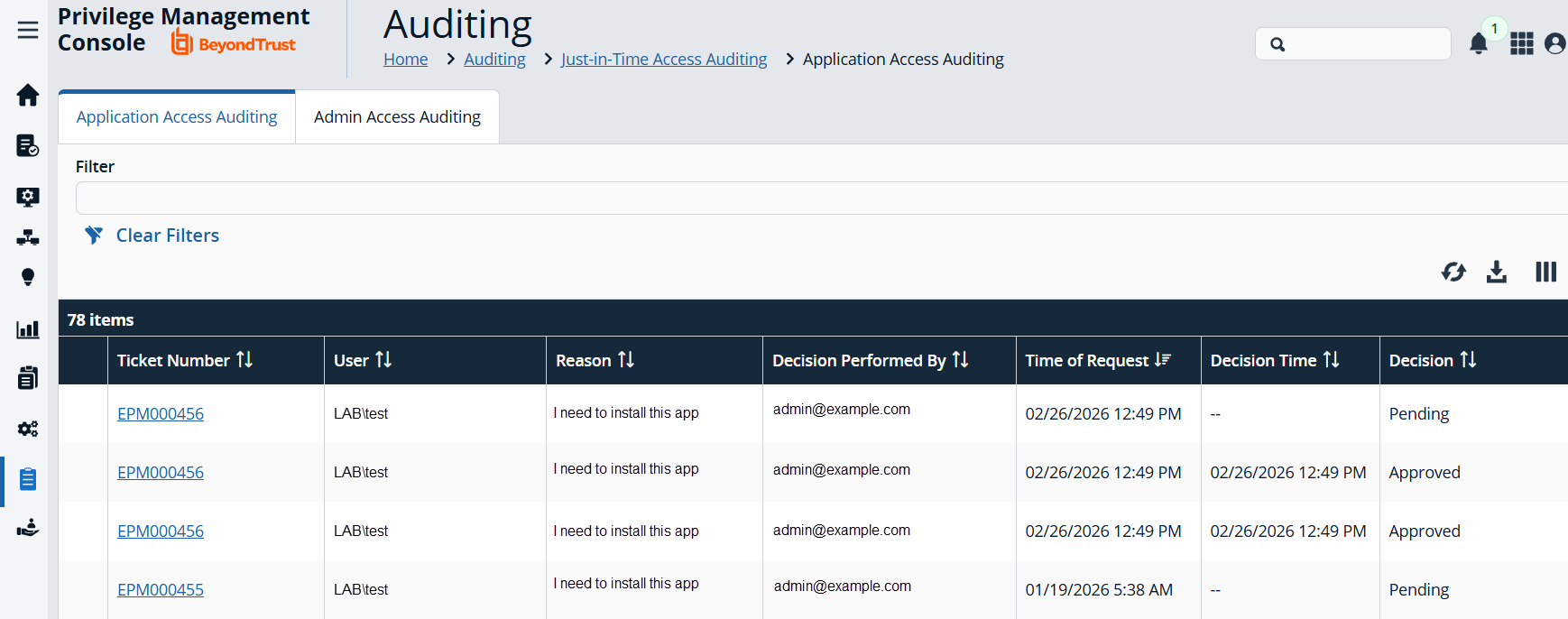
The Auditing page displays. - Select the Just-In-Time (JIT) Access Auditing tile.
You only see the Authorization Request Auditing tile if authorization request management is set up on the Configuration > Authorization Request Settings page.
Some of the key elements captured in the audit include:
- User: The user requesting authorization.
- Time of Request: The time the ticket is created.
- Decision Performed By: The ServiceNow user approving or denying the action.
- Decision Time: The time approval or denial occurs.
- Decision Duration: The time allotted for the authorized request.
- Decision Start Time: The time the decision duration started.
JIT activity audits
- Missing data: the Splunk app and the Sentinel connector do not pull /AuthorizationRequestAudits. ITSM-driven JIT application decisions are therefore only available by calling that endpoint directly.
- Limited detail: JIT Activity Audit records carry entity, audit type, ticket number (EntityName), user, Details text and timestamp. They have no structured change-data block.
| JIT activity | Client Events | Activity Audits | Authorization Request Audits (/v3/AuthorizationRequestAudits) |
|---|---|---|---|
| Rule fires with a JIT application access action | Yes: process event (e.g. 112) with EPMWinMac.AuthorizationRequest.* | No | Yes: request created |
| JIT app request approved/denied in the portal | No | Yes: Entity JITAccessManagement, AuditType Approve/Deny | Yes |
| JIT app request approved/denied through ITSM (ServiceNow/Jira) or the API | No | No | Yes |
| App launched after approval | Yes: process event with AuthRequest fields | No | Yes: StartTime set on first launch |
| JIT admin request approved/denied | No | Yes: Entity AdminAccessManagement, AuditType Approve/Deny/CreateNote, EntityName = ticket ID | n/a |
| JIT admin session start/stop | Yes: 302/303 plus Session.JITAdmin fields | No | n/a |
Updated 13 days ago
