
Event details | AI Agent Security
The Events page gives you one line per event. The details panel gives you the whole event: the chain of processes that led to it, which policies matched, who and where it came from, and the raw record underneath. It is where you answer "should this have been allowed" for a single action.
Scope of this guide
This guide explains the event details panel: its tabs and the sections on each. It does not cover writing policy rules.
Prerequisites
- You have administrator access to the tenant.
Open the details panel
- Go to Intelligence > Events.
- Select the value in the Activity column on the event you want to review.
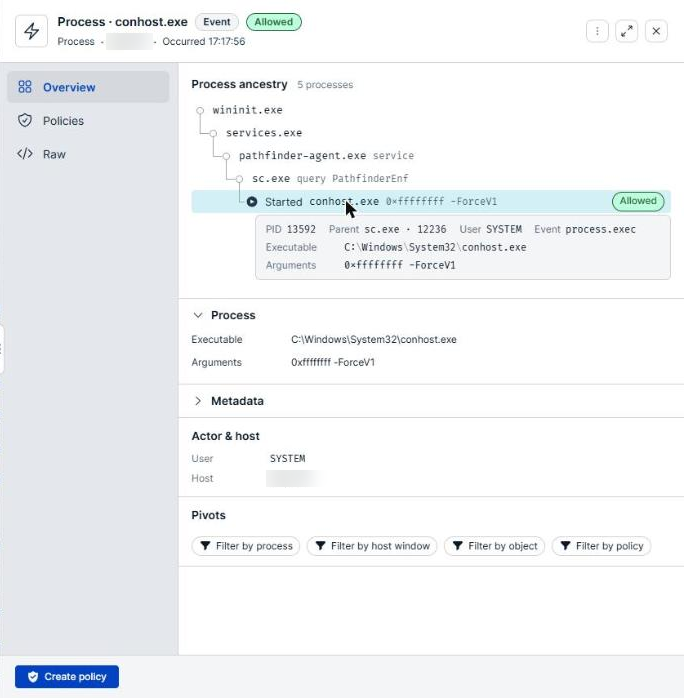
The panel opens beside the list. The header names the event, such as Process · conhost.exe, with its outcome badge, and below it the event family, the endpoint, and the time it occurred. To close the panel, select the X in the top right corner. The panel is part of the page URL, so you can copy the link to share the exact event.
Tabs
The tabs down the left side of the panel group the event's information. Overview is selected when the panel opens.
| Tab | Description |
|---|---|
| Overview | The process ancestry, details for the kind of event, a summary of matched policies, the actor and host, and pivots to related events. |
| Policies | Every policy that matched the action, with its decision and mode. |
| Raw | The complete event record. |
Process ancestry
The Process ancestry section shows the chain of processes behind the event, from the origin process at the top to the action itself at the bottom, where the action carries its outcome badge. The heading states how much the chain holds, such as 5 processes.
Each row is one process or one action, with a short hint of its arguments, such as sc.exe query PathfinderEnf. Repeated wrapper processes are folded into a single row with a count. Select a row to show its details:
| Field | Description |
|---|---|
| AI agent | The AI agent the process belongs to, when it was launched by one. |
| PID | The process ID. |
| Parent | The parent process, by name and process ID, such as sc.exe · 12236. |
| User | The user the process ran as. |
| Event | The activity recorded, such as process.exec. |
| Acting under | The AI agent the process is attributed to, when it was started on an agent's behalf. |
| Executable | The full path to the executable. |
| Arguments | The command line arguments. |
Long values, such as a full command line, are shortened. Select Show all to read the whole value.
Command lines can contain credentials and tokens. Treat what they show as sensitive, and take the same care with screenshots of this panel as you would with the credential itself.
Ancestry is what separates a normal event from a suspicious one. The same file.open is unremarkable from a service started by the operating system and worth investigating from a process started by a coding tool.
When the agent recorded more than the panel can place, a note under the chain says so, such as Only the most recent activities are shown. Earlier ones may exist.
Event detail
Below the ancestry, a section named for the kind of event gives its specifics. For a process event, the Process section shows the Executable and Arguments. Expand Metadata for additional recorded detail.
Matched policies
The Overview tab summarizes the policies that matched the action. The Policies tab lists them in full.
| Column | Description |
|---|---|
| Policy name | The policy that matched. Select it to open the policy. |
| Decision | What the policy decided for this action. |
| Mode | The policy's posture: Off, Audit, Require Approval, or Block. |
When no policy matched, the section reads No policies matched this action. Because everything is allowed by default, an allowed action with no matched policies was permitted because nothing covered it, not because a policy approved it. If you expected this action to be blocked, this section is where you find out that your policy did not match.
Actor & host
The Actor & host section shows who performed the action and where. Fields appear only when the agent recorded them.
| Field | Description |
|---|---|
| Actor | The process that performed the action. |
| User | The user the process ran as. |
| Machine | The endpoint the event came from. |
| Host | The host name for that endpoint. |
| Destination | The network destination, for network events. |
Pivots
The Pivots section moves you from this event to related ones.
| Button | Description |
|---|---|
| Filter by session | Shows the other events from the same agent session. Offered only for events that belong to one. |
| Filter by process | Shows the other events from the same process. |
| Filter by host window | Shows other events from the same host around the same time. |
| Filter by object | Shows other events involving the same object. |
| Filter by policy | Shows other events matching the same policy. |
Filter by host window is the pivot to reach for first. A single allowed action rarely tells you much; what the same host did in the surrounding minutes usually does.
Raw
The Raw tab shows the complete event record as JSON, including fields not surfaced elsewhere in the panel. Select Copy raw payload to copy it.
Use it to confirm what the panel summarizes, and when you need a value to paste into a ticket or a query. Credential-shaped values are redacted before the record is shown, but treat the whole payload as sensitive.
Create a policy from an event
When the action is one a policy can govern, the panel footer offers Create policy, which opens the policy builder. When a blocking policy already fired on the action, the footer offers Edit policy instead. Events that no policy can govern, such as health reports, show neither.
Verify the results
Confirm the Machine and the time match the event you meant to open. Confirm the Outcome of the action row matches the outcome in the header.
Next steps
- Use Filter by host window to see what else the host was doing when the event happened.
- Select the outermost process in the ancestry chain to check where the chain originated.
- Select Create policy if the event should have been blocked, then test the policy before enforcing it.
Updated about 2 hours ago
