
BeyondTrust managed policies | AI Agent Security
Everything is allowed by default, and each policy blocks or records specific actions. An empty policy list is an unrestricted environment, and writing your first policies from a blank page means guessing which agent behaviors matter. The BeyondTrust Managed tab removes the guesswork: a curated set of policies covering the agent behaviors that most often turn into incidents, grouped into categories you can work through one at a time.
Scope of this guide
This guide explains the BeyondTrust Managed tab: the curation line, the two views, how managed policies run on your endpoints, how to adapt one, and the full list of managed policies. It does not cover writing policy rules or managing list contents.
Prerequisites
- You have administrator access to the tenant.
Open the BeyondTrust Managed tab
- Go to Protection > Policies.
- Select BeyondTrust Managed.
The number in the tab label is the total number of managed policies. Search applies on top of it, so the list can show fewer policies than the tab label. The difference is your search, not a missing policy.
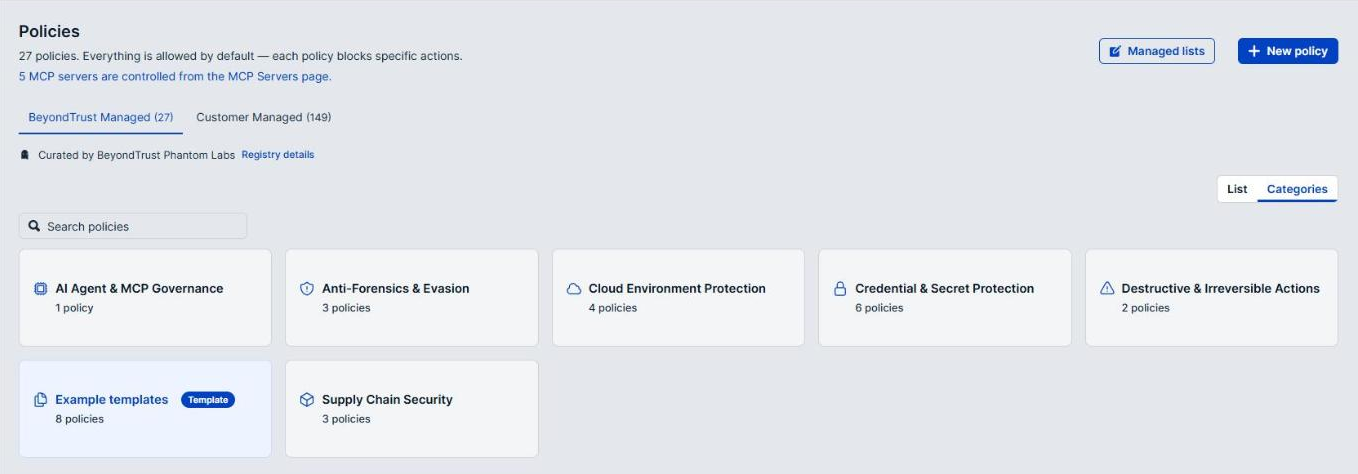
Curation
The line below the tabs reads Curated by BeyondTrust Phantom Labs. Phantom Labs research keeps this set current as agent behaviors change, which is the practical reason to check here before writing a policy of your own.
Select Registry details to see where the set is served from: Serving, Generation, Digest, Artifacts, and Parity. Select Hide registry details to collapse them again. These details are for troubleshooting with BeyondTrust support; day-to-day use does not need them.
Choose a view
Two buttons at the right of the tab content change how the policies are presented.
- Select List to see every managed policy as a flat list.
- Select Categories to group them into category cards. Each card names a category and the number of policies it holds. Select a card to open that category, then select All categories to return to the cards.
| Category | Policies | What it covers |
|---|---|---|
| AI Agent & MCP Governance | 1 | Which remote MCP servers agents may reach. |
| Anti-Forensics & Evasion | 3 | Agents destroying the record of their own activity, running offensive tradecraft, or planting persistence. |
| Cloud Environment Protection | 4 | Agents escalating privilege or exposing resources in AWS and Azure, and reaching cloud instance metadata. |
| Credential & Secret Protection | 6 | Agents reading credentials, secrets, SSH and signing keys, and token files. |
| Destructive & Irreversible Actions | 2 | Commands with no undo, such as recursive deletion, infrastructure teardown, and Git history rewrites. |
| Example templates | 8 | Starter policies to copy and fill in with your own values, marked with a Template badge. |
| Supply Chain Security | 3 | Unsanctioned agents, China-based model providers, and public package registries. |
To find a policy by name, enter all or part of it in the Search policies box. The Category filter is not offered on this tab; use Categories view instead.
How managed policies run
A managed policy runs at Audit or Off, never at Require Approval or Block.
Three things follow from this:
- Managed policies record, they do not block. Every managed policy outside Example templates starts at Audit, so it records what it matches without stopping anyone. Review that activity on the policy's Activity tab to see what it would block.
- They reach every endpoint through the
defaulttag. Every endpoint carries the built-indefaulttag, including endpoints enrolled later, and that tag applies the managed policies to the whole fleet. You can also attach a managed policy to specific endpoints or tags from its Attachments tab. - To block, fork the policy. Open the policy and select Fork to my policies. The fork is an ordinary Customer Managed policy that you can edit, test, and set to Require Approval or Block.
You can turn a managed policy Off or back to Audit from its details panel. You cannot edit, delete, or run a test against a managed policy; fork it first.
Example templates
The Example templates category holds starter policies for controls that depend on your own values, such as an AWS account number, an Azure tenant, or an internal API host. Each one carries a Template badge, ships turned Off, and has placeholder values such as your-aws-account-id that match nothing in your environment.
To use a template:
- Open the template and select Fork to my policies.
- On the Fill in your values screen, replace each placeholder with your own value, then select Continue. Select Skip for now to go to the rules with the placeholders still in place.
- Test and publish the fork, then attach it where it is needed.
Turned-off templates are not applied through the default tag, so a template affects no endpoint until you fork it and publish your copy.
BeyondTrust managed policies list
The table lists every BeyondTrust Managed policy, with the description it shows in the product. Select a policy's name on the BeyondTrust Managed tab to see its rules and activity.
| Category | Name | Applies to | Description |
|---|---|---|---|
| AI Agent & MCP Governance | Unauthenticated MCP servers | All | An AI agent reaching a remote MCP server that is not on the approved list. Approval is the control, not vendor reputation. |
| Anti-Forensics & Evasion | Anti-forensic evasion | AI Agents | An AI coding agent destroying the evidence of its own activity: clearing shell history, deleting or truncating system logs, disabling the audit subsystem, and making files immutable. These rarely have a legitimate purpose inside a coding session and they are what makes every other control unauditable. Enforced at the hook and again at process launch. |
| Anti-Forensics & Evasion | Offensive tradecraft | AI Agents | The three families of offensive tradecraft an AI coding agent should never run unsupervised: reverse shells and command-and-control, permission and ownership escalation, and persistence mechanisms. One rule per family, so the message names the specific hazard. |
| Anti-Forensics & Evasion | Shell config persistence | All | An AI coding agent writing to shell startup files, a common persistence foothold. |
| Cloud Environment Protection | AI-driven AWS privilege escalation | AI Agents | An AI agent granting itself administrator-equivalent AWS access through IAM policy changes or code that runs under a privileged execution role. |
| Cloud Environment Protection | AI-driven AWS resource exposure | AI Agents | An AI agent opening an AWS resource to outside principals by rewriting its resource policy, ACL, or sharing attributes. |
| Cloud Environment Protection | AI-driven Azure privilege escalation | AI Agents | An AI agent granting itself Azure admin. Covers direct Azure RBAC mutations (role assignments/definitions, elevateAccess) and the ARM deployment endpoint (a role can be granted via an ARM template deployment). Note: role-grant intent buried inside a linked or parameterized deployment template body is not reliably matchable (best-effort body inspection only). |
| Cloud Environment Protection | Cloud metadata (IMDS) access | AI Agents | An AI agent reaching the cloud instance metadata service (AWS/Azure IMDS at 169.254.169.254, Azure Instance Metadata Service, GCP metadata.google.internal, Alibaba 100.100.100.200, ECS 169.254.170.2), the classic path for stealing an instance/managed-identity's temporary credentials. |
| Credential & Secret Protection | AI reads of restricted files | AI Agents | Any AI coworker's file.read of a restricted-sensitivity path (credentials, SSH keys, .env), matched at the kernel file-open layer regardless of which binary or OS hosts the agent. |
| Credential & Secret Protection | Cloud credential reads | AI Agents | An AI coding agent reading cloud provider credential files and cluster config files. |
| Credential & Secret Protection | Dev tool and agent token reads | AI Agents | An AI coding agent reading the credentials held by developer tooling and by the coding agents themselves, including MCP server tokens. |
| Credential & Secret Protection | .env and token file reads | AI Agents | An AI coding agent reading dotenv files, package registry tokens and Terraform state. |
| Credential & Secret Protection | Password manager reads | AI Agents | An AI coding agent reading password managers, secret managers and OS keychains. |
| Credential & Secret Protection | SSH and signing key reads | AI Agents | An AI coding agent reading SSH private keys, PGP keyrings, TLS certificates and Java keystores. |
| Destructive & Irreversible Actions | Destructive commands | AI Agents | The three families of irreversible command an AI coding agent should never run unsupervised: recursive filesystem deletion, infrastructure teardown (Terraform, Helm, Kubernetes, cloud CLIs) and destructive database operations. One rule per family, so the message names the specific hazard. Bash remains available for everything else. |
| Destructive & Irreversible Actions | Irreversible data loss | AI Agents | The two operations an AI coding agent cannot undo and no backup reliably covers: whole-disk destruction (dd onto a device, mkfs, diskutil erase, wipefs) and Git history rewriting that discards commits or remote state (force-push, hard reset, filter-branch). Enforced at the coding-agent hook and again at process launch. |
| Example templates | Allow only approved Azure tenants | All | An AI agent's Azure Resource Manager (management.azure.com) request whose verified Microsoft Entra (Azure AD) token belongs to any tenant other than your approved ones. Requires JWKS verification wired for the tenant IdP; unverified or missing tokens are out of scope for this rule. Replace your-approved-tenant-id with your directory (tenant) GUID; add more in the builder or switch the condition to the Production tenants list. |
| Example templates | Allow only approved tenants on an internal API | All | An agent request to your multi-tenant internal API whose tenant field carries any value other than your approved ones; requests without the field are out of scope. Replace your-tenant-field=your-approved-tenant with the field name and value your API uses, then add more approved values in the builder. |
| Example templates | Guard a multi-tenant internal API | All | An agent request targeting a protected tenant of your multi-tenant internal API. Replace your-tenant-field=your-protected-tenant with the field name and value your API uses. |
| Example templates | Pin AWS account | AI Agents | An AI agent's request to an AWS account outside your approved set. The account is identified from the request's signature, so no connector setup is required. Replace your-aws-account-id with your approved account number. |
| Example templates | Pin Azure subscription | All | An AI agent's Azure Resource Manager request against an unapproved subscription. Replace your-azure-subscription-id with the subscription GUID. |
| Example templates | Pin Azure tenant (directory) | All | An AI agent's Azure Resource Manager (management.azure.com) request whose verified Microsoft Entra (Azure AD) token belongs to an unapproved tenant. Requires JWKS verification wired for the tenant IdP; the rule is inert on an unverified token. Replace your-azure-tenant-id with the directory (tenant) GUID. |
| Example templates | Pin Google Cloud project | All | An agent's HTTPS requests carrying the Google user-project header for an unapproved project. Replace your-gcp-project-id with the project. |
| Example templates | Wall off a Databricks workspace | All | An agent reaching a protected Databricks workspace by its host. Replace your-databricks-workspace.cloud.databricks.com with the workspace to wall off. |
| Supply Chain Security | Chinese model provider use | AI Agents | An AI agent reaching a China-based model provider (DeepSeek, Moonshot/Kimi, Qwen, Yi, Baidu, Tencent, ByteDance). |
| Supply Chain Security | Shadow AI agent binaries | All | An unsanctioned AI coding agent running at all, caught at process launch. Covers Aider, OpenCode and OpenClaw installed without approval. |
| Supply Chain Security | Third-party packages | AI Agents | An AI agent reaching a public package registry. Supply-chain visibility: which dependencies are agents pulling, and from where. |
Verify the results
Confirm that the BeyondTrust Managed tab count matches the number of policies in the list above. Open a managed policy outside Example templates and confirm it reads Audit, then check its Activity tab for recorded matches.
Next steps
- Review the Activity tab of each managed policy that has recorded matches, and decide whether you need it to block.
- Fork any managed policy you want to block, and set the fork to Block or Require Approval.
- Fork the Example templates that fit your environment and fill in your own values.
Updated about 2 hours ago
