
Organization settings | Pathfinder
By default, Pathfinder stores your users' personally identifiable information (PII) in the US. This includes email addresses, names, password hashes, and account activation tokens. With regional data residency, an organization administrator can choose a different region for the whole organization and can place individual users in a region of their own.
This helps you meet internal policies or regulatory obligations about where PII authentication data is stored. Your users sign in the same way, and they do not need to take any action when their data moves.
Residency covers data at restPathfinder stores your users' PII authentication data at rest in the region you select: the US, Canada, Brazil, the UK, Germany, India, Australia, or Singapore.
Processing is separate. PII authentication data leaves your selected region to be processed, and it is written back to your selected region afterward. Regional data residency controls where data is stored, not where it is processed.
Why it matters
- You choose where PII authentication data lives. Place it in a region that fits your policies or regulatory obligations.
- One setting covers the common case. Most organizations need a single region for everyone, and the organization region handles that without touching individual user records.
- Exceptions do not need a second organization. Both IdP region overrides and user region overrides cover organizations whose staff span several geographies.
- Your users are not disrupted. Sign-in works the same way, and users take no action when their data moves.
- Only administrators can change it. Users cannot change the region their own data is stored in.
ImportantThis capability helps you meet data residency requirements for PII authentication data. It does not by itself make your organization compliant with GDPR or any other regulation.
How regional data residency works
Region levels
Pathfinder's default region is US East (Virginia). It applies to any organization that has not chosen a region, and non-identifying data and the anonymized lookup key always stay there regardless of your settings.
You control data residency at three levels, and only an organization administrator can change any of them.
| Level | What it does | Where to set it |
|---|---|---|
| Organization region | Applies to everyone in your organization who does not have a user region override. | Organization Settings > Data Residenc |
| User region override | Replaces the organization region for one user. | User Management > Edit User |
| Identity provider region | When a user signs in through this provider for the first time, Pathfinder creates their account and stores it in this region. | Identity & Authentication Providers > Edit Identity Provider or Directory Authentication > Edit Directory Provider |
ImportantA user's effective region is the user region override if one is set, or the organization region if not.
The identity provider region is not part of this precedence. It determines where a user is first stored, not where they live afterward:
An identity provider region affects users only on first sign-in. If a user has already authenticated through the provider, and the provider's region is changed later, that user's PII authentication data is not automatically migrated.
If an identity provider's region is not set, those users are placed in the default US region, not in your organization region, even if your organization region is elsewhere.
For more information, see Where Pathfinder creates new users.
How sign-in is routed
This example shows an organization whose region is set to Europe (Frankfurt).
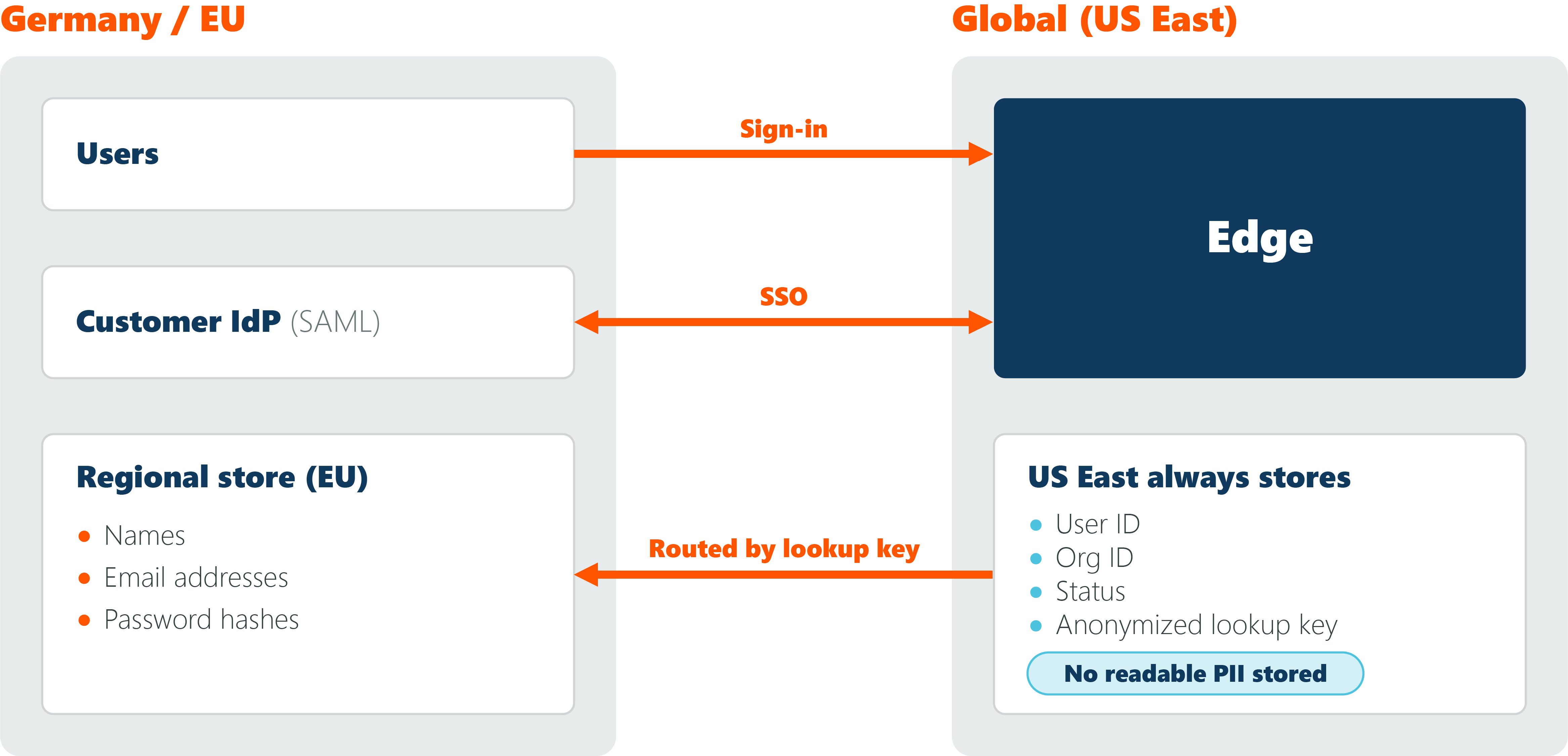
US East stores no readable PII, but sign-in requests pass through it on their way to the regional store.
- An administrator sets the organization region. Pathfinder saves the new region and starts a migration.
- Pathfinder migrates existing users. A background migration moves each user's PII authentication data to the new region.
- An administrator sets user region overrides where needed. The user's data moves to the selected region in a single operation.
- A user signs in. Pathfinder computes the keyed hash of the email address, matches it against the lookup key in the default region, and routes the request to the user's effective region.
- Pathfinder authenticates the user. Credential checks and profile reads happen against the regional store. The sign-in experience and the API response shape do not change.
Where Pathfinder creates new users
New users are not always created in your organization region. How a user arrives determines where their PII authentication data is first stored.
| How the user is created | Region used |
|---|---|
| An administrator invites the user | The region selected on the invitation |
| A SAML provider creates the user at first sign-in | The identity provider region set on that SAML provider |
| A directory provider creates the user at first sign-in | The identity provider region set on that directory provider |
Directory and SAML users are created automatically the first time they sign in, with no administrator involved. Set an identity provider region on each authentication provider so that those users are placed in the region you intend. If no region is set, they are placed in the default US region.
ImportantAn identity provider region affects users only on first sign-in. If a user has already authenticated through the provider, and the provider's region is changed, that user's PII authentication data is not automatically migrated.
For more information, see How regional data residency works.
What data is stored in your region
Supported regions
| Region | Geography |
|---|---|
| US East (Virginia) | United States (default region) |
| Canada Central | Canada |
| South America (São Paulo) | Brazil |
| Europe (Frankfurt) | Germany and the EU |
| Europe (London) | United Kingdom |
| Asia Pacific (Mumbai) | India |
| Asia Pacific (Singapore) | Singapore |
| Asia Pacific (Sydney) | Australia |
You can use any of these regions as your organization region, as a user region override, or as an identity provider region.
Data stored in your region
What Pathfinder stores in your effective region depends on how the user signs in. Everything listed below is stored in the effective region.
Local users (sign in with a Pathfinder password)
- Email address
- First and last name
- Display name
- Password hash
- Account activation token
- Invitation email address
SAML users (sign in through your identity provider)
- Email address
- First and last name
- Display name
Your identity provider holds their credentials, so Pathfinder stores no password.
Directory users (sign in through AD or LDAP)
- Directory identifier, in
username@domain.<Org ID>form - First and last name
- Display name
Your directory validates their credentials, so these users cannot sign in with a Pathfinder password. Pathfinder stores their directory identifier rather than their directory email address.
All users
The following data always stays in the default region, US East (Virginia), for every user:
- Internal user ID
- Organization ID
- Account status
- Anonymized lookup key
None of this data identifies a user. The anonymized lookup key cannot be reversed to recover an email address.
Manage regional data residency
Set the region for your organization
You must be an organization administrator.
-
Sign in to Pathfinder.
-
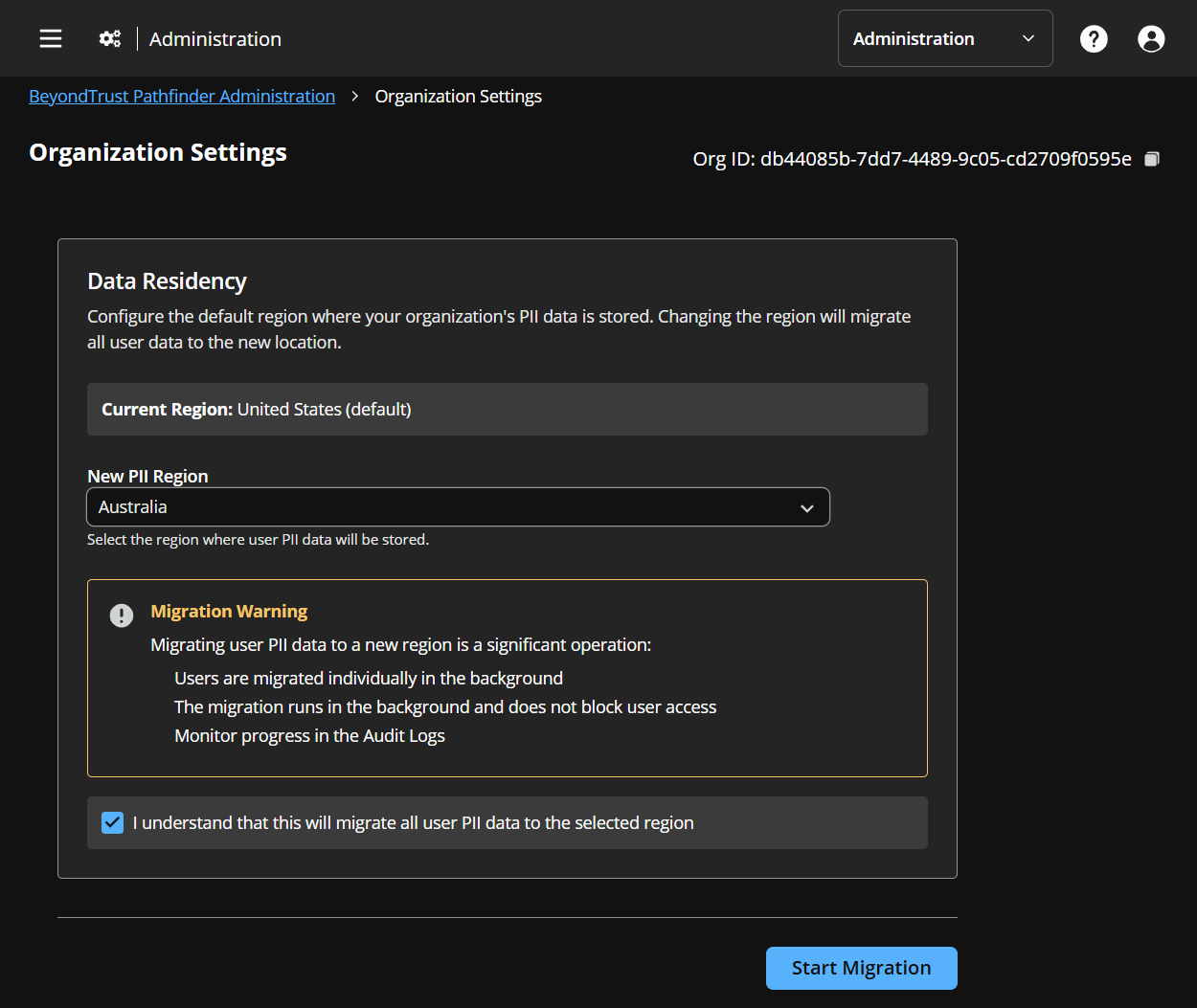
Go to Organization Settings.
-
In the Data Residency section, select the New PII region you want to use.
-
Read the migration warning, then select the acknowledgment checkbox to confirm your understanding.
-
Click Start Migration.
A background migration moves the PII authentication data of all existing users to the new region.
ImportantAn organization migration replaces existing user region overrides. When you change the organization region, the migration moves every user, including users who have a user region override. Any deliberate per-user placements are replaced by the new organization region.
If you maintain exceptions, record them before you change the organization region, then set the user region overrides again after the migration finishes.
Once a migration has been started, it cannot be stopped or cancelled. To monitor the progress of the migration, go to the Audit Logs.
Return your organization to the default region
Follow the steps in Set the region for your organization and select US East (Virginia). A background migration moves users' PII authentication data back to US East and removes it from the regional store.
Set a region for an individual user
You must be an organization administrator.
-
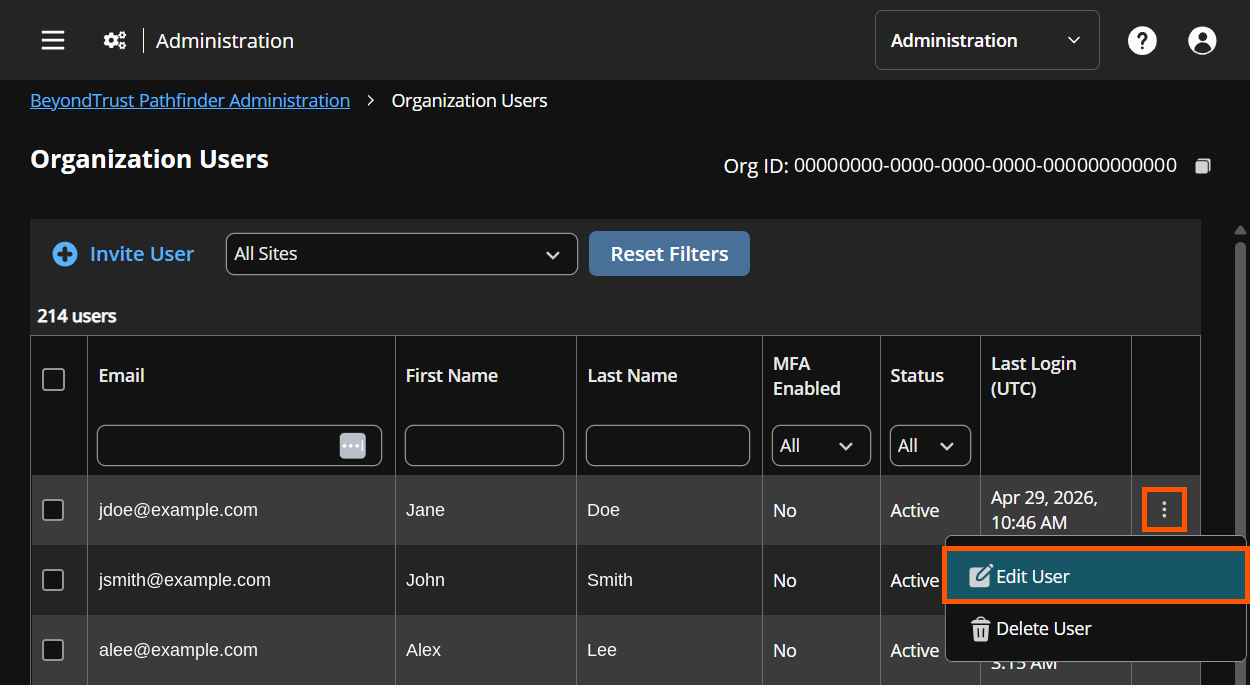
Go to Administration > User Management.
-
Select the ⋮ menu for the user, then select Edit User.
-
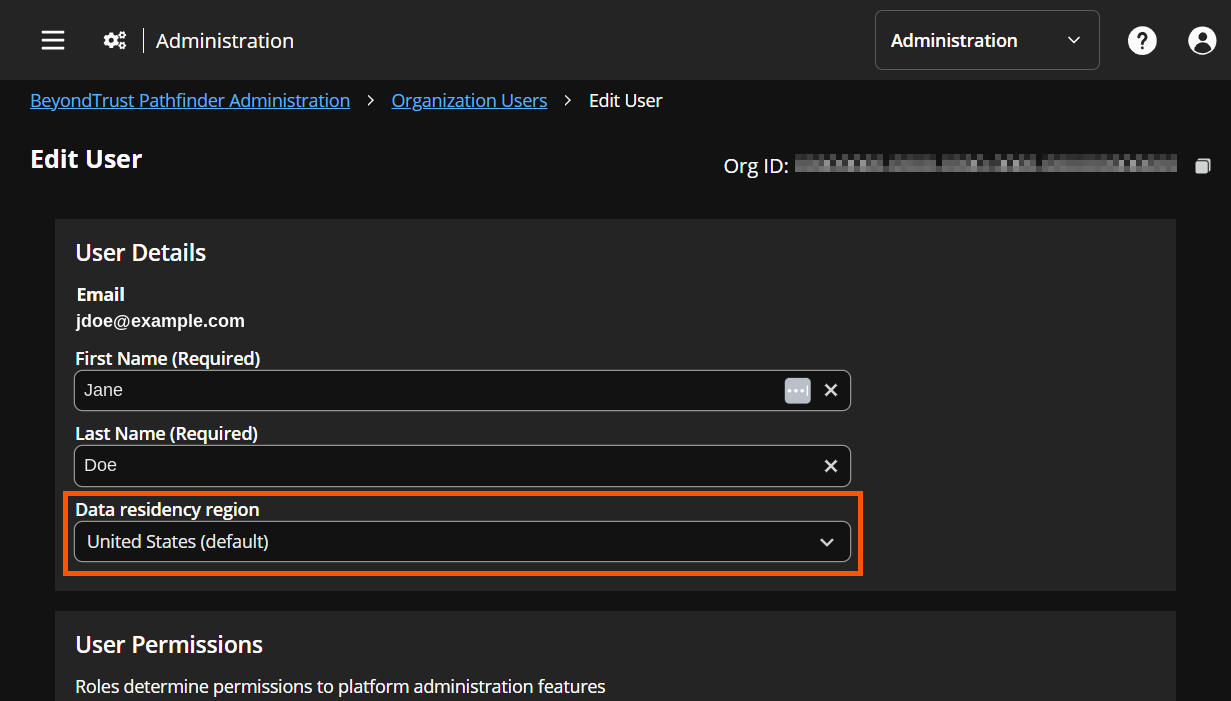
Under User Details, select a region in the Data residency region list.
-
Click Save.
The user's PII authentication data is written to the selected region and removed from the previous store in a single operation. There is no downtime for your organization, and the user does not need to do anything.
Remove a user's region override
Follow the steps in Set a region for an individual user and select US East (Virginia). The user returns to the organization region, and their PII authentication data moves in a single operation.
What your users experience
- Sign-in, password changes, profile updates, and user management work the same way. Nothing changes in how your users sign in or how you manage them.
- API responses keep the same shape. Your integrations do not need to change.
- Users take no action when their data moves. This applies to both organization migrations and individual user moves.
- Users can sign in during a migration. Their sign-in experience is unchanged while the migration runs.
- Users far from their effective region may see slightly higher sign-in latency. If someone works in a different geography from the rest of your organization, consider a user region override for them.
How regional data is protected
- Encryption at rest. Each region uses a dedicated encryption key.
- Point-in-time recovery is turned on for regional stores.
- No readable PII authentication data is stored outside the effective region. US East holds only non-identifying data and the anonymized lookup key, and the email address cannot be derived from that key.
- Processing is not limited to the effective region. PII authentication data leaves your selected region to be processed and is written back afterward. Cross-border processing is governed by your data processing agreement, not by this setting.
- Records cannot be split. A user record cannot exist partly in one region and partly in another.
- Administrator control. Only organization administrators can change the organization region, a user region override, or an identity provider region.
Updated about 2 hours ago
