
AI Agents – Endpoints | AI Agent Security
Before you write a policy for an AI agent, or block it, you need to know which machines it runs on, because a policy reaches an agent only through the endpoints it is attached to. The Endpoints tab of the agent details panel lists those machines, so you can see the reach of a change and open any one of them.
Scope of this guide
This guide explains the Endpoints tab of the agent details panel. It does not cover the endpoint details panel that opens when you select an endpoint; see Endpoints details.
Prerequisites
- You have administrator access to the tenant.
- At least one agent appears on the AI Agents page.
Open the Endpoints tab
- Go to Visibility > AI Agents.
- Select the row of the agent you want to review.
- Select the Endpoints tab, or select View all beside Runs on on the Overview tab.
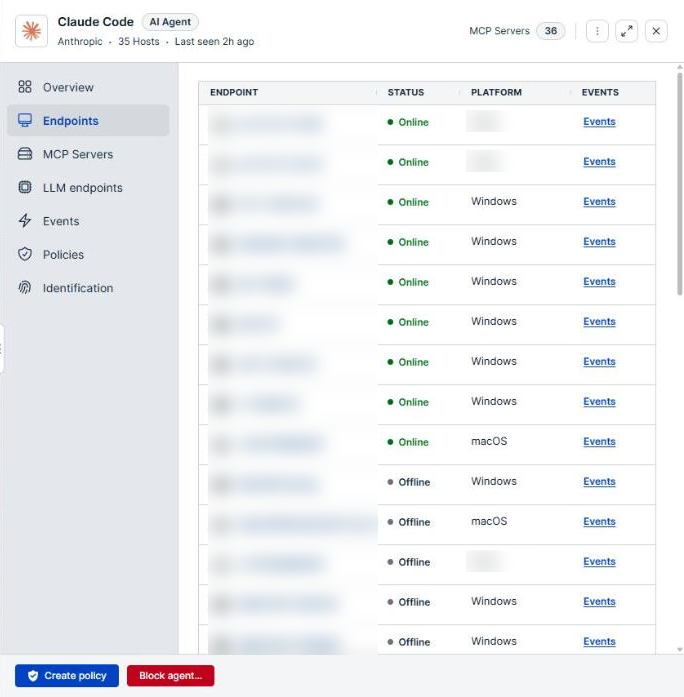
Column reference
| Column | Description |
|---|---|
| Endpoint | The endpoint name, with an icon for its operating system. Select the row to open the endpoint's details. |
| Status | A dot that shows whether the endpoint is online. |
| Platform | The operating system the endpoint runs. |
| Events | A link that opens the Events page filtered to that endpoint. |
Selecting Events shows everything the endpoint recorded, not only the agent's activity. Use it to see what else ran on the machine around the time the agent was active.
Hosts that are not enrolled
The tab lists only endpoints enrolled in your tenant. When the agent was also seen on hosts with no enrolled endpoint record, those hosts are listed by name below the table with a NOT ENROLLED tag. A host appears this way when the agent was observed indirectly, such as through the proxy, or when its hostname does not match an enrolled endpoint.
A host that is not enrolled has no details to open, and a policy cannot reach it until the AI Agent Security agent is installed and enrolled there.
When the agent was not seen on any endpoint, the tab reads Not seen running on any endpoint.
Verify the results
Confirm that the endpoints listed match the machines you expect the agent to run on, and that the ones you plan to govern show as online.
Next steps
- Select an endpoint to review its policies, events, and health. See Endpoints details.
- Install the AI Agent Security agent on any NOT ENROLLED host that belongs to your fleet.
Updated about 2 hours ago
