
AI Agents – Overview | AI Agent Security
The AI Agents list tells you an agent exists. The details panel tells you how far it reaches: the endpoints it runs on, the MCP servers and LLM endpoints it talks to, what it did, and which policies govern it. It is also where you start a policy for the agent or block it.
Scope of this guide
This guide explains the agent details panel: the action buttons, the panel tabs, and the Overview tab. It does not cover writing the policy itself. The Endpoints, MCP Servers, Events, and Policies tabs each have their own guide.
Prerequisites
- You have administrator access to the tenant.
- At least one agent appears on the AI Agents page.
Open the details panel
- Go to Visibility > AI Agents.
- Select the row of the agent you want to review.
The details panel opens beside the list with the agent name and icon at the top. Select the expand button to widen it, and the X in the top right corner to close it. When you open a related item from the panel, such as an endpoint, it opens in the same panel; select the back arrow to return to the agent.
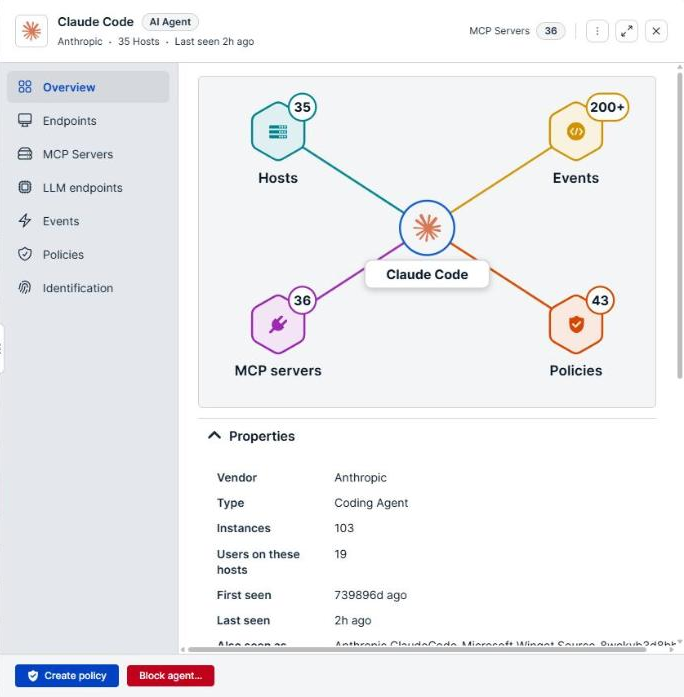
Actions
The buttons sit at the bottom of the panel.
| Button | Description |
|---|---|
| Create policy | Opens the policy builder, scoped to this agent. |
| Block agent… | Opens Create blocking policy?, which shows the rule that would block the agent. Select Block agent to create the policy. |
Block agent… creates a blocking policy, and the confirmation that follows tells you to apply it to the endpoints that need it from the Endpoints page. Until you do, the policy blocks nothing. If a blocking policy for the agent already exists, the dialog names it and asks whether to create another.
Block agent… is unavailable when no executable path has been observed for the agent. Hover over the button to read the reason: Block needs an executable path. None has been observed for this agent yet.
Tabs
The tabs down the left side of the panel group the agent's information. Overview is selected when the panel opens.
| Tab | Description |
|---|---|
| Overview | The summary diagram, the agent's properties, and a preview of the endpoints it runs on. |
| Endpoints | The endpoints where the agent runs. See AI Agents - Endpoints. |
| MCP Servers | The MCP servers the agent is configured with, called, or runs alongside. See AI Agents - MCP servers. |
| LLM endpoints | The LLM destinations the agent's coding sessions connected to in the last 7 days, with the Endpoint, Provider, Process, and Last seen for each. |
| Events | The activity recorded for the agent and for the processes it launched. See AI Agents - Events. |
| Policies | The policies in effect on the endpoints where the agent runs. See AI Agents - Policies. |
| Identification | How AI Agent Security recognized the agent: the signals that matched on each endpoint, such as process name, install path, code signature, launched-by lineage, and observed LLM connections. Select a signal to open the event behind it. |
Summary diagram
At the top of the Overview tab, a diagram shows the agent at the center with four counts around it. Select a count to open the matching tab.
| Card | Description |
|---|---|
| Hosts | The number of hosts where the agent was seen, including hosts that are not enrolled. Opens the Endpoints tab. |
| Events | The number of events recorded for the agent. A plus sign, such as 200+, means more events exist than were loaded. Opens the Events tab. |
| MCP servers | The number of MCP servers the agent uses. Opens the MCP Servers tab. |
| Policies | The number of policies in effect on the agent's endpoints. A 0 means no policy governs the agent yet. Opens the Policies tab. |
A dash (—) in place of a count means the count is still loading or could not be loaded.
Properties
Select the caret beside Properties to collapse or expand the section.
| Field | Description |
|---|---|
| Vendor | The company that makes the agent. |
| Type | The category of agent, such as Coding Agent. |
| Instances | The number of separate instances of the agent identified. |
| Users on these hosts | The number of users on the hosts where the agent was seen. |
| First seen | When the agent was first recorded. |
| Last seen | When activity was last recorded from the agent. |
| Also seen as | Other names the same product reported, such as the names of different builds. Appears only when the agent reported more than one name. |
| Installed at | The install paths where the agent was found, with the number of hosts for each. Select a path to open the events that mention it. Appears only when an install path is known. |
Installed at and Also seen as show the first few entries. Select the link that follows them, such as and 4 more, to show the rest, and Show fewer to collapse them again.
A dash (—) means no value is available.
Runs on endpoints
The section below Properties previews the endpoints the agent runs on, with the count in its heading, such as Runs on 3 endpoints. Select View all to open the Endpoints tab.
The heading counts only enrolled endpoints. When the agent was also seen on hosts that are not enrolled, the heading says so, such as Runs on 3 endpoints · 2 not enrolled, and those hosts are listed by name with a NOT ENROLLED tag. A host is not enrolled when the agent was observed indirectly, such as through the proxy, or when its hostname does not match an enrolled endpoint. These hosts have no endpoint record to open.
Verify the results
Confirm that the Hosts count matches the number of machines you expect the agent to run on, and that Last seen is recent enough to reflect current use. If the Policies count is 0, no policy governs the agent yet.
Next steps
- Select Create policy to govern the agent's activity.
- Open the Events tab to review what the agent and the processes it launched did.
- Check any NOT ENROLLED host and install the AI Agent Security agent on it if it belongs to your fleet.
Updated about 2 hours ago
