
Agent Skills details | AI Agent Security
The Agent Skills list tells you a skill is risky. The details panel tells you why. It shows what the skill claims to do, what tools it declared, where it came from, whether anyone uses it, and the exact evidence behind each finding, so you can decide whether the risk is real before you remove a skill your team depends on.
Scope of this guide
This guide explains the agent skill details panel: the header, the Identity fields, and the Findings cards. It does not cover removing a skill from an endpoint or changing a skill's contents.
Prerequisites
- You have administrator access to the tenant.
- At least one flagged skill appears on the Agent Skills page.
Open the details panel
- Go to Visibility > Agent Skills.
- Select the Skills tab.
- Select the row of the skill you want to review.
You can also select a skill name in a card on the Overview tab. The page switches to the Skills tab and opens the panel.
The details panel opens over the list. To close it, select the X in the top right corner.
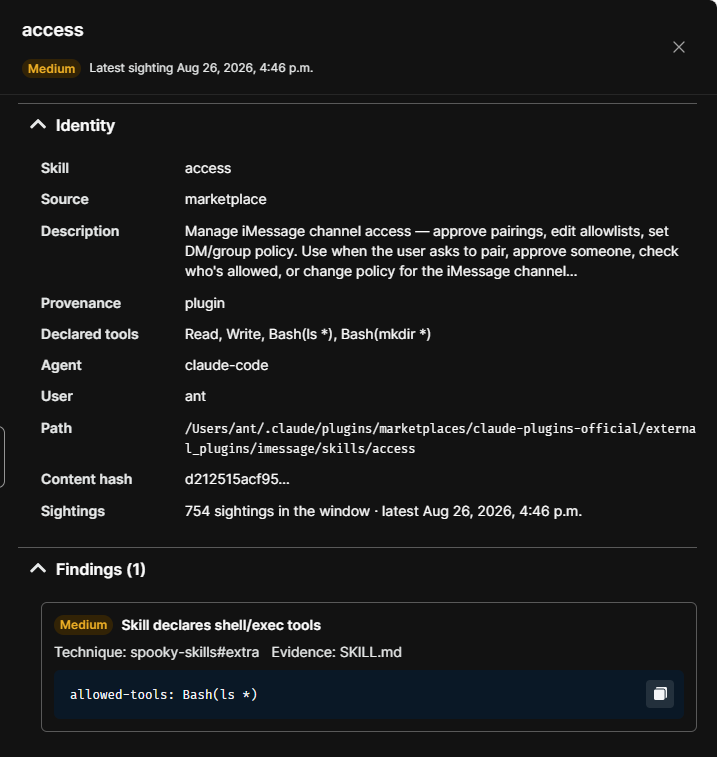
Panel header
The header shows the skill name, its severity badge, and when the agent last reported it, such as Last reported Oct 6, 2026, 4:46 p.m.
The severity in the header is the worst finding on the skill, matching the Risk column in the list.
Identity
The Identity section describes the skill and where it lives. Select the caret beside the heading to collapse or expand the section. Rows with no value for this skill are left out.
| Field | Description |
|---|---|
| Skill | The name of the skill. |
| Source | Where the skill came from, such as marketplace. |
| Description | The skill's own description of what it does and when an agent should use it. |
| Provenance | How the skill was delivered, such as plugin for a skill that arrived as part of a plugin. |
| Declared tools | The tools the skill declares it needs, such as Read, Write, and Bash(ls *). Bash entries show the command pattern the skill is allowed to run. |
| Agent | The AI agent that uses the skill, such as claude-code. |
| User | The user account on the endpoint that the skill is installed under. |
| Path | The full path to the skill directory on the endpoint. |
| Content hash | A fingerprint of the skill's contents, shortened for display. A change to this value means the skill's files changed. |
| Repo | For a skill from a git repository, the repository it came from. |
| Repo path | For a skill from a git repository, the path to the skill within it. |
| Commit | For a skill from a git repository, the commit the observed version corresponds to. |
| Files | The number of files in the skill and their total size. |
| Invocations (explicit) | The number of times Claude Code invoked the skill explicitly. Shown only when usage data is available. |
| Last used | When Claude Code last invoked the skill explicitly. Shown only when usage data is available. |
| Last reported | When the agent last reported the skill. An unchanged skill is reported again at least every 20 hours. |
Read Description and Declared tools together. A description that only mentions reading configuration, next to declared tools that include Write and Bash, means the skill can do more than it says.
Invocations (explicit) counts only uses that Claude Code records in its local usage file, matched by skill name. A skill that Claude Code triggered on its own is not counted, so a low count does not prove a skill is unused.
Findings
The Findings section lists what the scan flagged, with a count beside the heading. Select the caret beside the heading to collapse or expand the section.
Each finding appears as a card containing:
| Element | Description |
|---|---|
| Severity badge | The severity of that finding. A skill can hold findings at different severities. |
| Title | What was found, such as Skill declares shell/exec tools. |
| Technique | The detection technique that produced the finding, such as spooky-skills#extra. |
| Evidence | The file the finding came from, with the line number when known, such as SKILL.md:4. |
| Evidence snippet | The lines from that file around the match, such as allowed-tools: Bash(ls *). Select the copy button at the right of the snippet to copy the text. |
The snippet is the finding. Everything above it is a label; the snippet is what you check against the skill's stated purpose to decide whether to act.
Verify the results
Confirm that the Path and User identify the installation you meant to review. The same skill can be installed on several endpoints, and each installation is a separate row in the list.
Next steps
- Compare Declared tools against the skill's Description and confirm the skill needs every tool it declared.
- Copy the evidence snippet into your ticket or review notes so the finding travels with the decision.
- Note the Content hash before you approve a skill. If it changes later, the skill was modified after your review.
Updated about 2 hours ago
