
Secrets Safe: Overview | BI On-prem
What is Secrets Safe?
Secrets Safe is a secure solution for storing and managing secrets in a controlled, auditable environment. Password Safe administrators can assign groups in BeyondInsight to safes. Each safe operates as an isolated space where users can securely manage secrets within that safe.
Key features include:
- Ownership and Access Control: Ownership of secrets can be managed by anyone who is a current owner of the secret or has the Manage Safe permission. Assignment of permissions is safe-wide and can not be done on individual secrets.
- Permissions: Safes provide granular control over permissions, allowing users or groups to be assigned specific permissions that define how they can interact with secrets they do not own.
- Read-only access: Users can view, retrieve, and organize secrets into folders but cannot modify them.
- Ease of Access: Secrets can be quickly found and accessed using search and filtering tools.
How is Secrets Safe useful?
Secrets Safe minimizes the risk of unauthorized access to secrets. Each safe ensures that secrets are stored securely and accessed only by authorized users. Secrets Safe supports three different types of secrets: credential, file, and text.
How do I access Secrets Safe?
- Open a browser and enter the URL for your Password Safe instance: https://<hostname>/WebConsole/index.html.
- Enter your username and password.
- From the left menu, click
 .
.
The Secrets Safe page opens and displays.
The Secrets Safe page
Use the Secrets Safe page to view at-a-glance data about your secrets.
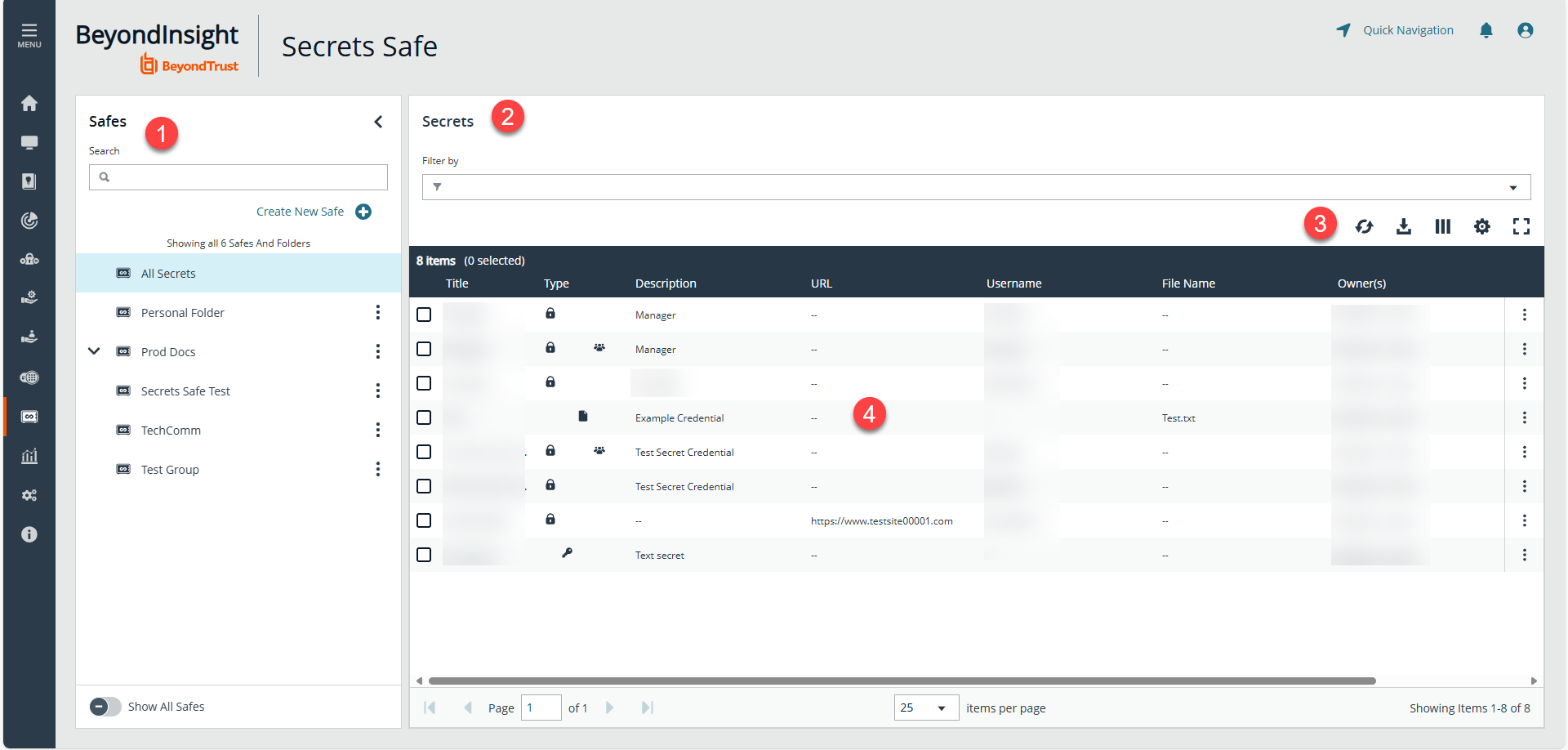
- Safes: View and create safes.
- Secrets: View and create secrets in the selected safe. Use filters to narrow the grid display.
- Secrets grid options: Click the icon to refresh the secrets grid, to download the displayed secrets to a .csv file, to select which columns to display, to reset the list to the default settings and to condense or expand the height of the rows in the list, and to hide the filters and expand the list.
- Secrets grid: View information about secrets.
Important informationUpon upgrade to BeyondInsight/Password Safe 24.3:
- Ownership: Secrets can now be owned by both users and groups simultaneously. Ownership takes precedence over safe-level permissions, provided the user has read access to the safe.
- Safes: Root folders are now called safes. They are no longer created or removed by assigning the "Secrets Safe" feature permission.
- Admin Access: BeyondInsight Administrators no longer have default access to all safes. They must be explicitly assigned permissions to safes and can only see safes they are part of via the team folder group.
- Any existing API script that rely on administrators having full access to safes will fail unless they are assigned access to the safes.
- Show All Safes: A new toggle allows administrators to view all safes.
- Permissions Management: Only BeyondInsight Administrators can manage migrated safe permissions by default. Users and groups can manage safes once granted "Manage Safe" permissions.
- Read Access: Users can only view safes and their contents if they have read access.
- Team Folder Group: On upgrade, the group that created a team folder is automatically granted "Create" and "Read" permissions to the new safe. This does not apply to safes created post-upgrade.
For configuration of Secrets Safe, see Secrets Safe: Configure.
Updated 6 months ago
