
OpenAI Projects | Insights
Learn how to create an OpenAI Projects connector in BeyondTrust Identity Security Insights.
Prerequisites
Before you configure the OpenAI Projects connector, ensure the following requirements are met.
OpenAI access
- You must be an Organization Owner in the OpenAI API Platform.
- At least one project exists in your organization that you want to collect data from.
Identity Security Insights access
- Administrator access to Identity Security Insights.
Step 1: Get a Project ID
- Sign in to the https://platform.openai.com.
- Click the gear icon in the top right corner to open the Settings page.
- Navigate to Projects.
- Record the Project ID.
Step 2: Create OpenAI Projects API key
- Sign in to the https://platform.openai.com.
- Go to Settings > Projects.
- Select the project you want to collect data from.
- Navigate to API Keys under Project.
- Click Create new secret key.
- Configure:
- Name:
BeyondTrust-OpenAiProjects-Connector - Project: The project you want to collect data from
- Permissions: Read only
- Name:
- Click Create secret key.
ImportantCopy and securely store the key; the key is only displayed once.
Final step: Create the connector in Insights
- From Insights Home, select
 > Connectors.
The Connectors page displays. - Click Total configured.
- Click Create Connector > OpenAI Projects.
The Create OpenAI Project Connector panel displays.
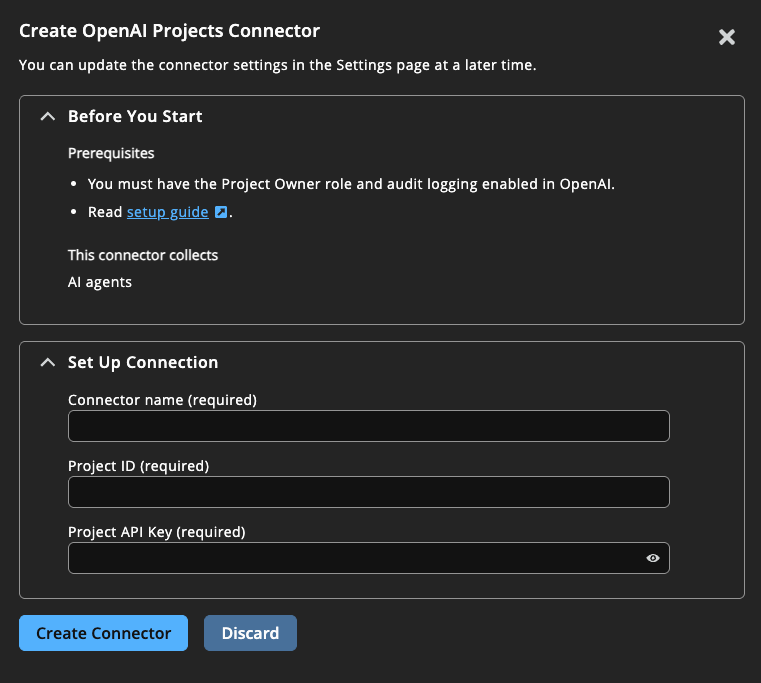
- Provide the following information:
- Name: A human-readable name for your OpenAI connector (typically the OpenAI project name).
- Project Id: Your OpenAI Project ID recorded above (e.g.,
proj-XXX). - API Key: Paste the API Key recorded above.
- Click Create Connector.
Navigate to > Connectors > Total Configured to confirm the connector was successfully created and review connector settings.
Updated about 1 month ago
