
ChatGPT | Insights
Prerequisites
ChatGPT access
- You are an Organization Administrator for your ChatGPT Enterprise workspace.
- You have access to the OpenAI API Platform (platform.openai.com) for the organization associated with your ChatGPT Enterprise subscription.
Compliance API access
- Compliance API access is enabled for your OpenAI API key. If not, you must request it from OpenAI Support before proceeding. See Request Compliance API access from OpenAI Support.
Identity Security Insights access
- Administrator access to Identity Security Insights.
Step 1: Generate an OpenAI API Key
- Sign in to the OpenAI API Platform at https://platform.openai.com.
- Ensure the correct ChatGPT Enterprise organization is selected.
- Navigate to Settings > API Keys (https://platform.openai.com/settings/organization/api-keys )
- Click Create new secret key.
- In the Create new secret key window, configure the following:
- Name: BeyondTrust-ChatGPT-Connector
- Project: Default project
- Permissions: All
- Click Create secret key.
ImportantCopy and securely store the key; the key is only displayed once.
Step 2: Request Compliance API access from OpenAI Support
New API keys do not include Compliance API permissions by default.
- Contact OpenAI Support by sending an email to [email protected], providing the following information:
- Key name
- Created By
- Last 4 digits of the API key
- Scope requested:
- read
- Use this sample request message:
"Please enable Compliance API Access for this API key."
After Support confirms that Compliance API access is enabled with read-only permissions, the key is ready for connector setup in Insights.
Step 3: Retrieve the Workspace ID
- Sign in to ChatGPT (https://chatgpt.com) as an Org Admin.
- Navigate to Manage Workspace > Workspace Settings.
- Copy the Workspace ID.
Final step: Create the connector in Insights
- From Insights Home, select
 > Connectors.
The Connectors page displays. - Click Total configured.
- Select Create Connector > ChatGPT Enterprise.
The Create ChatGPT Enterprise Connector panel displays.
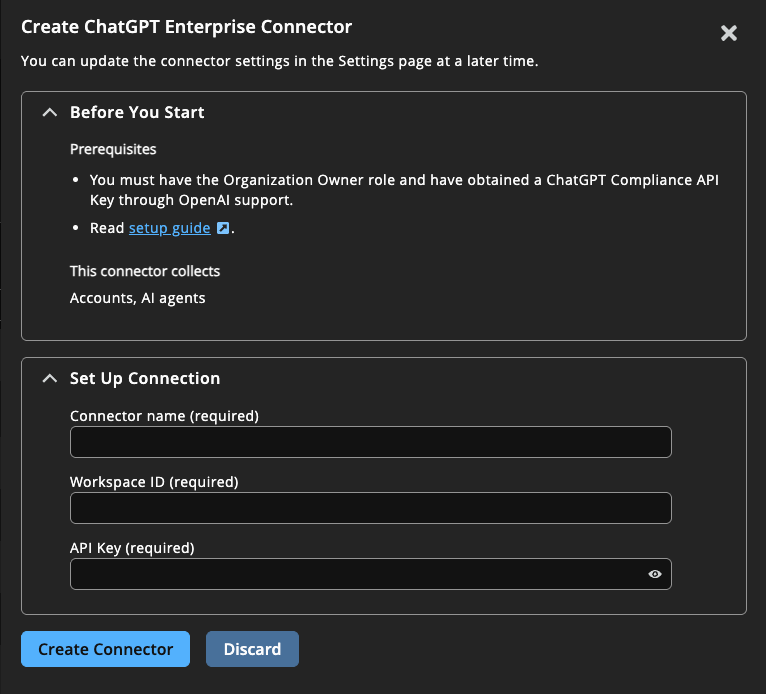
- Provide the following information to connect to ChatGPT:
- Name: A human-readable name for your ChatGPT connector.
- Workspace ID: Your Workspace ID recorded above.
- API Key: Paste the API key recorded above.
- Click Create Connector.
Navigate to > Connectors > Total Configured to confirm the connector was successfully created and review connector settings.
Updated about 1 month ago
