
Claude AI Enterprise | Insights
Learn how to create an Claude AI Enterprise connector in BeyondTrust Identity Security Insights.
Prerequisites
Before you configure the Claude AI connector, ensure the following requirements are met.
Claude AI Enterprise access
- You have the Primary Owner role for your Claude Enterprise organization.
- Compliance API access is enabled for your organization. (Contact Anthropic if it is not available in your settings.)
Identity Security Insights access
- Administrator access to Identity Security Insights.
Step 1: Create a compliance API key
- Log in to claude.ai as a Primary Owner.
- In the lower-left corner, select your profile, then click Organization Settings.
- In the left sidebar, click Data and privacy.
- Scroll to the bottom of the page to the Compliance API section.
- Verify that Compliance API access is enabled.
- Click Create key to generate a new compliance API key.
- When prompted to select scopes, select the read permissions:
read:compliance_activitiesread:compliance_org_dataread:compliance_user_data
ImportantCopy and securely store the key; the key is only displayed once.
Step 2: Retrieve the Organization ID
- From the same Organization Settings page, click Organization and access in the left sidebar.
- Scroll to the bottom of the page.
- Copy the Organization ID value.
Final step: Create the connector in Insights
- From Insights Home, select
 > Connectors.
The Connectors page displays. - Click Total configured.
- Select Create Connector > Claude AI Enterprise.
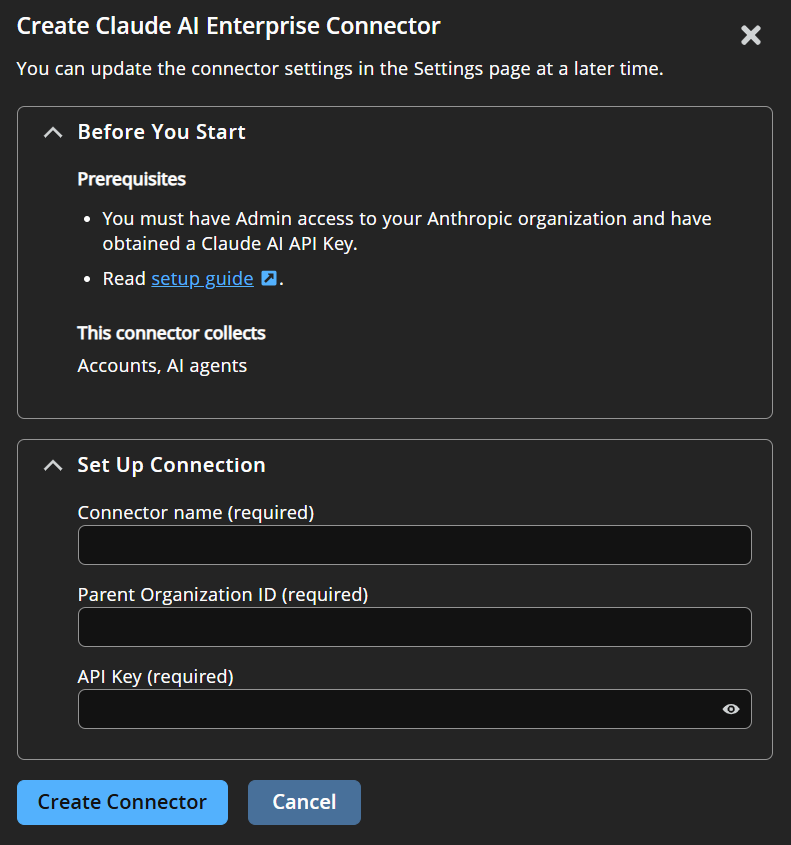
- Provide the information to connect to Claude AI Enterprise:
- Connector Name: A human-readable name for your connector
- Parent Organization ID: The Organization ID copied above.
- API Key: The Compliance API key created above.
- Click Create Connector.
Navigate to  > Connectors > Total Configured to confirm the connector was successfully created and review connector settings.
Updated about 2 months ago
