
OpenAI Admin | Insights
Learn how to create an OpenAI Admin connector in BeyondTrust Identity Security Insights.
Prerequisites
Before you configure the OpenAI Admin connector, ensure the following requirements are met.
OpenAI access
- You must be an Organization Owner in the OpenAI API Platform.
- Audit logging is activated for your organization. If not yet activated, see Step 1: Activate Audit Logging.
Identity Security Insights access
- Administrator access to Identity Security Insights.
ImportantThird-party documentation is subject to change. Updates might not be reflected in BeyondTrust documentation. For the most up-to-date information, visit Admin and Audit Logs API for the API Platform.
Step 1: Activate audit logging
Skip this step if audit logging is already activated for your organization.
After you activate audit logging for your API Platform organization, it cannot be deactivated.
- In OpenAI Admin, on the left-hand panel, navigate to Organization settings > Data controls > Data retention.
- Under Audit Logging, toggle Enable.
- Click Save.
Step 2: Get Organization ID
- Sign in to the OpenAI API Platform at https://platform.openai.com.
- On the top right corner, click on the gear icon for Settings page.
- On the Organization Settings page, record the Organization ID.
Step 3: Create Admin API key
- Sign in to the OpenAI API Platform at https://platform.openai.com.
- On the left panel, select Admin Keys.
- Click Create new admin key.
- In the Create new admin key page, configure the following:
- Name: BeyondTrust-OpenAiAdmin-Connector
- Permissions: Read only
- Click Create admin key.
ImportantCopy and securely store the key; the key is only displayed once.
Final step: Create the connector in Insights
-
From Insights Home, select
 > Connectors.
The Connectors page displays. -
Click Total Configured.
-
Select Create Connector > OpenAI Admin.
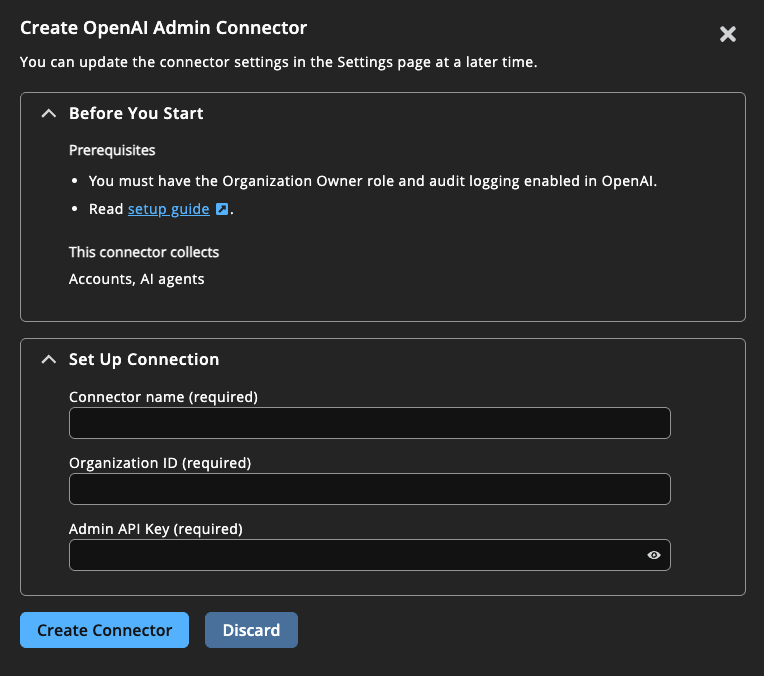
-
Provide the following information to connect to OpenAI Admin:
- Name: A human-readable name for your connector, typically the OpenAI Admin organization name.
- Organization ID: Your OpenAI Organization ID recorded earlier (for example, org-XXX).
- API Key: Enter the API Key recorded earlier.
-
Click Create Connector.
Navigate to > Connectors > Total Configured to confirm the connector was successfully created and review connector settings.
Updated about 2 months ago
