
EPM-UL certificates | EPM-UL
BeyondInsight for Unix & Linux (BIUL) 26.2.0 introduces centralized EPM-UL certificate management and revocation. You can now inspect, monitor, and revoke X.509 certificates issued across your Endpoint Privilege Management for Unix & Linux (EPM-UL) on-premises estate directly in the BIUL console.
When a certificate is revoked, BIUL updates the internal Certificate Authority database and generates a Certificate Revocation List (CRL). This revocation data is automatically distributed across all EPM-UL servers and endpoints, ensuring that any connection attempt presenting a revoked certificate is immediately terminated.
Certificate revocation is available for on-premises deployments of BIUL and PMUL. It is not available on SaaS instances.
Prerequisites
- All EPM-UL policy servers, submit hosts, and client endpoints must be running version 26.2.0 or later to fetch and enforce CRL checks. Hosts running earlier versions will not enforce revocation.
- Access to the PMUL Certificates page requires the Sysadmin role in BIUL. Navigation is hidden for non-sysadmin users and SaaS deployments.
View certificates
EPM-UL issues internal certificates through its own certificate authority (CA). BIUL lists those certificates on the PMUL Certificates page, where you can review certificate metadata and revoke a certificate that is no longer trusted.
View the certificate list
-
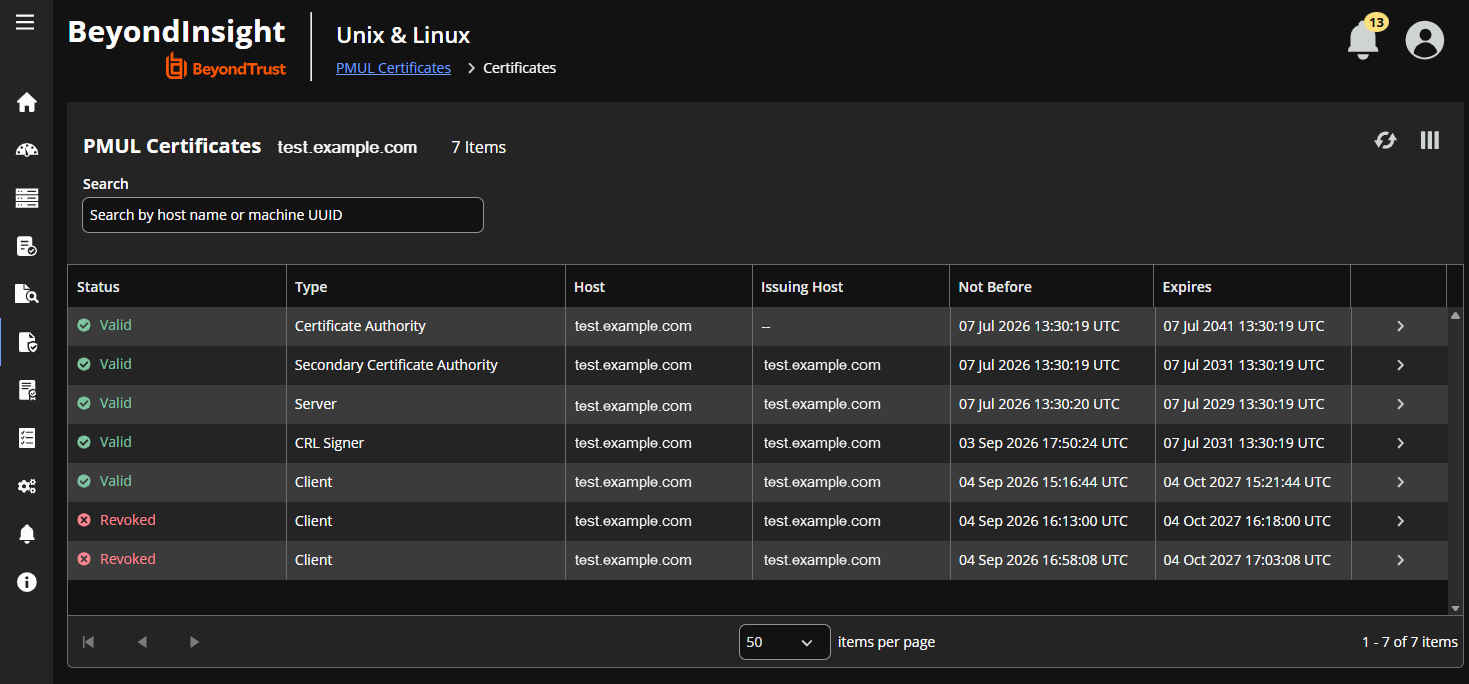
In the BIUL console, go to Configuration > PMUL Certificates.
-
Select the host whose certificates you want to view:
- If your environment contains multiple EPM-UL hosts with certificate management capabilities, select the host from the Host picker.
- If only one host is present, the page opens that host's certificates directly.
-
Review the certificate page. The page lists all internal certificates issued by the EPM-UL CA for the selected host.
-
Use the pagination controls to page through certificate records.
-
Filter and sort by Certificate Type, Status, or Host Name.
Certificate types
| Type | Description |
|---|---|
| Root CA | The top-level authority certificate |
| Subordinate CA | The intermediate signing CA for the host, identified in configuration as secondary_ca |
| Server | Used by PMUL policy, log, or REST services |
| Client | Issued to endpoint clients such as pbrun and pbsh, and to submit and run hosts |
| CRL Signer | A delegated credential used to sign indirect certificate revocation lists (CRLs) |
Revoke a certificate
Revoke an active certificate when you decommission a server, replace an endpoint, or respond to a security incident.
-
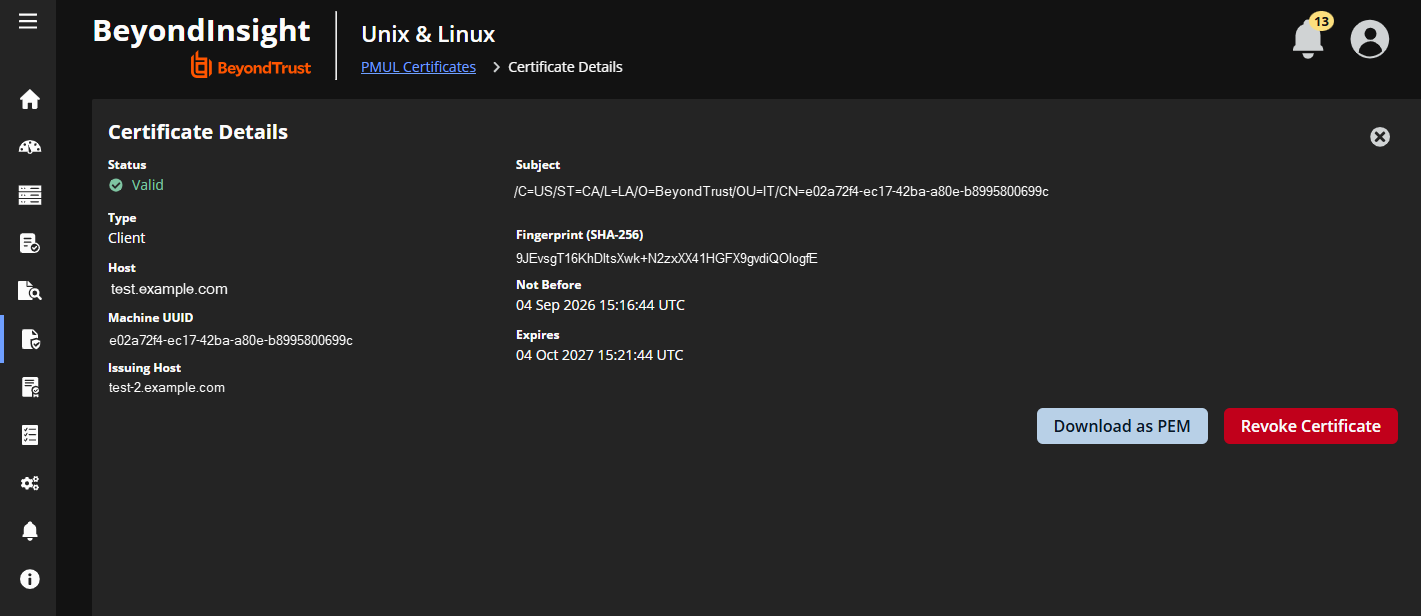
From the PMUL Certificates list, click the certificate row to open the Certificate Detail view.
-
Review the certificate metadata and X.509 attributes.
-
Click Revoke Certificate.
-
Select a Revocation Reason. BIUL uses the reasons defined in RFC 5280 and selects Key Compromise by default.
Reason Code Use when Key Compromise 1 The private key is suspected or confirmed to be compromised CA Compromise 2 A subordinate CA key has been compromised. This invalidates all certificates issued under that CA Affiliation Changed 3 The host or owner details have changed Superseded 4 The certificate has been reissued or replaced Cessation of Operation 5 The host or service is permanently decommissioned Certificate Hold 6 You want to temporarily suspend the certificate without revoking it permanently -
Confirm the action.
BIUL revokes and regenerates the host's CRL, and distributes it to all peer servers and endpoints.
Updated 23 days ago
