
Site configuration | RS Pathfinder
What is site configuration?
Site configuration allows administrators to manage settings for a BeyondTrust deployment, including the setup of public sites, access controls, and session management. It is crucial for tailoring the deployment to fit organizational needs.
How is site configuration useful?
Site configuration enables organizations to customize the BeyondTrust environment to meet specific requirements. It ensures that the right policies are applied to different sites and optimizes access management, user experience, and security settings across the system.
How do I access the Site Configuration page?
- Sign into app.beyondtrust.io.
The BeyondTrust Home page displays. - From the left menu, click Remote Support > Management.
The Management page opens and the Software tab displays by default. - At the top of the page, click Site Configuration.
The Site Configuration page displays.
The Site Configuration page
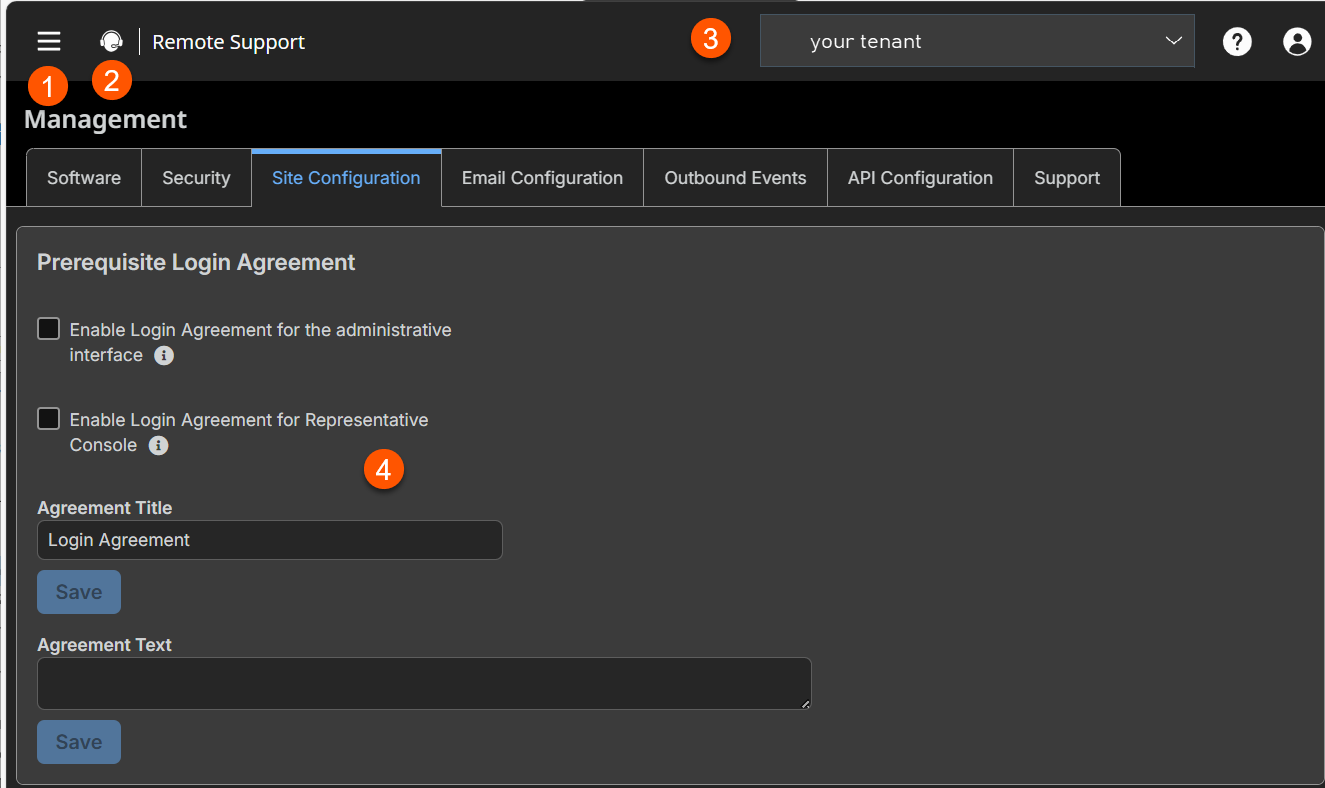
- Prerequisite Login Agreement: Customize the login agreement.
How to configure the site
Prerequisite login agreement
Administrators may restrict access to the login screen by enabling a prerequisite login agreement that must be confirmed before the login screen is displayed.
Enable login agreement
You can enable a login agreement that users must accept before accessing the /login administrative interface or the representative console. The configurable agreement allows you to specify restrictions and internal policy rules before users are allowed to log in.
Agreement title
Customize the title of the agreement. You can localize this text for any languages you have enabled.
Agreement text
Provide the text for the login agreement. You can localize this text for any languages you have enabled.
