Group policies | RS On-prem
What are group policies?
Group policies define permissions and settings for groups of users, enabling administrators to standardize and streamline access control.
How are group policies useful?
Group policies help ensure consistency in user permissions, simplify administrative tasks, and support secure and efficient management of user groups.
How do I access the Group Policies page?
- Use a Chromium-based browser to sign in to your Remote Support URL.
This URL is provided in the BeyondTrust welcome email and includes your site URL followed by /login. - From the left menu, click Users & Security.
The Users page opens and displays by default. - At the top of the page, click Group Policies.
The Group Policies page displays.
Add a policy
- Click Add.
The Add New Policy page displays. - For Policy Name, enter a unique name for the policy.
- For the Available Members, select a member to assign and click Add to move them to the Policy Members list.
You can use the Search box to find existing members. You can select users from your local system or select users or entire groups from configured security providers. If an attempt to add a user from a configured security provider is invalid, the synchronization log error message appears here as well as in the log. - Select the various group policy settings. See Group Policy settings.
- Click Save.
Copy a policy
To expedite the creation of similar policies, you can copy a policy with identical settings. You can then edit this new policy to meet your specific requirements.
- From the Group Policies page, find the group policy you want to duplicate, and click Copy
 .
. - The Add new policy page loads with the settings matching the original policy. Make any adjustments needed, then click Save.
Edit a policy
- From the Group Policies page, find the group policy you want to edit, and click Edit
 .
. - The Edit policy page loads. Make any adjustments needed, then click Save.
If you edit the group policy that is the default for the local provider, or has local administrator users, and remove administrator permissions, a warning message appears. Ensure other users have administrator permissions before proceeding.
Delete a policy
- From the Group policies page, find the group policy you want to remove, and click Delete
 .
. - When prompted, click Yes.
Change order
Click the Change Order button to drag and drop group policies to set their priority. Click Save Order for prioritization changes to take effect. When multiple policies apply to a given user, the permissions take effect by starting at the top of the Group Policies list, and then moving down the list. If a permission conflicts with a permission applied by a group policy higher in the list, then the lower permission will overwrite the higher, unless the higher was set as Final. By changing the order, you are changing the priority of the group policy. In short, group policies that appear lower in the list have a higher functional priority than those that are higher.
Search group policies
To quickly find an existing policy in the list of Group Policies, enter the name, or part of the name. The list filters to all policies with a name containing the entered search term. The list remains filtered until the search term is removed, even if the user goes to other pages or logs out. To remove the search term, click the X to the right of the search box.
Expand all / collapse all
To assist with searching and navigating the group policies, click the Expand All link above the grid to expand the details of all listed group policies. Click Collapse All to return to the unexpanded list of group policies.
Group Policy settings
Which settings should this group policy control?
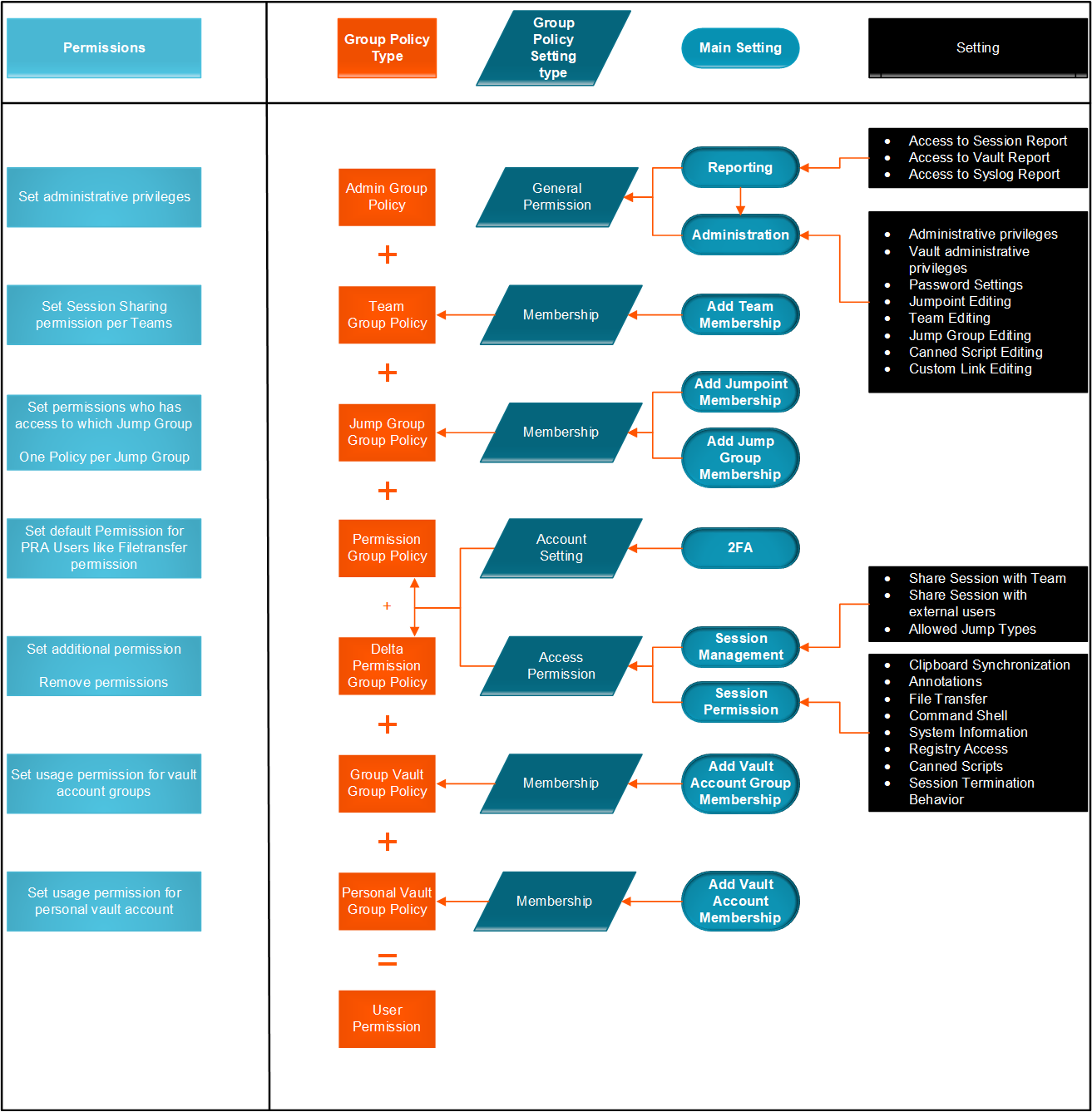
When you create a new group policy, you must select the settings and membership(s) that are either defined in the policy or left available for configuration for individual users. The list of settings is the following:
- Account Settings: Controls settings such as Two Factor Authentication, Account Expiration and Account enablement.
- General Permissions: Controls a variety of Administration and Reporting settings.
- Representative Permissions: Settings that allow access to remote endpoints.
- Attended and Unattended Sessions Permissions: Settings that control Session Policies.
- Availability Settings: Settings that determine a login schedule.
- Memberships: Settings that control the Add & Remove permissions for the following:
- Team membership
- Jumpoint membership
- Jump Group membership
- Vault Account and Account Group memberships
- Policy name: Enter a unique name that distinguishes this policy from others, usually based on the assigned permission level or the job function it supports.
- Available members: Users with access to your Privileged Remote Access site. Click Add > to move them to the Policy members list and apply this policy's settings to them. To remove access, select a member and click < Remove, or click << Remove All to clear the list.
Important informationIf a setting is Defined, it is controlled by this policy. You are not able to modify that privilege for an individual user from their user account page.
If it is not defined, it can be set individually.
If you have a policy that defines a permission and you do not want any policy to be able to override that permission, then you must set that permission as Final, and the policy must be a higher priority than other policies that additionally define that setting.
Account settings
- Two Factor Authentication
- Log in with an authenticator app: Two factor authentication (2FA) uses an authenticator app to provide a time-based, one-time code to login to the administrative interface, as well as the access console.
- If Required is selected, the user is prompted to enroll and begin using 2FA at the next login.
- If Optional is selected, the user has the option to use 2FA, but it is not required.
- Log in with an authenticator app: Two factor authentication (2FA) uses an authenticator app to provide a time-based, one-time code to login to the administrative interface, as well as the access console.
- Account Expiration:
- Account Never Expires: When checked, the account never expires. When not checked, an account expiration date must be set.
- Account expiration date: Causes the account to expire after a set date.
- Account Enablement
- Account disabled: Allows you to disable the account so the user cannot log in. Disabling does NOT delete the account.
- Comments: Add comments to help identify the purpose of this object.
General permissions
- Administration
- Administrative privileges
- Administrator: Grants the user full administrative rights.
- Vault Administrative Privileges
- Allowed to administer Vault: Enables the user access to the Vault.
- Password Setting
- Allowed to Set Passwords: Enables the user to set passwords and unlock accounts for non-administrative local users.
- Jumpoint editing
- Allowed to Edit Jumpoints: Enables the user to create or edit Jumpoints. This option does not affect the user's ability to access remote computers via Jumpoint, which is configured per Jumpoint or group policy.
- Public Site Editing
- Allowed to Edit Public Site: Enables the user to create and modify public site configurations, edit HTML templates, view the translation interface, etc.
- Customer Notice Editing
- Allowed to Edit Customer Notices: Enables the user to create and edit messages used to notify customers, as they are requesting support, of broadly impacting IT outages.
- File Store Editing
- Allowed to Edit File Store: Enables the user to add or remove files from the file store.
- Canned Message Editing
- Allowed to Edit Canned Messages: Enables the user to create or edit canned chat messages.
- Support Team Editing
- Allowed to Edit Support Teams: Enables the user to create or edit teams.
- Jump Group Editing
- Allowed to Edit Jump Groups: Enables the user to create or edit Jump Groups.
- Issue Editing
- Allowed to Edit Issues: Enables the user to create and edit issues.
- Skill Editing
- Allowed to Edit Skills: Enables the user to create and edit skills.
- Support Button Profile Editing
- Allowed to Edit Support Button Profiles: Enables the user to customize Support Button profiles.
- Canned Script Editing
- Allowed to Edit Canned Scripts: Enables the user to create or edit canned scripts for use in screen sharing or shell sessions.
- Custom Rep Link Editing
- Allowed to Edit Rep Custom Links: Enables the user to create or edit custom links.
- iOS Profile Editing
- Allowed to Edit iOS Profiles: Enables the user to create, edit and upload Apple iOS Profile content for distribution to iOS device users.
- Administrative privileges
- Reporting
- Session and Team Report Access
- Allowed to view support session reports Enables the user to run reports on support session activity, viewing only sessions in which they were the primary representative, only sessions in which one of their teams was the primary team or one of their teammates was the primary representative, or all sessions.
- Allowed to view support session recordings Enables the user to view video recordings of screen sharing sessions, show my screen sessions, and shell sessions.
- License Usage Report Access
- Allowed to view license usage reports Enables the user to run reports on Remote Support license usage.
- Vault Report Access
- Allowed to view Vault reports: Enables the user to run reports on Vault activity, viewing all event data or only their event data.
- Syslog Report Access
- Allowed to view syslog reports: Enables the user to download a ZIP file containing all syslog files available on the appliance. Admins automatically have permissions to access this report. Non-admin users must request access to view this report.
- Session and Team Report Access
Representative permissions
-
Allowed to provide remote support Enables the user to use the representative console in order to run support sessions. If support is enabled, options pertaining to remote support will also be available. Disable this setting for presentation-only users.
-
Session management
- Allowed to generate session keys for support sessions within the representative console Enables the user to generate session keys to allow customers to start sessions with them directly.
For more information, see Generate a session key.
- Allowed to generate access keys for sending iOS profiles Enables the user to generate access keys to offer iOS content to iOS device users.
For more information, see iOS profile access key.
- Allowed to manually accept sessions from a team queue Enables the user to select and start sessions that are in one of their team queues.
For more information, see Accept a session to start support .
- Allowed to transfer sessions to teams which they do not belong to Enables the user to transfer sessions to teams other than their own. If disabled, user interaction is restricted solely to the user's assigned teams.
- Allowed to share sessions with teams which they do not belong to Enables the user to invite a less limited set of user to share sessions, not only their team members. Combined with the extended availability permission, this permission expands session sharing capabilities.
For more information, see Session tools
- Allowed to invite external support representatives Enables the user to invite third-party users to participate in a support session, for the duration of that session only.
For more information, see Rep invite.
- Remove representative from session after inactivity: Sets the time interval to remove a representative from a session after inactivity. Values range from No Timeout to 24 hours.
- Allowed to use the get next session feature Enables the user to start supporting the oldest queued session from all of their teams simply by clicking a button.
For more information, see Accept a session to start support
- Allowed to enable extended availability mode Enables the user to receive email invitations from other users requesting to share a session even when they are not logged into the representative console.
For more information, see Extended availability.
- Allowed to edit the external key Enables the user to modify the external key from the session info pane of a session within the representative console.
For more information, see Session tools.-
- Allowed to generate session keys for support sessions within the representative console Enables the user to generate session keys to allow customers to start sessions with them directly.
-
Equilibrium
- Allowed to opt out of session assignments Enables the representative to mark himself or herself as unavailable for sessions to be assigned using Equilibrium.
- Do not assign sessions if the representative is participating in at least Sets the least number of sessions the representative must be supporting before sessions will no longer be automatically assigned using Equilibrium.
- Do not assign sessions if the representative has been idle for at least Sets the least amount of time the representative must have been idle before sessions will no longer be automatically assigned using Equilibrium.
For more information, see Equilibrium guide.
-
Rep to rep screen sharing
- Allowed to show screen to other representatives Enables the user to share their screen with another user without the receiving user having to join a session. This option is available even if the user is not in a session.
- Allowed to give control when showing screen to other representatives Enables the user sharing their screen to give keyboard and mouse control to the user viewing their screen.
For more information, see Rep-to-rep screen share.
-
Legacy Support Buttons
- Allowed to deploy and manage Support Buttons in personal queue Enables the user to deploy and manage personal Support Buttons. This setting affects deploying Support Buttons from both the web interface and the representative console. To deploy a Support Button from within a session, the Support Button Deployment session permission must also be allowed.
- Allowed to manage Team Support Buttons Enable the user to modify the Support Buttons deployed to teams they are a member of. If the user is a team lead or manager, they can modify the personal Support Buttons of any team members as well.
For more information, see Manage Support Buttons.
- Allowed to change the public portal associated with Support Buttons Enables the user to set the public portal through which a Support Button should connect. Because session policies may be applied to public portals, changing the portal may affect the permissions allowed in the session.
- Allowed to deploy team Support Buttons Enables the user to deploy team Support Buttons for teams they are a member of. This setting affects deploying Support Buttons from both the web interface and the representative console. To deploy a Support Button from within a session, the Support Buttons Deployment session permission must also be allowed.
For more information, see Session tools.
-
Jump Technology
- Allowed Jump methods:
- Jump Clients
- Local Jump (Windows only)
- Local VNC
- Local RDP
- Remote Jump
- Remote VNC
- Remote RDP
- Shell Jump
- Intel vPro
- Jump Item Roles A Jump Item Role is a predefined set of permissions regarding Jump Item management and usage. For each option, click the Edit button to open the Jump Item Role in a new tab.
- The Default role is used only when Use User's Default is set for that user in a Jump Group.
- The Personal role applies only to Jump Items pinned to the user's personal list of Jump Items.
- The Teams role applies to Jump Items pinned to the personal list of Jump Items of a team member of a lower role. For example, a team manager can view team leads' and team members' personal Jump Items, and a team lead can view team members' personal Jump Items.
- The System role applies to all other Jump Items in the system. For most users, this should be set to No Access. If set to any other option, the user is added to Jump Groups to which they would not normally be assigned, and in the representative console, they can see non-team members' personal lists of Jump Items.
- The Endpoint automation role sets how a user can use endpoint automation.
- Not allowed prevents them from seeing the Jump > Endpoint Automation tab altogether.
- A User can create new automation jobs with these restrictions:
- They are able to choose any existing Script Template but cannot edit the Script Template, Script Command, nor select or change the template accompanying Resources.
- The Script Template, Script Command, Operating System, and Resources fields are unavailable.
- They can run scripts only on Jump Items where their Jump Item Role includes the Start Sessions permission (set on the Jump > Jump Items Role page).
- An Administrator has full access and ability to create Jobs, Scripts Templates, and Resources.
For more information, see Jump Item Roles and Endpoint Automation.
- Allowed Jump methods:
-
Representative console
- Idle timeout Set how long the representative can be idle before being logged out of the representative console. This permission can use the site-wide setting or can override that setting.
Attended and unattended session permissions
- Attended and unattended session policies
- Session policy: Set the prompting and permission rules that should apply to this user's sessions. Choose an existing session policy or define custom permissions for this user.
- Description: View the description of a pre-defined session permission policy.
- Use the same permissions for unattended sessions To use the same permissions for both attended and unattended sessions, check Use the same permissions for Unattended sessions. Uncheck this box to define attended and unattended permissions separately. You can also copy the permissions from one to the other.
- Allow elevated access to tools and special actions on the endpoint: Check if desired, and if allowed by the Endpoint's platform.
- Support tool prompting
- Prompting rules: Choose to ask the customer permission to use any of the support features below. Select No Prompting to never prompt, Always Prompt to always prompt, or Prompt for Some Tools to choose which permissions to prompt for. If Prompt for Some Tools is chosen, a Prompt Customer option will appear beside each tool with the options to Never prompt or to Always prompt.
- Allowed to prompt once If Screen Sharing is set to View and Control and prompting is enabled, this option appears. Check the box to make the screen sharing prompt request access to all tools during the session, with no further prompts.
- Prompting options: Set how long to wait for a response to a prompt before defaulting to the answer of Deny or Allow.
For more information, see Desktop customer client user guide.
- Prompting rules: Choose to ask the customer permission to use any of the support features below. Select No Prompting to never prompt, Always Prompt to always prompt, or Prompt for Some Tools to choose which permissions to prompt for. If Prompt for Some Tools is chosen, a Prompt Customer option will appear beside each tool with the options to Never prompt or to Always prompt.
- Screen sharing
- Screen sharing rules: Enable the user to view or control the remote screen.
For more information, see Screen share.
- Allowed to show their screen to the customer: This option is available if View Only or View or Control is selected. Enables the user to share their screen with the customer during a support session.
For more information, see Show my screen.
- Clipboard synchronization direction: This is option is available if View and Control is selected. Select how clipboard content flows between representatives and end users. The options are:
- Not allowed: The representative is not allowed to use the clipboard, no clipboard icons display in the representative console, and cut and paste commands do not work.
- Allowed from Rep to Customer: The representative can push clipboard content to the customer but cannot paste from the end user's clipboard. Only the Send clipboard icon displays in the representative console.
- Allowed in Both Directions: Clipboard content can flow both ways. Both Push and Get clipboard icons display in the representative console.
For more information about the Clipboard Synchronization Mode, see Representative console.
- Allowed customer restrictions: This is option is available if View and Control is selected. Set if the user can suspend the remote system's mouse and keyboard input. The user may also prevent the remote desktop from being displayed.
- None does not set any restrictions on the remote system.
- Display, Mouse and Keyboard disables these inputs.
If this is selected, a check box is available to Automatically request a privacy screen on session start. Privacy screen is applicable only for sessions started from a Jump Client, a Remote Jump Item, or a Local Jump Item. We recommend using privacy screen for unattended sessions. The remote system must support privacy screen.For more information, see Restricted customer interaction.
- Application sharing prompt behavior: Set if a request for screen sharing should always or never prompt the customer to select applications to share, or if the user can choose whether to prompt for application sharing or not. Selecting Always or Rep Decides also allows you to predefine application sharing restrictions.
For more information, see Application sharing.
- Screen sharing rules: Enable the user to view or control the remote screen.
- Annotations
- Annotation rules: Enables the user to use annotation tools to draw on the remote system's screen.
For more information, see Annotations.
- Annotation rules: Enables the user to use annotation tools to draw on the remote system's screen.
- File transfer
- File transfer rules: Enables the user to upload files to the remote system, download files from the remote system, or both.
- Accessible paths on customer's filesystem: Allow the user to transfer files to or from any directories on the remote system or only specified directories.
- Accessible paths on representative's filesystem: Allow the user to transfer files to or from any directories on their local system or only specified directories.
For more information, see File transfer.
- Shell
- Shell rules: Enables the user to issue commands on the remote computer through a virtual command line interface.
Command shell access cannot be restricted for Shell Jump sessions. For more information, see Command shell.
- Shell rules: Enables the user to issue commands on the remote computer through a virtual command line interface.
- System information
- System information rules: Enables the user to see system information about the remote computer.
- Allowed to use system information actions: Enables the user to interact with processes and programs on the remote system without requiring screen sharing. Kill processes; start, stop, pause, resume, and restart services; and uninstall programs.
For more information, see System information.-
- Registry access
- Registry access rules: Enables the user to interact with the registry on a remote Windows system without requiring screen sharing. View, add, delete and edit keys, search and import/export keys.
For more information, see Registry editor.
- Registry access rules: Enables the user to interact with the registry on a remote Windows system without requiring screen sharing. View, add, delete and edit keys, search and import/export keys.
- Canned scripts
- Canned script rules: Enables the user to run canned scripts that have been created for their teams. Note that when the user is in view-only screen sharing, the customer receives a prompt to allow the script to run.
For more information, see Command shell.
- Canned script rules: Enables the user to run canned scripts that have been created for their teams. Note that when the user is in view-only screen sharing, the customer receives a prompt to allow the script to run.
- Elevation
- Elevation rules: Enables the user to attempt to elevate the customer client to run with administrative rights on the remote system.
For more information, see Elevate the customer client.
- Elevation rules: Enables the user to attempt to elevate the customer client to run with administrative rights on the remote system.
- Jump Clients pinning/unpinning
-
- Jump Clients pinning/unpinning rules: Enables the user to pin or unpin a Jump Client while in a session. Locations available for deployment depend on the Jump Client settings above.
For more information, see Session tools.
- Jump Clients pinning/unpinning rules: Enables the user to pin or unpin a Jump Client while in a session. Locations available for deployment depend on the Jump Client settings above.
- Chat
- Chat rules: Enables the user to chat with the remote customer.
- Allowed to push URLs to the customer's web browser: Enables the user to enter a URL into the chat area and then click the Push URL button to automatically open a web browser to that address on the remote computer.
- Allowed to send files using the chat interface: Enables the user to send files via the chat interface.
For more information, see Desktop customer client user guide.
- Session termination behavior
- When the support session ends, automatically: To prevent an end-user from accessing unauthorized privileges after an elevated session, set the client to automatically log the end user out of the remote Windows computer at session end, to lock the remote computer, or to do nothing. These rules do not apply to browser sharing sessions.
- Allow reps to override this setting per session: You can allow a user to override the session termination setting from the Summary tab in the console during a session.
For more information, see Chat with the customer.
Availability settings
- Login schedule
- Restrict representative log in to the following schedule Set a schedule to define when users can log in to the representative console. Set the time zone you want to use for this schedule, and then add one or more schedule entries. For each entry, set the start day and time and the end day and time.
If, for instance, the time is set to start at 8 am and end at 5 pm, a user can log in at any time during this window but may continue to work past the set end time. They will not, however, be allowed to log back in after 5 pm. - Force logout when the schedule does not permit login If stricter access control is required, check this option. This forces the user to log out at the scheduled end time. In this case, the user receives recurring notifications beginning 15 minutes prior to being disconnected. When the user is logged out, any owned sessions will follow the session fallback rules.
- Restrict representative log in to the following schedule Set a schedule to define when users can log in to the representative console. Set the time zone you want to use for this schedule, and then add one or more schedule entries. For each entry, set the start day and time and the end day and time.
Membership
-
Add Support Teams Membership
- Add To Support Teams: Search for teams to which members of this group policy should belong. You can set the role as Team Member, Team Lead, or Team Manager. These roles play a significant part in the Dashboard feature of the representative console. Click Add. Added teams are shown in a table. You can edit the role of members in a team or delete the team from the list.
-
Remove Support Teams Membership
- Remove From Support Teams: Search for teams from which members of this group policy should be removed, and then click Add. Removed teams are shown in a table. You can delete a team from the list.
-
Add Jumpoint Membership
- Add To Jumpoints: Search for Jumpoints which members of this group policy should be allowed to access, and then click Add. Added Jumpoints are shown in a table. You can delete a Jumpoint from the list.
-
Remove Jumpoint Memberships
- Remove From Jumpoints: Search for Jumpoints from which members of this group policy should not be removed, and then click Add. Removed Jumpoints are shown in a table. You can delete a Jumpoint from the list.
-
Add Jump Group Memberships
- Add To Jump Groups: Search for Jump Groups to which members of this group policy should belong. You can set each user's Jump Item Role to set their permissions specific to Jump Items in this Jump Group, or you can use the user's default Jump Item Roles set in this group policy or on the Users & Security > Users page. A Jump Item Role is a predefined set of permissions regarding Jump Item management and usage. You can also apply a Jump Policy to manage user access to the Jump Items in this Jump Group. Added Jump Groups are shown in a table. You can edit a Jump Group's settings or delete the Jump Group from the list.
-
Remove Jump Group Memberships
- Remove From Jump Groups: Search for Jump Groups from which members of this group policy should be removed, and then click Add. Removed Jump Groups are shown in a table. You can delete a Jump Group from the list.
-
Add Vault Account Memberships
- Add To Vault Accounts: Search for an account, select the Vault Account Role, and then click Add to grant members of the policy access to the selected Vault account. Users may have memberships added by other group policies. View Vault > Accounts to see all members within each group. Users may be assigned one of two roles for using the Vault account:
-
Inject (default value): Users with this role can use this account in Remote Support sessions.
-
Inject and Checkout: Users with this role can use this account in Remote Support sessions and can check out the account on /login. The Checkout permission has no effect on generic SSH accounts.
-
Enable the Add Vault Account Membership permission to assign a Vault Account Role to a Vault account in a group policy. The Vault Account Role is visible in the list of accounts added to the group policy.
- Add To Vault Accounts: Search for an account, select the Vault Account Role, and then click Add to grant members of the policy access to the selected Vault account. Users may have memberships added by other group policies. View Vault > Accounts to see all members within each group. Users may be assigned one of two roles for using the Vault account:
-
Add Vault Account Group Memberships
- Add To Vault Account Groups: Search for an account group, select the Vault Account Role, and then click Add to grant members of the policy access to the group of Vault accounts. Users may have memberships added by other group policies. View Vault > Accounts to see all members within each group. Users may be assigned one of two roles for using the group of Vault accounts:
-
Inject (default value): Users with this role can use this account in Remote Support sessions.
-
Inject and Checkout: Users with this role can use this account in Remote Support sessions and can check out the account on /login. The Checkout permission has no affect on generic SSH accounts.
-
Enable the Add Vault Account Group permission to assign a Vault Account Role to a group of Vault accounts in a group policy. The Vault Account Role is visible in the list of account groups added to the group policy.
- Add To Vault Account Groups: Search for an account group, select the Vault Account Role, and then click Add to grant members of the policy access to the group of Vault accounts. Users may have memberships added by other group policies. View Vault > Accounts to see all members within each group. Users may be assigned one of two roles for using the group of Vault accounts:
Export a group policy
You can export a session policy from one site and import those permissions into a policy on another site.
- From the left menu, click Users & Security.
The Users page opens and displays by default. - At the top of the page, click Session Policies.
The Group Policies page displays. - Click
 .
.
The Edit Policy page displays. - Click Export Policy at the bottom of the page, and then and save the file.
Import a policy to create a new policy
You can import policy settings to any other BeyondTrust site that supports session policy import.
-
From the left menu, click Users & Security.
The Users page opens and displays by default. -
At the top of the page, click Session Policies.
The Group Policies page displays. -
Click + Add, and then select them select the identity source from the list.
The Add Policy page displays. -
Click Select Policy File at the bottom of the page.
-
Locate the policy file and click it to open it.
The file is uploaded, and the policy sessions are updated to match the settings in the file. -
Click Save to make the policy available.
Sample policy matrix
The diagram below is an example of how multiple policies can work together.