
Consoles & downloads | RS Pathfinder
What is the Consoles & Downloads page?
The Consoles & Downloads page provides access to the Remote Support representative console installer, additional utilities, and integration tools for use with the Remote Support solution.
How is the Consoles & Downloads page useful to my organization?
It ensures representatives can easily download the tools and resources needed to perform support tasks effectively, streamlining setup and maintaining compatibility with your organization's Remote Support environment.
How do I access the Consoles & Downloads page?
- Sign into app.beyondtrust.io.
The BeyondTrust Home page displays. - From the main menu, click Remote Support > Consoles & Downloads.
Remote Support opens, and the Consoles & Downloads page displays. - From the left menu, click Consoles & Downloads.
The Rep Console page opens and displays by default.
The Console & Downloads page
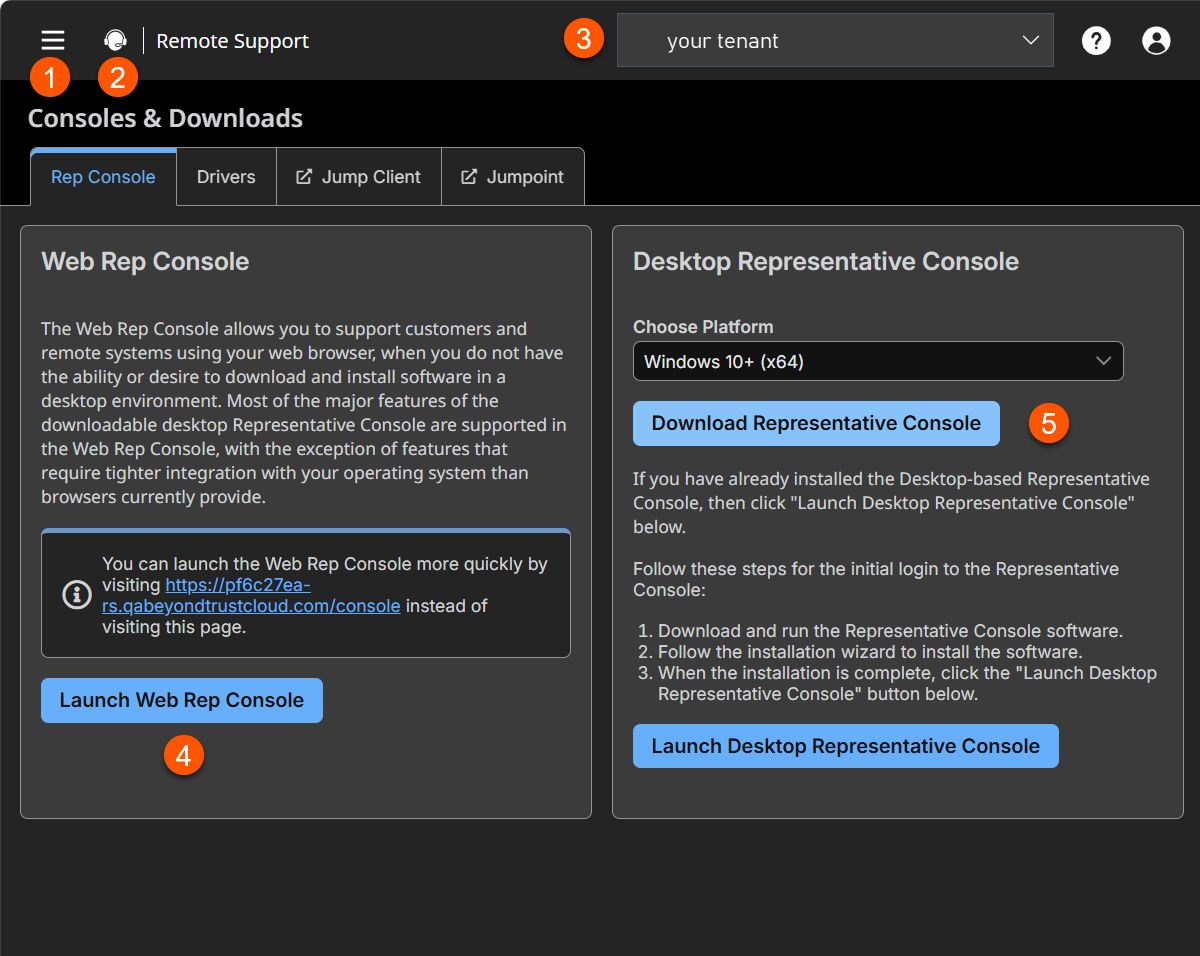
- Web Rep Console: Opens a Web Rep Console without installing a MSI file.
- Desktop Representative Console: Starts the download process of the MSI file.
What is the representative console?
The representative console is the interface used by your representatives to access all of Remote Support's features and functionality. You can access the rep console via a desktop client (the desktop rep console or via the web (the web rep console). Remote Support also offers an Android rep console app and an iOS rep console app.
What's the difference between the Desktop Representative console and the Web Rep console?
The desktop representative console:
- is an application you download to your computer.
- can only be used from the computer on which it is downloaded.
- is full-featured.
The web rep console:
- is accessed via a URL in a chromium-based browser.
- can be accessed from any computer.
- is a slightly modified version of the Remote Support Desktop Representative console.
How is the Rep console useful?
Your representatives use the Rep console to access Remote Support, where they can provide support to customers and remote systems for any device and any system - including Windows, macOS, Linux, Android, and iOS.
Launch the Web Rep console
In the Desktop Access Console section, click Launch Web Rep Console.
The Web Rep console opens in a new tab.
Download the Desktop Representative console
For macOS 10.15+ or Windows 10+ (x64)
- In the Desktop Representative Console section, select your computer system.
- Click Download Representative Console.
The installer downloads to your machine. - Open the installer and follow all on-screen prompts.
Note for Windows installation
- To install the representative console without displaying any windows, spinners, errors, or other visible alerts, append /S to the end of the EXE command.
- For mass deployment, we recommend using the Windows 10+ (x64) MSI installer.
For Linux (x64)
- In the Desktop Representative Console section, select your computer system.
- Click Download Representative Console.
The .bin file downloads to your machine. - Open Terminal.
- Run the following command, replacing downloaded-bin-file with the name of the downloaded file:
cd ~/Downloads sh '_downloaded-bin-file_'
The Desktop Representative console installs on your machine and you are automatically signed in to Remote Support on your Linux system.
For Windows 10+ (x64) MSI
Important infoWhen you mass-deploy consoles via MSI, ensure users authenticate with their consoles at least once prior to updating your B Series Appliance, because, during the initial login, a token from the B Series Appliance is provided to the representative console. This token requests software updates.
If the B Series Appliance is upgraded before any user logs into the representative console, or if an MSI from a previous version is used to install the representative console, the console fails to update, as it does not have the necessary token. If this occurs, the following error displays:
Error communicating with server while updating software. Please upgrade your software by downloading it from the web site. (1.1gws)"
Download and install the Windows 10+ (x64) MSI
Note for Windows 10+ (x64) MSI installation
- To install the representative console without displaying any windows, spinners, errors, or other visible alerts, append /S to the end of the EXE command.
- To deploy the installer to a large number of systems, the Microsoft Installer can be used with your systems management tool of choice.
- In your command prompt, when composing the command to install the console using an MSI, change to the directory where the MSI was downloaded and enter the command included on your Remote Support My Account page.
- In the Desktop Representative Console section, select your computer system.
- Click Download Representative Console.
The MSI file downloads to your machine. - Open a command prompt.
- Run the following command:
msiexec /i sra-con-win64-installer.msi
The Desktop Representative console installs on your machine.
Optional MSI installation parameters
You can include the following optional parameters for your MSI installation.
/quietor/qruns the installer without displaying any windows, spinners, error, or other visible alerts.INSTALLDIR=accepts any valid directory path where you want the console to install.RUNATSTARTUP=\accepts 0 (default) or 1. If you enter 1, the console runs each time the computer starts up.ALLUSERS=accepts "" (default) or 1. "" is the default value. This attribute is only needed when specifying per-machine installs.ALLUSERS=""results in a single user install. This forces the representative console to install in the same context that is being used to run the MSI installation. This is not ideal if Local System is used to run the installation, as is often the case with mass deployment tools. There is no way to target the install to a specified user via MSI parameters, so if you are deploying the MSI through an automated deployment system while using the single user install flag, the deployment system must run the MSI installation in the context of the same user who is expected to log in to the console.SHOULDAUTOUPDATE=<value>If you install for only the current user, you can choose to enter one of the following acceptable values:1to automatically update the console each time the site is upgraded0to require a manual console each time the site is upgradedImportant info- If you install the console for all users, consoles will not automatically update.
- If you use
ALLUSERS=1withSHOULDAUTOUPDATE=1,the representative console does notautomatically update.
