
Issues | RS Pathfinder
What are issues?
The Issues section provides a summary of any current system problems, such as connectivity errors or configuration issues, that may impact the performance or functionality of Remote Support.
How are they useful to my organization?
This section helps administrators identify and resolve system problems promptly, ensuring minimal disruption to support operations and maintaining optimal service delivery.
How do I access the Issues page?
- Sign into app.beyondtrust.io.
The BeyondTrust Home page displays. - From the left menu, click Remote Support > Configuration.
The Configuration page opens and the Options page displays by default. - At the top of the page, click Issues.
The Issues page displays.
The Issues page
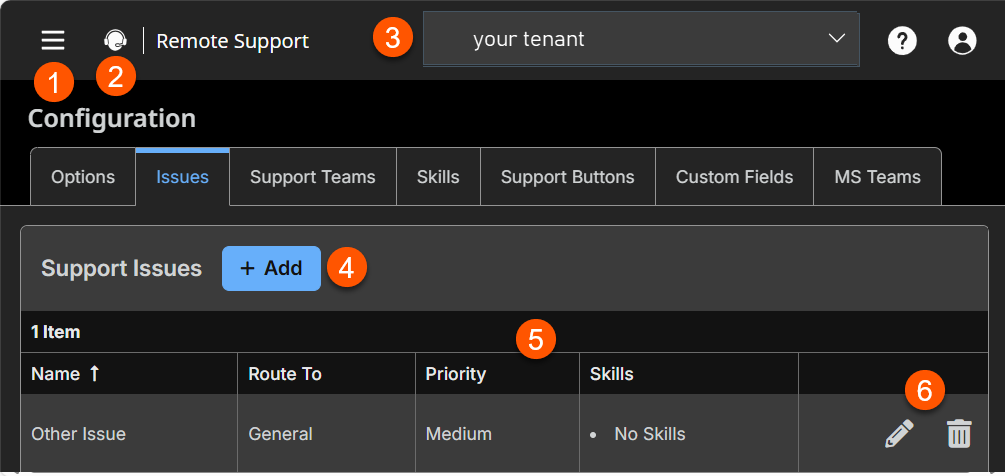
-
Add: Adds a support issue
-
Issue columns: List the Issue columns.
Issues columns
- Name: Unique name of the ticket.
- Route To: Select a specific team to route request.
- Priority: Set the issue priority.
- Skills: List of skills to route to specific issues.
Support issue prerequisites
- You must have at least one Support Team before you create support issues.
View your list of support issues
- Go to Configuration > Issues.
The default Support Issues list displays, along with any issues that were added.
Add a support issue
- Go to Configuration > Issues.
- Click + Add .
- Enter the issue details outlined below:
Support issue criteria
- Description: Add a brief description of an issue you expect to see as a support ticket.
Important information
If the issue submission form is enabled, this description is visible to customers and is used to help representatives quickly determine what type of problem the customer is experiencing. The description may also be visible to representatives requesting help from within a support session.
- Code name: Set a code name for integration purposes. If you do not set a code name, one is created automatically.
- Route to: Use the dropdown menu to have this issue routed to a specific team.
- Priority: Set the issue's priority to High, Medium, or Low, depending on how you want the system to handle it Medium.
- Allow representatives to request help for this support issue: Check the box if you want to allow representatives to request help for this support issue while in a session. If checked, the issue is listed in the Request Help flyout window of the representative console when the Session Sharing option is selected.
- Needed skills: Issues can be associated with the skills needed to resolve them best. Skills can be More Preferred, Less Preferred, or Ignored, depending on the level of knowledge required to resolve a given issue. This will determine how support requests are routed and handled by the system.
- Description: Add a brief description of an issue you expect to see as a support ticket.
- Click Save.
Edit a support issue
- Go to Configuration > Issues.
- Click the Edit icon in the grid.
- Edit the criteria you would like to change.
- Click Save.
Delete a support issue
- Go to Configuration > Issues.
- Click the Delete icon in the grid.
- Click Yes.
