
Jump Item Roles | RS Pathfinder
What are Jump Item Roles?
Jump Item Roles are a collection of permissions created for different roles in your organization which allow you to grant specific permissions for a user to access a Jump group. It allows you to grant specific permissions for a user to access a Jump Group. Jump Item Roles are applied to users from the Jump > Jump Item Roles page or from the Users & Security > Group Policies page.
How are Jump Item Roles useful to my organization?
Jump Item Roles help administrators manage access control and ensure users can only perform the necessary tasks for their role, enhancing security and efficiency during remote access sessions.
How do I access the Jump Item Roles page?
- Sign into app.beyondtrust.io.
The BeyondTrust Home page displays. - From the left menu, click Remote Support > Jump.
The Jump Clients page opens. - At the top of the page, click Jump Item Roles.
The Jump Item Roles page displays.
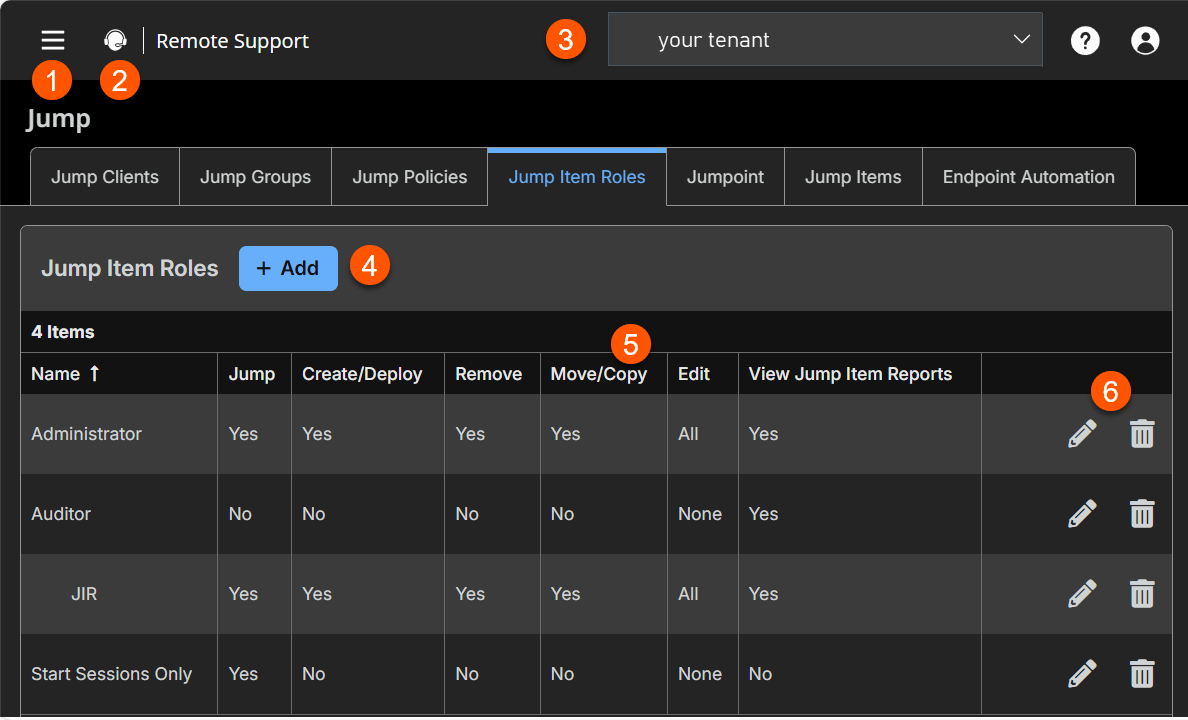
The Jump Item Roles page
-
Add: Adds a Jump Item Role.
-
Jump Item Roles columns: List Jump Item Roles columns.
Jump Item Roles columns
- Name: Unique name of the Jump Item Role.
- Jump: Defines if the Start Sessions permission is enabled. The values are Yes or No.
- Create/Deploy: Defines if the Create and deploy new Jump Items or upgrade Jump Clients permission is enabled.
- Remove: Defines if the Remove existing Jump Items permission is enabled.
- Move/Copy: Defines if the Move and Copy Jump Items permission is enabled. These permissions must be set on the Jump Item's origin and destination.
- Edit: Defines if the following permissions are enabled:
- Edit Jump Policy:
- Edit Behavior and Experience
- Edit Tag
- Edit Session Policy
- Edit Comments
- Edit Connectivity and Authentication
If one of the policies is enabled, then value of Some displays. If all six permissions are enabled, the value of All displays.
- View Jump Item Reports: Defines if the View Reports permission is enabled.
How to configure Jump Item Roles
If more than one role is assigned to a user, then the most specific role for a user is always used. The order of specificity for Jump Item Roles, from most specific to least specific, is:
- The role assigned to the relationship between a user and a Jump Group on the Jump > Jump Item Roles page.
- The role assigned to the relationship between a user and a Jump Group on the Users & Security > Group Policies page.
- The Jump Item Roles configured for a user on the Users & Security > Users page or the Users & Security > Group Policies page.
Starting in 25.2.1, new site installations automatically include a Jump Item Role called Auditor.
- On existing sites upgraded to 25.2+, this role is not created automatically. Admins may create it manually if needed.
- The Auditor role has a single permission, View Reports, allowing admins to grant a user access to run Jump Item reports without any additional permissions.
Add a Jump Item Role
- From the Jump Item Roles page, click Add.
The Add a Jump Item Role page displays. - In the Name field, type a unique name to help identify this role. This name helps when linking a Jump Item Role with a user or group of users in a Jump Group.
- In the Description field, type a description to summarize the purpose of this role.
- In the Permissions section, on the Jump Group or Personal Jump Items setting, you can set the following options:
| Field name | Description |
|---|---|
| Create new Jump Items or upgrade Jump Clients | With this setting selected, you can create Jump items and install them on a remote system. This permission is required to upgrade Jump Clients through the Representative Console and Web Rep Console. It is also required for access to the Jump Shortcuts Mass Import Wizard. When you create a Jump Item Role and have this permission selected, all the Edit permissions in the Jump Items section are automatically selected and the following message displays: ℹ️The user must be a member of a Jumpoint to deploy. |
| Move and Copy Jump Items | With this setting selected, you can move or copy Jump Items from one Jump Group into another. ℹ️ This permission must be set on the Jump Item Roles used in both the Jump Item's origin and destination. |
| Remove existing Jump Items | With this setting selected, you can delete Jump Items. |
| View Session and Jump Item Reports | With this setting selected, you can view reports. This applies to the Jump Group to which the user is added with this role. |
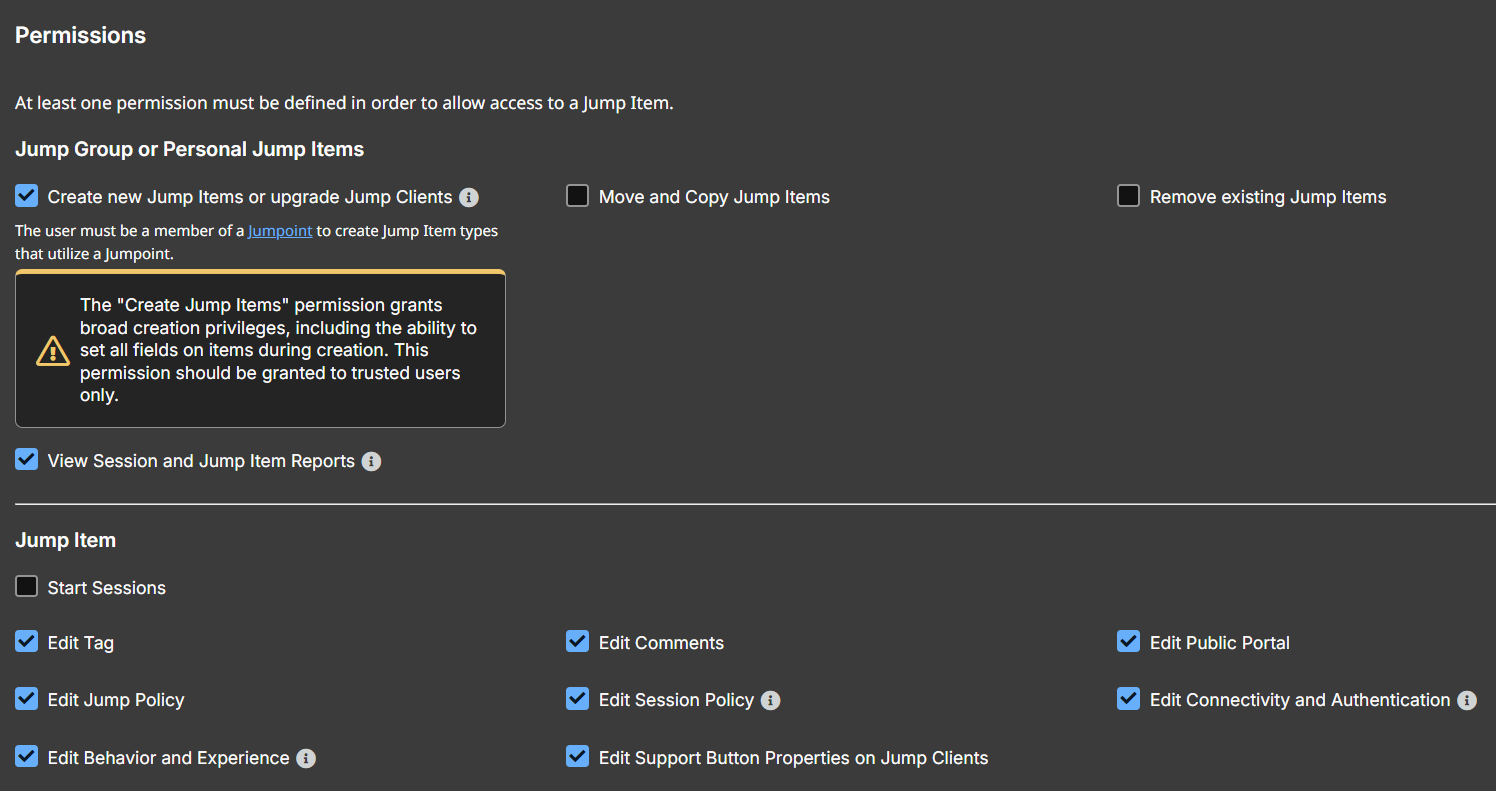
- In the Jump Item section, you can set the following options:
| Field name | Description |
|---|---|
| Start Sessions | You can Jump to a remote system. |
| Edit Tag | You are able to edit a Jump Item's tag field. |
| Edit Comments | You are able to edit a Jump Item's comments field. |
| Edit Public Portal | You can edit the public portal that is selected for a Jump Item. |
| Edit Jump Policy | You can set any Jump Policy that is applied to a Jump Item |
| Edit Session Policy | You set which session policy a Jump Item should use. Changing the session policy may affect the permissions allowed in the session. Applies to all Jump Item types. |
| Edit Connectivity and Authentication | You can modify a Jump Item's connection and authentication information. This includes such fields as hostname, Jumpoint, port, and username, among others. |
| Edit Behavior and Experience | You are able to modify the behavior of Jump Items. This includes the following field types:
|
| Edit Support Button Properties on Jump Clients | You can modify the Support Button Profile that is applied to a Jump Client. |
Edit a Jump Item Role
- From the left menu, click Jump.
The Jump Clients page opens and displays by default. - At the top of the page, click Jump Item Roles.
The Jump Item Roles page displays. - Select a role from the list, click the pencil
 .
.
The Edit Jump Item Role page displays. - Make your changes, and then click Save.
Delete a Jump Item Role
-
From the left menu, click Jump.
The Jump Clients page opens and displays by default. -
At the top of the page, click Jump Item Roles.
The Jump Item Roles page displays. -
Click the trash can
 .
.
The following message displays: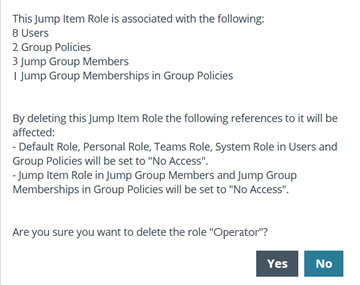
-
Click Yes.
