
iOS configuration | RS Pathfinder
What is iOS configuration?
iOS configuration refers to the distribution of Apple iOS configuration profiles that allow support representatives to provide users with public and private, administrator-configured profiles for downloading to iPhone, iPad, and iPod touch devices.
How is iOS configuration useful?
iOS configuration enables the seamless distribution of custom configuration settings to iOS devices, enhancing support by ensuring that devices are properly set up for user access and management during support sessions.
How do I access the iOS Configuration page?
- Sign into app.beyondtrust.io.
The BeyondTrust Home page displays. - From the left menu, click Remote Support > Public Portals.
The Public Sites page opens and the Public Sites tab displays by default. - At the top of the page, click iOS Configuration.
The iOS Configuration page displays.
The iOS Configuration page
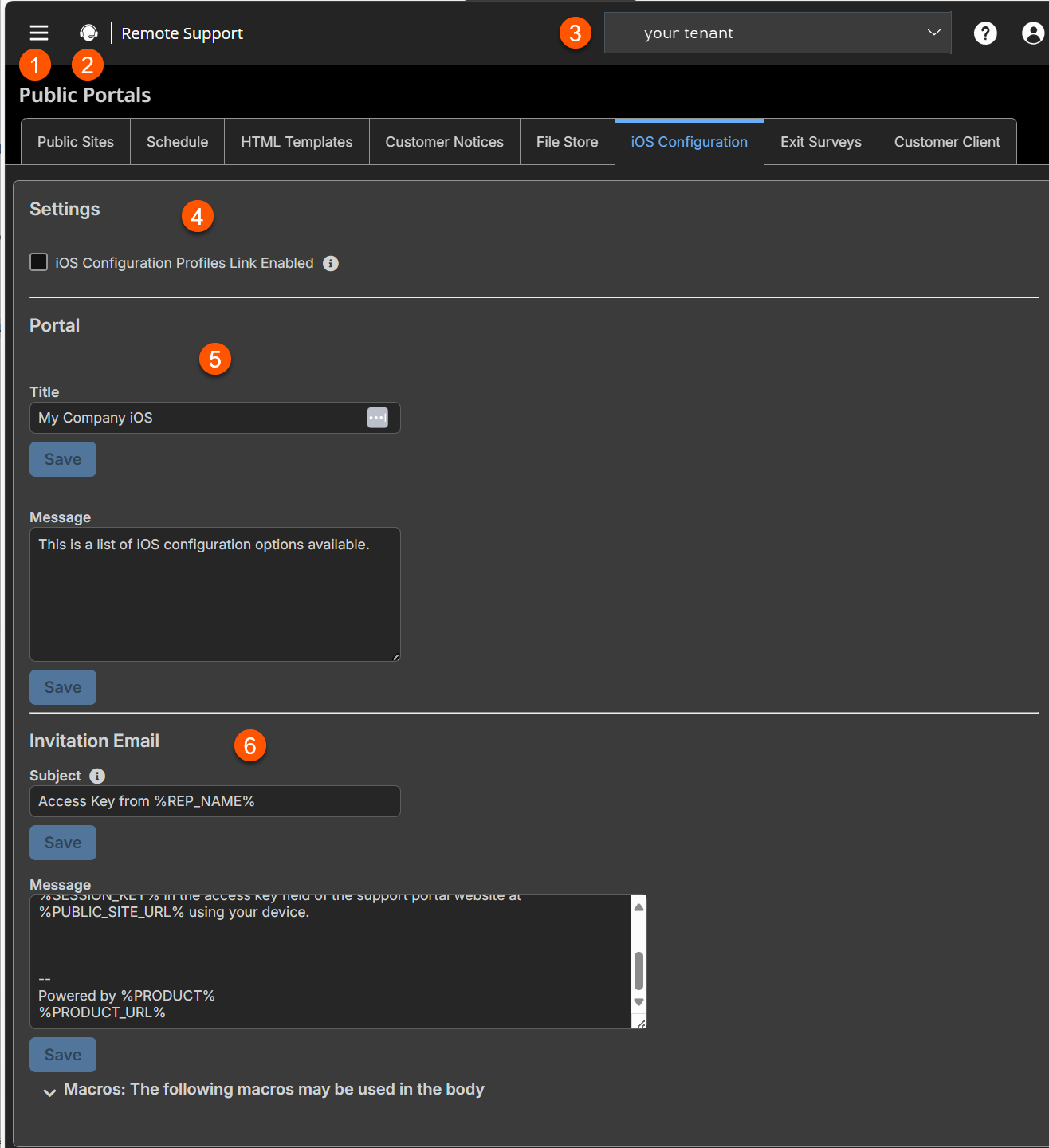
- iOS configuraton profile: Enable or disable iOS profiles.
- Portal: Customize the iOS portal page.
- Invitation Email: Send an access key to an iOS user via email.
iOS configuration profiles
BeyondTrust supports distribution of Apple iOS configuration profiles, allowing support representatives to offer public and private, administrator-configured profiles to iOS device users for downloading to their iPhone, iPad and iPod touch devices.
For more information, see iOS configuration profiles.
Important infoTo ensure that configuration profiles are downloaded to iOS devices over an encrypted HTTPS connection, you must check the Force Public Site to Use HTTPS checkbox on the Management > Security page. Otherwise, profile downloads will occur over unencrypted HTTP connections.
To administer Apple iOS settings, you must use an admin account. To create or modify Apple iOS configuration profiles, you must have the user account permission Allowed to Edit iOS Profiles. For a representative to give customers access to private configuration profiles, they must have the account permission Allowed to generate access keys for sending iOS profiles.
In Remote Support, navigate to Users & Security > Users and/or User & Security > Group Policies to modify account permissions.
After setting up and exporting a configuration profile from Apple’s free iPhone Configuration Utility, use Remote Support to make the profile available. You may find the iPhone Configuration Utility on Apple's iPhone Support web site.
Add new profile, edit, delete
Create a new profile, modify an existing profile, or remove an existing profile.
Add or edit iOS configuration profile
Name
Create a unique name to help identify this profile. This iOS configuration profile name should help the user select the right profile when browsing your support portal.
File
Upload the Apple iOS Profile you created with the iPhone Configuration Utility software. Note that the underlying Apple iOS Profile must be altered to change the contents of the iOS device profiles you wish to distribute to iOS device users.
Description
Add a brief description to summarize the purpose of this profile.
Public
Check the Public checkbox to make the profile appear in a list visible to any iOS user that browses your public portal. Note that the iOS users will not see a traditional representative list or issue submission dialog when browsing the public portal.
Leaving the Public checkbox unchecked allows you to restrict access to the iOS Profile you created. To download private profile content, users must enter an access key you generate in the representative console.
Settings
Select a public site to edit
From the dropdown, select the public site for which you want to configure settings.
iOS configuration profiles link enabled
If this option is checked, customers on iOS devices will see a link to the iOS configuration profiles portal when they access the public site. This page displays any public profiles you have available, and it provides a text entry box where customers can submit an access key their representative has provided, directing the customers to a private configuration profile.
Portal
Title
Customize the title of the iOS portal page. You can localize this text for any languages you have enabled.
Message
Customize the text that will display on the iOS portal page. You can localize this text for any languages you have enabled.
Invitation email
When a representative generates an Apple iOS profile access key from the representative console, the access key can be sent in an email to the iOS user.
Subject
Customize the subject of this email. You can localize this text for any languages you have enabled.
Message
Customize the body of this email. Use any of the macros listed below this field to customize the text for your purposes. You can localize this text for any languages you have enabled.
For more information, see Manage the iOS configuration profiles page.
