
Run reports | AD Bridge
For a list of reports available in AD Bridge, refer to the AD Bridge Report Book.
Audit and Access Reporting
Generate a sample report
You can generate reports using the Audit and Access Reporting plug-in for the BeyondTrust Management Console.
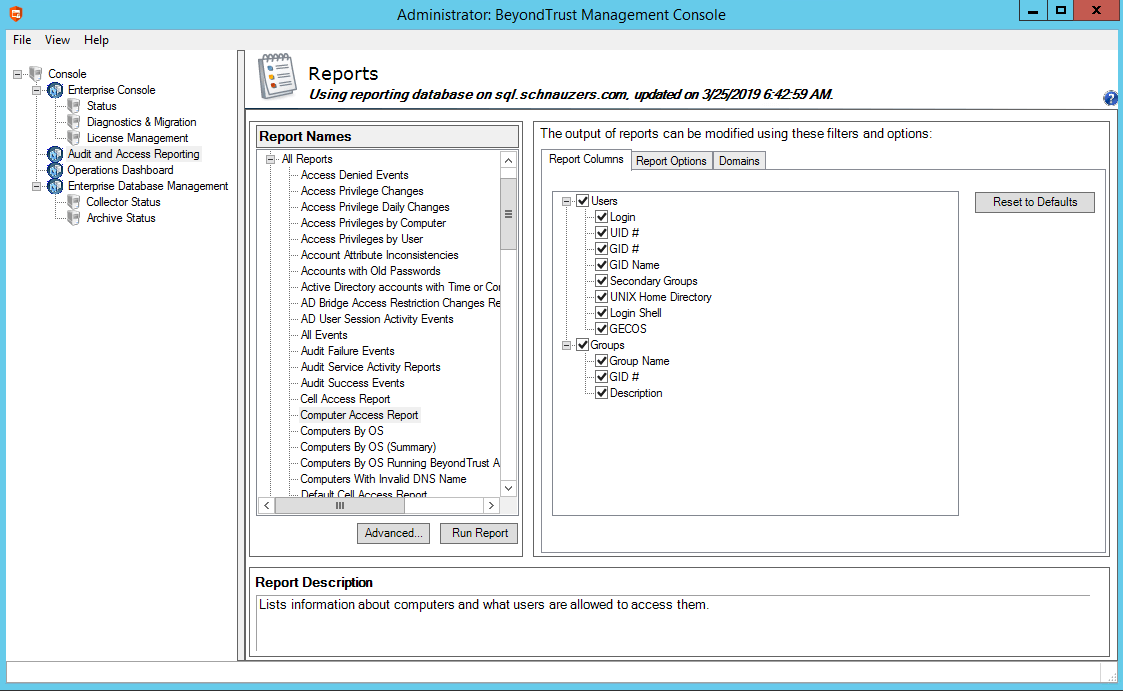
The following procedure shows how to create a computer access report.
-
In the BeyondTrust Management Console tree, click the Audit and Access Reporting node.
-
Under Report Names, expand All Reports, and then select Computer Access Report.
-
Click Run Report.
Review accounts with AD Bridge entitlement reporting
Entitlement reporting provides detailed analysis of accounts. Use entitlement reports:
- To review how group memberships impact access for users
- As part of your regulatory compliance
The AD Bridge agent includes a user monitor service that logs entitlement changes detected from local accounts and groups on each endpoint computer, and Active Directory (AD) changes that could affect account access and roles on computers.
All detected changes in entitlement are recorded in the Event Log subsystem for each AD Bridge agent. Using event forwarding, this data can be sent to an AD Bridge audit collector computer that can provide reporting across a centralized, enterprise-wide database.
For AD users, the User Monitor report only displays users who have been granted access to the computer with the RequireMembershipOf setting.
- If RequireMembershipOf is not enabled, a special pseudo user is reported.
- If the computer is running in Schemaless mode (see note below), the pseudo user uses the All Users accessible from domain %s format; otherwise the pseudo user uses the All Users in cell %s format.
The User Monitor only displays AD groups that contain at least one of the reported AD users.
ImportantSchemaless mode is deprecated.
The entitlement reports listed here are a sample of the many reports available. View the full list under All Reports in the BeyondTrust Management Console.
Access privileges by user
This entitlement report, organized by user name, shows which users can log into which computers and how that list has changed over time.
- The state of access privileges at the start date and end date are compared.
- Intermediate changes are not shown, so if a new user is added then deleted in the middle of the reporting time span, no change is shown in the report.
- The status date field indicates the date of the last change to the user during the report time span. If a user was added and later the user's UID was changed, the date of the UID change is shown in the report.
- When all of the fields in multiple rows match except for Computer Name and Status Date, those rows are collapsed so that one row is shown with a space separated list of the computers to which it applies.
- When the User Display Name, UID, or Account Type changes, the new value is shown followed by an asterisk (*).
Access privileges by computer
This entitlement report, organized by computer name, shows which users can log into which computers and how that list has changed over time.
- The state of access privileges at the start date and end date are compared.
- Intermediate changes are not shown, so if a new user is added then deleted in the middle of the reporting time span, no change is shown in the report.
- The status date field indicates the date of the last change to the user during the report time span. If a user was added and later the user's UID was changed, the date of the UID change is shown in the report.
- When the User Display Name, UID, or Account Type changes, the new value is shown with an asterisk (*).
Access privilege changes
This entitlement report shows changes to user privileges by date.
- Every change is shown, including changes that are later undone. This report does not provide a list of all users who can log into the computers, only those users for which there have been changes.
- When the User Display Name, UID, or Account Type changes, the new value is shown with an asterisk (*).
Access privilege daily changes
This entitlement report shows changes to user privileges on a daily basis.
- Every change is shown, including changes that are later undone.
- The report does not provide a list of all users who can log into the computers, only those users with changes.
- The report provides the same information as the Access Privilege Changes by User report, but with simplified search criteria.
- When the User Display Name, UID, or Account Type changes, the new value is shown with an asterisk (*) .
Account attribute inconsistencies
This entitlement report shows conflicts between UID, username, and GECOS.
Updated about 2 months ago
