
Long description: AWS Identity Center, temporary permission set | Entitle
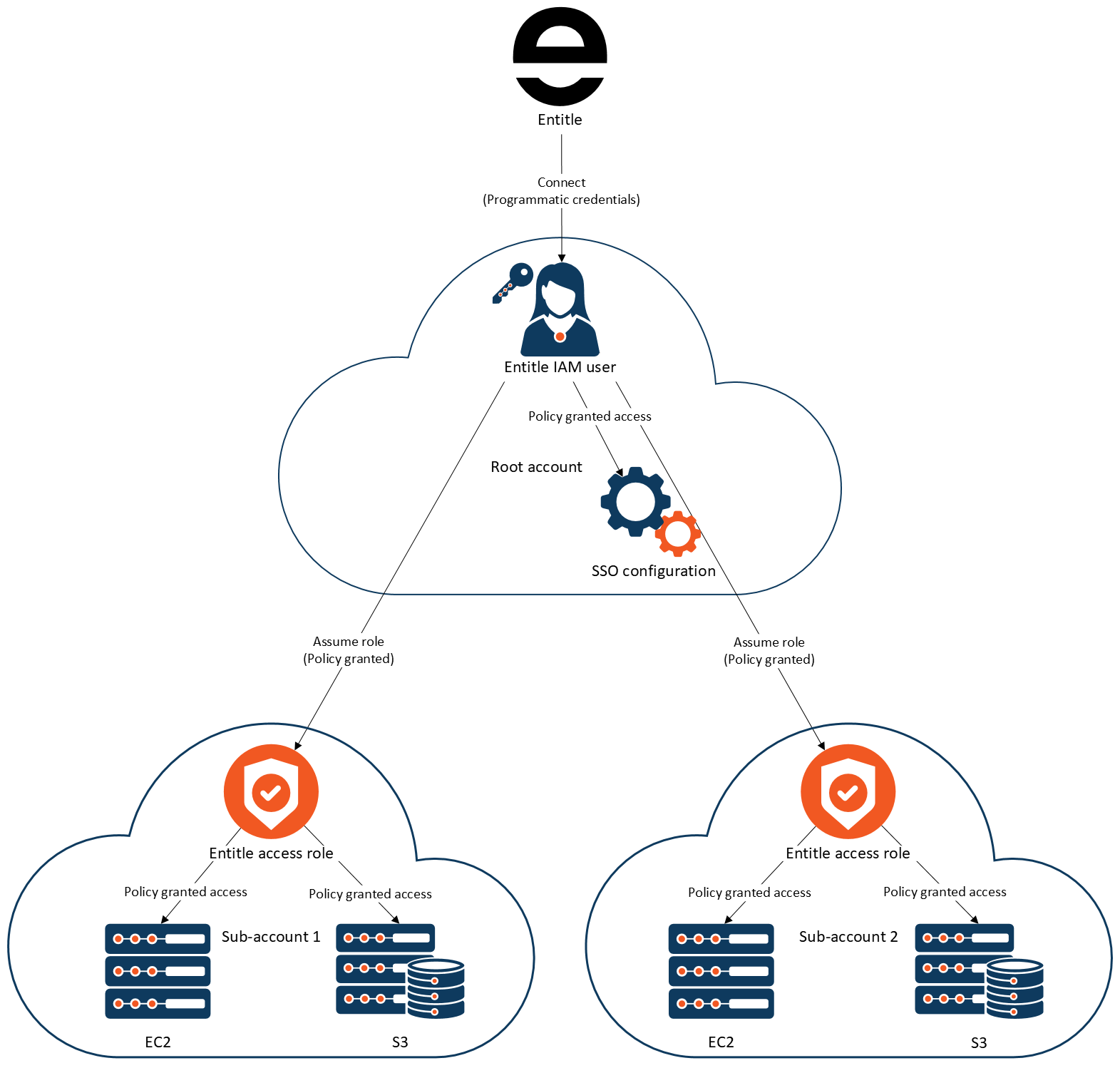
This diagram illustrates how Entitle connects to a primary cloud account and uses IAM roles to grant controlled, policy-based access to resources in multiple sub-accounts.
At a high level, Entitle connects to a primary cloud account using programmatic credentials. Within that primary account, an IAM user created for Entitle is granted policies that allow it to assume specific access roles in other accounts. Those cross-account roles then grant access to resources such as EC2 and S3 within each sub-account.
The architecture can be understood as a trust chain that flows from Entitle to the primary account, and from there to multiple sub-accounts.
Step 1: Entitle connects to the primary account
Entitle connects to the cloud environment using programmatic credentials. These credentials authenticate as an IAM user that exists in the primary cloud account. This user is labeled "Entitle IAM user."
The IAM user does not directly access workload resources. Instead, it is granted permissions through attached IAM policies. These policies allow the user to assume roles in other accounts.
Within the same primary account, the diagram also references the root account and an SSO configuration. These elements represent account-level identity and configuration context but are not the direct mechanism used for workload access. The key operational identity is the Entitle IAM user.
Step 2: The IAM user assumes cross-account roles
The IAM user in the primary account is granted permission to assume roles in other accounts. The diagram labels this as "Assume role (Policy granted)."
This means the IAM user uses AWS Security Token Service role assumption to gain temporary credentials for roles that exist in separate sub-accounts.
The primary account acts as a control point. It does not directly host the workload resources being accessed. Instead, it enables cross-account access through explicitly defined roles.
Step 3: Each sub-account contains an Entitle access role
Each sub-account contains a role labeled "Entitle access role." This role is configured to trust the IAM user from the primary account, allowing that user to assume it.
The Entitle access role in each sub-account has its own policies attached. These policies define what resources can be accessed and what actions are permitted.
The same structural model applies to multiple sub-accounts. The diagram shows two example sub-accounts, but the pattern is repeatable across any number of accounts.
Step 4: Roles grant access to cloud resources
Within each sub-account, the Entitle access role grants policy-based access to specific resources.
The diagram shows two example resource types:
- EC2 instances
- S3 buckets
The access role’s policies determine what actions can be performed on these resources. Access is not granted directly from Entitle to the resources. Instead, access flows through the assumed role inside each sub-account.
Updated 7 days ago
