Directory authentication | Pathfinder

This topic explains how to configure Active Directory (AD) or LDAP authentication for Pathfinder so you can sign in with directory-managed credentials.

Overview

Directory authentication allows Pathfinder users to sign in with credentials managed in an external directory service, such as Active Directory or another LDAP-compatible directory, instead of local Pathfinder accounts or SAML-based SSO.

Pathfinder does not connect to a directory service directly. Instead, it routes authentication requests through a BeyondTrust product already integrated with your directory: Password Safe, Privileged Remote Access, or Remote Support. Pathfinder uses that product's connection, referred to as a proxy site, to authenticate users.

Prerequisites

  • Administrator access in Pathfinder.
  • A connected BeyondTrust product configured with a directory service.
  • The directory domain and any required connection details.
  • The source product configured for the directory connection.
ℹ️

For more information, see the product documentation for your BeyondTrust product: Password Safe, Privileged Remote Access, or Remote Support.

Use a clear provider display name so administrators can distinguish multiple directory connections by region, domain, or business unit.

Supported authentication model

Directory authentication is distinct from other sign-in methods in Pathfinder.

  • Local authentication: Users are invited to Pathfinder and authenticate with Pathfinder-managed credentials.
  • SAML authentication: Users authenticate through an external IdP such as Microsoft Entra ID, Okta, or PingOne.
  • Directory authentication: Users authenticate against a directory domain through a connected BeyondTrust product: Password Safe, Privileged Remote Access, or Remote Support.

If your organization supports more than one authentication method, ensure users know which sign-in path applies to their account.

Add a provider

  1. Sign into app.beyondtrust.io.
    The BeyondTrust Home page displays.

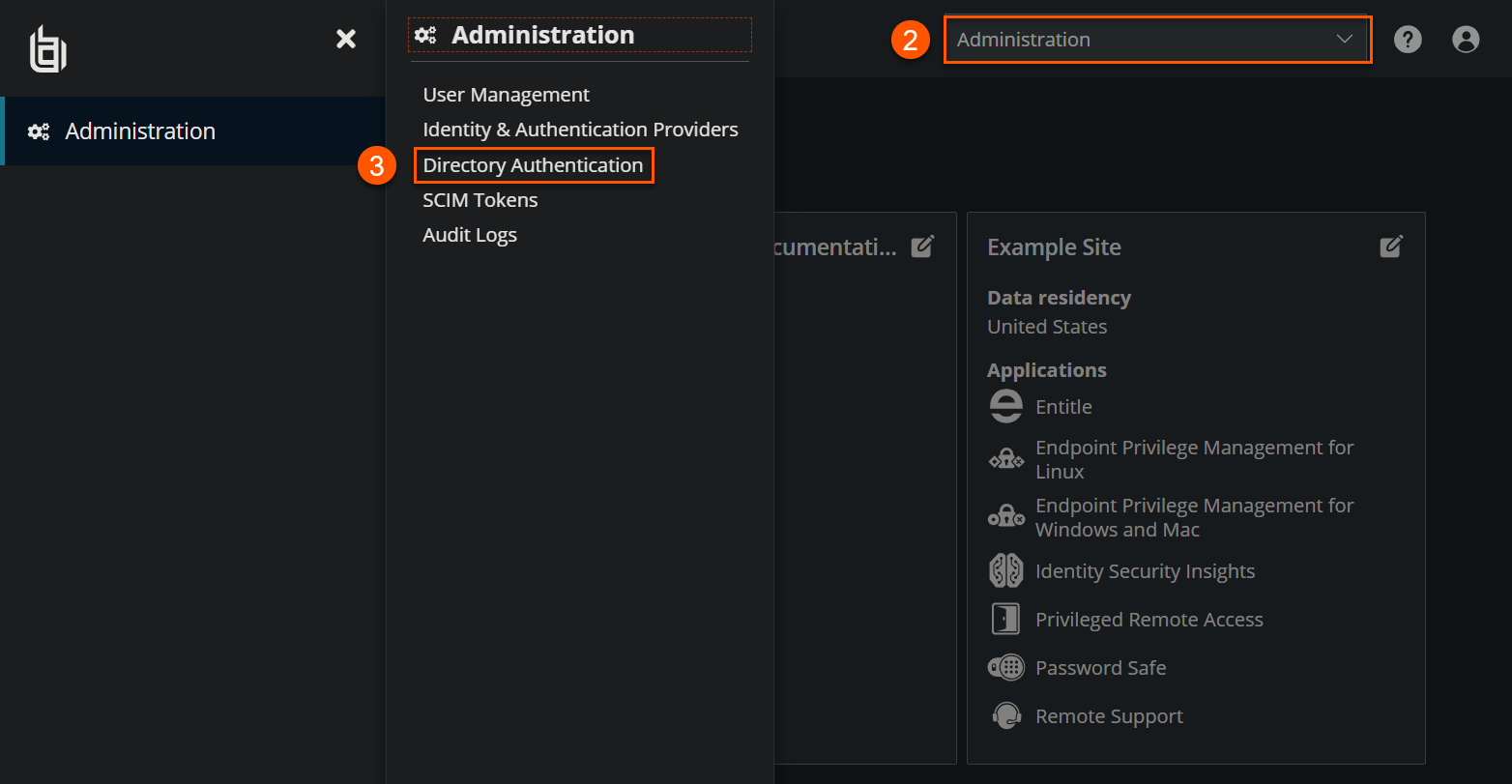
  2. Select your site name to display a drop-down menu.

  3. Select Administration.
    The BeyondTrust Platform Administration page displays.

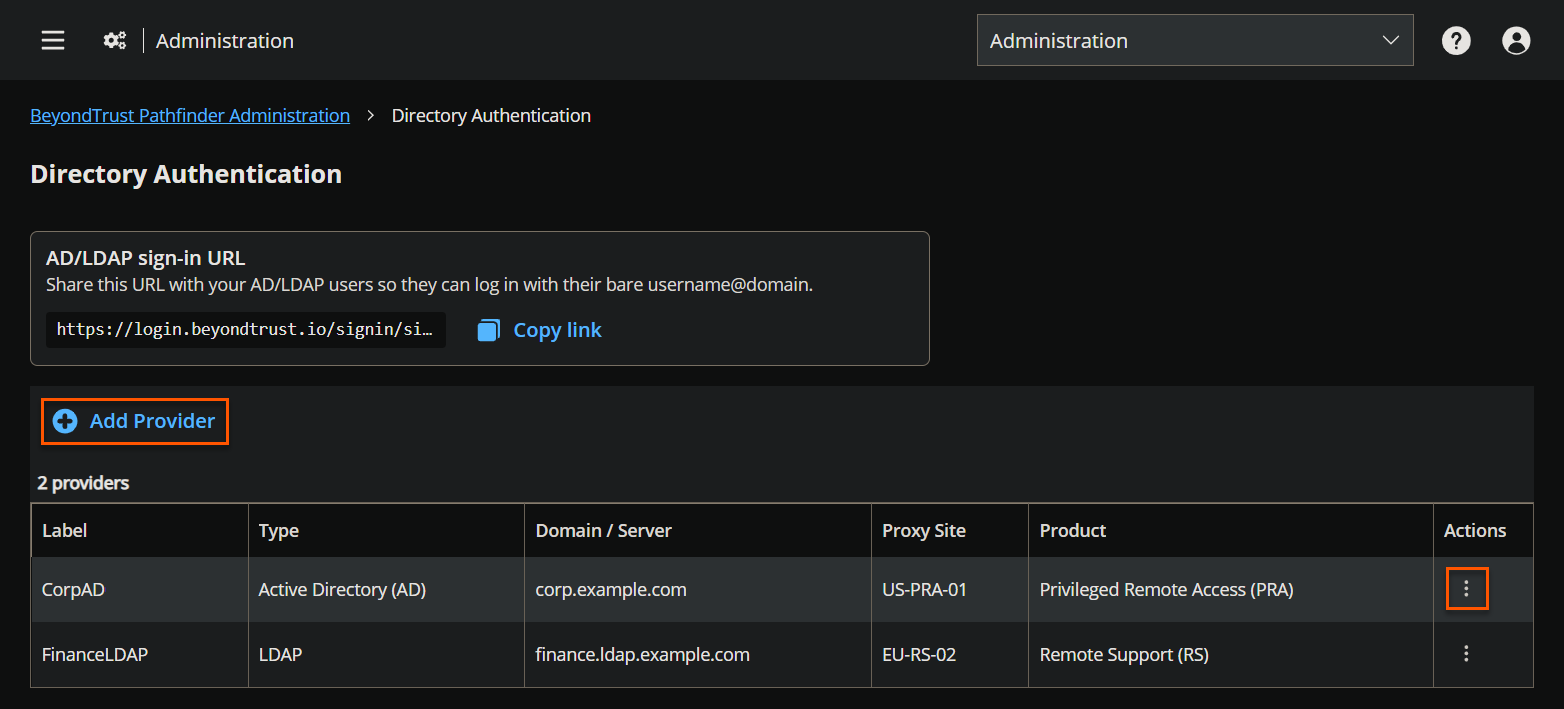
  4. Select Administration > Directory Authentication.
    The Directory Authentication page displays.

  5. Click Add Provider.
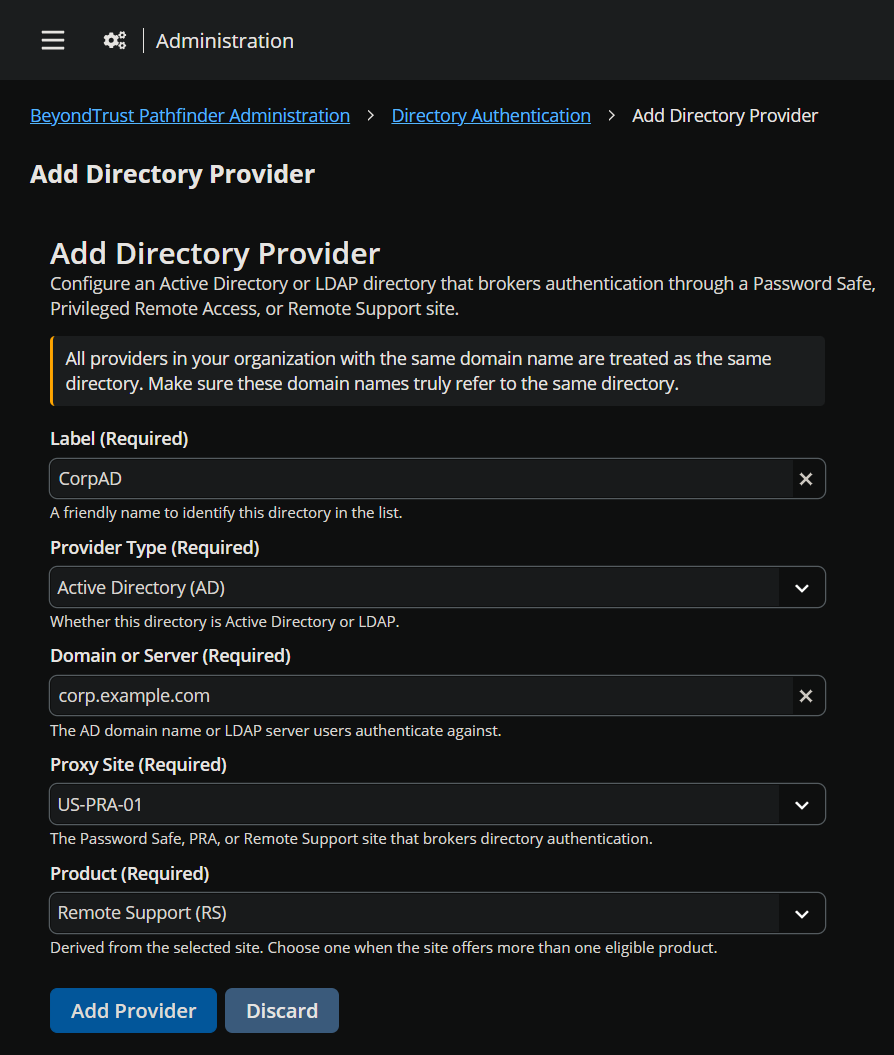
    The Add Directory Provider page displays.

  6. Enter a label for the provider.

  7. Select a provider type from the list: Active Directory or LDAP.

  8. Enter the domain or directory connection information required by your environment.

  9. Select the proxy site that will broker authentication.

  10. Select a product from the list.

  11. Click Add Provider.

  12. Verify the provider appears in the configured provider list.

After the provider is saved, Pathfinder can use it to route eligible users through directory authentication.

Edit or remove a provider

Administrators can update an existing provider when connection details change.

  • Edit the provider to update values such as display name, domain, or proxy site.
  • Remove the provider if it is no longer needed.
  • Review the impact before removal, especially if users currently rely on that provider to sign in.
⚠️

Caution

Removing a provider can prevent associated users from authenticating through that directory path until another supported authentication method is available.

User sign-in flows

Users can reach directory authentication through different entry points depending on how your organization is configured.

  • Tenant-scoped sign-in: This is the primary sign-in path. Users navigate directly to their organization-specific Pathfinder sign-in page and authenticate with their directory credentials.
  • Main sign-in page with email address: Returning users can enter their email address on the main sign-in page. Pathfinder can use that information to route the user to the correct tenant and authentication flow.
  • Main sign-in page with domain-qualified username: Users can sign in with a domain-qualified username where supported. Common formats include:
    • user@domain
    • DOMAIN\username

Use the format accepted by your organization's configured directory provider.

How directory users display in Pathfinder

When using directory authentication, Pathfinder might display directory-backed users differently from local users in administrative views.

  • User records may appear with a type such as AD or LDAP.
  • Existing users may be associated through identity mappings across connected products.
  • Some users may be pre-loaded or discoverable after provider activation, depending on the implementation.

Email address conflicts

If a directory-authenticated user has the same email address as an existing local Pathfinder user, Pathfinder may present a conflict-resolution or captive-portal flow so the user can be routed correctly.

Review these cases carefully to avoid duplicate identities or unintended sign-in paths.

©2003-2026 BeyondTrust Corporation. All Rights Reserved. Other trademarks identified on this page are owned by their respective owners. BeyondTrust is not a chartered bank or trust company, or depository institution. It is not authorized to accept deposits or trust accounts and is not licensed or regulated by any state or federal banking authority.