
Remote Support 25.3.1 release notes
December 18, 2025
🆕 New features
Slow-roll Releases
Remember that automatic update feature from Base 8.0? It’s back, but smarter and friendlier!
What’s Changing in 25.3:
- No surprise pushes. You get to choose when you update.
- You’ll get a heads-up when a new update is available.
- Download and install when it works for you. Full control, zero stress.
- Staggered releases mean no mass rollout chaos.
Simply check the auto install checkbox and select your update cadence.
This is updates done right: transparent, flexible, and customer-first.
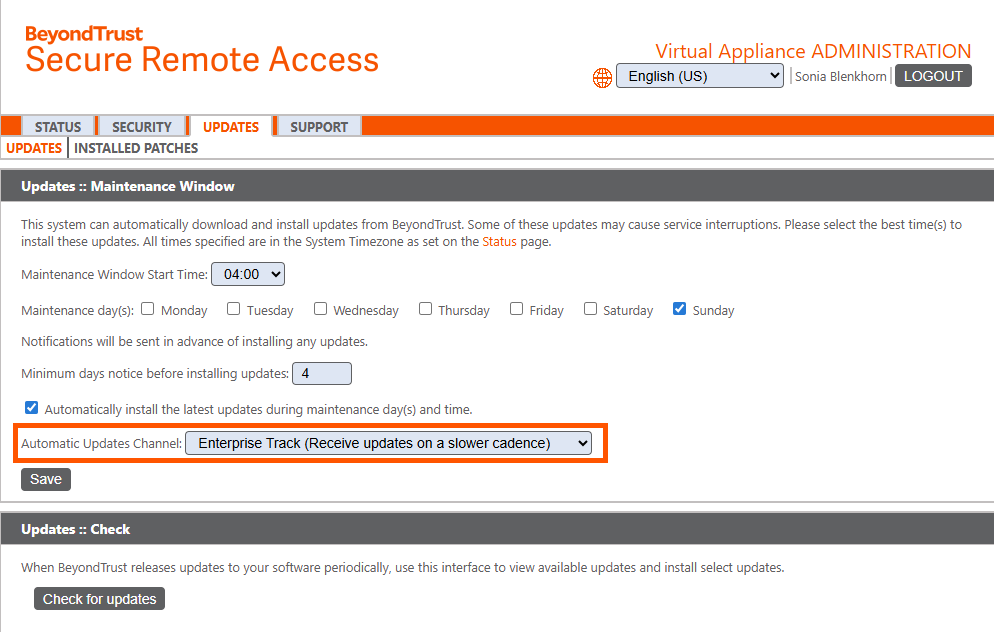
For more information, see:
Support for MacOS Tahoe
Get ready for the future of macOS! With the launch of Apple’s latest version, we have you covered. Enjoy instant compatibility, expert guidance, and tips to unlock the newest features without missing a beat.
Session Forensic Tool for Command Shell Traceability
We’re bringing the Privileged Remote Access Forensic Tool magic to Remote Support, because visibility is everything.
What’s in the toolbox?
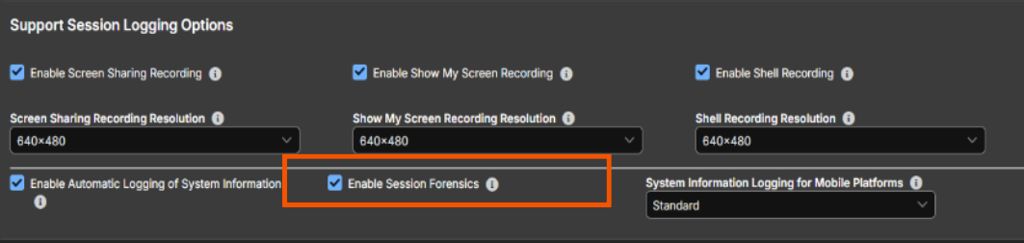
- Command Shell Traceability - Track every action taken in the Command Shell tab on Windows machines with Jump Client.
- Screen Sharing Capability - Advanced traceability of what happens during screen sharing: processes launched, keystrokes, applications, and more.
- Session Forensics Report - You can even run a report to display session events across all access sessions.
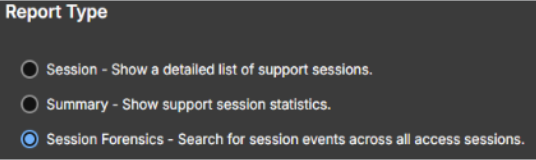
For more information, see:
Automatic import of Password Safe managed credentials and endpoints
Say goodbye to manual drudgery! Vault admins can now automatically import domain accounts, endpoints, and local accounts right after scheduled discovery runs, thanks to smart, predefined filters. With Import Rules, you can assign filters to apply during a predefined scheduled discovery. This keeps your Vault fresh and secure, while still giving you the freedom to manually import anything that falls outside the filters.
This works across all scheduled discovery job types supported by Vault.
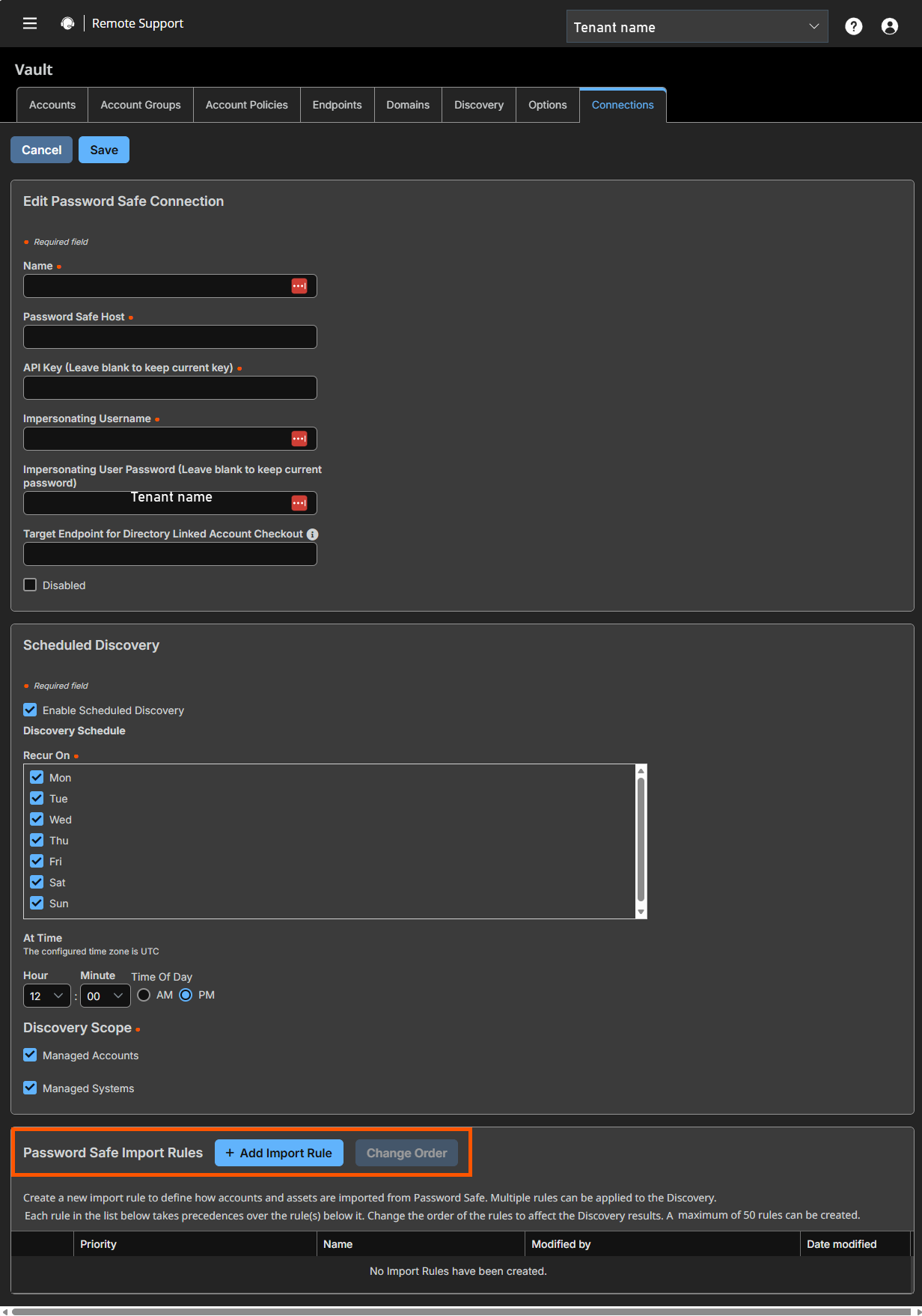
For more information, see:
Eliminate ECM Dependency for Password Safe Integrations
Goodbye ECM, Hello Simplicity!
We’re making Remote Support and Password Safe integrations faster, lighter, and cloud-ready. No more heavy lifting with Endpoint Credential Manager. This release kicks complexity to the curb!
What’s Changing?
- Native Discovery & Import: Remote Support now directly handles all the credential types you love: SSH, MS SQL, PostgreSQL, and MySQL, all without ECM.
- Simpler Deployments: No extra agents, no headaches. Upgrades are smoother, deployments are quicker.
- Cloud & DevOps Friendly: Built for zero-trust and just-in-time access, aligning perfectly with modern workflows.
Why You’ll Love It:
- Less infrastructure overhead
- Faster time-to-value
This update requires a new plugin download. For more information, see Install the Endpoint Credential Manager.
For more information, see:
✨ Enhancements
Improved dashboard charts and data
Get ready for a sleek, modern UX on the /login admin interface! This isn’t just a facelift, it’s a real-time command center for your appliance.
Here’s what’s new:
-
New License Usage panel, showing total active licenses, total available licenses, and total license pools.
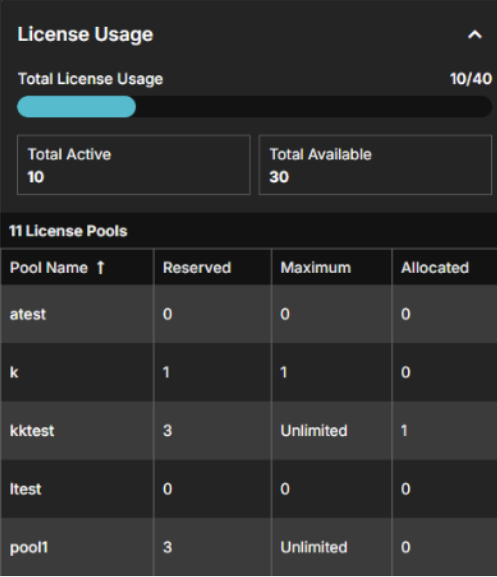
-
New Jump Clients panels, showing Online, Offline, and Offline (disabled) Jump Clients, and new Jumpoints panel, showing Connected, Partially Connected, and Disconnected Jumpoints.
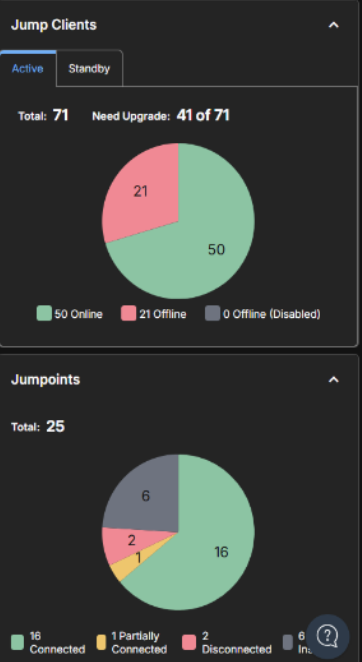
For more information, see:
Prioritize external representative invite session policy over jump item session policies
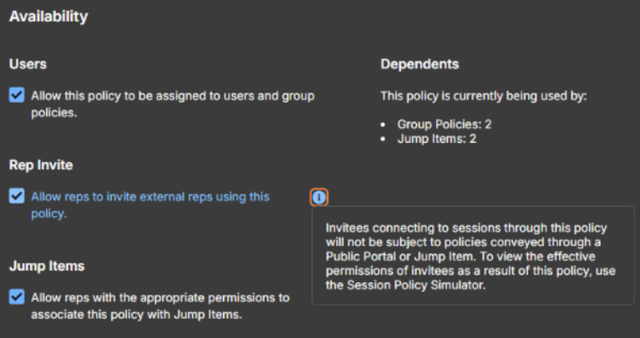
Managing Jump Client sessions just got easier, and way more intuitive. You can now prioritize Session Policies assigned to external reps/access invites, ensuring expected policy enforcement in external session/access scenarios.
What’s New?
- The policy selected during the invitation process is the only policy applied to the invited Rep.
- Jump Item and Public Portal policies are skipped for external invitees.
For more information, see:
Additional security controls for Command Shell context
Flexibility meets control! Shells start in the context of the endpoint’s logged in user and use a button in the console to open an elevated shell tab that runs in the system/root context (only if the Jump Client is elevated).
- Match the Logged-In User for a familiar experience
- Go System/Root when Jump Client is elevated for full power
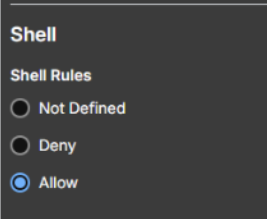
Allow Shell rules
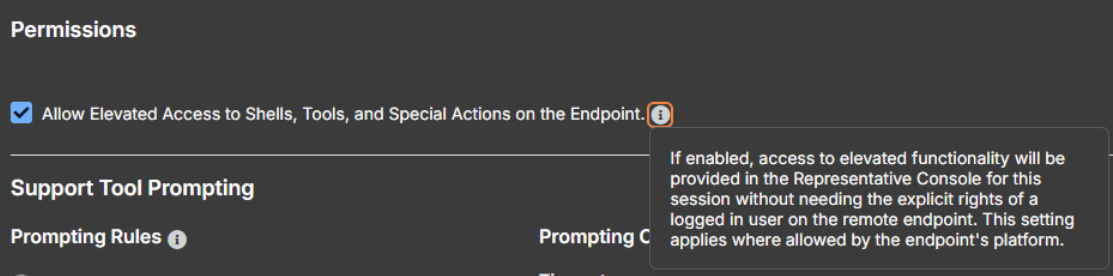
Allow elevated access
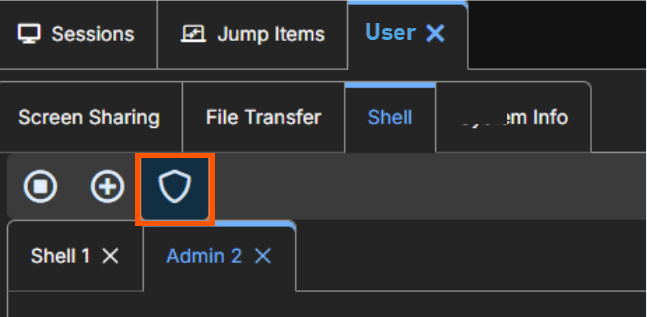
Open elevated shell tab running on system/root context
Your shell, your rules. Simple, secure, and ready to roll!
For more information, see:
Granular /login admin permissions
We’re introducing granular RBAC magic to make remote access management a breeze.
Remote Access Management Role
- Non-admins can add members to group policies
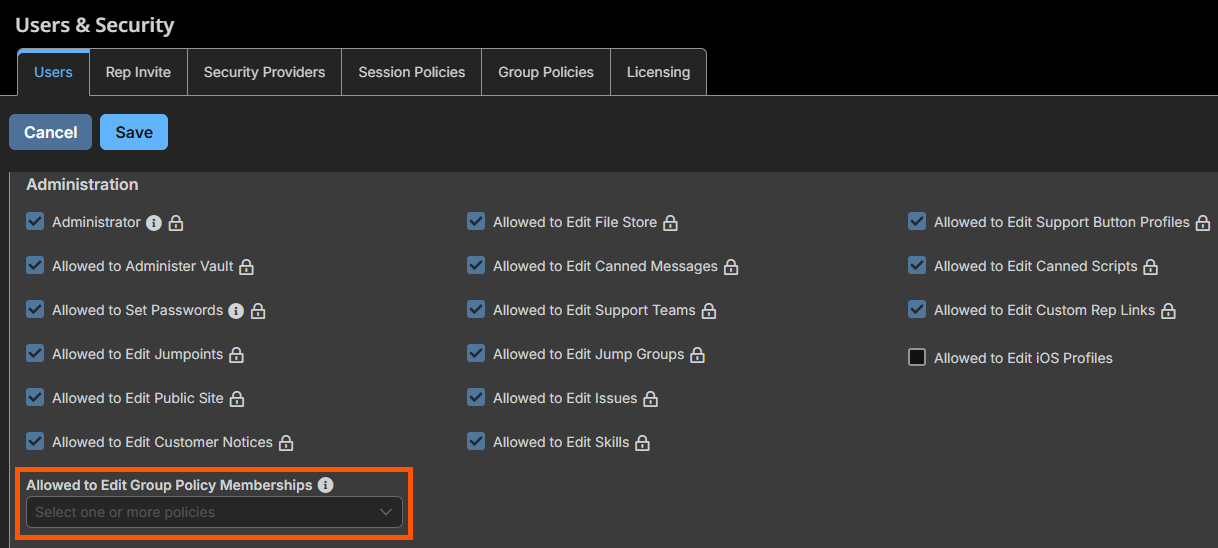
Why it matters:
Delegate /login administrative tasks to others that don’t need global admin rights to enable zero trust.
Non-admins:
- Can see the Group Policy tab
- Cannot create a new group policy or change the order
- Can only see and edit group policies they are in and
- Only membership section
For more information, see:
Grey out Vault accounts already in use
If a Vault account doesn’t allow simultaneous checkout and you try to grab it while someone else already has, no worries! The account still displays, but is grayed out with a little lock icon. Hover over it, and you’ll see a friendly message letting you know it’s currently checked out by another user.
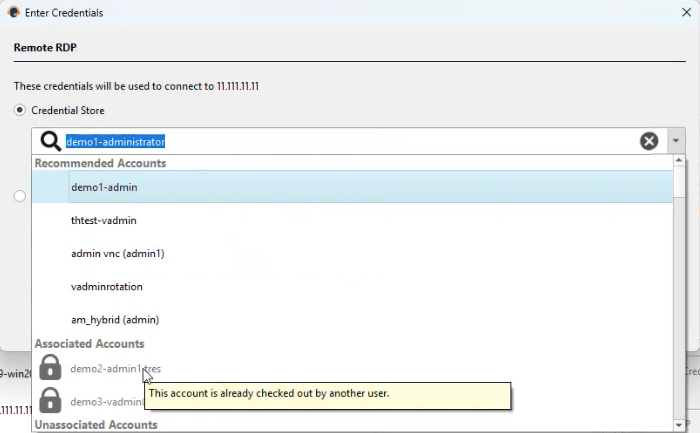
Desktop Console
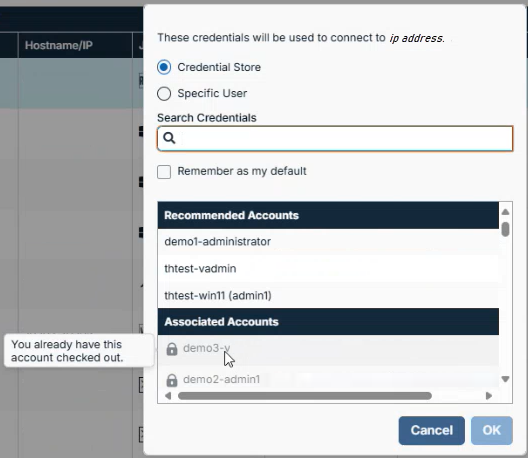
Web Console
For more information, see:
- Pathfinder - Allow simultaneous checkout rules
- Cloud - Allow simultaneous checkout rules
- On-Prem - Allow simultaneous checkout rules
Force close windows in elevated sessions
We’re adding new functionality to force close windows in an elevated session:
- New Config Option in /login > Management > Security
- Force-close any windows opened during an elevated session
- Applies to Windows elevated sessions only
- Off by default. Enable when you need that extra lockdown!
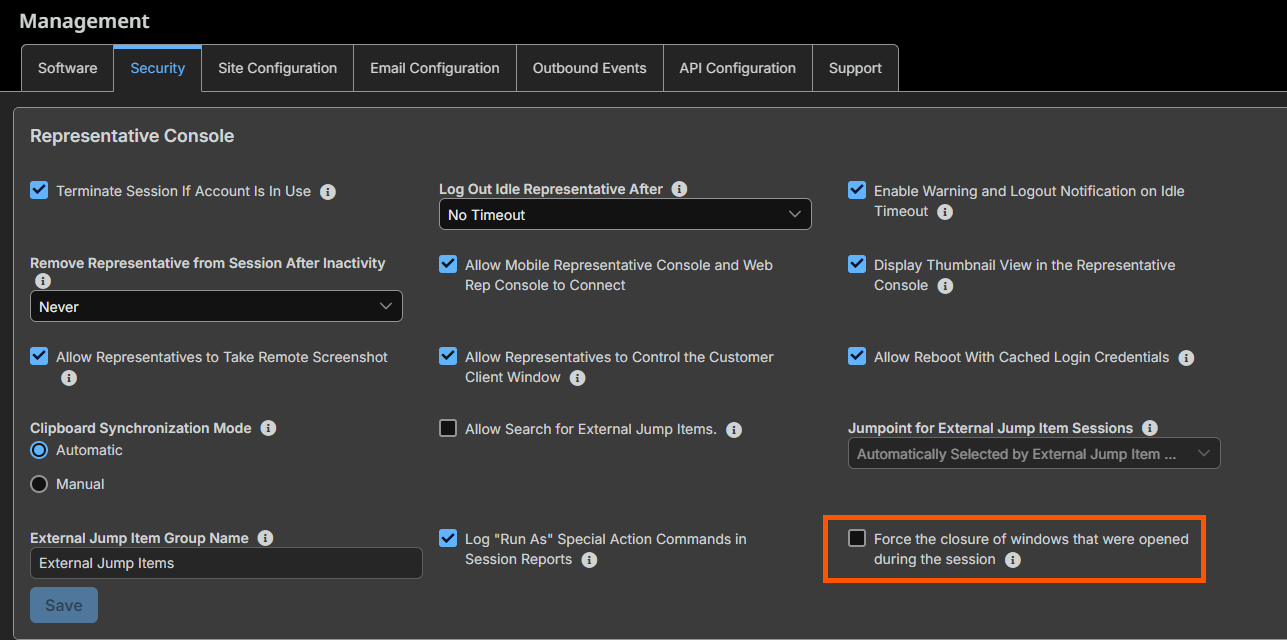
E.g.: Pathfinder - Management > Security > Representative Console
For more information, see:
🛠️ Issues resolved
| Product area | Description | Resolution |
|---|---|---|
| Reporting | Duplicate Jump Items report sometimes fails. | Resolved: Duplicate Jump Items report no longer fails. |
| API | Configuration API version updated to 1.11. | The session_forensics property was added to the RemoteRdpJumpItem schema. The rdp_service_account_id property was added to the Jumpoint schema. The platform_name, workgroup, password_safe_type, and system properties were added to the VaultPasswordSafeAccount schema. The perm_edit_group_policy_memberships property was added to the GroupPolicy schema. |
| Group Policies | License pools that are configured for a single Group Policy sometimes display a Session Policy name. | Resolve: License pools that are configured for a single Group Policy no longer display a Session Policy name. |
| Vault | Issue when creating RDP Jump Items from the Vault -> Endpoints -> Jump Items Link page. | Resolved: Issue no longer occurs. |
| Vault | Issue when moving an account from a Default Group to an Account Group that doesn’t have any users. | Resolved: Issue no longer occurs. |
| Vault | Unable to cancel Password Safe Discoveries once they are started. | Resolved: Password Safe discoveries can be canceled once started. |
| Pathfinder | API Docs page only displays in Dark Mode. | Resolved: API Docs page displays in Dark and Light Modes. |
| Pathfinder | When upgrading a Pathfinder site, some users are not able to login due to their account being marked as Disallowed. | Resolved: Users can now log in as expected. |
| Atlas | Public Label field is empty on Atlas traffic nodes. | Resolved: Public Label field is no longer empty on Atlas traffic nodes. |
| Text Updates | Custom Field Display name is sometimes blank. | Resolved: Custom Field Display name is no longer blank. |
| Text Updates | Escaped characters in the error message display when a Password Safe credential doesn’t have a schedule to be released. | Resolved: Escaped characters in the error message no longer display when a Password Safe credential doesn’t have a schedule to be released. |
| Text Updates | Grammar error in a VNC error message. | Resolved: corrected grammar error. |
| Text Updates | “//” is missing from “https://” in the Start Session window in the RepConsole. | Resolved: “//” no longer missing from “https://” in the Start Session window in the RepConsole. |
| Text Updates | Message vague when Remote Jumps fail. | Resolved: Now providing a more detailed message when Remote Jumps fail. |
| Text Updates | Message vague when Mid-Session elevation fails due to a Secondary Logon service. | Resolved: Improved error messaging displayed to users when Mid-Session elevation fails due to a Secondary Logon service. |
| Misc | Issue with iOS Configuration Profiles not being sorted alphabetically when viewed on an iOS device. | Resolved: iOS Configuration Profiles are now sorted alphabetically when viewed on an iOS device. |
| Misc | UI scaling issue with smaller display sizes causing some characters to overlap on the Reports page. | Resolved: Smaller display sizes no longer cause characters to overlap on the Reports page. |
| Misc | Uploading a Canned Script Resource File with character greater than the character limit causes the Upload button to not be displayed until the page is refreshed. | Resolved: Uploading a Canned Script Resource File with character greater than the character limit no longer causes the Upload button to not be displayed. |
| Misc | Connection Type removed from Jump Client Installers table. | Resolved: Added Connection Type back to the Jump Client Installers table. |
| Misc | Pressing Enter in a field while editing or creating a User causing the change to be cancelled. | Pressing Enter in a field while editing or creating a User no longer causes the change to be cancelled. |
| RepConsole | Vague wording for ‘Credential’ column in RepConsole. | Resolved: Updated the “Credential” column in the RepConsole to “Initiating Credential”. Updated the tooltip to reflect the change. |
| RepConsole | Control-Alt-Delete button is enabled when the Customer Client is not running in Service Mode. | Resolved: Control-Alt-Delete button no longer enabled when the Customer Client is not running in Service Mode. |
| RepConsole | Caps Lock not working when doing a session from Windows 11 to a Mac running macOS 15. | Resolved: Caps Lock working as expected. |
| RepConsole | Credential List takes a long time to load from Password Safe. | Resolved: Credential List no longer takes a long time to load from Password Safe. |
| WebRepConsole | WebRepConsole Shell Jump sessions not showing any characters when dead-keys are hit twice. | Resolved: WebRepConsole Shell Jump sessions now show characters when dead-keys are hit twice. |
| Virtual Smart Card | Filtering Smart Card certificates must conform with Microsoft standards. | Updated the method for filtering Smart Card certificates to conform with Microsoft standards. |
| Virtual Smart Card | Issue when pushing the Virtual Smart Card Customer service to a remote system that also had the Virtual Smart Card Representative service. | Resolved: Pushing the Virtual Smart Card Customer service to a remote system that also had the Virtual Smart Card Representative service works as expected. |
| Jump Client | Issue with overriding the Support Button profile and Support Button direct queue at install time. | Resolved: Issue no longer occurs. |
| Jump Client | Jump Client logs errors to the Windows Event Viewer if it cannot connect to the appliance for over an hour. | Resolved: Jump Client no longer logs errors to the Windows Event Viewer if it cannot connect to the appliance for over an hour. |
| Jump Client | No “auto” option available for the --startup command line option for Linux Jump Clients. | Resolved: Added an “auto” option to the --startup command line option for Linux Jump Clients. |
| Jumpoint | New Jumpoint Docker image required in Docker Hub. | Resolved: Jumpoint Docker image updated in Docker Hub. |
| Mac | Issue with the Option key + a number key not sent correctly in Command Shell sessions when Finnish language is used. | Resolved: Option key + a number key are sent correctly in Command Shell sessions when Finnish language is used. |
| Mac | Issue with Command + keypad numbers not been sent correctly through screen sharing to a Mac Customer Client. | Resolved: Command + keypad numbers are now sent correctly through screen sharing to a Mac Customer Client. |
| Mac | Issue when sending an extra Shift key stroke through screen sharing when using modifier keys with capital letters from Mac RepConsoles to Mac Customer Clients. | Resolved: Sending an extra Shift key stroke through screen sharing when using modifier keys with capital letters from Mac RepConsoles to Mac Customer Clients works as expected. |
| Mac | Issue with Screen Sharing sometimes displaying a black screen when the Customer Client was running on macOS 14. | Resolved: Screen Sharing no longer displaying a black screen when the Customer Client was running on macOS 14. |
| Linux | Issue with customer presence detection on Linux. | Resolved: Customer presence detection on Linux works as expected. |
| Linux | Issue spawning unnecessary processes from the Customer Client on newer Linux distributions. | Resolved: Unnecessary processes no longer spawning from the Customer Client on newer Linux distributions. |
| Linux | Issue with SELinux displaying a warning about the JumpClient after RedHat 9 systems were rebooted. | Resolved: SELinux no longer displaying a warning about the Jump Client after RedHat 9 systems were rebooted. |
📝 Requirements
- Requires Base 8.1.0
- Supports ECM Protocol 1.6
- Supports upgrades from 25.1.1 Remote Support+.
- Validated with ECM 1.6.2601
- Validated with Integration Client 25.1.1
- Includes VSC 1.2.10.2
Before upgrading, ensure any SSL certificates used are either from a trusted Certificate Authority, or, for self-signed certificates, the certificate is either trusted on all endpoints or explicitly included in their installation.
