
Site configuration | PRA Pathfinder
What is site configuration?
Site configuration allows administrators to manage settings for a BeyondTrust deployment, including the setup of public sites, access controls, and session management. It is crucial for tailoring the deployment to fit organizational needs.
How is site configuration useful?
Site configuration enables organizations to customize the BeyondTrust environment to meet specific requirements. It ensures that the right policies are applied to different sites and optimizes access management, user experience, and security settings across the system.
How do I access the Site Configuration page?
- Sign into app.beyondtrust.io.
The BeyondTrust Home page displays. - From the main menu, click Privileged Remote Access > Management.
The Management page opens and the Software tab displays by default. - Click the Site Configuration tab.
The Site Configuration tab displays.
The Site Configuration page
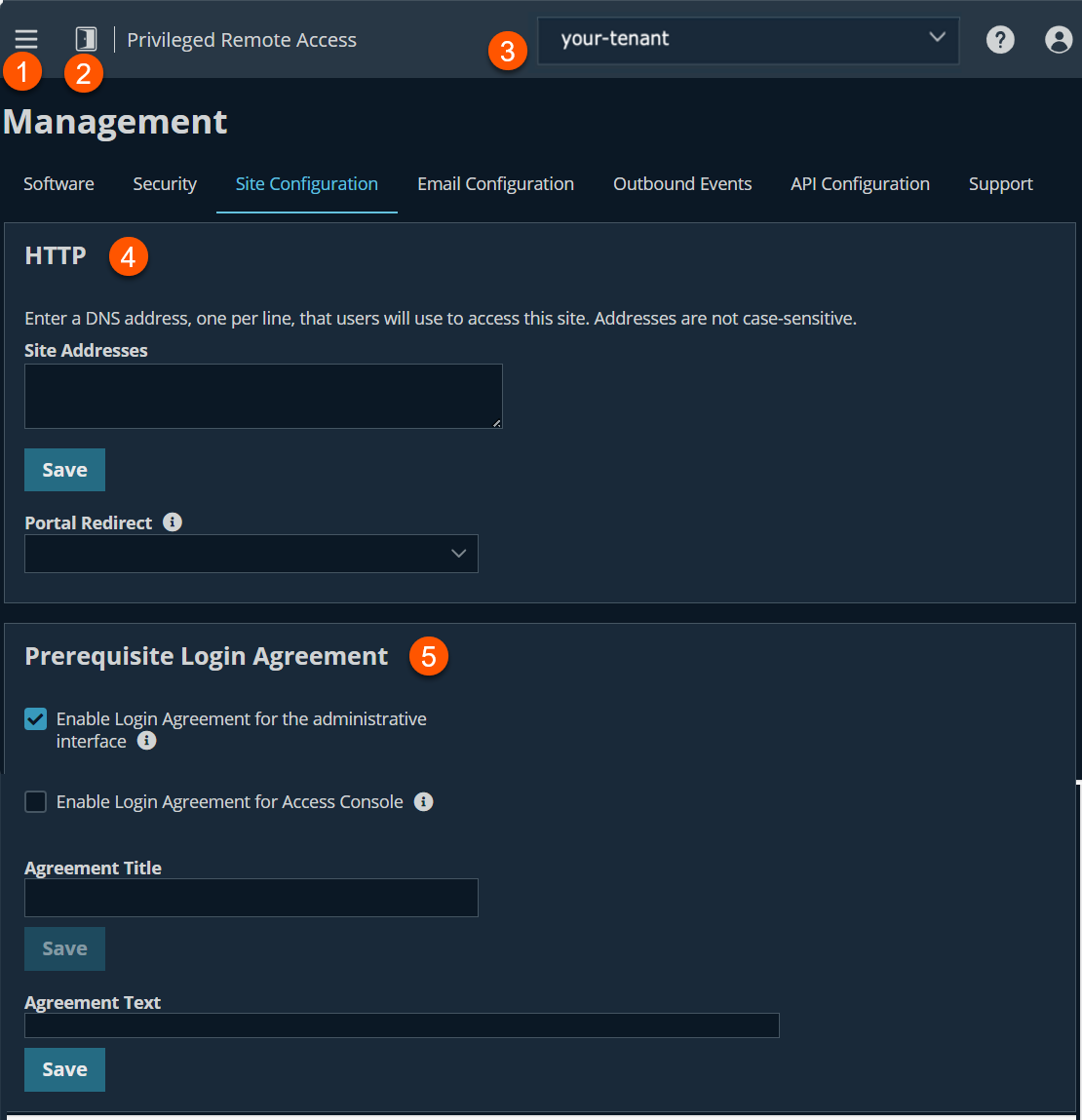
- Left menu: Easy access to all pages in Privilege Remote Access, including Status, Consoles & Downloads, My Account, Configuration, Jump, Vault, Console Settings, Users & Security, Reports, Management, and Appliance pages.
- Status: Opens the Status page.
- Header: Change your tenant site, manage your profile, and access documentation.
-
HTTP: Sets site addresses for your appliance.
-
Prerequisite Login Agreement: Customize the login agreement.
HTTP
- Sign into app.beyondtrust.io.
The BeyondTrust Home page displays. - From the main menu, click Privileged Remote Access > Management.
The Management page opens and the Software tab displays by default. - Click the Site Configuration tab.
The Site Configuration tab displays. - For Site Addresses, enter one or more DNS addresses that resolve to your Appliance.
- For Portal Redirect, this setting controls what happens if a user navigates to the site index. By default, Redirect to /login is selected. Users who enter the portal address are automatically redirected to the Admin (/login) interface. The other two options are the following:
- Redirect to the Privileged Web Access Console
- No Redirect
- Click Save.
HTTP port and HTTPS port
Experienced network technicians operating in non-standard network environments can change the ports through which BeyondTrust traffics. These port settings should be adjusted only in the case where ports other than the standard 80 and 443 are used for web access.
This feature is available only to customers who own an on-premises B Series Appliance. BeyondTrust Cloud customers do not have access to this feature.
Prerequisite Login Agreement
Enable login agreement for the administrative interface
This setting displays an agreement that the user must accept before they can login into the web portal.
Enable Login Agreement for Access Console
This setting displays an agreement that the user must accept before they can login into the Access Console.
Agreement title
This setting allows you to customize the title of the agreement.
Agreement text
This setting allows you to provide the text for the login agreement.
Updated 9 months ago
