
B Series Appliance on-premises security | PRA On-prem
What is security in the B Series Appliance?
Security in the BeyondTrust Appliance B Series encompasses a range of features and integrations designed to protect remote access sessions while maintaining productivity. The B Series Appliance provides secure remote access to computers over the internet or local networks, offering exceptional performance, reliability, ease-of-use, and scalability. BeyondTrust Secure Remote Access ensures that users can view and control systems remotely, as if physically present, through a solution optimized for secure remote access.
How is it useful to my organization?
Security in the B Series Appliance safeguards remote access sessions by integrating with external user directories, such as LDAP, for secure user management and by preventing sensitive data from being routed outside the organization. Logging is performed directly on the B Series Appliance, enabling organizations to review all endpoint and user interactions, including video playback of desktop screen activity. Extensive auditing and recording help organizations maintain compliance and accountability.
Secure Remote Access also supports multiple operating systems, including Windows, Mac, Linux distributions, and mobile platforms, allowing secure control of laptops, desktops, servers, kiosks, point-of-sale systems, smartphones, and network devices. The solution works seamlessly over internal and extended networks or as an internet-accessible tool, mediating connections between users and remote systems while enabling chat sessions, file transfers, and access to system information and diagnostics.
By integrating with leading systems management and identity management solutions, and through its robust API, Secure Remote Access supports deeper customization. Managers can create teams, customize queues, and generate reports on all session activity, ensuring secure operations across diverse environments.
Architecture
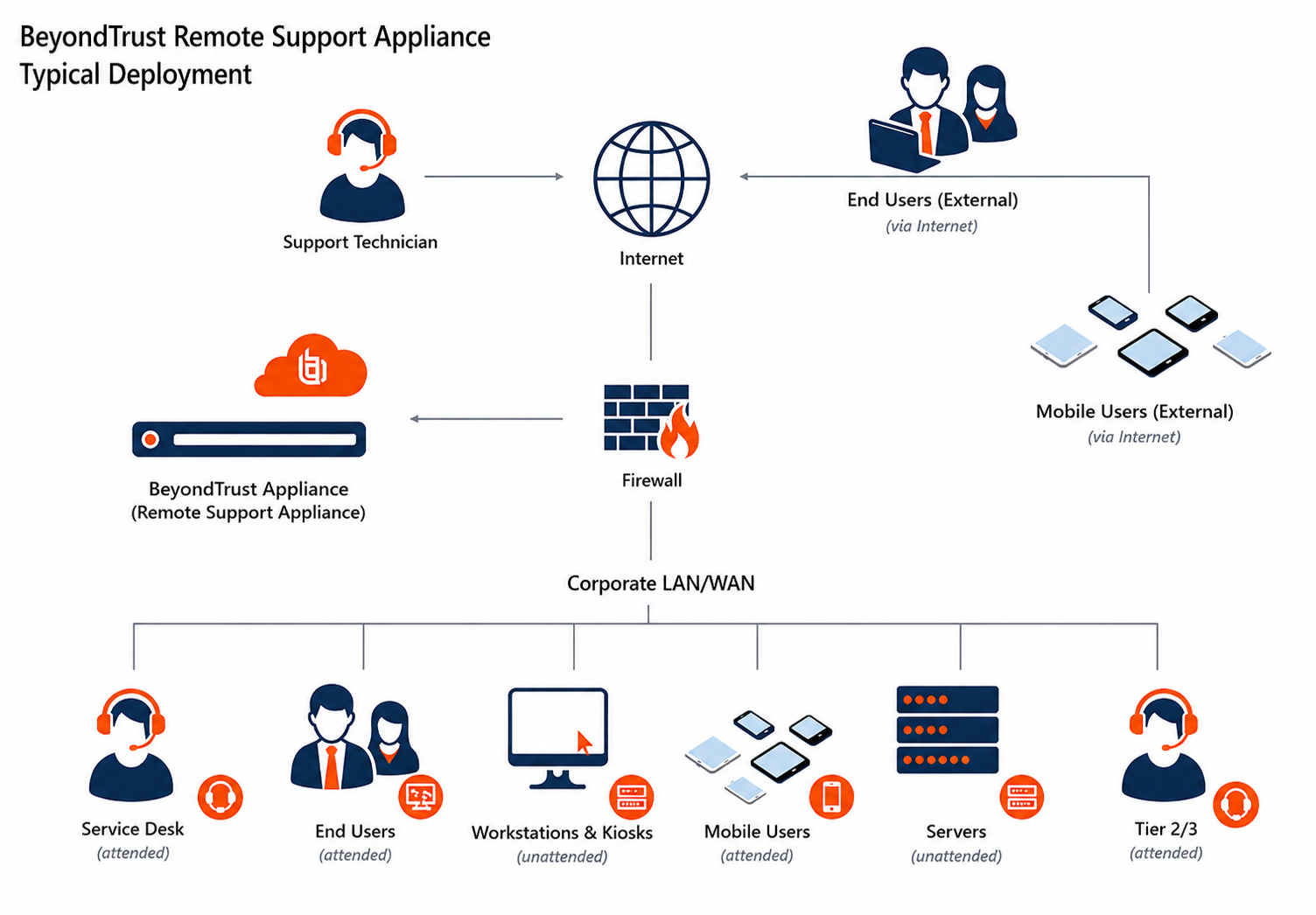
To make secure remote access possible, the BeyondTrust Secure Remote Access architecture places the B Series Appliance as the focal point of all communications. The B Series Appliance provides interface using Hypertext Transfer Protocol (HTTP) for unauthenticated services, Secure HTTP (HTTPS) for authenticated services, and direct client connections accepted over a proprietary, BeyondTrust-defined protocol.
The B Series Appliance is comprised of two main components. The first, called Base, is made up of the firmware that provides system-level configuration of a B Series Appliance. Settings such as IP addresses and security certificate configurations are all configured via the Base firmware, which is accessed via the /appliance web interface.
The software used for site-level configuration, accessed via the /login web interface, makes up the second functional component. The user configuration and session options take place behind the /login page, and you can download the console, endpoint client, Jump Clients, Gateways, and security provider connection agents from there. Sessions always occur through the B Series Appliance, and since the connections are outbound from the clients to the B Series Appliance using well known ports, the application can communicate without local firewall changes.
Validation
To ensure the security and value of our product, BeyondTrust incorporates vulnerability scanning in our software testing process. We track the results of vulnerability scans performed prior to a software release and prioritize resolution based on severity and criticality of any issues uncovered. Should a critical or high-risk vulnerability surface after a software release, a subsequent maintenance release addresses the vulnerability. Updated maintenance versions are distributed to our customers via the update manager interface within the Secure Remote Access administrative interface. When necessary, BeyondTrust Technical Support contacts customers directly, describing special procedures to follow to obtain an updated maintenance version.
In addition to internal scanning procedures, BeyondTrust contracts with third-parties for a source code level review as well as penetration testing. The source code review conducted essentially provides validation from a third party that coding best practices are followed and that proper controls are in place to protect against known vulnerabilities. A penetration test is conducted to confirm the findings.
Authentication
Secure Remote Access can be provisioned for locally defined user Secure Remote Access accounts or can be integrated into existing authentication sources. For instance, a commonly integrated authentication source is Microsoft Active Directory. When using a directory such as this, all authentication follows the existing controls and processes in place for safeguarding user accounts.
Additional security providers are available that allow for user authentication using Kerberos or SAML (for single sign-on) or using RADIUS (for multi-factor authentication). Each of these providers can be configured to use LDAP groups to set the permissions for the user, allowing you to map existing LDAP groups to teams in Secure Remote Access.
There are a large number of granular permissions that can be granted to users. These permissions determine which features in Secure Remote Access a user has access to.
Credential management
BeyondTrust Secure Remote Access can be integrated with an Endpoint Credential Manager (ECM) to improve password security for privileged users and vendors.
An ECM functions as the middleware for communication, and the ECM can be used to integrate Secure Remote Access with password vaults.
Credential injection is a built-in feature of Secure Remote Access. It allows administrators and privileged users to seamlessly inject credentials into systems without exposing plain text passwords, and this feature can also be used with third-party vault tools.
Credential management with BeyondTrust Vault
BeyondTrust Vault is a credential store that exists on the B Series Appliance, enabling discovery of and access to privileged credentials. You can manually add privileged credentials, or you can use the built-in discovery tool to scan and import Active Directory and local accounts into BeyondTrust Vault.
BeyondTrust Vault fits seamlessly with service desk workflow because it is integrated directly with the Secure Remote Access solution. Technicians do not have to learn to use another tool or even exit Secure Remote Access to retrieve passwords. With just one click in the BeyondTrust console, users can select the correct credential from the dropdown and log directly in to a remote system - without ever having to know or even see the actual password.
For information about the BeyondTrust Vault credential management solution, see Vault FAQs.
Encryption and ports
BeyondTrust Secure Remote Access can be configured such that it enforces the use of SSL for every connection made to the B Series Appliance. Secure Remote Access requires that the SSL certificate being used to encrypt the transport is valid.
Secure Remote Access can natively generate certificate signing requests. It also supports importing certificates generated off the B Series Appliance. Configuration options also are available to disable the use of SSLv3, TLSv1, and/or TLSv1.1. BeyondTrust always has TLSv1.2 enabled to ensure proper operation of the B Series Appliance. Available cipher suites can be enabled or disabled and reordered as needed to meet the needs of your organization.
The BeyondTrust software itself is uniquely built for each customer. As part of the build, an encrypted license file is generated that contains the site Domain Name System (DNS) name and the SSL certificate, which is used by the respective Secure Remote Access client to validate the connection that is made to the B Series Appliance.
The chart below highlights the required ports and the optional ports. Note that there is minimal port exposure of the B Series Appliance. This drastically reduces the potential exposed attack surface of the B Series Appliance.
