BeyondInsight and Password Safe 25.3.0 release notes
December 11, 2025
For a list of supported platforms for the latest version of BeyondInsight and Password safe, see Supported Platforms.
Supported Platforms for previous versions of BeyondInsight and Password Safe can be found in the BeyondInsight, Password Safe, and U-Series Appliance Documentation Archive.
🆕 New features
Two new roles for Auditor
We’ve enhanced the Auditor role with greater precision by introducing two specialized roles: Auditor-Sessions and Auditor-Reports. These new roles provide focused access and improved control, empowering teams to manage session data and reporting.

For more information, see Role based access.
TOTP for managed accounts
With more apps requiring multi-factor authentication (MFA), Password Safe now makes it easy. We support Time-based One-Time Passwords (TOTP) for Managed Accounts, so when you check out an account, using the built-in generated TOTP codes makes secure access simple.
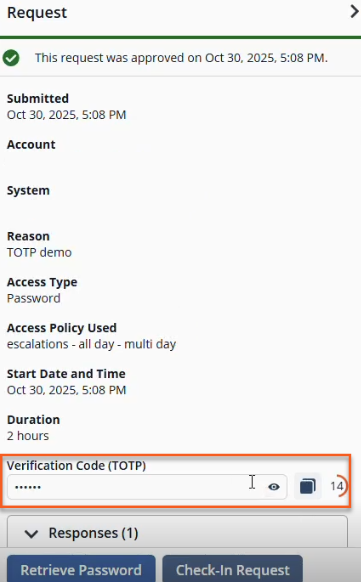
For more information, see Two-Factor Authentication Using TOTP.
Move Secrets and Folders
In previous versions, Secrets were constrained to their Safes by the UI. You can now move Secrets freely within the same Safe or across multiple Safes which gives you more control, improved organization, and streamlined management.
For more information, see Secrets Safe.
IPv6 support for Password Safe
Password Safe now fully supports IPv6-enabled environments, meeting Federal and DoD compliance requirements. Core functions include asset discovery, scanning, session management, credential rotation, and IP-based integrations which can operate seamlessly with IPv6 addresses, ensuring secure and reliable performance in modern network infrastructures.
Use of Security Identifier to improve account identification precision in reports
Password Safe reports for service accounts, IIS application pools, and scheduled tasks now leverage the Security Identifier (SID) of the user account when available, ensuring greater precision in account identification.
Automatic upgrade of BeyondTrust Discovery Agents to use OAuth
Starting with BeyondInsight 25.3.0, agents that currently use certificate-based authentication are automatically and silently upgraded to use OAuth authentication for communication. This change enhances security and simplifies future authentication management.
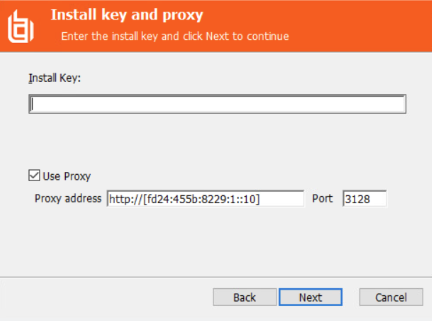
Resource Broker proxy auto detected
No more manual steps. Proxy settings are now detected automatically, saving you time and simplifying your configuration process.
For more information, see Resource broker.
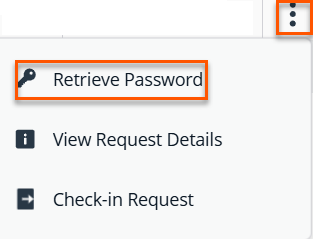
Initiate Secure Sessions with Enhanced Requestor Workflow
Launching a session or retrieving a password is now faster and easier. Previously, you had to open the request details panel. Now you can do it instantly without that extra step.
For more information, see Requests tab.
Password change notifications for managed accounts
Administrators now get an extra layer of assurance with a confirmation dialog when changing passwords. This applies to both Managed Accounts and the Managed System Advanced Details view. This helps prevent mistakes and keep your environment secure.
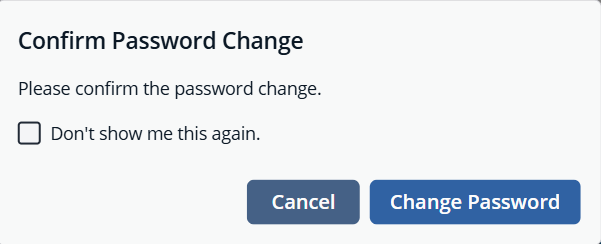
For more information, see Managed Accounts.
Updated Smart Rules filtering
We’ve improved Smart Rule management by adding inline warnings whenever you modify the criteria for a child Smart Rule. This is only attended for a very limited set of criteria and ones that have the highest impacts if misconfigured. This helps prevent misconfigurations and keeps your rules working as intended.
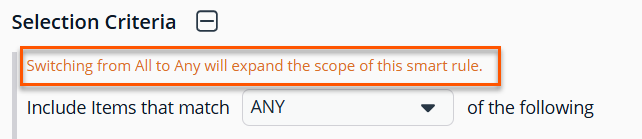
For more information, see Smart rules filtering.
Control Visibility of Show Password Button
We’ve improved our login experience with a new option for administrators to enable or disable the Show Password button. When enabled, users can view what they are typing in the password field as they type it.
For more information, see Configuration: System settings.
Improved Filtering for Pending Approvals with Future-Dated Requests
We’ve streamlined the approvals experience to make it easier to manage pending and future-dated requests:
-
The Request Date filter now includes expanded options, with a default range of Last 7 to Next 7 days for quick access to relevant requests.
-
A new Request Submitted column shows when each request was initiated.
-
The Request Date column is now labeled Request Start Date and the Requested On field is now labeled to Request Submitted On for greater accuracy.
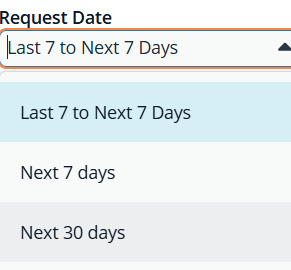
For more information, see Approvals tab.
Custom ports for LDAP Functional Accounts
You can now specify a custom port for both new and existing LDAP Functional Accounts.
For more information, see Configuring custom ports.
Attribute enhancements
We’ve introduced several improvements to make managing attributes easier and more intuitive:
-
Simplified Attribute Control: Previously, attributes could only be assigned or unassigned through Smart Rules. Now, the new Unassign Attribute button gives you direct control—no extra steps required.
-
Helpful Guidance Built-In: An informational message appears to the Attributes configuration page for managed accounts and assets, complete with a link to the relevant configuration page for quick access to details.
-
Streamlined Navigation: The Details & Attributes (current data) tab is now simply Details (current data) reflecting its updated scope.
-
Improved Attribute Organization: Custom attributes have moved! They no longer appear in the Details tab within the Advanced Details panel. Instead, you’ll find them in the new Attributes section, where they’re easier to access and edit.
-
Faster Data Management: Two new columns, Attribute Name and Attribute Type, have been added to the table. Both support filtering, so you can find what you need faster.
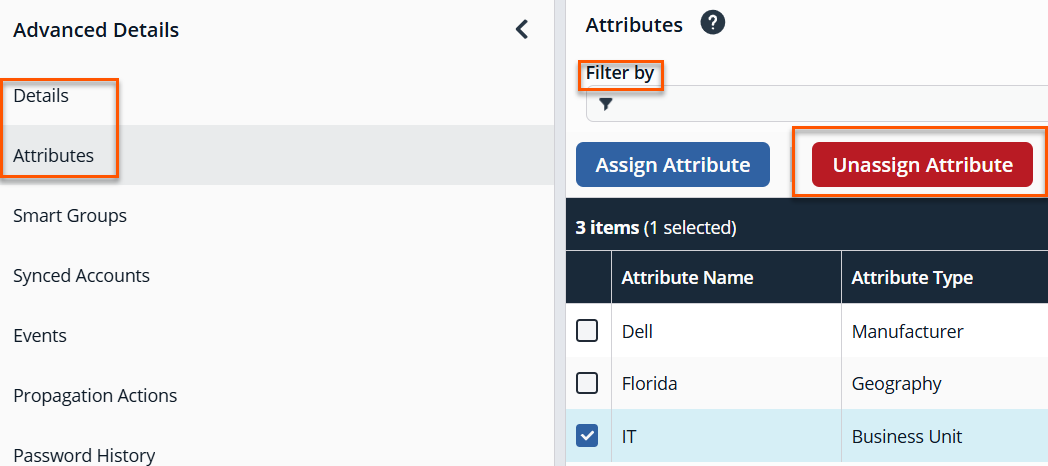
For more information, see Assets and Managed Accounts.
Directory attributes
> 🛑
The Directory Attributes feature is only available for cloud and on-premises versions.
Smarter Directory Integration: If your account uses synced directory attributes, you’ll now see them instantly when you click Directory Attributes in the Account Settings panel. If not, a clear message displays: Directory Attributes have not been set up for this account.
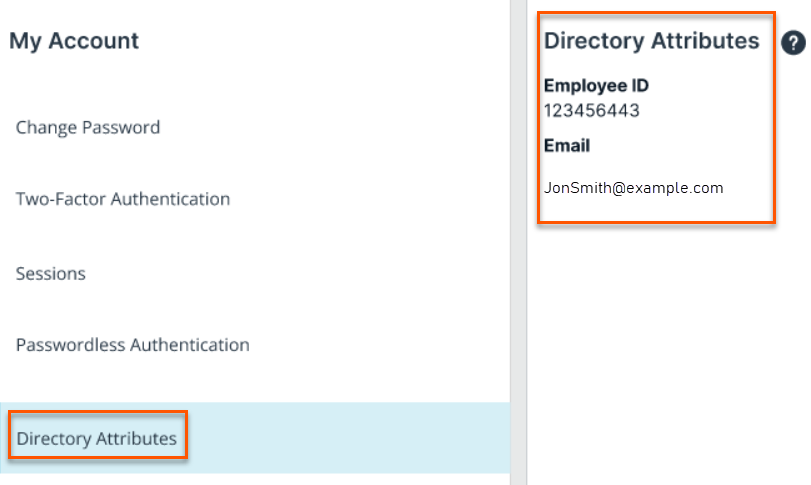
For more information, see Directory attributes.
Updates to Secrets UI
The Secrets User Interface (UI) just got smarter with powerful new enhancements:
- Hyperlinked URL column in the Secrets table for easier navigation
- Advanced path filter search within Secrets Safe for faster, more precise results
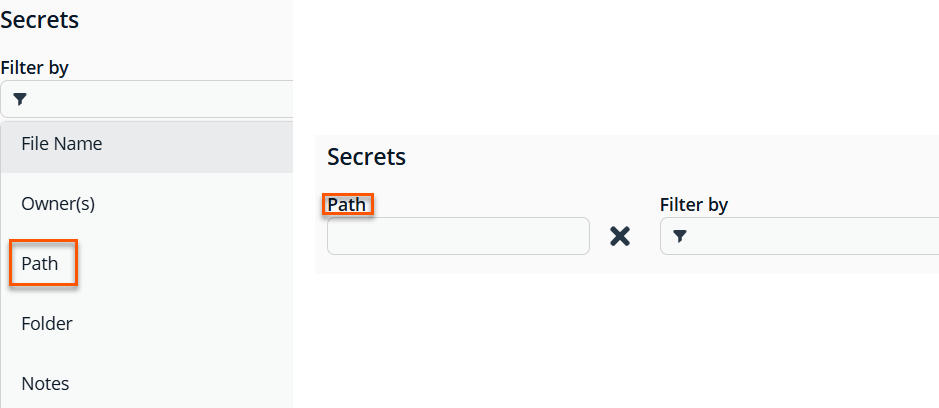
For more information, see Secrets Safe.
New Cloud Reports and Improved Password Safe Update Activity
Gain deeper insights into account management with the Managed vs. Unmanaged Account Details and Managed Account Onboarding Details reports, now available in Password Safe Analytics and Reporting for Cloud deployments. Previously exclusive to on-premises, the Managed vs. Unmanaged Account Details report helps you quickly identify unmanaged accounts and strengthen your security posture and the Managed Account Onboarding Details report lists Managed Accounts in Password Safe along with information about their onboarding.
The Password Safe Update Activity report now includes the following new columns: Asset OS, Managed System Platform, Failed, and Reason.
For more information, see Analytics & Reporting.
✨ Enhancements
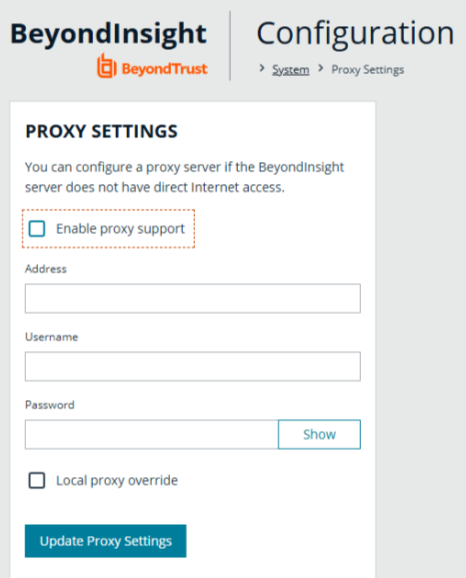
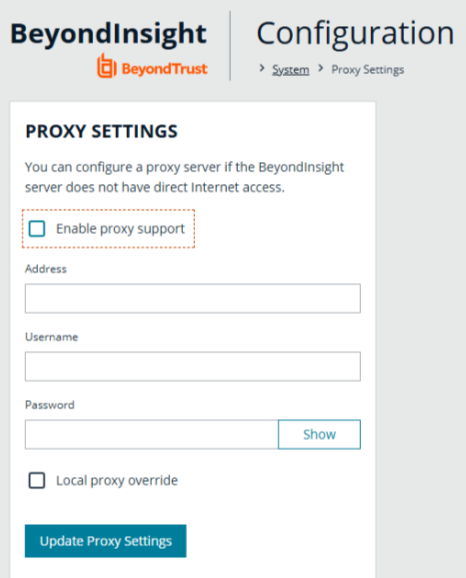
Remove Proxy Configuration settings (On-premises only)
Proxy configuration settings are now removed. You can configure proxy settings on the U-Series appliance.
Workforce Passwords updated to latest design specifications
We’ve given the Workforce Passwords UI a fresh new look! It gives you a more consistent, modern, and accessible experience. It ensures the interface aligns with the rest of the product, making it easier to navigate, more intuitive to use, and better suited for accessibility standards.
Autofill Credentials
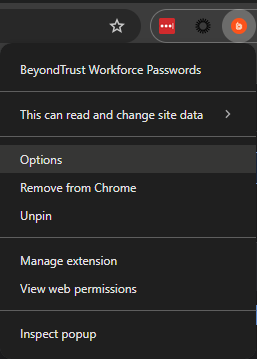
Administrators can now configure whether autofill and client-side selection of autofill option are possible.
- In Chrome: Right-click on the browser extension and select Options.
- In Firefox: Right-click on the browser extension, select Managed Extensions, and select the Options tab.
- In Edge: Right-click on the browser extension and select in Extension Options.
Chrome example:
For more information, see Workforce Passwords user guide for PS Cloud.
New Autofill pop-up
Heads up! We’ve added a quick pop-up to let you know that autofill is now turned off by default. Don’t worry, you’re still in control. Workforce Passwords 25.3.0.1 introduces a brand-new setting that lets you choose whether login info autofills when pages load. Want it back on? Just go to your browser extension’s Options menu (if your admin gives the thumbs-up) and flip the switch!
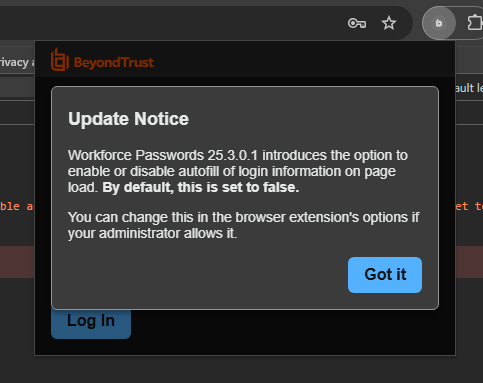
For more information, see Workforce Passwords user guide for PS Cloud.
Generate a password when creating a credential
We’ve made setting passwords simpler and smarter! Our new Set Password header includes a handy toggle that lets you choose between Manual Input or Auto Generate. Want a secure password fast? Switch to Auto Generate, pick a Password Policy, and click Generate Password to instantly create a password that meets your organization’s rules. You can even tweak it afterward if you’d like! If no password policies are enabled, no worries. You can still set one manually. Simple, flexible, and secure!
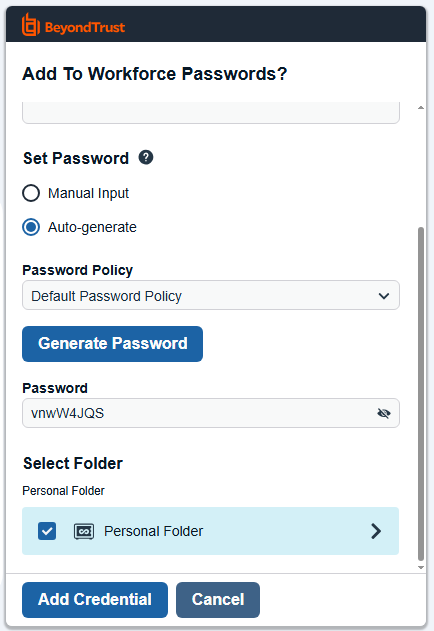
For more information, see Workforce Passwords user guide.
Scan processing options (On-premises only)
We’ve introduced improved performance and scalability of scan data processing through architectural changes.
- Scan Processing Service
As part of this upgrade, the Scan and Agent Event Processing options dialog box has been removed.
For more information, see Scan processing services.
Public API backend migrated
The Public API backend has been migrated to a modern .NET service. As part of this upgrade, the platform now applies stricter validation and enforcement of the published API contract.
All documented API behaviors remain supported; however, scripts or integrations that depend on undocumented or previously lenient behavior (that is, permissive URL parsing, implicit type coercion, or reliance on specific error text) may encounter new errors.
We recommend reviewing any custom automation or integrations to ensure they comply with the documented API contract.
Managed accounts without credentials excluded from requestable results
The GET ManagedAccounts API endpoint no longer returns managed accounts that do not have an associated credential when querying for requestable accounts. Previously, accounts onboarded through Smart Rules (for example, from scan data or directory queries) that were not configured for automatic management or rotation could appear as requestable. Attempting to request a password or initiate a session against these accounts resulted in an error and generated excessive log entries when Password Cache was configured to cache those accounts.
This behavior change applies to all type parameter values that return requestable accounts, including system, database, cloud, domainlinked, application, and recent.
🛠️ Issues resolved
| Product Area | Description | Resolution |
|---|---|---|
| Authentication | In certain SAML configurations, existing integrity protections did not have adequate coverage. | Strengthened validation in the SAML-based authentication workflow. |
| Groups | Users who sign in to Pathfinder with a standard Pathfinder account may be removed from Password Safe Cloud groups if the Identity Provider does not have a domain defined and the user chooses to continue with a local account instead of authenticating through the appropriate provider. | The system no longer removes standard users from Password Safe Cloud under this circumstance. |
| API | Password Safe API Managed Systems/Targets occasionally returned unexpected results. | The endpoint has been updated to ensure the filtering is consistent with other APIs. |
| API | If you create a user through the SCIM API in Password Safe, TOTP two-factor authentication status of the new user does not respect the value of the Enable TOTP setting configured in the system. | SCIM accounts created via the API now adhere to TOTP settings for Local Accounts. SCIM accounts that were created via API may need to be manually updated to enforce use of TOTP. |
| API | Password Safe API Managed Systems/Targets occasionally returned unexpected results if the Smart Rule used in the filter is configured with an Asset Smart Rule criteria. | The endpoint has been updated to ensure the filtering by Asset Smart Group works regardless of the configuration details of the Asset Smart Rule being used in the filter. |
| API | When you add an Active Directory user via the API and the Disable forms login for new directory accounts checkbox is selected, the user setting is not disabled. | The Disable forms login for new directory accounts checkbox works as expected for new Active Directory users created from the API. |
| Password Safe | There is a performance at large scales with Password Safe Portal - Approvals on the grid, as well as when using the Directory and Location filters. | The performance of the Approvals grid, as well as that of the Directory and Location filters, has been improved significantly. |
| Password Safe | Failed functional account password changes are not triggering notification emails for Domain Functional Accounts. | Functional account notifications for Domain Functional Accounts now work as expected. |
| Password Safe | There is a performance issue at large scales with the Password Safe Portal - Completed Sessions grid. | The performance of the Completed Session grid has been improved significantly. |
| Password Safe | An unexpected error stating the Form is stale. may be shown when you create or update a connector with type SNMP, and you click Create Connector or Update Connector. | The Connectors page has been updated to ensure that this error no longer occurs. |
| Password Safe | While a timeout for Managed System Password Rotation exists, built-in Password Services Plugins were not always respecting this value, resulting in long wait times and bloated password change queues. | Built-in Password Services Plugins now respect the configured timeout for Managed System Password Rotations, resulting in less wait times and password change queues that are processed more quickly. As a result, depending on the configured timeout length, some systems that take a long time to respond may timeout instead of rotating. If this is occurring, we recommend increasing the Connection Timeout on the affected Managed System(s). |
| Secrets Safe | Under some circumstances, the All Secrets Folder does not show every single secret that the user has access to. | The All Secrets Folder now shows every single secret that the user has access to. |
| SSH | SSH connections fail for the login account when you use a DSS key for authentication. | SSH connections now succeed when you use a DSS key for login account authentication. |
| SSH | When testing or changing the password for a managed account using the built-in Palo Alto platform, the SSH session is not exiting even after success, staying open until it expires and blocking future changes. | The built-in Palo Alto platform has been updated to exit after a successful test or change. |
| Services | When you click Apply in the BeyondTrust Configuration Tool may result in some services not starting correctly, in environments where the Appliance Management Software is at 4.4.x or newer. | When you click Apply in the BeyondTrust Configuration Tool, it now starts the appropriate services as expected. |
| Reports | There is a performance issue at large scales with the Inactive Managed Accounts report. | Made improvements to the Inactive Managed Accounts report, greatly reducing the time it takes to run with large scale datasets. |
| Smart Rules | In some cases, Asset based Smart Rules with an Asset Platform filter criteria, take a long time to process. | Performance of processing Asset Smart Rules with an Asset Platform filter criteria has been improved. |
| Smart Rules | In some cases, Asset based onboarding Smart Rules, take a long time to process if there are a lot of Assets included in the criteria. | Improved the performance of processing Asset onboarding Smart Rules. |
| Smart Rules | Smart Rule Options, not applicable for PS Cloud instances, were still appearing in those environments. | The options have been removed from the PS Cloud Configuration area. They still remain accessible via Configuration for any on-premises customers. |
| Policy User Smart Rules | While a Smart Rule that assigns Endpoint Privilege Management policy(ies) is processing, new and updated policies cannot be uploaded using the Privileged Management Policy Editor (MMC). The issue does not occur when using the Web Policy Editor to undertake the same policy changes. | New or updated policies can now be uploaded using the Privileged Management Policy Editor (MMC) even if a Smart Rule that assigns Endpoint Privilege Management policy(ies) is processing simultaneously. |
| Smart Rules | While a linking Smart Rule that links to all Managed Systems is processing, the User may not be able to load the Request Details panel. | The Request Details panel can now be loaded even while a linking Smart Rule that links to all Managed Systems is processing. |
| Omni Worker | A large backlog in the Event Forwarding queue can cause the service to stall. | The event forwarding logic has been updated to avoid the stall condition even when the backlog is very large. |
| BeyondInsight Configuration → Support → Purging Options (On-premises only) | If configured, when Database Index Maintenance runs, it generates a permission related error message instead of completing successfully. | This has been resolved where the BeyondInsight database is on the appliance, and instructional messaging has been put in the user interface if the BeyondInsight database is remote. |
| Scan Processing | Local user account names (Windows and Linux) are not updating correctly in the user account database after scans. This primarily affects version 24.3 (Cloud only). | Implemented a case-sensitive check for username changes and included the username property if a change was detected, which was merged into the Scan Processing service. |
📝 Requirements
- Direct upgrades to 25.3.0 are supported from BeyondInsight versions 23.3 or later releases.
- BeyondInsight 25.3.0 supports SQL Server 2016 SP2 or higher.
🗒️Notes
- This release is available by download for BeyondTrust customers (https://beyondtrustcorp.service-now.com/csm) and by using the BeyondTrust BT Updater.
- The SHA-256 signature is : 2f741f62ae25b8972829ab4b496a7799238a14f4ee9f026e1732d58f1d5156ea
- The SHA-1 signature is: ea1b33bfce88a65045a880f0eb79593bcb790041
- The MD5 signature is: c7ca2e1cd31309bd231f66965875ed94
⏰ Deprecation notices
Endpoint Privilege Management File Integrity Monitoring and Session Monitoring
The Endpoint Privilege Management File Integrity monitoring (FIM) and Session Monitoring features are no longer available, and events are no longer generated. You can view them if you have a long retention policy.
Data related to Endpoint Privilege Management File Integrity Monitoring and Session Monitoring from the Analytics & Reporting Pivot Grid will be removed in an upcoming release. If you have custom reports that use these data points, please review them. You can either stop using those reports or update them to use other available data points if needed.
Proxy configuration settings moved from BeyondInsight/Password Safe to U-Series (On-premises only)
The configuration of proxy settings is now centralized in the U-Series management software, therefore, this configuration interface has been removed from BeyondInsight/Password Safe. All previously entered proxy information is intact and can be edited from within the U-Series management software.