
Jump Items | PRA Pathfinder
What are Jump Items?
Jump Items are individual systems or devices that are made available for remote access within a Jump Group, enabling administrators to organize and control access to remote systems in a secure manner.
How are Jump Items useful to my organization?
Jump Items allow support users to securely access and troubleshoot remote systems, ensuring efficient issue resolution while maintaining control over which systems can be accessed and when. Create Jump Shortcuts to start standard support sessions, web jump shortcuts, VNC sessions, and Remote Desktop Protocol sessions, or to Shell Jump to SSH-enabled or Telnet-enabled network devices.
How do I access the Jump Items page?
-
Sign into app.beyondtrust.io.
The BeyondTrust Home page displays. -
From the main menu, click Privileged Remote Access > Jump.
The Jump page opens and the Jump Clients tab displays by default. -
Click the Jump Items.
The Jump Items page displays.
The Jump Items page
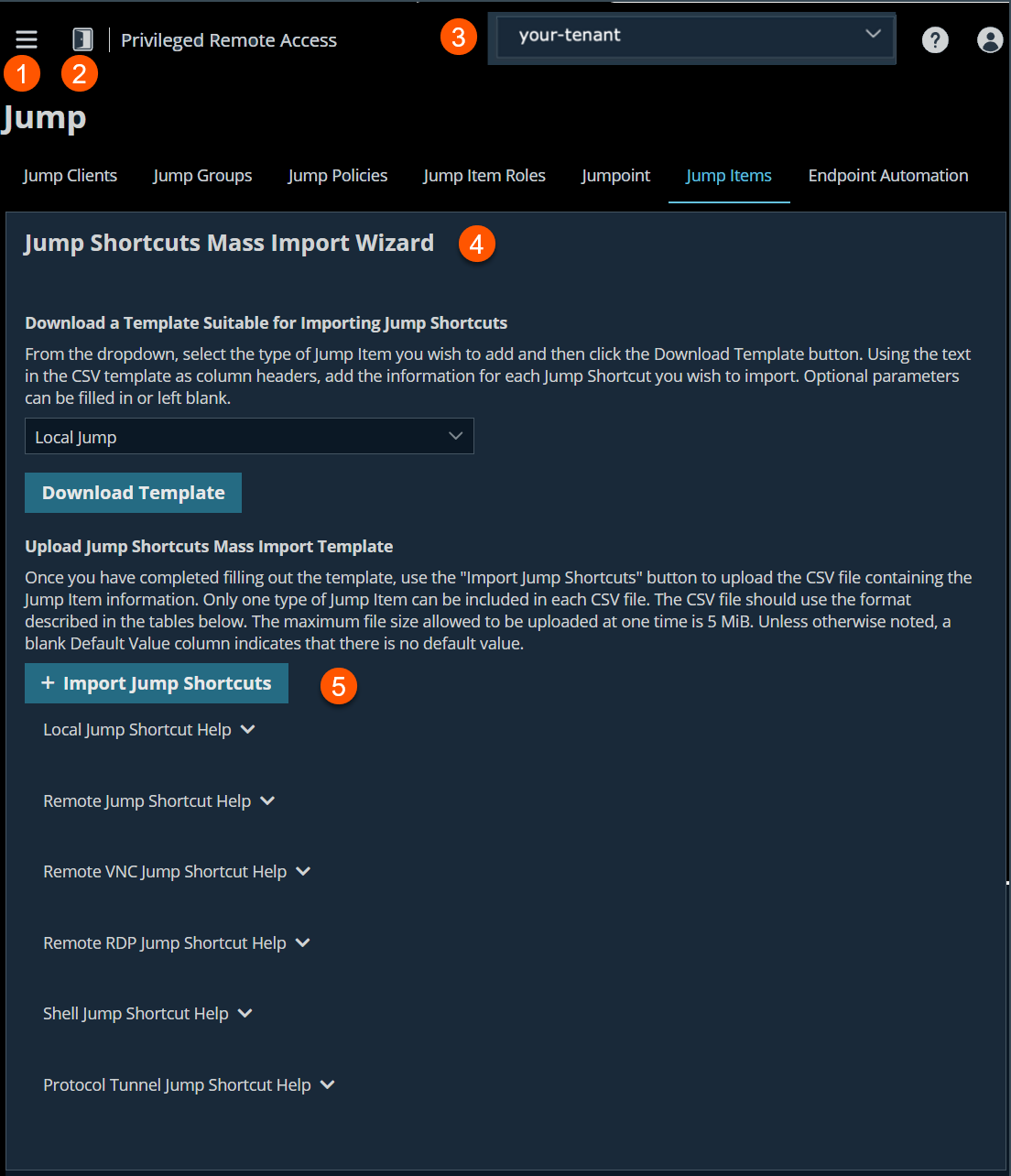
- Left menu: Easy access to all pages in Privilege Remote Access, including Status, Consoles & Downloads, My Account, Configuration, Jump, Vault, Console Settings, Users & Security, Reports, Management, and Appliance pages.
- Status: Opens the Status page.
- Header: Change your tenant site, manage your profile, and access documentation.
- Mass Import Wizard: Downloads a template for specified Jump Items.
- .Configuration Help: Parameter values on the different types of Jump Items.
Jump Shortcuts Mass Import Wizard
You can use the Jump Shortcuts Mass Import Wizard to create Jump Shortcuts for anyone of the following sessions:
- Local Jump
- Remote Jump
- Remote VNC
- Remote RDP
- Shell Jump
- Protocol Tunnel Jump
- Web Jump
Important informationLinux Jumpoints can only be used for RDP, SSH/Telnet, and VNC sessions. Linux Jumpoints do allow for credential injection from user or Vault, as well as RemoteApp functionality and Shell Jump filtering. Clustered Jumpoints can only add new nodes of the same operating system.
You cannot mix Windows and Linux nodes.
When you create a large number of Jump shortcuts, it may be easier to import them via a spreadsheet than to add them one by one in the representative console.
Download a template suitable for importing Jump Shortcuts
To do this, use the templates via the Jump Shortcuts Mass Import Wizard and follow these steps:
- From the Download a Template Suitable for Importing Jump Shortcuts section, click the dropdown and select the type of Jump Item you wish to add.
- Click Download Template.
A comma-separated file (*.csv) is downloaded. - Use the text in the CSV template as column headers and add the information for each Jump shortcut you wish to import. Optional fields can be filled in or left blank.
Import Jump Shortcuts
Once you have completed filling out the template, click Import Jump Shortcuts to upload the CSV file containing the Jump Item information. The CSV file should use the format described in the tables below.
The maximum file sized allowed to be uploaded at one time is 5 megabytes (MB). Only one type of Jump Item can be included in each CSV file.
Jump Shortcut Help
Local Jump Shortcut help
| Parameter | API Value | Required | Default Value | Description |
|---|---|---|---|---|
| Hostname | local_jump_hostname | Yes | The hostname of the endpoint to be accessed by this Jump Item. This string has a maximum of 128 characters. | |
| Name | name | Yes | The name of the endpoint to be accessed by this Jump Item. This string has a maximum of 128 characters. | |
| Jump Group | group | Yes | The code name of the Jump Group with which this Jump Item should be associated. | |
| Tag | tag | No | You can organize your Jump Items into categories by adding a tag. This string has a maximum of 64 characters. | |
| Comments | comments | No | You can add comments to your Jump Items. This string has a maximum of 1024 characters. | |
| Jump Policy | jump_policy | No | The code name of a Jump Policy. You can specify a Jump Policy to manage access to this Jump Item. | |
| Session Policy | session_policy | No | The code name of a Session Policy. You can specify a Session Policy to manage the permissions available on this Jump Item. | |
| Endpoint Agreement Policy | endpoint_agreement_policy | No | no_prompt | The value "accept" will automatically accept the endpoint agreement if it times out and allow the session to start. The value "reject" will automatically reject the endpoint agreement and stop the session from starting. The value "no_prompt" will not show an endpoint agreement even if the feature is configured. This field has no effect if the global endpoint agreement setting is not enabled. |
Remote Jump Shortcut help
| Parameter | API Value | Required | Default Value | Description |
|---|---|---|---|---|
| Hostname | remote_jump_hostname | Yes | The hostname of the endpoint to be accessed by this Jump Item. This string has a maximum of 128 characters. | |
| Jumpoint | jumpoint | Yes | The code name of the Jumpoint through which the endpoint is accessed. | |
| Name | name | Yes | The name of the endpoint to be accessed by this Jump Item. This string has a maximum of 128 characters. | |
| Jump Group | group | Yes | The code name of the Jump Group with which this Jump Item should be associated. | |
| Tag | tag | No | You can organize your Jump Items into categories by adding a tag. This string has a maximum of 64 characters. | |
| Comments | comments | No | You can add comments to your Jump Items. This string has a maximum of 1024 characters. | |
| Jump Policy | jump_policy | No | The code name of a Jump Policy. You can specify a Jump Policy to manage access to this Jump Item. | |
| Session Policy | session_policy | No | The code name of a Session Policy. You can specify a Session Policy to manage the permissions available on this Jump Item. | |
| Endpoint Agreement Policy | endpoint_agreement_policy | No | no_prompt | The value "accept" will automatically accept the endpoint agreement if it times out and allow the session to start. The value "reject" will automatically reject the endpoint agreement and stop the session from starting. The value "no_prompt" will not show an endpoint agreement even if the feature is configured. This field has no effect if the global endpoint agreement setting is not enabled. |
Remote VNC Jump Shortcut help
| Parameter | API Value | Required | Default Value | Description |
|---|---|---|---|---|
| Hostname | remote_vnc_hostname | Yes | The hostname of the endpoint to be accessed by this Jump Item. This string has a maximum of 128 characters. | |
| Jumpoint | jumpoint | Yes | The code name of the Jumpoint through which the endpoint is accessed. | |
| Port | port | No | 5900 | A valid port number from 100 to 65535. |
| Name | name | Yes | The name of the endpoint to be accessed by this Jump Item. This string has a maximum of 128 characters. | |
| Jump Group | group | Yes | The code name of the Jump Group with which this Jump Item should be associated. | |
| Tag | tag | No | You can organize your Jump Items into categories by adding a tag. This string has a maximum of 64 characters. | |
| Comments | comments | No | You can add comments to your Jump Items. This string has a maximum of 1024 characters. | |
| Jump Policy | jump_policy | No | The code name of a Jump Policy. You can specify a Jump Policy to manage access to this Jump Item. | |
| Session Policy | session_policy | No | The code name of a Session Policy. You can specify a Session Policy to manage the permissions available on this Jump Item. |
Remote RDP Jump Shortcut help
| Parameter | API Value | Required | Default Value | Description |
|---|---|---|---|---|
| Hostname | remote_rdp_hostname | Yes | The hostname of the endpoint to be accessed by this Jump Item. This string has a maximum of 128 characters. | |
| Jumpoint | jumpoint | Yes | The code name of the Jumpoint through which the endpoint is accessed. | |
| Username | rdp_username | No | The username to sign in as. | |
| Domain | domain | No | The domain the endpoint is on. | |
| Quality | quality | No | best_performance | The quality at which to view the remote system. Can be black_white (Black & White for lowest bandwidth consumption), few_colors (8-bit color quality), more_colors (16-bit color for medium color quality performance), full_colors (32-bit for true color reproduction), best_performance (VP9 codec for more fluid video), or lossless (high definition for exact reproduction). This cannot be changed during the Remote Desktop Protocol (RDP) Session. |
| Console Session | console | No | 0 | 1: Starts a console session. 0: Starts a new session. |
| Ignore Untrusted Certificate | ignore_untrusted | No | 0 | 1: Ignores certificate warnings. 0: Shows a warning if the server's certificate cannot be verified. |
| SecureApp Type | secure_app_type | No | none | The SecureApp launch method. Can be "none", "remote_app" (to use RDP's built-in RemoteApp functionality), "remote_desktop_agent" (to use BeyondTrust's Remote Desktop Agent), or "remote_desktop_agent_credentials" (to use BeyondTrust's Remote Desktop Agent with Credential Injection). If "remote_desktop_agent" or "remote_desktop_agent_credentials" are chosen then the Remote Desktop Agent must be installed on the remote system. |
| RemoteApp Name | remote_app_name | No | The RemoteApp program name. This string has a maximum of 520 characters. | |
| RemoteApp Parameters | remote_app_params | No | A space-separated list of parameters to pass to the RemoteApp. Parameters with spaces can be quoted using double-quotes. This string has a maximum of 16000 characters. | |
| Remote Executable Path | remote_exe_path | No | The path to the remote executable that will be launched using the Remote Desktop Agent. This can only be used if the SecureApp Type uses the Remote Desktop Agent. | |
| Remote Executable Parameters | remote_exe_params | No | A space-separated list of parameters to pass to the remote executable that will be launched using the Remote Desktop Agent. Parameters with spaces can be quoted using double-quotes. This can only be used if the SecureApp Type uses the Remote Desktop Agent. | |
| Target System | target_system | No | The name of the target system being accessed by the remote application. This value is used to limit the list of injected credentials to only those that are valid on the target system. This value can only be used if the SecureApp Type uses the Remote Desktop Agent with Credential injection. | |
| Credential Type | credential_type | No | The type of credentials that will be injected into the remote executable. This value will depend on the password vault from which credentials are retrieved. This value can only be used if the SecureApp Type uses the Remote Desktop Agent with Credential injection. | |
| Name | name | Yes | The name of the endpoint to be accessed by this Jump Item. This string has a maximum of 128 characters. | |
| Jump Group | group | Yes | The code name of the Jump Group with which this Jump Item should be associated. | |
| Tag | tag | No | You can organize your Jump Items into categories by adding a tag. This string has a maximum of 64 characters. | |
| Comments | comments | No | You can add comments to your Jump Items. This string has a maximum of 1024 characters. | |
| Jump Policy | jump_policy | No | The code name of a Jump Policy. You can specify a Jump Policy to manage access to this Jump Item. | |
| Session Forensics | session_forensics | No | 0 | 1: Enables RDP with Session Forensics functionality. 0: Uses normal RDP functionality. |
| Session Policy | session_policy | No | The code name of a Session Policy. You can specify a Session Policy to manage the permissions available on this Jump Item. |
Shell Jump Shortcut help
| Parameter | API Value | Required | Default Value | Description |
|---|---|---|---|---|
| Hostname | shelljump_hostname | Yes | The hostname of the endpoint to be accessed by this Jump Item. This string has a maximum of 128 characters. | |
| Jumpoint | jumpoint | Yes | The code name of the Jumpoint through which the endpoint is accessed. | |
| Username | shelljump_username | No | The username to sign in as. | |
| Protocol | protocol | Yes | Can either be "ssh" or "telnet". | |
| Port | port | No | SSH: 22, Telnet: 23 | A valid port number from 1 to 65535. Defaults to 22 if the protocol is SSH or 23 if the protocol is Telnet. |
| Terminal Type | terminal | No | xterm | Can be either xterm or vt100. |
| Keep-Alive | keep_alive | No | The number of seconds between each packet sent to keep an idle session from ending. Can be any number from 5 to 300 or blank to disable the feature. | |
| Name | name | Yes | The name of the endpoint to be accessed by this Jump Item. This string has a maximum of 128 characters. | |
| Jump Group | group | Yes | The code name of the Jump Group with which this Jump Item should be associated. | |
| Tag | tag | No | You can organize your Jump Items into categories by adding a tag. This string has a maximum of 64 characters. | |
| Comments | comments | No | You can add comments to your Jump Items. This string has a maximum of 1024 characters. | |
| Jump Policy | jump_policy | No | The code name of a Jump Policy. You can specify a Jump Policy to manage access to this Jump Item. | |
| Session Policy | session_policy | No | The code name of a Session Policy. You can specify a Session Policy to manage the permissions available on this Jump Item. |
Protocol Tunnel Jump Shortcut help
| Parameter | API Value | Required | Default Value | Description |
|---|---|---|---|---|
| Hostname | protocol_tunnel_hostname | Yes | The hostname of the endpoint to be accessed by this Jump Item. This string has a maximum of 128 characters. | |
| Jumpoint | jumpoint | Yes | The code name of the Jumpoint through which the endpoint is accessed. | |
| Name | name | Yes | The name of the endpoint to be accessed by this Jump Item. This string has a maximum of 128 characters. | |
| Jump Group | group | Yes | The code name of the Jump Group with which this Jump Item should be associated. | |
| Tunnel Type | tunnel_type | No | tcp | The type of tunnel which is one of IP, K8S, MSSQL, MySQL, PSQL, or TCP. |
| Tunnels | tcp_tunnels | No | The list of one or more tunnel definitions. It is required when the tunnel type is TCP. A tunnel definition is a mapping of a TCP port on the local user's system to a TCP port on the remote system specified by the hostname. Any connection made to the local port will cause a connection to be made to the remote port, allowing data to be tunnelled between local and remote systems. Multiple mappings should be separated by a semicolon. An example input for this field is "auto->22;3306->3306". In this example, a randomly chosen local port maps to remote port 22, and local port 3306 maps to remote port 3306. | |
| Filter Rules | filter_rules | No | The list of one or more filter rules. It is required when the tunnel type is IP. A filter rule is required to contain an IP address rule, and may contain an optional port rule and optional IANA protocol keyword (default ANY), each separated by a space in the order of: IP rule, port rule, protocol number. Multiple rules should be separated by a semicolon. An IP rule is either a range in the form of two IPv4 addresses separated by a dash, a list in the form of 1 or more IPv4 addresses separated by a comma, or CIDR notation IP address. A port rule is either a range of port numbers (from 1 to 65535) in the form of two ports separated by a dash or a list in the form of 1 or more ports separated by a comma. An example input for this field is "192.168.12.0/24 9000 TCP;192.168.1.10-192.168.1.20 8000-8005 UDP;192.168.2.10,192.168.2.20 ANY;10.10.10.10 ICMP;127.0.0.1 90,9000 TCP". | |
| Username | username | No | The username which is required when the tunnel type is mssql. This string has a maximum of 128 characters. | |
| Database | database | No | The database which is used when the tunnel type is mssql. This string has a maximum of 128 characters. | |
| Local Address | local_address | No | 127.0.0.1 | The local address on which the system will be listening for connections to the defined tunnels. The value must be within the 127.0.0.0/24 subnet. |
| Tag | tag | No | You can organize your Jump Items into categories by adding a tag. This string has a maximum of 64 characters. | |
| Comments | comments | No | You can add comments to your Jump Items. This string has a maximum of 1024 characters. | |
| Jump Policy | jump_policy | No | The code name of a Jump Policy. You can specify a Jump Policy to manage access to this Jump Item. | |
| Session Policy | session_policy | No | The code name of a Session Policy. You can specify a Session Policy to manage the permissions available on this Jump Item. | |
| URL | url | No | The url which is used for Kubernetes tunnel jump items. This string has a maximum of 256 characters. | |
| CA Certificates | ca_certificates | No | The certificate which is used for Kubernetes tunnel jump items. This string has a maximum of 12288 characters. |
Web Jump Shortcut Help
| Parameter | API Value | Required | Default Value | Description |
|---|---|---|---|---|
| Name | website_name | Yes | The name of the Website to be accessed by this Jump Item. | |
| Jumpoint | jumpoint | Yes | The code name of the Jumpoint through which the endpoint is accessed. | |
| Jump Group | group | Yes | The code name of the Jump Group with which this Jump Item should be associated. | |
| Tag | tag | No | You can organize your Jump Items into categories by adding a tag. This string has a maximum of 64 characters. | |
| Comments | comments | No | You can add comments to your Jump Items. This string has a maximum of 1024 characters. | |
| Jump Policy | jump_policy | No | The code name of a Jump Policy. You can specify a Jump Policy to manage access to this Jump Item. | |
| Session Policy | session_policy | No | The code name of a Session Policy. You can specify a Session Policy to manage the permissions available on this Jump Item. | |
| URL | url | Yes | The website's URL. The URL must begin with a protocol of either "http" or "https". | |
| Verify Certificate | verify_certificate | No | 1 | 1: Verify certificate validity and, if there are problems, prevent the session from starting. 0: Ignore all certificate problems. |
| Username Format | username_format | No | passthru | passthru: Pass the username through directly from the credential provider. username_only: If the username is in UPN (Username@Domain) or DLLN (DOMAIN\Username) format then the domain is removed. Only the username is injected. |
| Username Field Hint | username_field_hint | No | A CSS style query selector that identifies the username field to help with the initial credential injection. If this value is provided and a matching element is not found, then the credential injection will fail. | |
| Password Field Hint | password_field_hint | No | A CSS style query selector that identifies the password field to help with the initial credential injection. If this value is provided and a matching element is not found, then the credential injection will fail. | |
| Submit Button Hint | submit_button_hint | No | A CSS style query selector that identifies the submit button to help with the initial credential injection. If this value is provided and a matching element is not found, then the credential injection will fail. | |
| Auth Timeout | authentication_timeout | No | 3 | The amount of time in seconds the web Jump Client should wait for authentication to succeed before timing out. This can be any number from 1 to 30. |
Endpoint User Agreement
The endpoint agreement prompts the end user to allow the Jump Shortcut to run. To enable the endpoint agreement:
- Click the Enable Endpoint User Consent Configuration for Applicable Jump Items checkbox.
- Add a Title and Text.
- Add a Timeout value. The default value is 60 seconds.
- Be sure to Save each change.
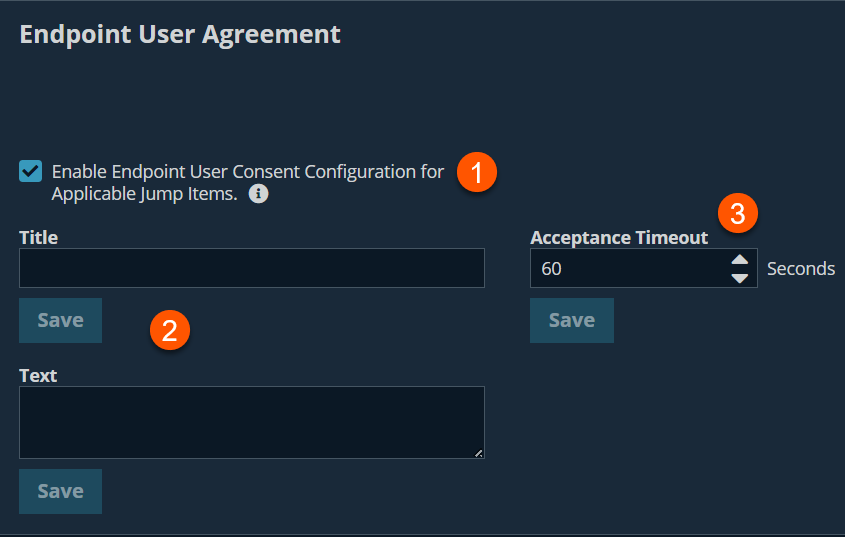
The Endpoint Agreement only applies to Jump Clients, Remote Jump Shortcuts, and Local Jump Shortcuts.
Jump Item settings
Simultaneous Jumps
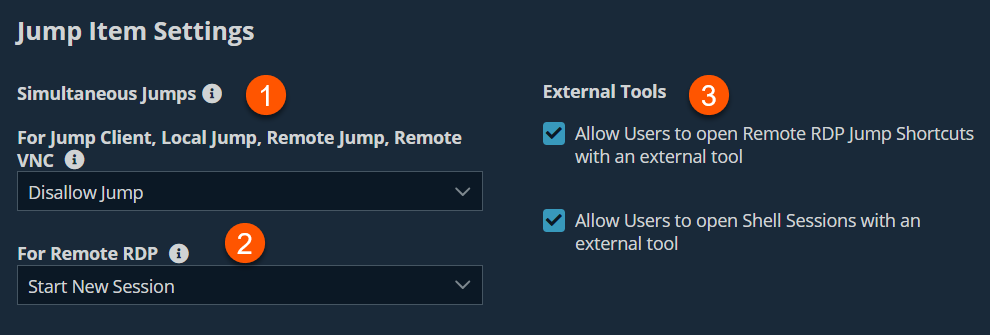
Simultaneous Jumps provide a way for multiple users to gain access to the same jump item without having to be invited to join an active support session by another user.
- By using the For Jump Client, Local Jump, Remote Jump, Remote VNC field, you can create new sessions. The options you can choose are the following:
| Value Name | Description |
|---|---|
| Join Existing Session | Provides a way for multiple users to gain access to the same Jump Item without an invitation to join an active session by another user. The first user to access the Jump Item maintains ownership of the session. Users in a shared Jump session see each other and can chat. Users can join a session that was started from another copy of a Jump Client in a different Jump Group. Session permissions are based on the original Jump Client that started the session. Once the first user is in a session, subsequent users will be able to enter the session. The first user will receive a notification that another user has joined the session, but the first user will not have an opportunity to deny access before other user joins. If this setting is not selected, a user cannot join a session that was started from another copy of a Jump Client, unless it is the same Jump Group. |
| Disallow Jump | Ensures only one user can Jump to a Jump Item at a time. Only an invitation by the user who originated the session can allow for a second user to access the session. |
- From the For Remote RDP field, you can create new sessions which jump to a specific RDP Jump item. The options you can choose are the following:
| Value Name | Description |
|---|---|
| Start a New Session | Provides a way for multiple users to gain access to the same Jump Item without an invitation to join an active session by another user. For RDP, a new independent session will start for each user which jumps to a specific RDP Jump Item, and the RDP configuration on the endpoint will control any further behavior regarding simultaneous RDP connections. |
| Disallow Jump | Ensures only one user at a time can Jump to a Jump Item. Only an invitation by the user who originated the session can allow for a second user to access the session. |
- From the External Tools section, select the appropriate checkboxes to use external tools (that is, bring your own tools (BYOT)) with a Remote RDP or Shell sessions. If selected, this enables a user to run the local RDP client vs the one embedded in the Access console.
Shell Filtering
The Shell feature restricts which commands can be executed. It works in conjunction with the values that are configured for an individual on the Command Shell section of the Users & Security > Users page. For groups of users, you can set up session policies on the Users & Security > Session Policies page.
Shell Prompt Matching Validation
A part of the Shell feature is being able to tell when your shell is at a prompt, so regex pattern is used that matches a shell prompt, and a default one that works almost anywhere is given.
![Shell Filtering interface with two sections. The first section, labeled "Recognized Shell Prompts," has a text box containing the regular expression .*[>#%\$] and a "Save" button. The second section, labeled "Shell Prompt Matching Validation," has an empty text box and a "Check" button.](https://files.readme.io/d6e55e275ddb08fa933b2258f46bd89aad58b10c2d4a8845c1ffb41e52b70d23-PF_UX_JumpItems_ShellFiltering_Page.png)
Updated 9 months ago
