
On-premises network infrastructure | PRA On-prem
The following questions should be considered when implementing your B Series Appliance in the network.
How are connections established to the B Series Appliance?
The connection from each of the various clients is an outbound connection from the computer to the B Series Appliance, and the only required ports are 80 and 443. Therefore, the allowed ports would typically be 80 and 443 from the internet to the DMZ, and 80 and 443 from the internal network to the DMZ.
Is port 443 the only port that needs to stay open inbound to the B Series Appliance?
The connection from each of the various clients is an outbound connection from the computer to the B Series Appliance, and the only required ports are 80 and 443. Therefore, the allowed ports would typically be 80 and 443 from the internet to the DMZ, and 80 and 443 from the internal network to the DMZ. Port 22 is an outbound port from the B Series Appliance to BeyondTrust. More ports may be available depending on your build.
Optionally, the B Series Appliance can be configured to automatically check for updates from btupdate.com. This requires an outbound connection on port 443 from the B Series Appliance and the ability to connect to a DNS server to resolve this name. If the DNS server is within the DMZ, no additional ports would be required, but if the DNS server is in a different zone, the necessary ports for this would need to be allowed as described in the Firewall Rules table in the previous section. This can be avoided by downloading updates for the B Series Appliance and applying them manually. Lastly, the server is configured with an NTP server to sync the time on the B Series Appliance. This can be supported by connecting to clock.bomgar.com, or it can be supported pointing to an internal NTP server using Port 123.
What other outbound connectivity does the B Series Appliance need?
The B Series Appliance can be configured with an NTP server to sync the time on the B Series Appliance. This can be supported by connecting to clock.bomgar.com, or it can be supported pointing to an internal NTP server using Port 123.
Is the LDAP server on the same LAN as your B Series Appliance?
If not, you must install a BeyondTrust Connection Agent on the LDAP server to support communications between the B Series Appliance and the LDAP Server.
Will there be two B Series Appliances configured, one as a backup B Series Appliance to support automatic failover?
If so, the B Series Appliances need to be on the same subnet, and they each need a DNS A Record for their individual IP Addresses.
Will you be utilizing a RADIUS server with BeyondTrust?
If so, this is typically port 1812.
Will you be utilizing a Kerberos Key Distribution Center (KDC) with BeyondTrust?
If so, the users typically communicate with their KDC over port 88 UDP.
Is your client base completely internal or accessible through a VPN?
If so, deploying the B Series Appliance on an internal network segment is ideal, and no firewall changes are required, because both the B Series Appliance and all of the supported clients are internal to the firewall.
Are you accessing endpoints outside of your company's internal network?
If so, best practices in network design discourage opening external access directly to your internal network. If you are using BeyondTrust to access endpoints external to your network, it is highly recommended that the B Series Appliance reside in a DMZ that segments the internal network from the internet.
How are updates to the B Series Appliance done?
The B Series Appliance can be configured to automatically check for updates from btupdate.com. This requires an outbound connection on port 443 from the B Series Appliance and the ability to connect to a DNS server to resolve this name. If the DNS Server is within the DMZ, no additional ports would be required, but if the DNS server is in a different zone, the necessary ports for this would need to be allowed. This can be avoided by downloading updates for the B Series Appliance and applying them manually.
Example firewall rules
Below are example firewall rules for use with BeyondTrust, including port numbers, descriptions, and required rules. If a B Series Appliance has multiple IP addresses, outbound traffic for services such as LDAP can flow out of any configured address. Because of this, it is best practice to make firewall rules apply for all IP addresses configured on each B Series Appliance.
| Firewall Rules | |
|---|---|
| Internet to the DMZ | |
| TCP Port 80 (optional) | Used to host the portal page without the user having to type HTTPS. The traffic can be automatically rolled over to port 443. |
| TCP Port 443 (required)* | Used for all session traffic. |
| UDP Port 3478 (optional) | Used to enable Peer-to-Peer connections if the Use Appliance as Peer-to-Peer Server option is selected. |
| Internal Network to the DMZ | |
| TCP Port 80 (optional) | Used to host the portal page without the user having to type HTTPS. The traffic can be automatically rolled over to port 443. |
| TCP Port 161/UDP | Used for SNMP queries via IP configuration settings in the /appliance interface. |
| TCP Port 443 (required)* | Used for all session traffic. |
| DMZ to the Internet | |
| TCP Port 443 to the specific host gwsupport.bomgar.com (optional) | Default port used to establish connections with BeyondTrust Technical Support for advanced troubleshooting/repairs. |
| TCP Port 443 to the specific host btupdate.com (optional) | You can optionally enable access from the B Series Appliance on port 443 to this host for automatic updates, or you can apply updates manually. |
| DMZ to the Internal Network | |
| UDP Port 123 | Access NTP server and sync the time. |
| LDAP - TCP/UDP 389 (optional)‡ | Access LDAP server and authenticate users. |
| LDAP - TCP/UDP 636 (optional)‡ | Access LDAP server and authenticate users via SSL. |
| Syslog - UDP 514 (required for logging) | Used to send syslog messages to a syslog server in the internal network. Alternatively, messages can be sent to a syslog server located within the DMZ. |
| Syslog - TCP Port 6514 | Used to send syslog messages over TLS to a syslog server in the internal network. Alternatively, messages can be sent to a syslog server located within the DMZ. | |
| DNS - UDP 53 (required if DNS server is outside the DMZ) | Access DNS server to verify that a DNS A record or CNAME record points to the B Series Appliance. |
| TCP Port 25, 465, or 587 (optional) | Allows the B Series Appliance to send admin mail alerts. The port is set in SMTP configuration. |
| TCP Port 443 (optional) | B Series Appliance to web services (e.g., HP Service Manager, BMC Remedy) for outbound events. |
| TCP Port 5696 | Allows the B Series Appliance to access the KMIP server located in the internal network for Data at Rest Encryption. |
| Internal Network to Internal Network | |
| Port 389, 636 (Active Directory), 445 (Local Account Management) | Ports used for discovery and rotation of Vault accounts. |
Each of the following BeyondTrust components can be configured to connect on a port other than 443: representative console, customer client, presentation attendee client, Jumpoint, connection agent.
If the LDAP server is outside of the DMZ, the BeyondTrust Connection Agent is used to authenticate users via LDAP.
Ports and firewalls
BeyondTrust solutions are designed to work transparently through firewalls, enabling a connection with any computer with internet connectivity, anywhere in the world. However, with certain highly secured networks, some configuration may be necessary.
-
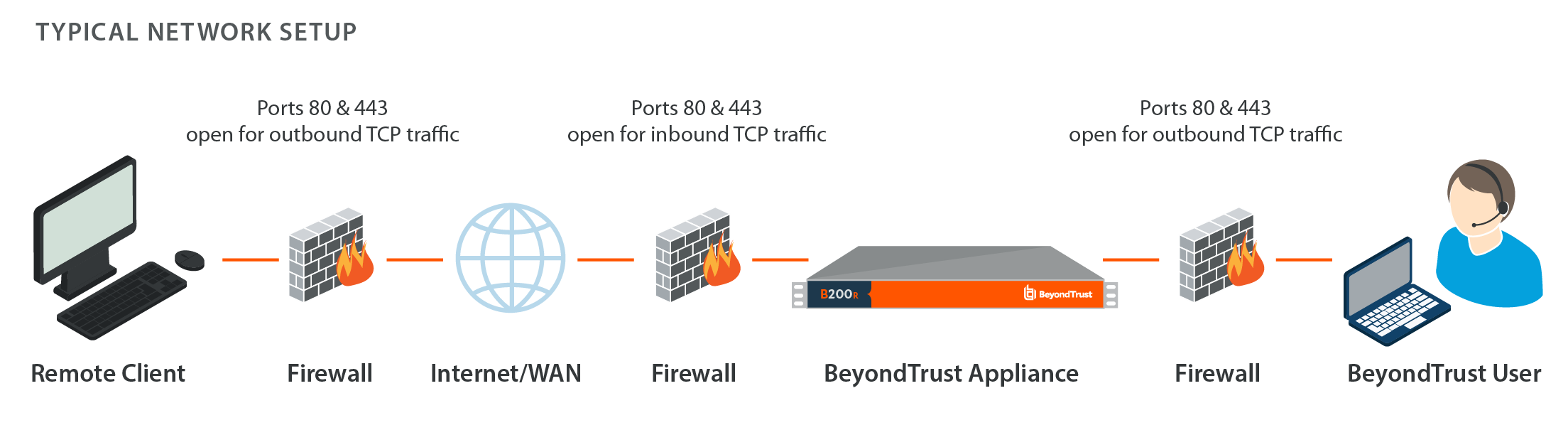
Ports 80 and 443 must be open for outbound TCP traffic on the remote system's and local user's firewalls. More ports may be available depending on your build. The diagram shows a typical network setup; more details can be found in B Series Appliance installation.
BeyondTrust Cloud requires use of port 443 only.
-
Internet security software such as software firewalls must not block BeyondTrust executable files from downloading. Some examples of software firewalls include McAfee Security, Norton Security, and Zone Alarm. If you do have a software firewall, you may experience some connection issues. To avoid such issues, configure your firewall settings to allow the following executables:
- sra-scc.exe
- sra-con.exe
- sra-jpt.exe
- sra-sjp.exe
- sra.rfb.exe
- sra-rdp.exe
- sra-tnl.exe
- sra-rdt.exe
- sra-sjt.exe
- sra-web.exe
- sra-vpro-connection.exe
- sra-cli.exe
-
For assistance with your firewall configuration, please contact the manufacturer of your firewall software.
-
See example firewall rules based on B Series Appliance location.
If you should still have difficulty making a connection, contact BeyondTrust Technical Support.
Updated 9 months ago
