
Updates | PRA On-prem
What is the Updates page?
The Updates page in the /appliance web interface is where you manage software updates for the B Series Appliance, ensuring it operates with the latest features, performance improvements, and security patches.
How is it useful to my organization?
Keeping the appliance updated minimizes vulnerabilities, maintains compatibility with BeyondTrust services, and supports optimal performance, enhancing overall reliability and security.
How do I access the Updates page?
- Use a Chromium-based browser to sign in to your B Series Appliance. The URL is provided in the BeyondTrust welcome email and includes your site URL followed by /appliance.
- From the top menu, click Updates.
The Updates page opens and displays by default.
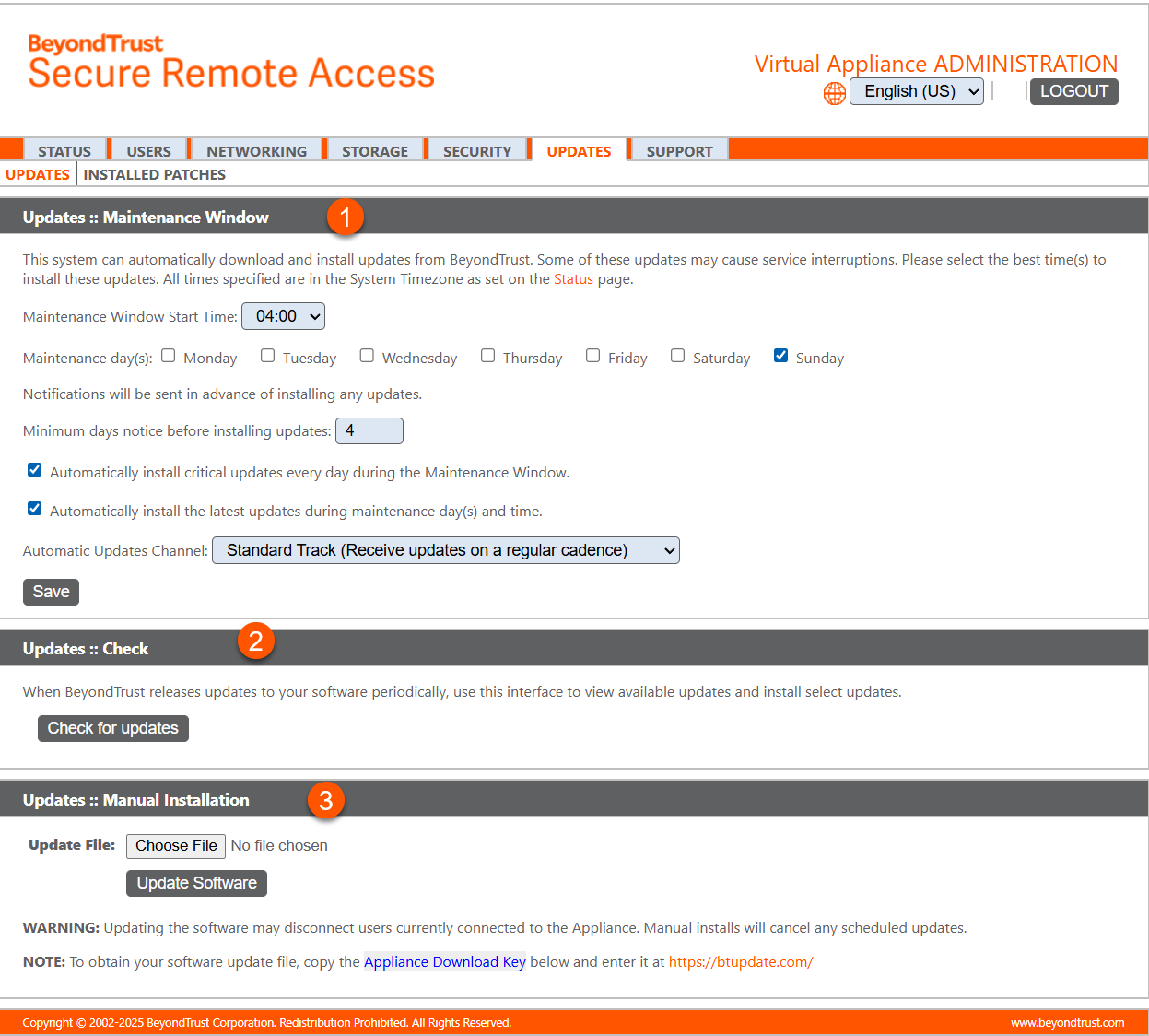
- Maintenance Window: Allows the administrator to schedule a time for updates.
- Check for updates: Checks to see if new updates are available.
- Manual Installation: Allows the administrator to manually install updates.
How to install updates
The B Series Appliance periodically checks for critical updates and emails the admin contact person when updates are available. You can select if you want the updates to install automatically and use the dropdown menu to select a time for the installation.
Updates requiring a B Series Appliance reboot or the interruption of services are excluded from the automatic update process unless you check the box to include them.
BeyondTrust will continue to notify you of the latest builds as they become available. Whenever you receive notification that new update packages have been built for your B Series Appliance, clicking the Check for Updates button will locate the packages and make them available for you to install.
If multiple software packages have been built for your B Series Appliance, each one will be listed separately in the list of available updates. Your new software is automatically downloaded and installed when you click the appropriate Install This Update button.
If no update packages or patches are available for your B Series Appliance, a message stating "No updates available" is displayed. If an update is available but an error occurred when distributing the update to your B Series Appliance, an additional message is displayed, such as "An error occurred building your update. Please visit BeyondTrust support for more information."
It is not mandatory to use this Check for Updates feature. If your B Series Appliance is not internet-facing or if your organization's security policy does not allow for automatic update functionality, you can manually check for updates.
- Click the Appliance Download Key link to generate a unique B Series Appliance key, and then, from a non-restricted system, submit that key to BeyondTrust's update server.
- Download any available updates to a removable storage device and then transfer those updates to a system from which you can manage your B Series Appliance.
- After downloading a software package, browse to the file from the Manual Installation section, and then click the Update Software button to complete the installation.
Please be prepared to install software updates directly after download. Once an update has been downloaded, it will no longer appear in your list of available updates. Should you need to redownload a software update, contact BeyondTrust Technical Support.
- When the BeyondTrust End User License Agreement (EULA) screen appears, fill out the required contact information and click the Agree-Begin Download button to accept the EULA and continue the installation. If you have multiple B Series Appliances with the same site configuration (either for failover or for ATLAS) you will only need to accept the EULA once.
Note that if you chose to decline the EULA, an error message displays and you will not be able to update your BeyondTrust software.
If you have any issues updating after accepting the EULA, please contact BeyondTrust Technical Support .
During the installation process, the Updates page will display a progress bar to notify you of the overall update progress. Updates made here will automatically update all sites and licenses on your BeyondTrust Appliance B Series.
If you are installing a software update, logged-in representatives will temporarily lose connections to any sessions and the console; therefore, schedule software updates for non-peak hours. However, if your update package contains only additional licenses, you can install the update without interrupting representative connections.
Automatic updates disabled by default
Based on customer feedback, we have decided to keep the default setting for general automatic updates disabled. This approach ensures customers retain full control over their update preferences and overall experience.
Important informationThis does not apply to FedRAMP customers.
Customers may still choose to enable automatic updates at any time through their settings.
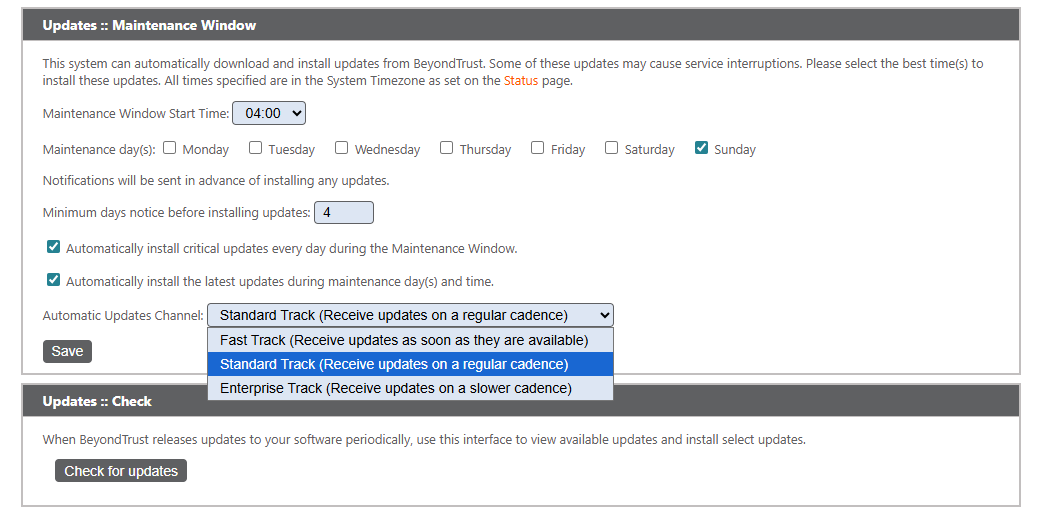
To turn on automatic updates:
- From the left menu, select Appliance.
- Click Updates.
- Check the box next to Automatically install the latest updates during maintenance day(s) and time.
- Click Save.
Maintenance window
You can set a time to automatically download and install updates from BeyondTrust.
If you check the Automatically install the latest updates during maintenance day(s) and time box, you can select an Automatic Update Channel:
- Fast Track - Receive updates as soon as they are available for the latest major release and new maintenance releases (e.g. 25.2, 25.2.2, etc)
- Standard Track - Receive updates on a regular cadence for the latest major release (e.g. 25.2)
- Enterprise Track - Receive updates less frequently. This track operates at n‑2, meaning it is two versions behind the current release.
Automatic updates do not apply to a failover configuration or an ATLAS deployment.
Warning shown when Automatic Critical Updates are disabled
Administrators can configure whether the system automatically installs critical product updates. When an administrator disables automatic updates, the system provides additional safeguards to prevent accidental or unsafe configuration changes.
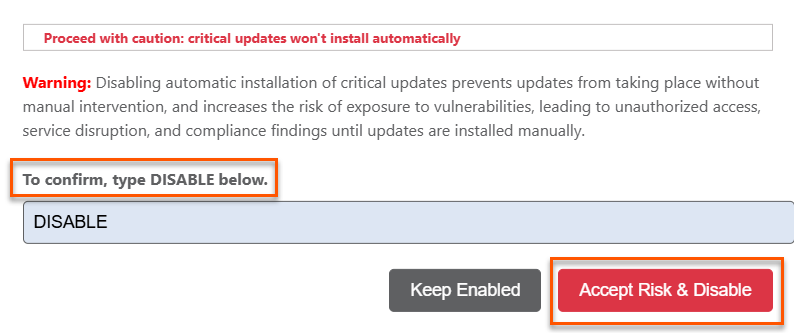
When an administrator unselects the Automatically install critical updates every day during the Maintenance Window checkbox, the system displays a high‑visibility warning. This warning explains the security implications of disabling automatic updates and highlights the importance of maintaining up‑to‑date system protection.
To complete the change, the administrator must type a confirmation string exactly as shown. The system does not save the configuration until this confirmation string is entered correctly. This requirement helps ensure that administrators intentionally apply the change and understand its impact.
Update service connectivity status
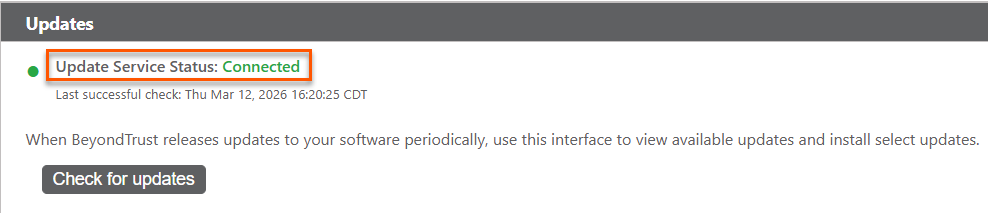
The Updates page displays the system’s current connectivity status and timestamp of the last successful update check to the BeyondTrust update service.
A new status indicator at the top of the page and displays three states:
- Connected (green dot): Update service reachable with last successful check timestamp
- Connectivity Issue (red dot): Update service not reachable with troubleshooting hints (firewall, DNS, proxy), link to Network Diagnostics, and last successful check timestamp (or "Never")
- Unknown (blue dot): Connectivity not yet verified prompting the admin to check for updates
This information helps administrators identify whether the system can reach the update service. If automatic updates are enabled but the system cannot connect, the Updates page clearly indicates that update checks may fail. This visibility allows administrators to diagnose connectivity issues before they affect update delivery.
Inline warning when updates are connected but disabled
If auto-updates are enabled but the update service is unreachable, a yellow warning banner appears in the Maintenance Window section:
Automatic critical updates are enabled, but the update service is not reachable. This appliance may not receive critical security and stability updates until connectivity is restored.
Updated about 2 months ago
