
EPM for Windows and Mac (Cloud and Pathfinder) 26.1.1495
✨ Enhancements
Policy Editor
Improved identity authentication
Improved identity authentication for Windows and Mac by updating Entra ID user group information when EPM policies are updated. The periodic refresh of Entra ID user group data is now configurable between 4 and 24 hours.
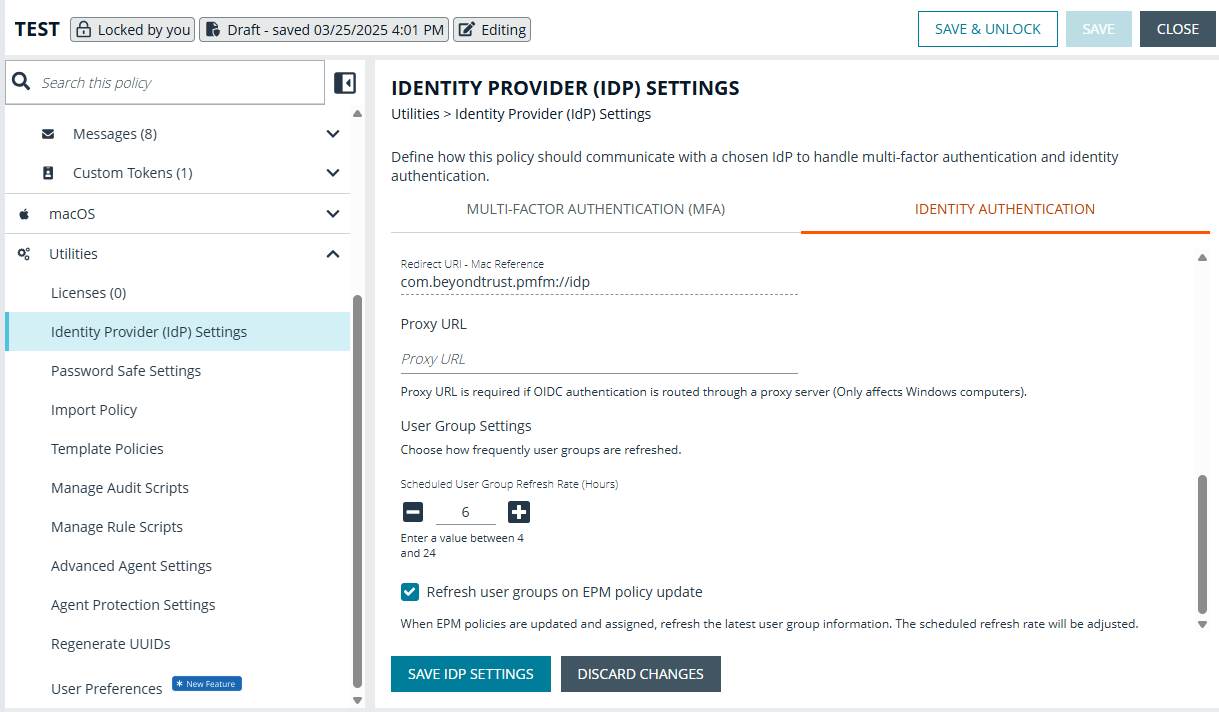
For more information, see Identity authentication.
Endpoint Authentication: Configuration options to Windows messages
Added Identity fields to Windows messages so customers can configure how identity authentication messaging is presented to end users on the endpoint.
To see this setting, go to a message and expand Message: Body Options.
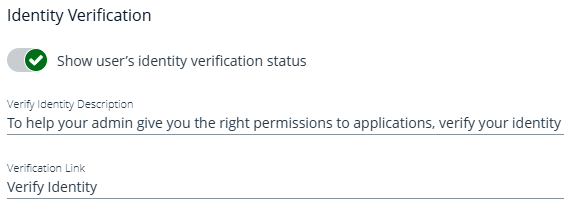
For more information, see Identity authentication.
Policy Editor API
- Added macOS Application Definition API
Added Policy Editor APIs (via the Management API) to read, create, and delete macOS application definitions. Using the API, customers can edit policies programmatically.
- Updated Application Description validation
Removed duplicate Application Description validation and added an Application Index field. This allows customers to correlate applications in the request payload with specific errors returned in responses from the Windows or macOS Policy Editor API endpoints.
Updated settings in read-only mode
We’ve updated settings to be interactive even when the policy is in read-only mode.
-
Message previews
Can now click Preview when accessing Windows and macOS messages.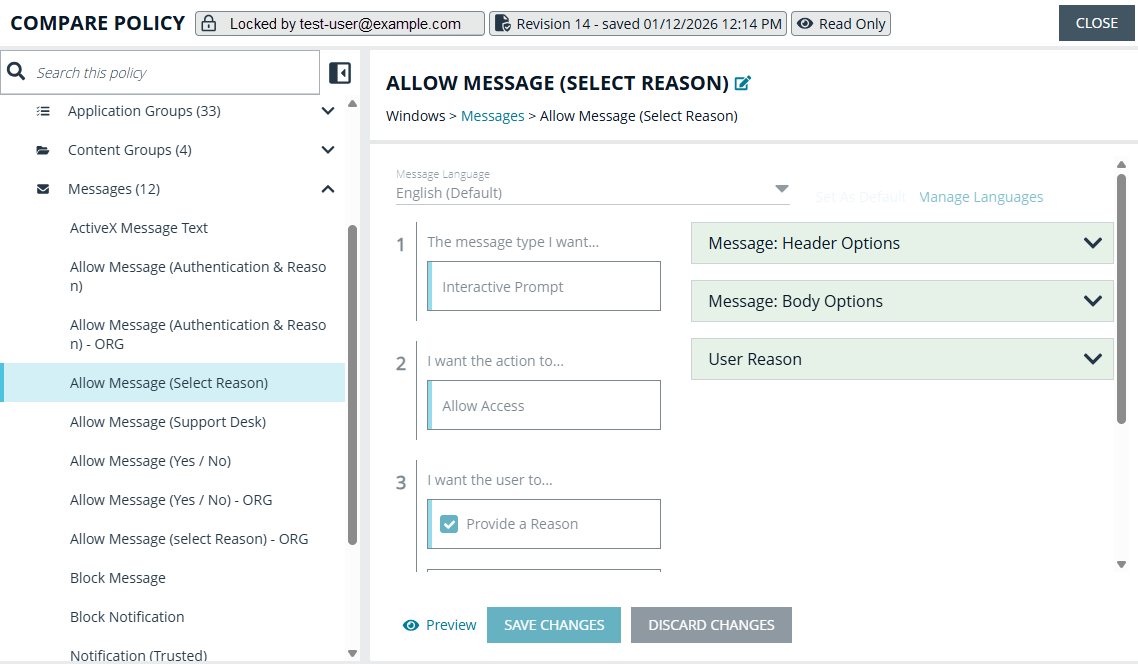
-
Application Rule filters
The Rule Filters count is clickable in Windows and macOS Application Rules pages, allowing quick access to filters applied to an app rule, including when the policy is opened in read-only mode.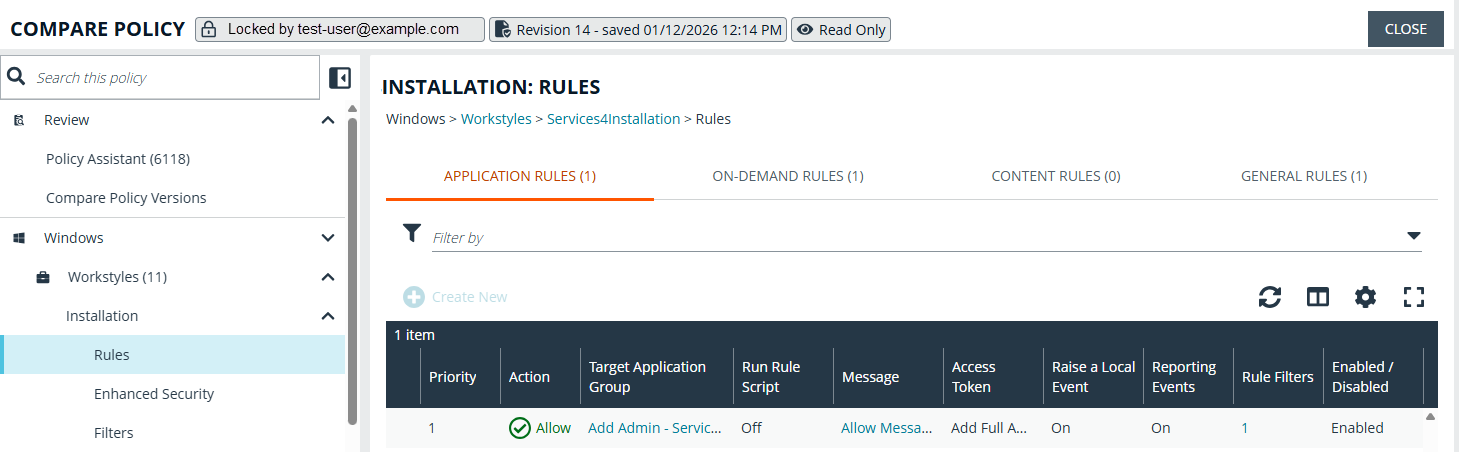
Updated template policies
Updated Windows QuickStart templates to include multi‑language translations for the Reason field used in Messages.
Collapsible and expandable menu
The Policy Editor menu is now collapsible, increasing available page real estate and improving usability when working with data grids.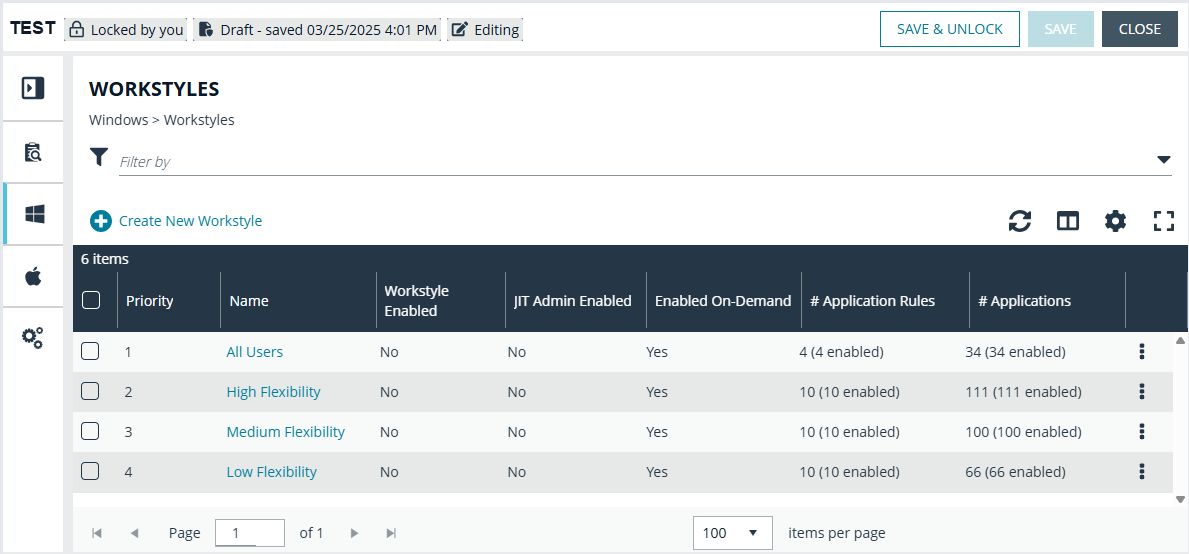
Analytics
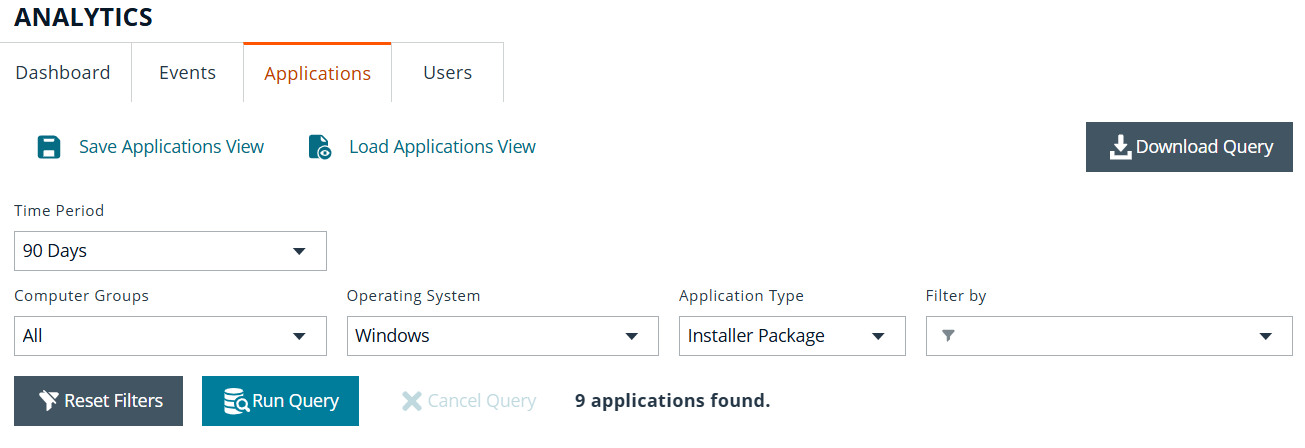
Query applications on demand
The Applications page now gives you more flexibility in how and when you access your data.
You can refine filters before running a query, then execute it on demand when you’re ready. This helps reduce unnecessary processing and ensures results reflect exactly what you need.
Downloading data is now even easier. You can generate a CSV on demand without running the query first. The Prepare Download modal also includes an Available Records count, so you can confirm how many records match your filters before exporting.
Together, these enhancements streamline your workflow and provide clearer visibility into your application data.
For more information, see
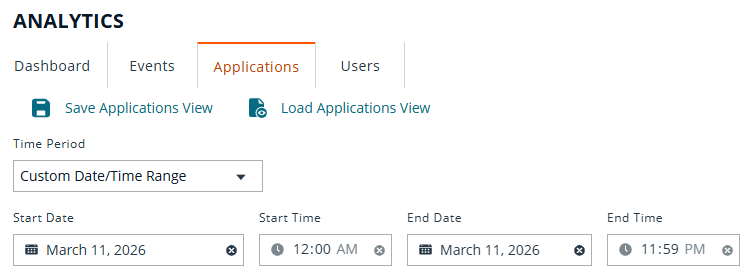
Added custom date and time range filter on the Applications page
We’ve introduced a powerful new custom time and date filter on the Applications page, giving you greater precision when analyzing your data.
You can now select a specific start and end date and time within the last 90 days, allowing you to focus on exact activity windows; whether you’re investigating an incident, reviewing a deployment, or tracking changes.
When loading a saved Applications view, the selected custom time range is now clearly displayed, ensuring full visibility into the timeframe being used before you run a query or download data.
This enhancement gives you sharper insights, clearer context, and greater confidence in your analysis.
For more information, see
Events page: message update
Improved the error message on the Events page for high‑volume queries that cannot return results, so that users are clearly advised to reduce the time range (for example, to the last 7 days) before running the query again.
Updates on Applications page
- Updated toast and page notifications: Added clarity to the toast and notifications on the Applications page, so that the customer knows to input a custom start and end date when the Custom Time Range filter has been selected.
- Updated the notification to input the custom date and time range when downloading from the Applications page.
- Updated Custom Date & Time Range in Saved Applications View & Load Applications View within Analytics, Applications page
- Enhanced the saved views in the Users page; customers have visibility of the columns and filters saved.
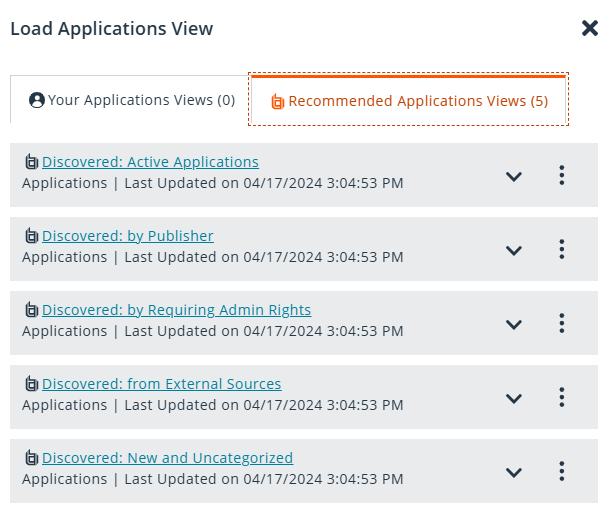
Added BT logo to Recommended Views
Enhanced visibility of BT Recommended Views by adding the BT logo to the root folder.
Now display deleted Computer Group names
Enhanced Analytics so that it will display references to the Computer Group name even after its deleted.
Other
EPM notifications
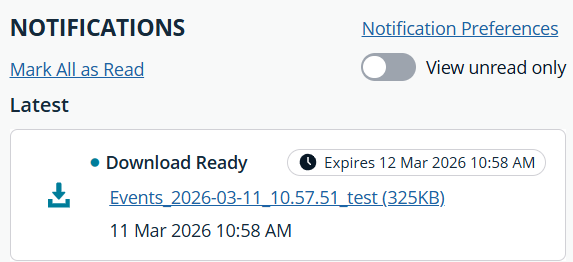
Users will now receive notifications when their computer logs and CSV files are ready for download. These notifications will appear both in the panel and in the new "All Notifications" view, ensuring users are promptly informed when their requested files are available.
Added email notifications for JIT requests
Added email notifications to new JIT Application Access and JIT Admin requests. EPM users can now opt out to receive email alerts when new requests are raised, with direct links to the relevant JIT request for quick action. Notifications are sent only to users with approval permissions, and each user can enable or disable these notifications in their settings.
Updated headings in Computer details
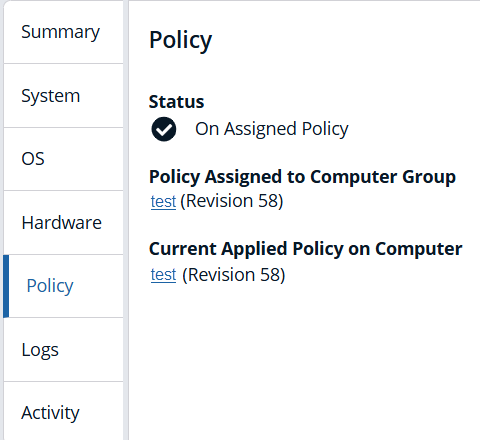
Updated the headings for 'Policy Assigned to Group' and 'Current Applied Policy' on the computer details policy tab to emphasize that they are headers for the 'Policy' and 'Revision' fields.
Management API
- API security hardening: Aligned API security headers by refining cache-control (added max-age=0), standardizing CSP with an explicit object-src directive on all responses, and enabling HSTS with subdomain coverage.
- Updated audit and event log endpoints to verify that the authenticated caller is associated with the agentID for which audit activity is being submitted.
- Updated the JIT admin access request endpoints to verify that the authenticated caller is associated with the agentId for which status inquiries or requests are being submitted.
- Updated Dockerfiles to ensure that the last USER is a USER other than root.
- Restricted the AuthorizationRequestAudit endpoint to admins only.
Updated Webhook URL validation
Updated Webhook URL validation to prevent '.' characters and updated colon validation to check for a count greater than 0, rather than a count greater than 1.
Pathfinder MCP Gateway: Expanded data access for AI Agents
- Computer List, Computer Group List, Policy List, and User List data is now accessible via the Pathfinder MCP gateway, enabling customers to build AI Agents that can programmatically query and retrieve key EPM data points.
- You can now quickly understand a summary of each JIT Admin session in a readable text format based on event data and clearly identify if the session activity deviated from the reason given for the session, all accessible via the Pathfinder MCP Gateway.
For more information, see Configure Pathfinder MCP.
🛠️ Issues resolved
| Product area | Description | Resolution |
|---|---|---|
| Analytics | CSV exports form the Applications page ignored Workstyle and Policy filters. | Ensured CSV downloads now honor Workstyle and Policy filters. |
| Analytics | Recommended Views showed incorrect Computer Groups. | Recommended Views now displays the correct Computer Groups saved. |
| Analytics | Uppercase hostnames caused 404s on direct routes and refreshes. | Fixed an issue that was causing 404 errors when navigating directly to routes or refreshing pages with uppercase letters in the hostname. |
| Analytics | Users could see a session expiry timeout message while a long‑running Analytics query was still executing. | Resolved a bug which showed the session timeout message for a long running query. |
| Analytics | When running a new query on the Applications page, results sometimes opened on the same page number as the previous query instead of starting from page 1. | Updated the Applications page so that each new query now starts from page 1, ensuring results are shown from the beginning every time you run a new search. |
| Analytics | In classic EPM, Analytics grid buttons regressed from Download to the older Download all label. | The label for the Download button now displays as Download. |
| Analytics | Inconsistent Analytics Events results between “All Computer Groups” and specific group selections. | Updated the behavior with Analytics Events filtering between ‘All Computer Groups’ and specific Computer Group selection to be consistent. |
| Analytics | Corrupt .gz event files could stall Logstash processing. | Updated handling so corrupt files no longer block event processing. |
| Analytics | The Events page tabs lacked a clear border, making the tabbed sections visually inconsistent with design guidelines. | A border now shows around the defined section for each tab. |
| Analytics | Inconsistent “Name” vs. “View name” terminology in Save Events View. | Updated terminology in the Save Events View for consistency. |
| Auditing | Activity audit entries for system‑initiated unarchive events did not include the device name. | Added the device name to the activity audit entry when a computer is unarchived by the system. |
| BeyondInsight | After upgrading to BeyondInsight 25.1.1, the EPM system tray on Windows endpoints displayed the policy name followed by “revision 0” and did not show the policy date. | BeyondInsight Only Updated the Windows client system tray to read the policy’s revision and date so the tray information now matches the effective policy. |
| Computers | After uninstalling and reinstalling an endpoint, duplicate entries appeared in the Computers grid even when the Duplicate Names toggle was disabled. | Corrected Computers grid behavior so reinstalls no longer generate duplicates. |
| Configuration | On the Configuration page in EPM Cloud (Pathfinder and Classic), the highlighted tab could become out of sync with the content after using the browser Back button. | Updated the Configuration page so the correct tab now remains highlighted when navigating with the browser Back button. |
| Management API | Under high request volume, the Management API could hit EPM rate limits and intermittently return HTTP 500 errors. | Adjusted rate limiting so high‑volume traffic no longer triggers 500 errors. |
| Management rules | Management rule execution caused heavy CPU usage and DB saturation at scale. | Optimized rule evaluation to avoid full agent‑table scans per registration. |
| Management rules | The Property “Type” field used an “Is One Of” operator. | Updated the operator for the property ‘Type’ to be ‘Equals’ instead of ‘Is One Of’. |
| Microsoft Entra ID config | Rule-level Microsoft Entra ID (Azure AD) account filters in multi-rule workstyles were not always applied correctly. In affected cases, some Entra ID groups were not returned to the EPM Windows client, causing the associated rule-level filters to never match. Workstyle-level filters were not impacted. | Updated server-side policy parsing so Entra ID groups used in rule-level account filters are consistently discovered and returned to the EPM Windows client, including in multi-rule workstyles. Rule-level filters that rely on these groups now evaluate as expected. |
| Microsoft Entra ID config | Slow discovery of new Microsoft Entra ID groups/subgroups. | Updated the AzureAdPolicyGroupPollMinutes system parameter to 60 to allow EPM to discover new group/subgroups quicker in Microsoft Entra ID without a policy change. |
| Microsoft Entra ID config | Entra ID group membership data did not reliably reach clients, causing policy filters to mis‑apply on endpoints. | Updated the AzureAdIntegration to include direct graph user lookup, improved logging, and group transitive group lookup from MS Graph API version 5. |
| Pathfinder | Pathfinder users intermittently saw “Access Denied” while navigating, especially in JIT Access Management. | Pathfinder Only Fixed role handling so valid users no longer see access errors. |
| Policy Editor | Users with the read‑only Auditor role could still see the Edit and Lock button on unlocked policies. | Fixed issue when a user has Read Only Policy permissions (i.e. Auditor role via RBAC) the Edit and Lock button is now hidden when accessing an unlocked policy in Read Only mode. |
| Policy Editor | In read-only mode, the Message Name and Description fields appeared editable, even though those changes could not be saved. Experienced in Windows and macOS messages. | Updated these fields so Message Name and Message Description are not editable when accessing a policy in Read Only mode. |
| Policy Editor | The Windows Applications API returned an HTTP 500 Internal Server Error when a request to the create‑windows‑application endpoint contained a null application group or application. | Fixed issue with Policy Editor API when passing a null value for application group or application no longer causes a 500 error, instead a 400 error message is returned. |
| Policy Editor | Using a Windows Quick Start Template Policy, the placeholder text shown in Just‑In‑Time (JIT) application access messages was not editable. | The JIT application access message configuration for Windows was enhanced so that both the Reason field placeholder text and the Duration text are now configurable. |
| Policy Editor | Various informational panels, including Application, On‑Demand, and Content rules, and Custom Tokens displayed raw HTML tags instead of rendering formatted content. | The rendering logic for info panels was updated to strip or correctly interpret embedded HTML tags. |
| Policy Editor | Certain message types in Policy Editor triggered an additional, redundant “Windows Hello”. | The Windows Hello message is not shown in Header options for Message types that do not have Windows Hello capability. |
| Policy Editor | On the Messages page, clearing the check box Verify their identity through an Identity Provider was not activating the Show message on secure desktop toggle. | Updated the message options so that clearing Verify their identity through an Identity Provider re‑enables the Show message on secure desktop toggle. |
| Policy Editor API | The Windows GET endpoint for the Policy Editor Applications API intermittently returned 404 Policy Not Found responses instead of 429 Too Many Requests. | Updated the Windows Policy Editor API so the response 429 - Too many Requests is returned when the error occurs. |
| Policy Editor API | When multiple create/update/delete (CUD) operations were executed in quick succession via the Applications API, the policy lock was only applied at the upload stage. | Fixed a race condition issue in the Policy Editor API that caused changes to policies to disappear when multiple requests are made simultaneously. |
| User management/Logon | Some users could not log in to EPM without refreshing the browser. | Users can now log on without refreshing the browser. |
Package Manager
🛠️ Issues resolved
| Description | Resolution |
|---|---|
Customers with apostrophes in their host name (for example, Test's-MacBook) could not successfully activate Package Manager. Activation failed with a validation error indicating the system name contained invalid characters. | Updated Package Manager activation handling so devices with apostrophes in the host name can now activate successfully without triggering the “system name has invalid characters” validation error. |
EPM for Mac adapters
✨ Enhancements
- Clicking Refresh all Policies from the EPM‑M menu bar now updates policies more quickly when an endpoint has been moved to a different Computer Group in EPM Cloud.
🛠️ Issues resolved
| Description | Resolution |
|---|---|
| On some macOS endpoints, policies did not always update after the device woke from sleep. | Updated the EPM for Mac adapter so policy refresh succeeds after sleep, even when temporary storage links expire. |
🧩 EPM components
- Policy Editor: 26.1.119
- EPM Cloud: 26.1.1495
- PM Reporting Database: 24.6.10
📝 Requirements
- Microsoft .NET Framework 4.6.2 (required to use PM Cloud Windows Adapter)
🔄 Compatibility
Supported versions
| Product | Recommended | Supported |
|---|---|---|
| EPM Windows adapter | 26.1.1495 | 25.8.840 | 25.7.509 | 25.6.554 | 25.5.440 | 25.4.598 | 25.3.671 | 25.2.485 | 24.8.446 | 24.7.831 | 24.6.697 | 24.5.1037 | 24.4.361 | 24.3.766 | 24.2.499 | 24.1.581 |
| EPM for Windows | 26.1.23.0 | 25.8.12.0 | 25.4.270.0 | 25.4.184.0 | 25.2.1.0 | 24.8.98.0 | 24.7.425.0 | 24.5.361.0 | 24.5.351 | 24.3.294.0 | 24.1.108.0 |
| EPM Response Generator for Windows | 26.1.23.0 | 25.8.12.0 | 25.4.270.0 | 25.4.184.0 | 25.2.1.0 | 24.8.98.0 | 24.7.425.0 | 24.5.361.0 | 24.5.351.0 | 24.3.294.0 | 24.1.108.0 |
| EPM for macOS | 26.1.0.120 | 25.8.0.53 | 25.4.2.2 | 25.4.1.2 | 25.2.0.1 | 24.8.0.1 | 24.7.0.1 | 24.5.2.3 | 24.5.1.1 | 24.5.0.1 | 24.3.0.1 | 24.1.0.1 |
| PM macOS adapter | 26.1.0.120 | 25.8.0.53 | 25.6.0.48 | 25.4.1.2 | 25.2.0.1 | 24.8.0.1 | 24.7.0.1 | 24.5.2.3 | 24.5.1.1 | 24.5.0.1 | 24.3.0.1 | 24.1.0.1 |
| PM Rapid Deployment Tool for macOS | 26.1.0.5 | 25.8.0.1 | 25.4.1.2 | 25.2.0.1 | 24.8.0.1 | 24.7.0.2 | 24.5.0.1 | 24.3.0.1 | 24.1.0.1 |
| PM Response Generator for macOS | 26.1.0.120 | 25.8.0.53 | 25.4.2.2 | 25.4.1.2 | 25.2.0.1 | 24.8.0.1 | 24.7.0.1 | 24.5.2.3 | 24.5.1.1 | 24.5.0.1 | 24.3.0.1 | 24.1.0.1 |
🗒️Notes
View related releases:
