
Endpoint Privilege Management for Windows 26.1.23
🆕 New features
Identity authentication
In this release, we are introducing an identity authentication feature integrating Endpoint Privilege Management with Microsoft Entra ID. This means your users can now confirm their Entra ID identity right from the Task tray icon or through EPM messages. Once verified, policies can use your Entra ID group membership to manage access.
For admins, it’s now possible to set up Entra ID groups for Windows workstyles. Plus, EPM events will include user email addresses after identities are confirmed making tracking and management easier.
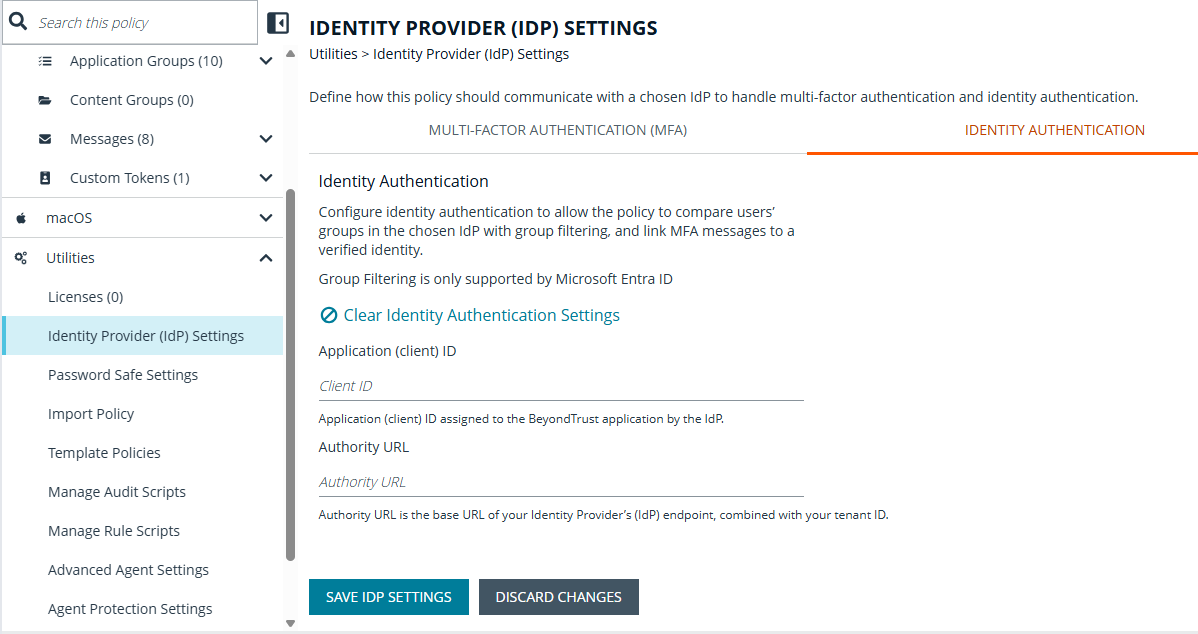
For more information, see Identity authentication.
✨ Enhancements
Improved identity authentication
Improve Identity authentication for Windows and Mac by updating Entra ID User group information when EPM policies are updated and making the periodic Entra ID User group information configurable between 4 and 24 hours.
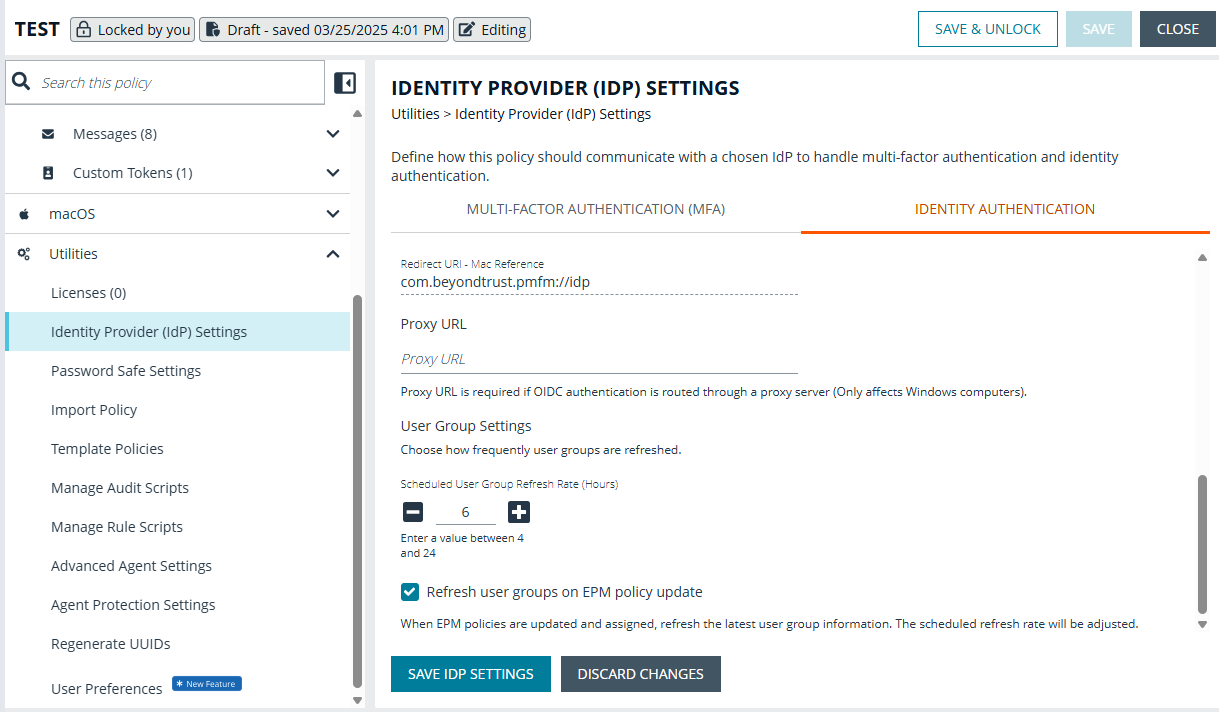
For more information, see Identity authentication.
Enhanced ServiceNow rule script
The enhanced ServiceNow rule script supports authentication via OAuth Client Credential Grant flow. To use this feature, replace the “Username” and “Password” properties in ServiceNowSettings.json with “ClientId” and “ClientSecret”.
Updated Microsoft Entra ID filtering
You can now target Windows workstyles using Microsoft Entra ID group membership. Endpoint Privilege Management evaluates the signed in user’s identity and applies policy based on their Entra ID groups.
🛠️ Issues resolved
| Description | Resolution |
|---|---|
| In some cases, MFA and identity verification links in endpoint messages were misaligned or partially hidden. | Updated the message layout so links are clearly visible and properly aligned in all supported configurations. |
| A lock contention could sometimes cause performance problems when thousands of PowerShell processes are run and there’s a long backlog of ECS events. | Improved responsiveness under heavy PowerShell and ECS workloads. |
| The Defendpoint service memory would increase when large volumes of ECS audit events are being generated. | Added safeguards to manage ECS event backlogs. |
| EPM-W would fail to determine the elevation requirements of certain applications, resulting in rules not matching as expected. | Standardized application behavior across supported client versions. |
| Service startup could be delayed while resolving certain Anti‑Tamper security identifiers (SIDs). | Optimized Anti‑Tamper checks during service startup. |
| More than 20 IP addresses on a single endpoint was not supported by EPM-W. | This is now supported. |
| The duration text shown to users after a Just‑In‑Time (JIT) Application Access request was approved was hard‑coded in English and could not be localized. | The JIT approval duration messages can now be configured and translated into your preferred language. |
| Accessibility alt-text on the ‘enter business reason’ field was not configurable. | The Reason field placeholder text can now be configured and localized so administrators can align the hint text with their language and UX standards. |
| Minor memory defects led to occasional heap corruption crashes of the DefendpointService process for some customers. | Improved service stability after an upgrade. |
| A COM class rule would not apply the correct token when it was modified by a PowerRules script. | Improved reliability in secured environments after upgrade. |
| Certain uninstallers would fail to launch when a Challenge Response message was used. | Uninstallers can startup successfully when using Challenge Response. |
| The MMC Policy Editor did not display message header text and buttons correctly in message previews. | Corrected message previews in the MMC Policy Editor. |
| MSI installer package rules failed to match when setup executables extracted MSI files to temporary directories containing GUIDs in the path (for example, C:\ProgramData{GUID}\installer.msi) | Fixed MSI detection after upgrades. |
| On some Windows 11 ARM devices, using EPM with Forcepoint DLP could cause browsers to crash on launch. | Improved compatibility with Forcepoint DLP on Windows 11 ARM. |
| The “Allow child processes to match this rule” feature failed to match against installer and script child processes. | MSI installers started from elevated PowerShell correctly inherit the parent PowerShell application group. |
| Digitally signed Visual Basic scripts were not always matched correctly by publisher, causing inconsistent rule enforcement. | Improved publisher validation for signed scripts so rules apply consistently. |
| The Endpoint Utility could hang when started from an elevated PowerShell or Command Prompt. | Endpoint Utility opens and responds normally when run from elevated shells. |
| The script (.vbs, .ps1, .bat) and management console (.msc) files were incorrectly reported as executables in event logs and analytics. | The QuickStart policy now prioritizes specific file types over generic executables, ensuring accurate reporting of the actual file launched. |
| Hash criteria matching could fail when applied to remote files with a status of ‘offline’. | Updated file hash handling so rules work reliably for files on redirected desktops and offline locations. |
| The Content Group search functionality was missing from the MMC Policy Editor. | Updated the MMC Policy Editor. |
🔐 Security updates
- Updated zlib version to 1.3.2.
📝 Requirements
- Microsoft .NET Framework 4.6.2 (required to use Power Rules, PowerShell audit scripts, PowerShell API, and Agent Protection)
- Microsoft .NET Framework 4.8 (required to use Multifactor Authentication with an OIDC provider)
- PowerShell 3.0 (required to use Power Rules, PowerShell audit scripts, and PowerShell API)
- Trellix (formerly McAfee) Agent (required if you are installing the Privilege Management client with switch EPOMODE=1)
🔄 Compatibility
- Privilege Management Policy Editor 26.1.119 (recommended), 24.1+
- Privilege Management ePO Extension 25.5 (recommended), 22.7+
- Privilege Management Console Windows Adapter 26.1.1495 (recommended), 22.1+
- BeyondInsight/Password Safe 25.1.1.165 (recommended)
- Trellix Agent 5.7+
- Trellix ePO Server 5.10 Service Pack 1 Update 4 (recommended), Update 13+
- For 5.10 SP1 Update 2 see BeyondTrust Compatibility with Trellix ePO
🗒️Notes
View related releases:
