
BeyondInsight for Unix and Linux 26.2
🆕 New features
Manage and revoke EPM-UL certificates from the console
You can now view, inspect, and revoke the certificates issued by an Endpoint Privilege Management for Unix and Linux (EPM-UL) certificate authority without leaving the console. A new EPM-UL Certificates entry in the left menu gives system administrators a single place to audit certificate state across their environment.
- View all certificates issued by a certificate authority, with certificate type, status, issuing server, and host.
- View the certificate revocation list, including the revocation date, reason, and revoking host.
- Open a certificate to see its full attributes and whether it is active or revoked.
- Revoke a certificate directly from the certificate detail page, selecting a standard revocation reason.
- Sort and filter certificates and revocation records by status, issuer, host, or revocation date.
Certificate management is available for on-premises deployments only, and requires the system administrator role.
ImportantRevoking a certificate requires Endpoint Privilege Management for Unix and Linux 26.2.0 or later. Against version 26.1.0, the certificate and revocation pages are read-only.
BIUL currently only shows the certificates on the Certificate Authority host only.
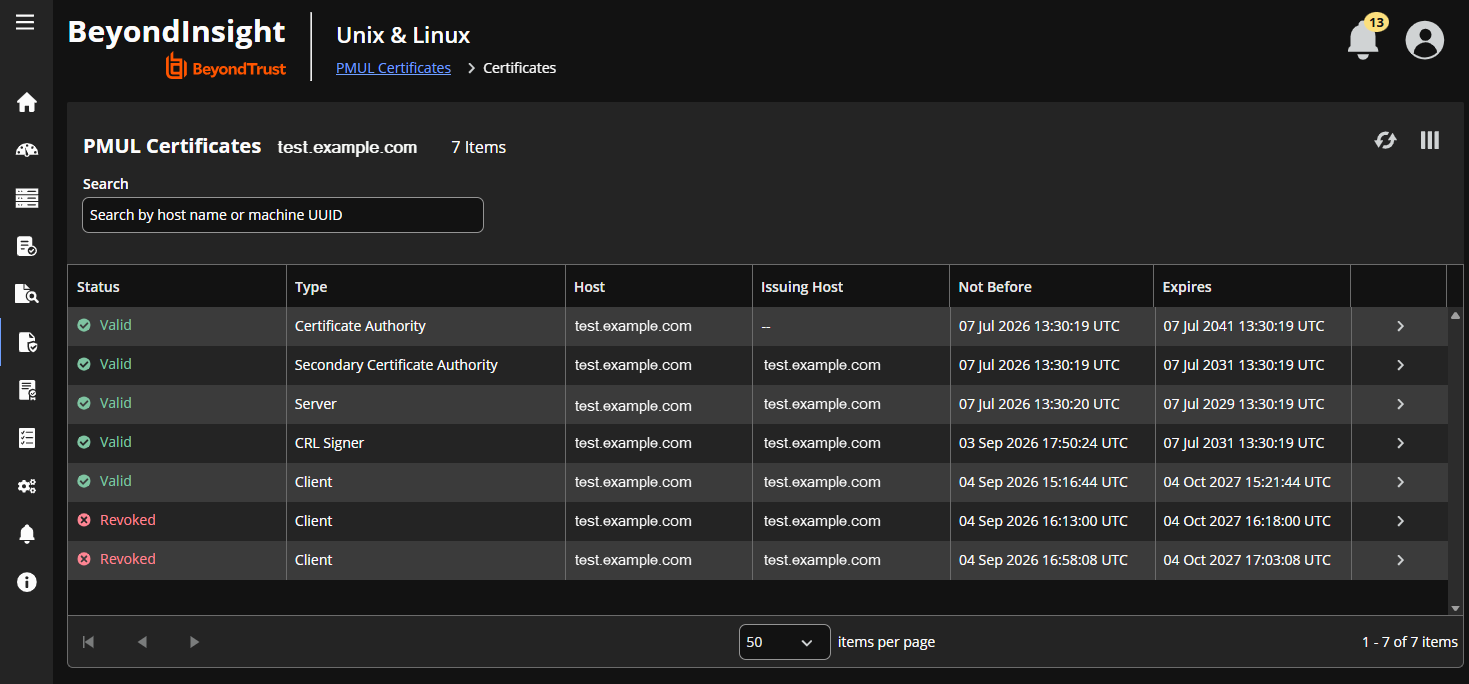
For more information, see EPM-UL certificates.
Deploy AD Bridge from a software repository
You can now install and update AD Bridge from a Linux software repository instead of relying only on install scripts and packages. Select a repository you want to use, then deploy it to your endpoints as a primary action.
- Configure a preferred software repository. The public BeyondTrust repository is used by default, and you can point to an internal repository instead. One repository can be configured at a time.
- Register or remove the repository on your endpoints as a primary action, which creates the appropriate repository definition for RPM-based or DEB-based hosts.
- Profiling now records whether an endpoint's packages were installed from a repository, along with the repository URL.
- Install and update actions generate the correct package manager commands for endpoints configured with a repository.
Software repository deployment applies to AD Bridge on Linux endpoints, and is available for on-premises deployments.
Create and reuse AD Bridge domain join templates
You can now save the settings used to join an endpoint to a domain as a reusable template, then apply that template when you run an AD Bridge domain join action. Selecting a template populates the domain join form for you, which removes repeated manual entry when onboarding many endpoints into the same domain.
Templates apply when Use Domain Browser is turned off. With the domain browser turned on, you continue to browse for the organizational unit manually.
For more information, see Create and manage AD Bridge join templates.
Track policy changes with the Role Based Policy transaction status bar
A transaction status bar now appears across the top of every Role Based Policy page, so you can always see whether a transaction is open. When a transaction is in progress, the bar shows who started it, the reason given, and when it started, and it links you to the transaction summary. When no transaction is open, the bar links you to the page where you start one.
- If you are not the owner of the open transaction, the bar gives you the option to override it.
- The transaction summary card has been removed from the Role Based Policy landing page, because the status bar replaces it.
The transaction bar is hidden when transaction mode is turned off.
Use an Elastic alias for SIEM event indexes
You can now send events to an Elastic alias instead of an index with a date-based suffix. When you turn on Use Elastic Alias in the SIEM connection settings, index lifecycle management is handed to Elastic rather than creating a new index each day, which simplifies long-term index management.
ImportantCreate the alias in Elastic before you turn this setting on. If the alias does not exist, saving the SIEM connection fails with an error.
For more information, see Add a SIEM connection.
✨ Enhancements
Redesigned Role-Based Policy transaction summary
The transaction summary has been reworked to make it easier to review what a transaction changed before you commit it.
- Tables in the summary are now collapsible.
- Created, updated, and deleted items are shown as counts with accompanying icons.
- Setting names and values now match what you see elsewhere in the console, instead of showing raw internal names or numeric values in place of enabled and disabled.
- Multi-part items are now reported in full. Commands include the path to the executable, and schedules include their time periods.
- The summary respects dark mode throughout.
- Sub-items stay correctly grouped when a parent item is renamed partway through a transaction.
Validate script policy before saving
The script policy editor now requires you to validate your changes, and requires validation to pass, before saving is allowed. This prevents an invalid script policy from being saved from either the Role-Based Policy role editor or the main editor.
Remove an SMTP server configuration
You can now remove a configured SMTP server from the console. Previously the configuration could not be cleared, because the fields were required whenever the form was saved.
Consistent deletion behavior for integration settings
Deleting a Password Safe configuration now behaves the same way as deleting an SMTP configuration, with a matching confirmation prompt and a success message once the configuration is removed.
Updated console theme
The console has been updated to the current BeyondTrust visual theme, including revised dark mode colors and rounded corners on interface elements.
📝 Requirements
- AD Bridge 26.1.0 or later is required. The tenant join command options changed in that release, and earlier versions are not supported.
- EPM-UL 26.2.0 or later is required to revoke certificates. In version 26.1.0, the certificate and revocation pages are read-only.
- Certificate management and software repository deployment are available for on-premises deployments only.
🛠️ Issues resolved
| Product area | Description | Resolution |
|---|---|---|
| Auditing and Events | The Prog and Who columns in change management events did not filter. | The Prog and Who filters in change management events now return the expected results. |
| Auditing and Events | Content on the Privilege Management for Networks tab flashed continuously and generated console errors. | The Privilege Management for Networks tab now loads cleanly without flashing content. |
| Authentication | Active Directory users could not sign in to on-premises deployments, receiving an invalid credentials warning even when they belonged to a group with console access. | Active Directory users who belong to a group with console access can now sign in to on-premises deployments. |
| Authentication | Signing in with a return destination that used a role-based route guard redirected users to the 403 page even when they held the required roles. | Role-based route guards now wait for user information to load, so users are taken to their intended destination after signing in. |
| Authentication | When a session ended unexpectedly on-premises, data from the previous session was retained, so a different user signing in on the same tab could briefly see the earlier user's data. | Application data is now cleared when a session ends for any reason, including session expiry. |
| Configuration | Authentication Services appeared as a configuration property for remote groups, which do not support them. | Authentication Services is no longer offered as an option for remote groups. |
| Console UI | Dropdown menus retained focus when scrolling and could only be closed from within the dropdown. | Dropdown menus now close when you click anywhere outside them. |
| Console UI | A color picker appeared in the code editor next to any comment line that began with # followed by a valid color code. | The code editor no longer displays a color picker for comment lines. |
| Console UI | Spacing and alignment were inconsistent across settings pages, filter bars, and side cards, including SMTP settings, Client Registration Profiles, User Lockout Settings, EPM-UL settings, Host Details, the Role Based Policy Test Suite, the sessions and Event Search filters, and option buttons throughout the console. | Spacing, alignment, and headings are now consistent across the console. |
| Console UI | Content overflowed its card or failed to wrap at narrow page widths, affecting the first run wizard, the directory services editor, the scanning hosts side card, and the SMTP settings buttons. | Console content now stays within its card and wraps correctly at all page widths. |
| Console UI | Several buttons appeared disabled, used the wrong style, were hidden when no data was present, or were labeled in title case. | Buttons throughout the console now use a consistent style, remain visible, and are labeled in sentence case. |
| Console UI | Icons and buttons shifted position or size when a section loaded, when the pointer hovered over them, or when the window was resized, including the host action scheduler arrows, the Client Usage tab, the task details information icon, and the Add schedule group button. | Icons and buttons now render at a stable size and position. |
| Console UI | The clear button was missing from the EPM-UL settings search input and from the Client Registration Profiles inputs. | The clear button has been restored to these inputs. |
| EPM-UL | Numerical values in EPM-UL settings were displayed with comma formatting, which could be misread. | Numerical values in EPM-UL settings now display without comma formatting. |
| EPM-UL | The Yes and No option buttons in the EPM-UL settings editor both appeared selected when a value was changed. | Only the selected option is now highlighted in the EPM-UL settings editor. |
| EPM-UL | The reason for change input retained its value after settings were saved and reloaded. | The reason for change input now clears after the settings are saved. |
| Host management | Deleting hosts in bulk from the host inventory failed with an error and the hosts were not removed. | Hosts can now be deleted in bulk from the host inventory. |
| Host management | The description field for a host credential was populated with undefined in the first run wizard and in the host credentials section. | The host credential description field now starts empty. |
| Host management | The SSH keys table in the Hosts section displayed no rows even though the item count showed that keys existed. | The SSH keys table now displays all keys. |
| Host management | The option to allow client caching could be enabled for platforms that do not support it, such as AIX, Solaris, and Linux PPC. | The client caching option is now offered only for supported Linux x86_64 hosts. |
| Host profiling | Profiling did not identify the registry name service (RNS) primary when DNS was misconfigured and the RNS record contained a short name instead of the full FQDN, which affected subsequent RNS installation, update, and configuration. | Profiling now accepts a short name match when identifying the RNS primary and displays an EPM-UL warning in the console. |
| Host profiling | Profiling did not retrieve the EPM-UL certificate authority (CA) fingerprint on a v26.x primary license server when RNS was running, which could block further service installation. | Profiling now retrieves the CA fingerprint from the RNS service record and correctly identifies the primary license server when RNS is running. |
| Host profiling | Profiling returned the wrong certificate type for the EPM-UL host, which prevented the primary license server from being identified and passed incorrect values to later install and update commands. | Profiling now extracts the correct certificate type, so the primary license server is identified correctly. |
| Host profiling | Remote commands such as profiling hung waiting for a password on hosts running sudo 1.9.17 or later, because the newer sudo discards a password supplied before it is requested. | BeyondInsight for Unix & Linux (BIUL) now supplies the password when newer versions of sudo request it, so sudo and sudo su delegations complete as expected. |
| Licensing | The Client Usage page failed with repeated wait errors and an out of memory error in environments with approximately 3,000 or more clients, and was slow with about 300 clients. | The Client Usage page now loads reliably in environments with large numbers of clients. |
| Notifications | The mark as read and unread button in the notification side card did not update to reflect the current state after being clicked. | The mark as read and unread button now updates immediately to reflect the current state. |
| Notifications | Stale host notifications rendered incorrectly in the notification dropdown when the hosts they referenced had been deleted. | Stale host notifications for deleted hosts now render correctly. |
| Role-Based Policy | Transaction summaries grouped sub-items incorrectly when the name of a parent element changed between saves, so changes appeared under a group name that no longer existed. | Transaction summaries now group sub-items correctly when a parent element is renamed. |
| Role-Based Policy | The Add Command Group menu opened behind the side card when Discard was clicked in Policy > Server Details > Role Based Policy > Command Groups. | The Add Command Group menu no longer opens when the side card is discarded. |
| Role-Based Policy | The delete button for a command or executable row was not visible in the command group side card. | The delete button is now visible in the command group side card. |
| Role-Based Policy | The selected role was not retained while a role was being updated. | The selected role is now retained while the role is updated. |
| Software deployment | The AD Bridge install action allowed the domain join details to be left empty when domain join was enabled, and then failed silently on the final page of the wizard. | The AD Bridge install wizard now requires domain join details when domain join is enabled. |
| Software deployment | The summary page displayed an out-of-date command for the AD Bridge tenant join. | The summary page now displays the current AD Bridge tenant join command. |
| Software deployment | AD Bridge software actions were blocked after a software repository was deployed when no local packages were available. | AD Bridge software actions now run from the deployed software repository when no local packages are available. |
