
BeyondInsight and Password Safe 26.3 release notes
BeyondInsight and Password Safe 26.3 is available for on-premises and cloud deployments.
For a list of supported platforms for the latest version of BeyondInsight and Password Safe, see Supported Platforms.
🆕 New features
Application Connection Sets for Remote applications
Application Connection Sets let a remote application draw credentials round-robin from a pool of managed accounts instead of a single account, so concurrent users no longer share or take over the same session. You define the set, add the managed accounts that belong to it, and specify the target server and port the application connects to, such as a Remote Desktop Services host.
- Password Safe assigns the next available account in the set when a session starts and blocks the session request when every account in the set is in use.
- A global session cooldown buffer of two minutes prevents an account from being reassigned immediately after a session ends.
For more information, see Configure Application Connection Sets for Remote Applications.
Time-based one-time password support in Secrets Safe and Password Safe
You can now store a time-based one-time password (TOTP) secret key alongside a credential, view the current code, and copy it when you sign in to a target application. This removes the need to keep authenticator secrets outside of BeyondInsight.
- Store a TOTP secret on a credential in Secrets Safe, then view and copy the current code from the web console or retrieve it through the API.
- Copy or autofill the code directly from the Workforce Passwords browser extension.
- Use TOTP as the multi-factor method when checking out a Password Safe managed account.
The maximum length of the TOTP secret key differs by credential type:
- 1024 characters in Secrets Safe
- 255 characters for Password Safe managed accounts.
For more information, see Store TOTP secret key in Secrets Safe.
Changes to report subscriptions for on-premises deployments
Reporting and subscriptions features in on-premises deployments are now more closely aligned with the experience available in Password Safe Cloud. This is foundational work required to remove the Analytics & Reporting feature’s dependency on SSRS and includes some exciting new features for on-premises customers.
- Report Subscriptions can now be delivered as file downloads, either from an interactive grid or via the Public API
- Report Subscriptions now offer an email delivery method that does not rely on SSRS, in which a link to the file download is sent by email.
- Report subscriptions now support the creation, editing, and viewing of a logical custom name, making it easier to tell apart multiple subscriptions for the same report
- When editing report subscriptions, the selected parameter values used for the report can now also be modified
- Reports that are not available without SSRS have been deprecated. Equivalent non-SSRS reports have been added wherever possible.
Important
- These changes apply to on-premises deployments. These new capabilities are already available in Password Safe Cloud, which does not and has never relied on SSRS.
- These new features do not apply to subscriptions created for reports in the DEPRECATED folder.
- You cannot edit subscriptions for deprecated SSRS reports, and those subscriptions do not support a logical custom name. Shared folder and email delivery remain the only options for those subscriptions.
For more information, see Analytics and Reporting.
Smart Rule editor selection and display improvements
The Smart Rule editor now keeps your selections consistent as you page through and filter a selection grid, and the Smart Rules page loads reliably regardless of the reprocessing limit a rule holds.
For more information, see Smart Rules: Configure.
✨ Enhancements
Select the Smart Rule type when you create a Smart Rule
The Create Smart Rule button now opens a selection list so you choose the Smart Rule type before the configuration form opens. This makes the available rule types clear up front and reduces the chance of creating a rule of the wrong type.
For more information, see Create Smart Rules type.
Back up report subscription details during Analytics and Reporting configuration
The Analytics and Reporting Configuration Wizard includes an optional step that backs up existing report subscription details from the Report Server database, so subscription configuration is preserved when you reconfigure reporting.
This feature does not create new subscriptions. Instead, it provides subscription information that helps users manually recreate existing subscriptions.
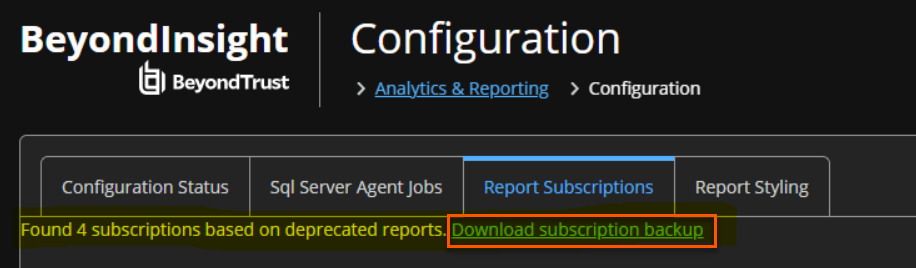
ImportantThis change applies to on-premises deployments only.
Report performance improvements
Reporting continues to receive targeted performance work across releases. The following reports and items include performance enhancements:
- Smart Group parameter filter dataset on all reports
- Secrets Safe Entitlement Report
- Managed Account Password Age Report
- Account Password Age by Last Scan
- Password and Session Activity Report limit increase from 50,000 to 250,000 rows.
PAPI updates
- Time-based one-time codes (TOTP) for Secrets Safe credential secrets
A credential secret can now carry a TOTP configuration, and the current code can be retrieved through the API.GET /api/public/v3/secrets-safe/secrets/{secretId}/totp/code: Returns the current one-time code with its validity window (Code, ValidFromUtc, ValidToUtc).
Requires Secrets Safe (Read) or Workforce Passwords (Read).
- New request body version 3.3
There is a new request body on version 3.3 to the following API endpoints:POST /api/public/v3/secrets-safe/folders/{folderId}/secretsPUT /api/public/v3/secrets-safe/secrets/{secretId}
Version 3.3 adds TotpEnabled and TotpSecretKey to the credential body. TotpSecretKey accepts a Base32 key or an otpauth:// URI and is required when TotpEnabled is set to true.
On update, null leaves the setting unchanged, false disables it, and true provisions or replaces it. The secret key is never returned in any response.
Secret response models now also return TotpEnabled and TotpParameters (Digits, PeriodSeconds).
- Connection Set credentials on applications
GET application responses now include the ConnectionType property, which identifies the credential type used by the Application Session. The property returns the following:- ManagedAccount
- FunctionalAccount
- ConnectionSet for round-robin credential assignments
Directory user sign in for Password Safe on Pathfinder
Active Directory, LDAP, and Microsoft Entra ID users can now sign in to Password Safe on Pathfinder with their existing directory accounts. For AD and LDAP, Password Safe acts as the Pathfinder proxy site: Pathfinder sends the user's credentials through a Resource Broker to Password Safe, which checks them against your directory and returns the result. Entra ID users sign in through Pathfinder SSO and are set up in Password Safe as Entra ID users.
This applies only to Password Safe Cloud on Pathfinder.
For more information, see Configure LDAP in Pathfinder and Configuring SAML User Mappings in Pathfinder.
Directory users and groups in User Management on Pathfinder
You can now add and manage Active Directory, LDAP, and Microsoft Entra ID users and groups in Password Safe on Pathfinder. This works in User Management and through the Public API. You can then give those groups permissions.
- Active Directory Group Sync and Entra ID Group Sync are now available in Pathfinder mode, as is the Use Group Resolution option on directory credentials.
- Assign roles, permissions, and Smart Group access to directory groups. Group membership is checked at sign in.
This applies only to Password Safe Cloud on Pathfinder.
For more information, see Sync Entra ID in Password Safe on Pathfinder.
SAML user mappings for Active Directory on Pathfinder
A new SAML User Mappings page under Authentication Management lets you choose how SAML sign ins from each identity provider match to Password Safe users.
- Choose a mapping type for each identity provider (issuer): None or Active Directory.
- With Active Directory, a sign in whose SAML assertion includes a security identifier (SID) is matched to the Active Directory user with that SID.
- LDAP mapping is handled with the None/legacy logic.
This applies only to Password Safe Cloud on Pathfinder.
For more information, see Configure SAML user mappings in Pathfinder.
SCIM user and group provisioning through Pathfinder
Set up SCIM once in Pathfinder, and Password Safe stays in sync as users and groups change in your identity provider. Pathfinder sends user and group changes to Password Safe, which creates, updates, and removes the matching users and groups automatically.
- Users: Creates and updates, including renames, are synced. Deleting or deactivating a user disables the Password Safe account, so release history is kept.
- User type comes from
externalId: An Entra object ID creates an Entra ID user. A distinguished name creates an Active Directory or LDAP user, checked live against your configured directories. Any other value, or no match, creates a local user. - Groups: Creating, renaming, and deleting groups is synced, along with membership changes. Provisioned groups are local groups. A local group and a directory group can't share the same name.
- Renames keep access: Users and groups are tied to their Pathfinder identity, so renaming one in your identity provider updates the existing Password Safe account or group. Memberships and permissions stay in place.
- Permissions stay in Password Safe: Pathfinder manages group existence and membership. Assign roles, Smart Groups, and permissions to provisioned groups in Password Safe.
Important
- Check your
externalIdmapping before you turn on provisioning, because it sets the user type. To get directory users, the matching Entra ID, Active Directory, or LDAP directory credentials must already exist in Password Safe. Each LDAP server host must also be registered in a Resource Zone.- Point your identity provider at Pathfinder. Password Safe doesn't provide a SCIM endpoint in Pathfinder mode.
This applies only to Password Safe Cloud on Pathfinder.
For more information, see SCIM provisioning.
Directory attributes available on Pathfinder
Directory attributes for Active Directory and Microsoft Entra ID users are now available in Pathfinder mode.
- View directory attributes in the PAM configuration panel and in Account Settings.
- Smart Rules can filter on directory attribute values.
- The Dedicated Account Smart Rule filter now offers Directory Attribute Match.
This applies only to Password Safe Cloud on Pathfinder.
For more information, see Directory attributes and Dedicated Smart Rules.
User Type recorded in sign in audits
On Pathfinder, every sign in passes through Pathfinder's OIDC handoff, so the Authentication Type audit field always shows OIDC. Sign in audits now also record a User Type (Local, Active Directory, LDAP, or Microsoft Entra ID), so you can tell which kind of account the user signed in with.
- User Type is added next to Authentication Type. It doesn't replace it, so existing audit tools and parsers keep working.
- Pathfinder Audit Logs show directory users as
username@domain.<Org ID>, while Password Safe User Audits show only the username. To match a sign in across both, compare the username and the time.
This applies only to Password Safe Cloud on Pathfinder.
Pathfinder IP allowlist enforced for Password Safe
When an organization administrator turns on Enforcement for the IP allowlist in Pathfinder, Password Safe now applies the same allowlist to the network security rules on your Password Safe Cloud instance. Only approved public source IP addresses can reach the instance, so the allowlist protects Password Safe as well as Pathfinder.
- You manage the allowlist in Pathfinder only. Whenever entries change or Enforcement is turned on or off, Password Safe updates its rules to match.
- Turning off Enforcement stops blocking traffic but keeps your entries.
- Changes aren't instant. Pathfinder settings can take up to five minutes to apply.
ImportantPassword Safe applies the allowlist exactly as Pathfinder sends it, and doesn't automatically allow your Resource Broker IP addresses. Before you turn on Enforcement, add the public egress addresses your Resource Brokers use, along with your user, VPN, and integration networks.
If administrators get locked out, there's no in-product override. Contact BeyondTrust Support for help.
This applies only to Password Safe Cloud on Pathfinder.
For more information, see Configure IP allowlists in Pathfinder.
BeyondInsight follows the language selected in the Pathfinder platform menu
BeyondInsight now displays in the language you select in the Pathfinder platform menu, so you no longer configure a separate language setting in BeyondInsight.
- Your selection follows you across Pathfinder applications. BeyondInsight reads the language at startup, so a language you select in another Pathfinder application is already in effect the first time BeyondInsight loads.
- If you select Browser Default, BeyondInsight uses your browser's current language setting. If you change your browser language, BeyondInsight automatically updates to match only if the browser language matches one of the languages that BeyondInsight supports. Otherwise, selecting Browser Default results in BeyondInsight displaying in English (United States).
- BeyondInsight ships English, French, German, Japanese, Korean, Portuguese,and Spanish.
ImportantThis change applies only to BeyondInsight running in Pathfinder.
On-premises and cloud installs keep BeyondInsight's own language selection on the sign in page and in the header.
For more information, see Language selection in BeyondInsight.
🛠️ Issues resolved
| Product area | Description | Resolution |
|---|---|---|
| Analytics & Reporting | The Managed Account Password Age summary section was incorrect in some cases if the system included accounts with no password change history, and the Password Age Threshold parameter filter did not always produce expected results when selecting Unspecified as a filter value. | The summary section now includes accounts with no password change history, so its counts and percentages match the chart and detail sections. |
| Analytics & Reporting | The CSV export of the Managed vs Unmanaged Account Details report left the Managed column blank for every row, even though the web console displayed the correct value. | The CSV export now includes the correct Managed value for every row. |
| Analytics & Reporting | Real-time reports responded slowly and intermittently stopped responding, because changing any report parameter re-ran the queries behind every parameter rather than only the affected ones. | Changing a report parameter now refreshes only the parameters that depend on it, which improves report responsiveness. |
| Analytics & Reporting | In the Configure Report panel for the Managed vs Unmanaged Account Details report, the Privilege and User Account Location filters listed only an All option, so you could not narrow the report to a specific value even though the report data contained several. | Both filters now list every distinct value in the report data as a selectable option, and selecting a value filters the report output. |
| API | Public API callers behind a load balancer intermittently received a 401 response reporting that authentication rules failed, even after signing in successfully. | The public API now holds session state in shared storage rather than in the memory of a single node, so sessions remain valid across all nodes in a multi-node deployment. |
| API | After an administrator recycled the client secret for an application user, requests that used the new secret failed with a 401 invalid_client response for several minutes while the revoked secret continued to authenticate. | Recycling a client secret now takes effect immediately, and the previous secret stops authenticating. |
| API | The Secrets Safe secret search endpoint accepted a favorites filter but returned all matching secrets and always reported secrets as not favorited. Reads of child folders returned no favorites value. | Secret search now honors the favorites filter, and both search results and child folder reads return the correct favorites value. |
| Authentication | FIDO2 authenticator registration failed on Password Safe Cloud instances that use a custom hostname, and reported that credentials could not be created because the authenticator was already registered. | FIDO2 registration now uses the custom hostname when one is configured. You must re-enroll existing FIDO2 credentials after you change a custom hostname. |
| Authentication | Following an upgrade to version 26.2, environments hosting the BeyondInsight database on Azure SQL experienced SAML Single Sign-On (SSO) login failures. | Updated the upgrade process to properly configure authentication services on Azure SQL databases, ensuring SAML SSO logins function as expected. |
| Configuration | Discovery scans were marked complete even though some scan targets were never processed, and stale entries in the processing folder were counted as active scans indefinitely, which exhausted the available scan slots. | Scan event processing now records completion accurately, releases entries for scans that are no longer running, and no longer consumes scan slots for stale entries. |
| Configuration | Scan processing stopped once the processing folder reached its limit of 20 scans, and requests for new stop jobs returned no results and reported that the scan processing limit was reached. | Scan processing now detects scan targets that have no corresponding orchestration message and processes them, which prevents orphaned targets from consuming scan slots. |
| Configuration | Event forwarding connectors in Password Safe Cloud and Pathfinder delivered only the test event. Application audit events and Password Safe events never reached the receiving endpoint. | Event forwarding connectors now deliver application audit events and Password Safe events to the configured endpoint. |
| Configuration | Tenants that used event forwarding experienced sustained high database I/O, because the query that exports events to a SIEM scanned the full event log table on every run. | The event log table now includes an index on the timestamp column used by the export query, which reduces database I/O. |
| Configuration | The User Audit report in Password Safe Cloud returned roughly the last four months of history rather than the documented retention period, and older audit data was permanently removed. | The audit data purge interval now matches the documented retention period for Password Safe Cloud. You cannot recover data that was removed before this fix. |
| Endpoint Privilege Management | Assets with Endpoint Privilege Management data that were marked for deletion were not being removed during scheduled maintenance purges. | Updated the purge process to ensure assets associated with Endpoint Privilege Management data are successfully deleted as expected. |
| Password Safe | Testing a Salesforce functional account failed. | Password Safe now builds the Salesforce endpoint URL with the correct capitalization, and functional account tests succeed. |
| Smart Rules | Smart Rule processing ran slowly and the web console responded slowly, because a stored procedure that resolves assets by operating system consumed excessive database resources. | The stored procedure now resolves assets by operating system more efficiently, which improves Smart Rule processing and web console performance. |
| Smart Rules | One rule with a non-standard value caused the entire Smart Rules page to show an error. You could not view, edit, or delete any rule on the page. | A rule with a non-standard reprocessing frequency value no longer prevents the Smart Rules page from loading. The system shows Default for that rule. |
| Upgrade | After upgrading to 25.3 or later, every discovery scan target failed during processing, assets never received local groups, accounts, or services, and failed targets retried continuously and built a backlog. | The upgrade now converts the affected database column to the correct data type on databases that were not repaired by an earlier upgrade step, and discovery scans save data as expected. |
| User Management | The user export CSV reported the number of assigned roles as 1 for every user, regardless of how many Password Safe roles were assigned. The user grid displayed the correct count. | The user export CSV now reports the correct number of assigned roles for each user. |
📝 Requirements
- Direct upgrades to 26.3 are supported from BeyondInsight version 24.3.0 or later releases.
- BeyondInsight 26.3 supports SQL Server 2016 SP2 or higher.
🗒️ Notes
- This release is available by download for BeyondTrust customers (https://beyondtrustcorp.service-now.com/csm) and by using the BeyondTrust BT Updater.
- The SHA-256 signature is: 8f809d4c4108360c6cde0b65101dec806de5e8771e77de3dd65bc7ddc3b095e0
- The SHA-1 signature is: 6d1e3b6f04d9b38b3844abda21a66b64a6580972
- The MD5 signature is: c07ef027c10ec020a03741f43d692335
- BIPS 26.3 includes ECM v1.6.2609 bundle with Password Safe Plugin v26.3.1
⏰Deprecation notices
-
SSRS (SQL Server Reporting Services): is deprecated as the reporting backend for on-premises BeyondInsight deployments in release 26.3. Support for SSRS will be removed in a future release. As BeyondTrust continues this transition, some subscription features and other SSRS functionality may be impacted. On-premises customers should pay close attention to release notes and the SSRS Deprecation KB article.
-
SSRS Reports (Legacy Configuration Folder): The legacy BeyondInsight Entitlement by Group report has been moved to the Deprecated reports folder in 26.3 to align on-premises reporting with Password Safe Cloud. It remains accessible but will be removed in a future release. Transition to the Entitlement by Group report in the standard reports library.
-
RADIUS Authentication for Public API: is deprecated in 26.3 and will be removed in a future release. Migrate to Personal Access Tokens (PAT) or TOTP-based MFA. SAML support for the Public API is planned for a future release.
-
The PSRUN tool is being deprecated in 26.3. Existing 26.2 configurations continue to function. This tool is being replaced with the Password Safe Command Line Interface (CLI) Application. For more information about Password Safe CLI Application, see Password Safe CLI Application.
-
Windows Active Directory SSO authentication (eEye.RetinaCSSSO) is deprecated in version 26.3 and will be removed in version 27.1. To maintain single sign-on functionality, transition to SAML or Claims-Aware authentication.
⌛ End of support
The product versions below have reached, or are nearing, their end of support. Upgrade to the latest version to continue receiving updates and support. Support ends on the last day of the month listed below.
For more information about supported versions, see Product Support Life Cycle.
| Product version | End of support |
|---|---|
| Out of support | |
| Password Safe 24.2.x | September 2026 |
| Near end of support | |
| Password Safe 24.3.x | December 2026 |
