
EPM for Windows and Mac (Cloud and Pathfinder) 26.2.1697
🆕 New features
Added Okta support for Identity Authentication
Introduced support for Okta as an Identity Provider for both Windows and macOS so that Okta group membership can be used in the Policy Editor to manage policy assignments. Active Directory Settings has also been changed to Directory Service Settings as part of this update.
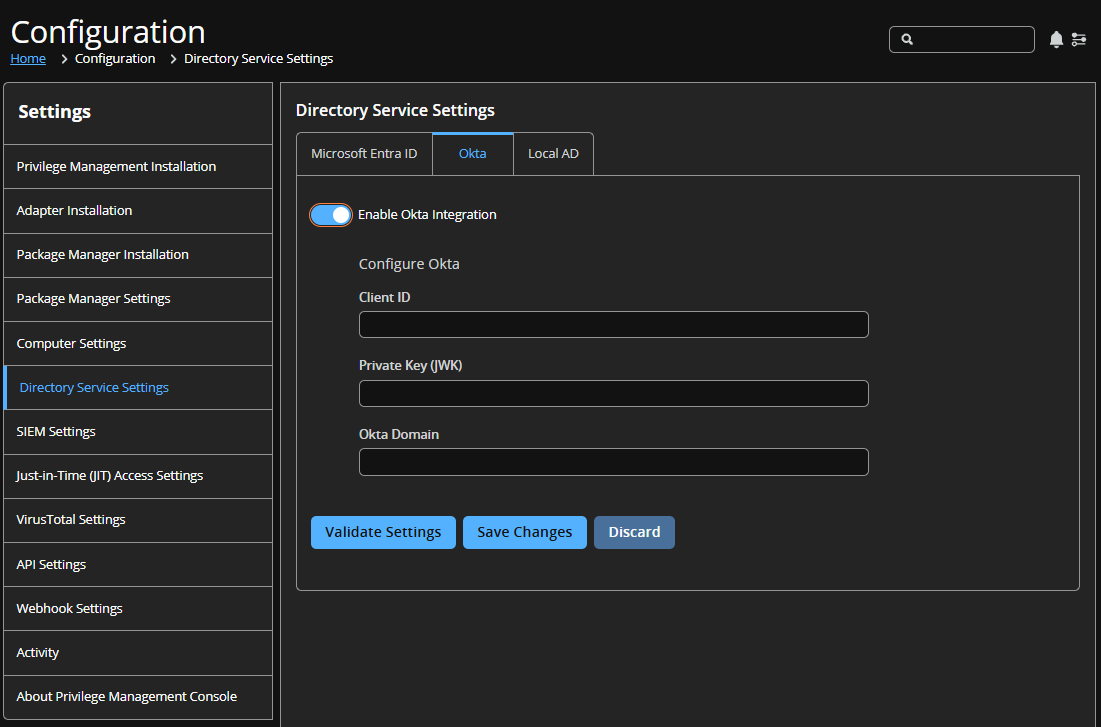
For more information, see Okta and EPM config guide.
✨ Enhancements
Policy Editor
AD computer groups in workstyle computer filters
BeyondTrust EPM for Windows is expanding its workstyle policy engine to support Active Directory computer groups as a filter target, giving IT and security teams a more precise, scalable way to enforce endpoint privilege policies.
Today, workstyle computer filters are limited to local OS constructs like hostnames and IP addresses. This forces admins into manual, brittle targeting that doesn't scale across large estates and leaves meaningful security gaps. With this capability, admins can reference existing AD computer groups directly within workstyle filters, applying policies to entire machine populations without managing individual device lists.
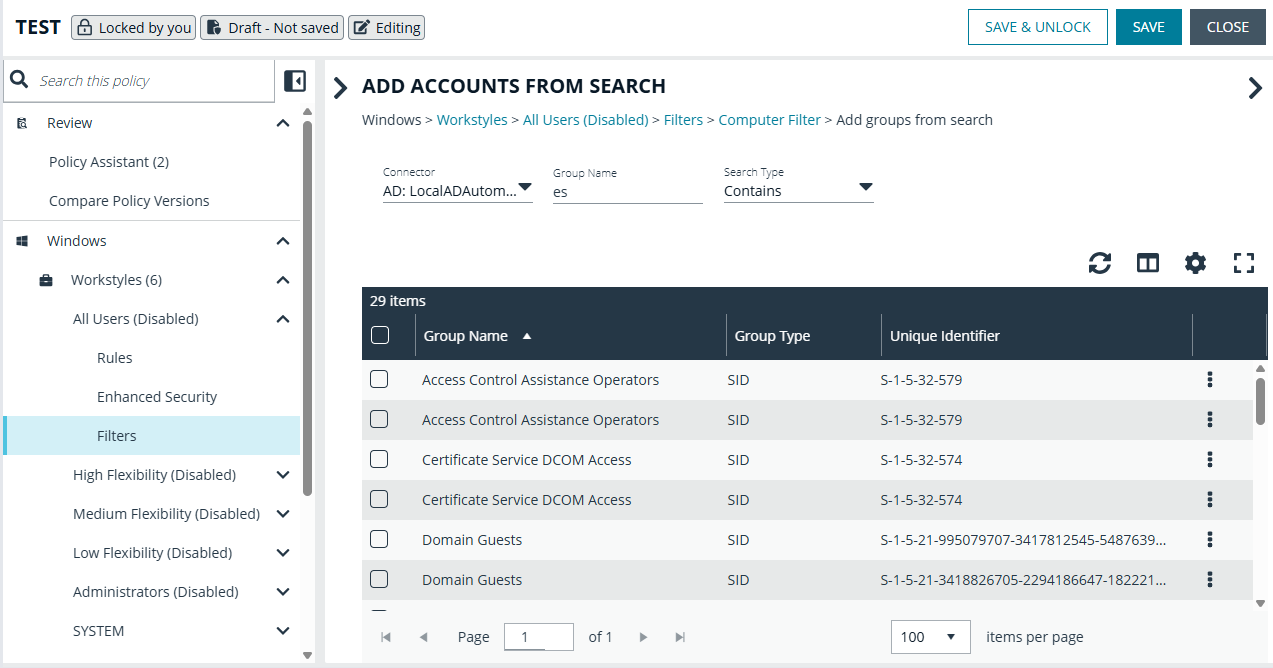
For more information, see:
- Workstyles > Add filters (Pathfinder)
- Workstyles > Add filters (Classic)
macOS: Multi-language support for messages
Adds multi-language/locale support for macOS messages in the Policy Editor, matching the existing Windows support.
macOS Messages are now configurable for multiple languages, allowing you to translate policy message strings to their native locale on the endpoint. The macOS QuickStart has been updated to parity to Windows QuickStart which include Dutch - Netherlands, French, German, Italian, and Spanish.
Policy Editor API: Added support for Windows COM definitions
Added Policy Editor API support for COM Windows application definitions. Read, create, and delete operations are now available programmatically against policy.
Analytics
Search Users and Events by Custom Time Date
We've introduced a powerful new custom time and date filter on the Users and Events pages, giving you greater precision when analyzing your data.
You can now select a specific start and end date and time within the last 90 days, allowing you to focus on exact activity windows whether you're investigating an incident, reviewing a deployment, or tracking changes.
When loading a saved Users or Events view, the selected custom time range is now clearly displayed, ensuring full visibility into the timeframe being used before you run a query or download data.
This enhancement gives you sharper insights, clearer context, and greater confidence in your analysis.
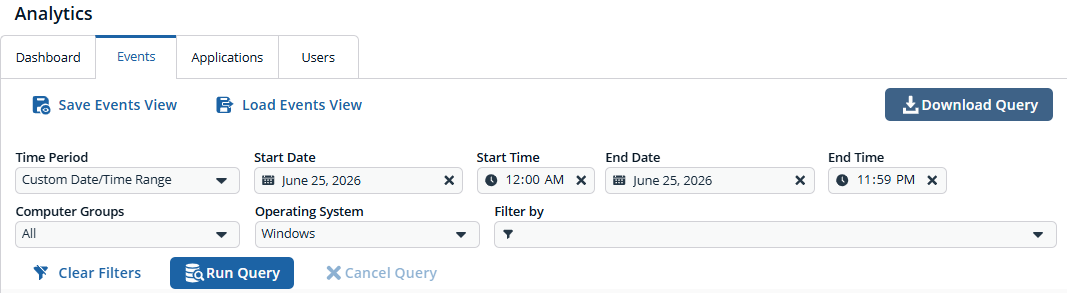
For more information, see
- Events analytics and User analytics (Pathfinder)
- Events analytics and User analytics (Classic)
Query Users and Events on Demand
The Users page and the Events page now give you more flexibility in how and when you access your data. You can refine filters before running a query, then run it on demand when you're ready. This helps reduce unnecessary processing and ensures results reflect exactly what you need.
Downloading data is now even easier. You can generate a CSV on demand without running the query first. The Prepare Download modal also includes an Available Records count, so you can confirm how many records match your filters before exporting.
Together, these enhancements streamline your workflow and provide clearer visibility into your events data.
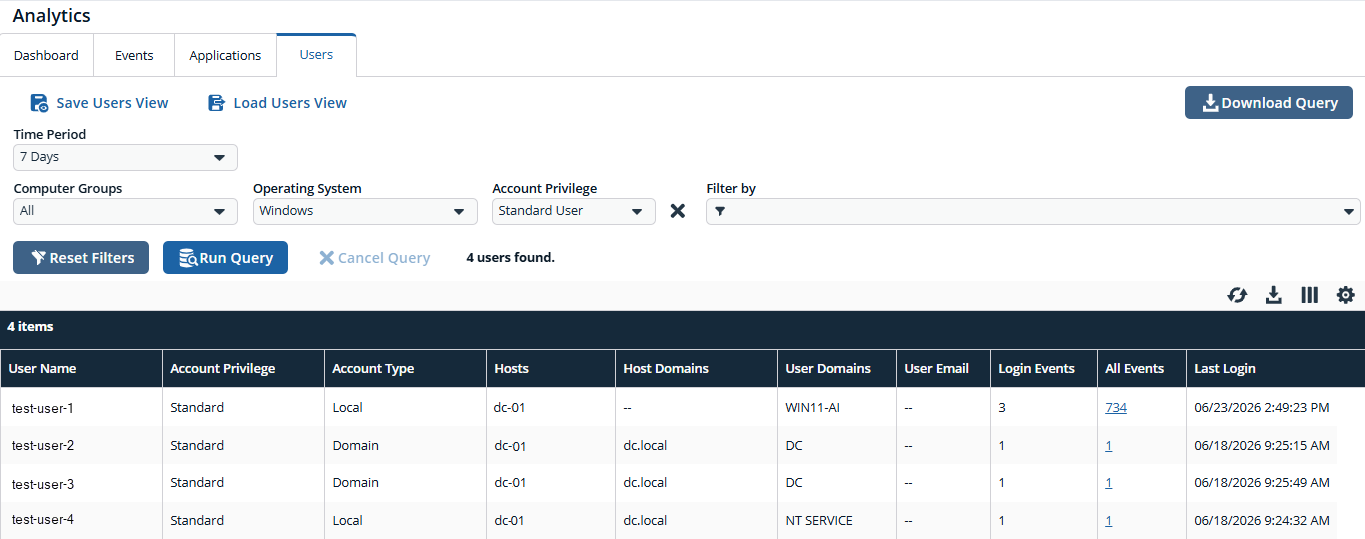
For more information, see
- Events analytics and User analytics (Pathfinder)
- Events analytics and User analytics (Classic)
Pathfinder
EPM and PathFinder: New AI Configuration page
EPM now includes a dedicated AI Configuration page, giving administrators explicit control over AI-generated insights such as JIT Session Summary. EPM AI features are off by default. You must opt in before any data is sent to a large language model (LLM) to ensure compliance with legal, privacy, and security requirements.
Display JIT Admin session summaries in EPM
EPM now displays summaries (generated by a large language model) of just-in-time admin sessions directly in the user interface, giving reviewers an at-a-glance view of what the end user actually did during their elevated session and whether their activity aligned with the stated reason for access. This replaces manual, event-by-event review with a concise narrative, accelerating session audits and anomaly detection.
Other
Harden AWS S3 integration with least-privilege authorization and live validation
EPM now uses real, least-privilege validation for Amazon Web Services S3 access, replacing simulation and legacy methods to ensure accurate, reliable configuration. This update eliminates false validation failures, improves compatibility with modern IAM and S3 settings, and enhances overall security without requiring customer changes.
🛠️ Issues resolved
Policy Editor
| Description | Resolution |
|---|---|
| When a user deleted a Windows message linked to a Content Rule, no warning was displayed that the associated rule would also be deleted. This warning already existed for App and On-Demand rules but was missing for Content Rules. | Extended the existing deletion-warning implementation to Content Rules, so users now receive a confirmation prompt before deleting a message that is linked to any rule type. |
| In Computer Filters, the "Match the remote desktop (instead of the local computer)" toggle state was not persisted after being set. Changes to this toggle were lost on save or navigation. | Fixed the toggle so its state is correctly saved and retained, ensuring the remote-desktop matching preference persists as expected. |
The ParentProcess.Value field in the Policy Editor API Mapper was case-sensitive when building Application rules. This could cause mismatches if the group ID case in the policy differed from the input value. | Made ParentProcess.Value case-insensitive for the Mapper, so it now uses whatever case the group ID has in the policy. This is a non-breaking change. |
| The "Message Language" dropdown in Windows Messages was not selectable when viewing a policy in Read Only mode, making it impossible to view message text for any language other than the default. | Fixed the multi-language dropdown to be interactive in Read Only mode, allowing users to view message text for all configured languages. |
| The Audit Script and Upload Image pages did not display an "You have unsaved changes" message when navigating away with unsaved edits, risking accidental data loss. | Added the unsaved-changes warning modal to both the Audit Script and Upload Image pages to prevent users from inadvertently discarding their work. |
| Security fixes | Resolved security fixes. See KB0023720. |
EPM
| Description | Resolution |
|---|---|
| The Privilege Management Installation page contained an incorrect section label. The section listing clients and related tools was titled "Adaptor" instead of "Product". | Fixed the section label from "Adaptor" to "Product" on the Privilege Management Installation page. |
| The Webhook section label in the configuration side panel was inconsistent across locales, displaying "Webhook" for US English and "Webhooks" for UK English. | Fixed the label so it is now consistent across all locale settings. |
| VirusTotal Reputation Score tokens rendered as empty values in JIT ticket-create webhook payloads. | Fixed token rendering so VirusTotal Reputation Score values are correctly populated in JIT webhook payloads. |
| The legacy Microsoft Sentinel SIEM integration remained visible for tenants that did not have Sentinel configured. | Decommissioned the legacy Sentinel integration for tenants without an active Sentinel configuration. Tenants with an active integration are unaffected and will be migrated separately. |
| SIEM S3 integration validation would hang and fall back to a generic "Failed to Validate settings" error when configured against restricted AWS regions. | Validation now returns a clear, actionable error message for restricted AWS regions instead of hanging indefinitely. |
| The Help icon rendered as a square block, and some icons faded or disappeared from the UI. | Fixed icon rendering so the Help icon and related UI icons display correctly. |
| The calendar icon in date picker filters was visually misaligned across the Privilege Management Console. | Fixed the calendar icon alignment in all date picker filters. |
The AuthorizationRequest service permanently failed all JIT Application Access create requests (PUT /authmgmt/) whenever ServiceNow returned any error during an OAuth token refresh. | Fixed the service to handle transient ServiceNow OAuth token-refresh errors gracefully, so JIT Application Access requests are no longer permanently blocked by a single token-refresh failure. |
| Upgrading the Local AD Connector installer without proxy parameters could cause existing proxy configuration to be removed. | Fixed the installer so proxy settings are preserved correctly during upgrades, even when proxy parameters are not explicitly supplied. |
The AgentListTableSyncService background processor could fail permanently on a small-batch SQL error, causing newly activated computers to take up to 24 hours to appear in the Computers list and leading to a memory leak. | Resolved the issue so newly activated computers now appear promptly after activation without waiting for the nightly full synchronization cycle. |
| Analytics incorrectly displayed events from groups for which a user only held View permission, rather than the required Analyze permission. | Event visibility in Analytics now correctly enforces group-level permissions. |
| Filtering the Analytics Events page by Command Line over a 7-day period failed for tenants with large data sets. | The Command Line filter now returns results reliably regardless of data volume. |
| Exporting a newly created policy or downloading its latest revision returned an incorrect policy ID. | Fixed the export and download functions so the correct policy ID is used for newly created policies. |
| Users attempting to apply a policy encountered an infinite loading screen after selecting a policy and application group. | Resolved the infinite loading state so the Apply to Policy workflow completes as expected. |
| The "Add to Policy" action did not work correctly when applied to SRA installer data. | Fixed "Add to Policy" so it correctly handles SRA installer event data. |
| The selection counter did not appear next to the Items label in the Computers list header when one or more computers were selected. | Fixed the counter so it correctly displays the number of selected computers next to the Items label. |
| A deleted agent could continue to authenticate after acknowledging the deactivation command. | Agent credentials are now properly invalidated upon deletion, preventing further authentication. |
| The Enter Business Justification for JIT Admin requests could display with a white background on macOS Tahoe when dark mode was enabled. | The Enter Business Justification for JIT Admin requests now displays correctly on macOS Tahoe when dark mode is enabled. |
Package Manager
🆕 New features
Select Package Manager versions for EPM Computer Groups
Administrators can now pin a specific Package Manager version for EPM Computer Groups, giving them full control over when updates are applied. Instead of automatically receiving the latest version, administrators can select a specific version from the dropdown in Manage Update settings, enabling staged rollouts and reducing the risk of unexpected changes in production environments.
The Latest Available option remains the default for organizations that prefer automatic updates. For those choosing a pinned version, we recommend selecting the highest available version that matches the current latest release (e.g., 26.1.1495 (Latest)) to ensure you start from the most current baseline.
Note: Downgrades are not currently supported. Downgrade support will be available in a future release.
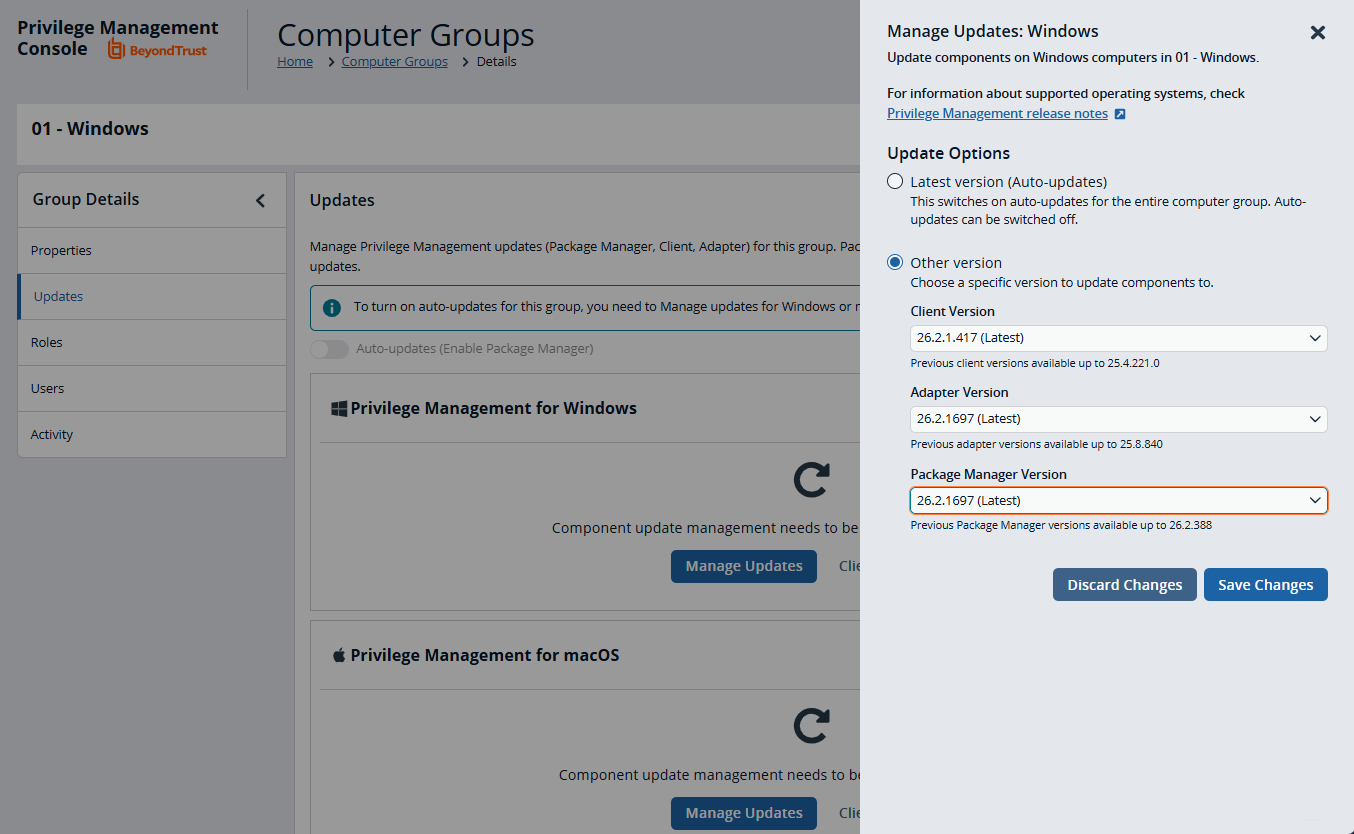
For more information, see Select a Package Manager version.
Added support for OAuth for Password Safe
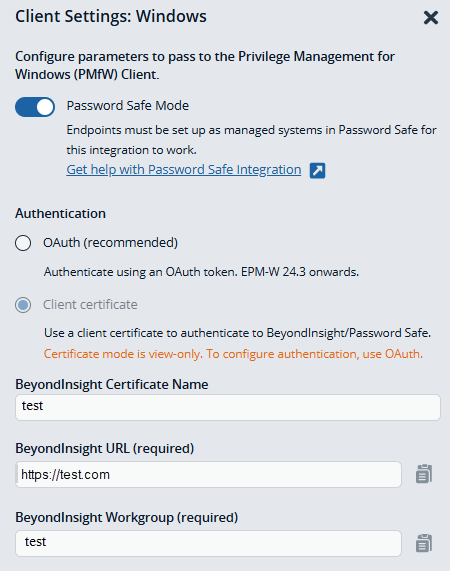
Package Manager now supports OAuth-based authentication when deploying or upgrading Windows clients in Password Safe mode. Previously, Password Safe integration through Package Manager was limited to client certificate (mTLS) authentication. This enhancement gives administrators the option to use OAuth, the preferred and more modern authentication method, which also enables compatibility with TLS 1.3.
When Password Safe Mode is enabled in the Windows Client Settings, administrators can now select an authentication method:
- OAuth (default): Enter the Activation ID, Activation Key, BeyondInsight URL, and BeyondInsight Workgroup. These values are sourced from your BeyondInsight environment and passed to the Windows Client installer command.
- Client Certificate: The existing certificate-based configuration remains available and unchanged.
Package Manager automatically includes the required OAuth parameters in the installer command string for new installations and upgrades.
🛠️ Issues resolved
NA
EPM for Mac adapters
✨ Enhancements
NA
🛠️ Issues resolved
NA
🧩 EPM Components
- Policy Editor: 26.2.1.54
- PM Cloud: 26.2.1697
📝 Requirements
- Microsoft .NET Framework 4.6.2 (required to use PM Cloud Windows Adapter)
🔄 Compatibility
Supported Versions
PM Windows adapter
Recommended: 26.2.1697
Supported: 26.1.1495 | 25.8.840 | 25.7.509 | 25.6.554 | 25.5.440 | 25.4.598 | 25.3.671 | 25.2.485 | 24.8.446 | 24.7.831 | 24.6.697 | 24.5.1037
PM for Windows
Recommended: 26.2.1.417
Supported: 26.1.23.0 | 25.8.12.0 | 25.4.270.0 | 25.4.184.0 | 25.2.1.0 | 24.8.98.0 | 24.7.425.0 | 24.5.361.0 | 24.5.351
PM Response Generator for Windows
Recommended: 26.2.1.417
Supported: 26.1.23.0 | 25.8.12.0 | 25.4.270.0 | 25.4.184.0 | 25.2.1.0 | 24.8.98.0 | 24.7.425.0 | 24.5.361.0 | 24.5.351.0
PM for macOS
Recommended: 26.2.1.1
Supported: 26.1.0.120 | 25.8.0.53 | 25.4.2.2 | 25.4.1.2 | 25.2.0.1 | 24.8.0.1 | 24.7.0.1 | 24.5.2.3 | 24.5.1.1 | 24.5.0.1
PM macOS adapter
Recommended: 26.2.1.1
Supported: 26.1.0.120 | 25.8.0.53 | 25.6.0.48 | 25.4.1.2 | 25.2.0.1 | 24.8.0.1 | 24.7.0.1 | 24.5.2.3 | 24.5.1.1 | 24.5.0.1
PM Rapid Deployment Tool for Mac OS
Recommended: 26.2.1.1
Supported: 26.1.0.5 | 25.8.0.1 | 25.4.1.2 | 25.2.0.1 | 24.8.0.1 | 24.7.0.2 | 24.5.0.1
PM Response Generator for MacOS
Recommended: 26.2.1.1
Supported: 26.1.0.120 | 25.8.0.53 | 25.4.2.2 | 25.4.1.2 | 25.2.0.1 | 24.8.0.1 | 24.7.0.1 | 24.5.2.3 | 24.5.1.1 | 24.5.0.1
