
Identity Security Insights 26.03
🆕 New features
Network Discovery
From assets to accounts in a single scan
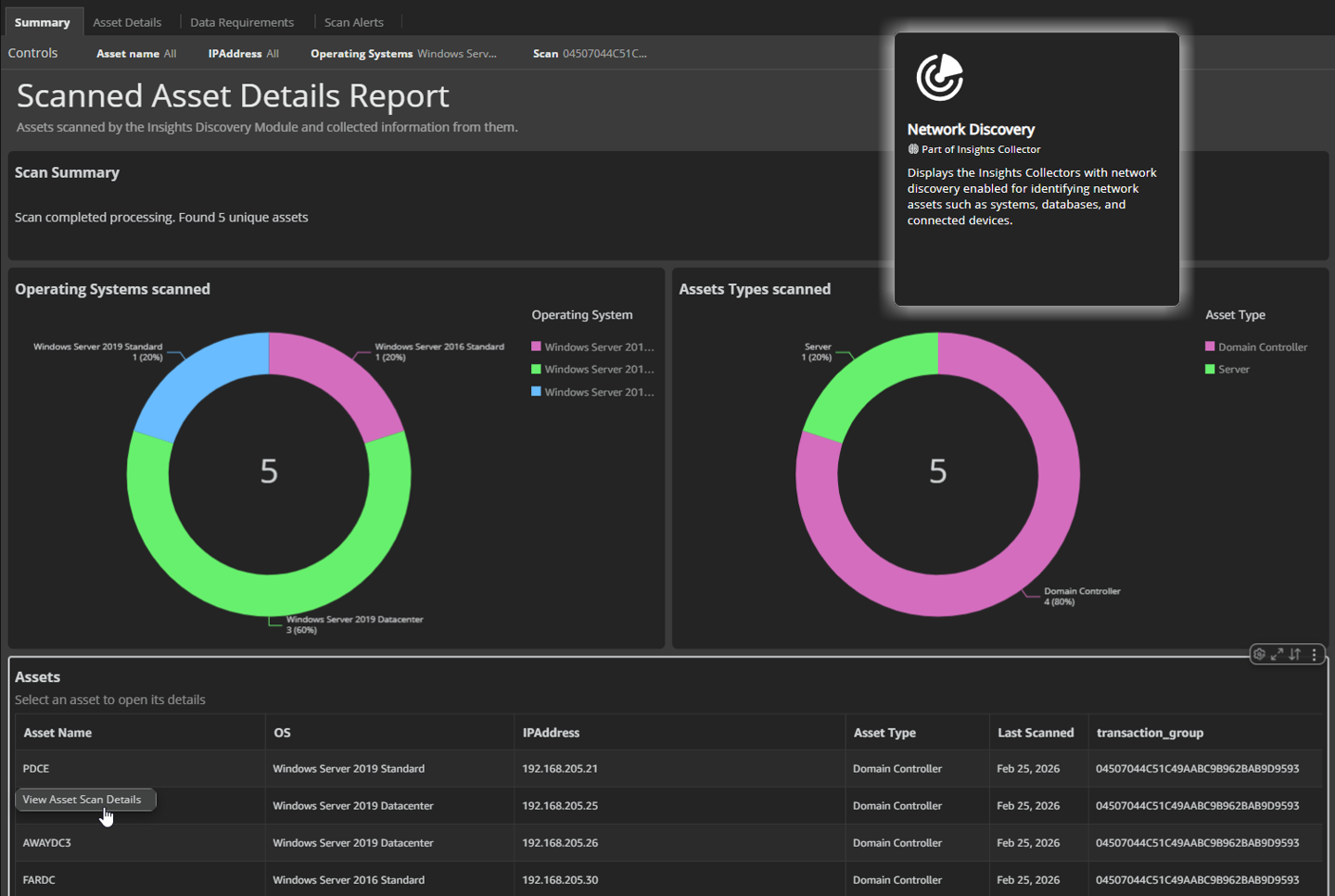
Insights can now independently discover assets across your network and surface everything from local admin accounts and SSH keys to database users, no additional products required. Just deploy the Insights Collector, provide your credentials, and get a full picture of who has access in a single interactive report.
What you get with this update
- Network and system discovery: Scan IP ranges to discover Windows, Linux/Unix, and network devices. For each asset found, the scan collects local users and groups, installed software, running services, scheduled tasks, and SSH authentication keys giving you a full picture of what's running and who has access.
- Database user enumeration: Go beyond the network layer. By providing database credentials, the discovery engine logs into your MS SQL Server, MySQL, MongoDB, PostgreSQL, Oracle, Sybase, and Teradata instances to enumerate the users within them surfacing accounts that traditional network scanning alone cannot find.
- Multi-credential scanning: Configure a single scan with multiple credentials – one for system access (Windows or SSH) and one for each database type you want to scan. This enables comprehensive discovery across both infrastructure and data layers in a single pass.
- Flexible scheduling: Run scans immediately for a quick assessment, schedule a one-time scan, or set up recurring scans on a daily, weekly, or monthly basis to keep your asset inventory current.
- Interactive scan report: View results through a four-tab report. The Summary shows total assets discovered with breakdowns by operating system and asset type. Select any asset to drill into its details – software, services, users, groups, database users, SSH keys, and scheduled tasks. A Data Requirements tab shows scan coverage, and a Scan Alerts tab flags any issues encountered during the scan.
Important informationEnabling Network Discovery on a collector automatically installs the discovery agent onto the member server, no manual installation is required. The member server must have network access to the scan targets on the ports configured in your scan credentials.
Why It Matters
You can't protect privileged accounts you don't know exist. Network Discovery gives you visibility into the local accounts, service credentials, database users, and SSH keys spread across your environment providing the foundation to bring them under management and close gaps in your security posture.
Secrets by account
See every access relationship, not just the totals
This update introduces a new Secrets By Account tab in the Secrets Inventory. Previously, you could only see a rolled-up view showing how many accounts could access each secret. Now, you can drill into every individual access relationship to see exactly which accounts reach which secrets and how.
What you get with this update
- Secrets By Account View: See every individual account-to-secret access relationship in a new dedicated tab, so you can pinpoint exactly who has access to what and through which path.
- Direct vs. Indirect Access Filtering: Filter secrets by access type to quickly isolate accounts with direct privileged access versus those inheriting access through group memberships or policies.
- Contextual Drill-Down: Click any access relationship to open a side panel with detailed metadata and an interactive graph of the secret's connections, so you can visually trace how an account reaches a secret without leaving the page.
